Site footer
The header, hero, feature grid, and pricing table are all in place; the page ends on an empty band at the bottom of your min-h-dvh column.
This lesson fills it with the footer: three link columns, a brand block, a copyright line, and a row of social icon buttons.
The markup is trivial, and that is the trap. Each social button is an icon with no text, which a screen reader announces as nothing, so every one needs its own accessible name. Get that labelling and the column reflow right here and this surface clears the project’s accessibility bar with no remediation pass.
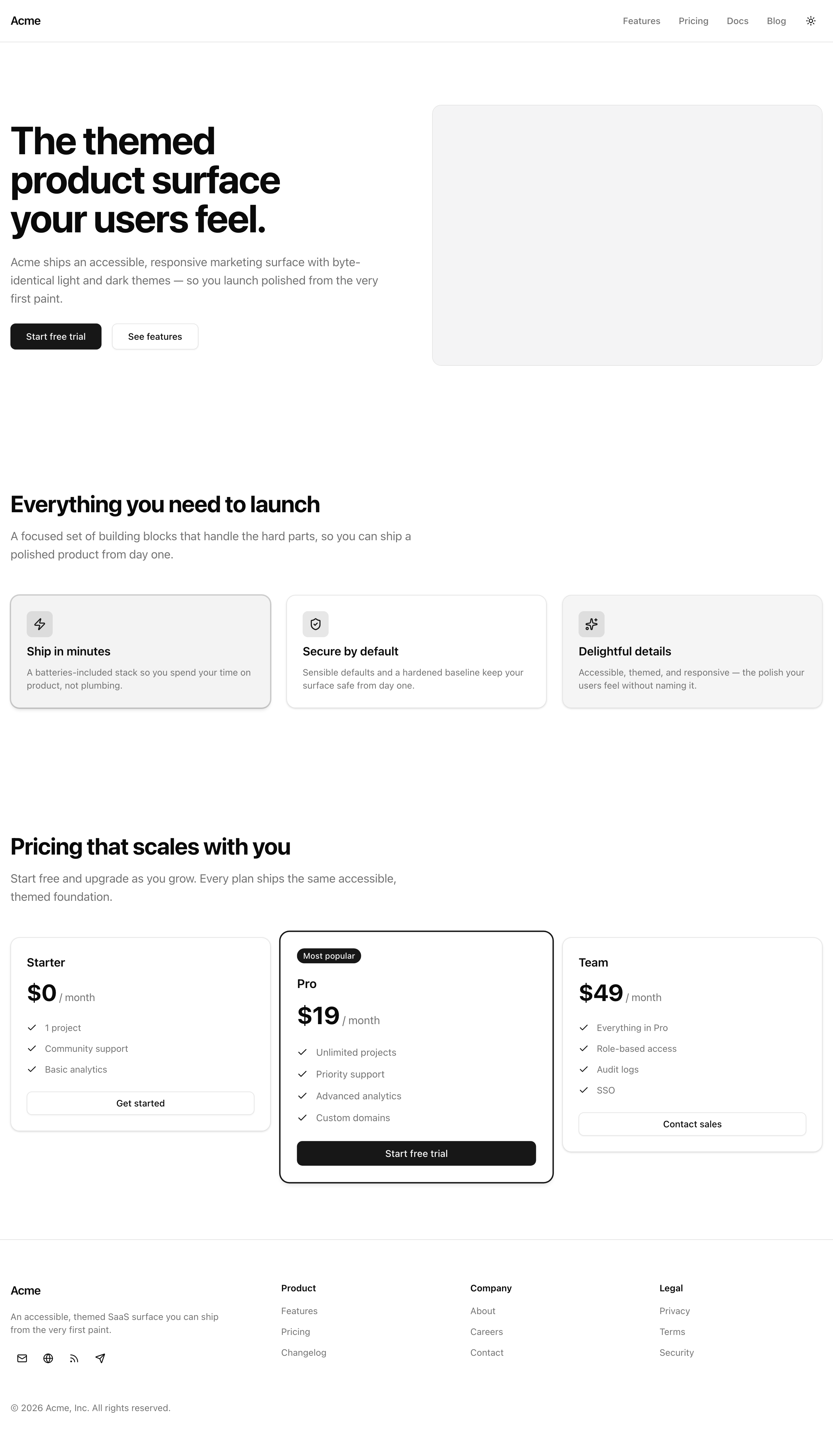
The finished footer at desktop width: the brand block sits left of three link columns, with the social buttons under the blurb.
Your mission
Section titled “Your mission”Build the footer band: three link columns (Product, Company, and Legal), a brand block with the “Acme” wordmark and a one-line blurb, a copyright line, and a row of social icon buttons.
Map the columns and the social row from footerGroups and socialLinks, the two typed arrays already exported from src/lib/data.ts, rather than hand-placing any column or button.
Each social button shows one lucide glyph and no text, so each needs its own accessible name stating its destination, with the glyph kept decorative so it doesn’t compete. This is the icon-button pattern from “No ARIA is better than bad ARIA” in the shadcn and accessibility-baseline chapter, applied here.
Wrap the whole band in one <footer> landmark, with each link column as a <nav> landmark rather than a nested footer.
Use only the project’s semantic color tokens — text-foreground, text-muted-foreground, border-border, bg-background — never a literal color value.
A newsletter form and any locale or currency switcher are out of scope; this is a static footer.
<footer> landmark.md they stack into one column with no horizontal scroll.Coding time
Section titled “Coding time”Open src/components/site-footer.tsx — the start/ scaffold is an empty <footer data-testid="site-footer" />.
Build it against the brief above and the lesson’s tests, then open the walkthrough to compare.
Reference solution and walkthrough
The whole component is one file. Read it part by part, from the imports down to the copyright line.
import Link from 'next/link';
import { Button } from '@/components/ui/button';import { footerGroups, socialLinks } from '@/lib/data';
export const SiteFooter = () => (  <footer    data-testid="site-footer"    className="border-t border-border bg-background"  >    <div className="container mx-auto flex flex-col gap-12 px-4 py-12 lg:py-16">      <div className="grid grid-cols-1 gap-10 md:grid-cols-[1.5fr_repeat(3,1fr)]">        <div className="flex flex-col items-start gap-4">          <Link            href="/"            className="rounded-md text-lg font-semibold tracking-tight text-foreground outline-none focus-visible:ring-[3px] focus-visible:ring-ring/50"          >            Acme          </Link>          <p className="max-w-xs text-sm text-pretty text-muted-foreground">            An accessible, themed SaaS surface you can ship from the very first            paint.          </p>          <div className="flex items-center gap-1">            {socialLinks.map((link) => (              <Button key={link.href} asChild size="icon" variant="ghost">                <a aria-label={link.label} href={link.href}>                  <link.icon />                </a>              </Button>            ))}          </div>        </div>
        {footerGroups.map((group) => (          <nav            key={group.heading}            aria-label={group.heading}            className="flex flex-col gap-3"          >            <h2 className="text-sm font-semibold text-foreground">              {group.heading}            </h2>            <ul className="flex flex-col gap-2">              {group.links.map((link) => (                <li key={link.href}>                  <Link                    href={link.href}                    className="rounded-md text-sm text-muted-foreground outline-none transition-colors hover:text-foreground focus-visible:ring-[3px] focus-visible:ring-ring/50"                  >                    {link.label}                  </Link>                </li>              ))}            </ul>          </nav>        ))}      </div>
      <p className="text-sm text-muted-foreground">        © 2026 Acme, Inc. All rights reserved.      </p>    </div>  </footer>);
Four imports: Next’s Link, the shadcn Button you have used all chapter, and the typed footerGroups and socialLinks arrays from @/lib/data that drive the columns and the social row. No logo import — the brand is a text wordmark, not an image.
import Link from 'next/link';
import { Button } from '@/components/ui/button';import { footerGroups, socialLinks } from '@/lib/data';
export const SiteFooter = () => (  <footer    data-testid="site-footer"    className="border-t border-border bg-background"  >    <div className="container mx-auto flex flex-col gap-12 px-4 py-12 lg:py-16">      <div className="grid grid-cols-1 gap-10 md:grid-cols-[1.5fr_repeat(3,1fr)]">        <div className="flex flex-col items-start gap-4">          <Link            href="/"            className="rounded-md text-lg font-semibold tracking-tight text-foreground outline-none focus-visible:ring-[3px] focus-visible:ring-ring/50"          >            Acme          </Link>          <p className="max-w-xs text-sm text-pretty text-muted-foreground">            An accessible, themed SaaS surface you can ship from the very first            paint.          </p>          <div className="flex items-center gap-1">            {socialLinks.map((link) => (              <Button key={link.href} asChild size="icon" variant="ghost">                <a aria-label={link.label} href={link.href}>                  <link.icon />                </a>              </Button>            ))}          </div>        </div>
        {footerGroups.map((group) => (          <nav            key={group.heading}            aria-label={group.heading}            className="flex flex-col gap-3"          >            <h2 className="text-sm font-semibold text-foreground">              {group.heading}            </h2>            <ul className="flex flex-col gap-2">              {group.links.map((link) => (                <li key={link.href}>                  <Link                    href={link.href}                    className="rounded-md text-sm text-muted-foreground outline-none transition-colors hover:text-foreground focus-visible:ring-[3px] focus-visible:ring-ring/50"                  >                    {link.label}                  </Link>                </li>              ))}            </ul>          </nav>        ))}      </div>
      <p className="text-sm text-muted-foreground">        © 2026 Acme, Inc. All rights reserved.      </p>    </div>  </footer>);
The page’s single <footer> landmark, its one contentinfo . border-t border-border draws the rule separating it from the pricing table above; bg-background plus the inner container mx-auto px-4 keep it on the page’s tokens and inside the gutter.
import Link from 'next/link';
import { Button } from '@/components/ui/button';import { footerGroups, socialLinks } from '@/lib/data';
export const SiteFooter = () => (  <footer    data-testid="site-footer"    className="border-t border-border bg-background"  >    <div className="container mx-auto flex flex-col gap-12 px-4 py-12 lg:py-16">      <div className="grid grid-cols-1 gap-10 md:grid-cols-[1.5fr_repeat(3,1fr)]">        <div className="flex flex-col items-start gap-4">          <Link            href="/"            className="rounded-md text-lg font-semibold tracking-tight text-foreground outline-none focus-visible:ring-[3px] focus-visible:ring-ring/50"          >            Acme          </Link>          <p className="max-w-xs text-sm text-pretty text-muted-foreground">            An accessible, themed SaaS surface you can ship from the very first            paint.          </p>          <div className="flex items-center gap-1">            {socialLinks.map((link) => (              <Button key={link.href} asChild size="icon" variant="ghost">                <a aria-label={link.label} href={link.href}>                  <link.icon />                </a>              </Button>            ))}          </div>        </div>
        {footerGroups.map((group) => (          <nav            key={group.heading}            aria-label={group.heading}            className="flex flex-col gap-3"          >            <h2 className="text-sm font-semibold text-foreground">              {group.heading}            </h2>            <ul className="flex flex-col gap-2">              {group.links.map((link) => (                <li key={link.href}>                  <Link                    href={link.href}                    className="rounded-md text-sm text-muted-foreground outline-none transition-colors hover:text-foreground focus-visible:ring-[3px] focus-visible:ring-ring/50"                  >                    {link.label}                  </Link>                </li>              ))}            </ul>          </nav>        ))}      </div>
      <p className="text-sm text-muted-foreground">        © 2026 Acme, Inc. All rights reserved.      </p>    </div>  </footer>);
The whole reflow is this one line. grid-cols-1 stacks every child on mobile; at md and up the template becomes four tracks — a wider 1.5fr for the brand block, three equal 1fr tracks for the link columns. The brand needs the extra room for its wordmark, blurb, and social row. One grid, no flex wrapper, no max-width hack. This is the mobile-first reflex from “Breakpoints and the mobile-first reflex”: you set the cut once.
import Link from 'next/link';
import { Button } from '@/components/ui/button';import { footerGroups, socialLinks } from '@/lib/data';
export const SiteFooter = () => (  <footer    data-testid="site-footer"    className="border-t border-border bg-background"  >    <div className="container mx-auto flex flex-col gap-12 px-4 py-12 lg:py-16">      <div className="grid grid-cols-1 gap-10 md:grid-cols-[1.5fr_repeat(3,1fr)]">        <div className="flex flex-col items-start gap-4">          <Link            href="/"            className="rounded-md text-lg font-semibold tracking-tight text-foreground outline-none focus-visible:ring-[3px] focus-visible:ring-ring/50"          >            Acme          </Link>          <p className="max-w-xs text-sm text-pretty text-muted-foreground">            An accessible, themed SaaS surface you can ship from the very first            paint.          </p>          <div className="flex items-center gap-1">            {socialLinks.map((link) => (              <Button key={link.href} asChild size="icon" variant="ghost">                <a aria-label={link.label} href={link.href}>                  <link.icon />                </a>              </Button>            ))}          </div>        </div>
        {footerGroups.map((group) => (          <nav            key={group.heading}            aria-label={group.heading}            className="flex flex-col gap-3"          >            <h2 className="text-sm font-semibold text-foreground">              {group.heading}            </h2>            <ul className="flex flex-col gap-2">              {group.links.map((link) => (                <li key={link.href}>                  <Link                    href={link.href}                    className="rounded-md text-sm text-muted-foreground outline-none transition-colors hover:text-foreground focus-visible:ring-[3px] focus-visible:ring-ring/50"                  >                    {link.label}                  </Link>                </li>              ))}            </ul>          </nav>        ))}      </div>
      <p className="text-sm text-muted-foreground">        © 2026 Acme, Inc. All rights reserved.      </p>    </div>  </footer>);
The brand wordmark — a Link to / reading “Acme”, not an <img>. outline-none focus-visible:ring-[3px] focus-visible:ring-ring/50 drops the browser default for a clear ring on keyboard focus. Every link in the footer carries this same treatment.
import Link from 'next/link';
import { Button } from '@/components/ui/button';import { footerGroups, socialLinks } from '@/lib/data';
export const SiteFooter = () => (  <footer    data-testid="site-footer"    className="border-t border-border bg-background"  >    <div className="container mx-auto flex flex-col gap-12 px-4 py-12 lg:py-16">      <div className="grid grid-cols-1 gap-10 md:grid-cols-[1.5fr_repeat(3,1fr)]">        <div className="flex flex-col items-start gap-4">          <Link            href="/"            className="rounded-md text-lg font-semibold tracking-tight text-foreground outline-none focus-visible:ring-[3px] focus-visible:ring-ring/50"          >            Acme          </Link>          <p className="max-w-xs text-sm text-pretty text-muted-foreground">            An accessible, themed SaaS surface you can ship from the very first            paint.          </p>          <div className="flex items-center gap-1">            {socialLinks.map((link) => (              <Button key={link.href} asChild size="icon" variant="ghost">                <a aria-label={link.label} href={link.href}>                  <link.icon />                </a>              </Button>            ))}          </div>        </div>
        {footerGroups.map((group) => (          <nav            key={group.heading}            aria-label={group.heading}            className="flex flex-col gap-3"          >            <h2 className="text-sm font-semibold text-foreground">              {group.heading}            </h2>            <ul className="flex flex-col gap-2">              {group.links.map((link) => (                <li key={link.href}>                  <Link                    href={link.href}                    className="rounded-md text-sm text-muted-foreground outline-none transition-colors hover:text-foreground focus-visible:ring-[3px] focus-visible:ring-ring/50"                  >                    {link.label}                  </Link>                </li>              ))}            </ul>          </nav>        ))}      </div>
      <p className="text-sm text-muted-foreground">        © 2026 Acme, Inc. All rights reserved.      </p>    </div>  </footer>);
The social row, the lesson’s hinge. <Button asChild> renders no <button> of its own — Radix’s Slot merges its props onto the child <a>, so the aria-label and href belong on the <a>, not on Button. The lucide <link.icon /> is decorative, so that label is the control’s only accessible name. This is the icon-only button pattern from “No ARIA is better than bad ARIA”; put the label on Button and it lands nowhere useful.
import Link from 'next/link';
import { Button } from '@/components/ui/button';import { footerGroups, socialLinks } from '@/lib/data';
export const SiteFooter = () => (  <footer    data-testid="site-footer"    className="border-t border-border bg-background"  >    <div className="container mx-auto flex flex-col gap-12 px-4 py-12 lg:py-16">      <div className="grid grid-cols-1 gap-10 md:grid-cols-[1.5fr_repeat(3,1fr)]">        <div className="flex flex-col items-start gap-4">          <Link            href="/"            className="rounded-md text-lg font-semibold tracking-tight text-foreground outline-none focus-visible:ring-[3px] focus-visible:ring-ring/50"          >            Acme          </Link>          <p className="max-w-xs text-sm text-pretty text-muted-foreground">            An accessible, themed SaaS surface you can ship from the very first            paint.          </p>          <div className="flex items-center gap-1">            {socialLinks.map((link) => (              <Button key={link.href} asChild size="icon" variant="ghost">                <a aria-label={link.label} href={link.href}>                  <link.icon />                </a>              </Button>            ))}          </div>        </div>
        {footerGroups.map((group) => (          <nav            key={group.heading}            aria-label={group.heading}            className="flex flex-col gap-3"          >            <h2 className="text-sm font-semibold text-foreground">              {group.heading}            </h2>            <ul className="flex flex-col gap-2">              {group.links.map((link) => (                <li key={link.href}>                  <Link                    href={link.href}                    className="rounded-md text-sm text-muted-foreground outline-none transition-colors hover:text-foreground focus-visible:ring-[3px] focus-visible:ring-ring/50"                  >                    {link.label}                  </Link>                </li>              ))}            </ul>          </nav>        ))}      </div>
      <p className="text-sm text-muted-foreground">        © 2026 Acme, Inc. All rights reserved.      </p>    </div>  </footer>);
Each link group is its own <nav> landmark, so assistive tech can enumerate the navigation regions by name — “Product”, “Company”, “Legal” — instead of finding three anonymous lists. The aria-label reuses group.heading, keeping the visible heading and the accessible name in sync from one string.
import Link from 'next/link';
import { Button } from '@/components/ui/button';import { footerGroups, socialLinks } from '@/lib/data';
export const SiteFooter = () => (  <footer    data-testid="site-footer"    className="border-t border-border bg-background"  >    <div className="container mx-auto flex flex-col gap-12 px-4 py-12 lg:py-16">      <div className="grid grid-cols-1 gap-10 md:grid-cols-[1.5fr_repeat(3,1fr)]">        <div className="flex flex-col items-start gap-4">          <Link            href="/"            className="rounded-md text-lg font-semibold tracking-tight text-foreground outline-none focus-visible:ring-[3px] focus-visible:ring-ring/50"          >            Acme          </Link>          <p className="max-w-xs text-sm text-pretty text-muted-foreground">            An accessible, themed SaaS surface you can ship from the very first            paint.          </p>          <div className="flex items-center gap-1">            {socialLinks.map((link) => (              <Button key={link.href} asChild size="icon" variant="ghost">                <a aria-label={link.label} href={link.href}>                  <link.icon />                </a>              </Button>            ))}          </div>        </div>
        {footerGroups.map((group) => (          <nav            key={group.heading}            aria-label={group.heading}            className="flex flex-col gap-3"          >            <h2 className="text-sm font-semibold text-foreground">              {group.heading}            </h2>            <ul className="flex flex-col gap-2">              {group.links.map((link) => (                <li key={link.href}>                  <Link                    href={link.href}                    className="rounded-md text-sm text-muted-foreground outline-none transition-colors hover:text-foreground focus-visible:ring-[3px] focus-visible:ring-ring/50"                  >                    {link.label}                  </Link>                </li>              ))}            </ul>          </nav>        ))}      </div>
      <p className="text-sm text-muted-foreground">        © 2026 Acme, Inc. All rights reserved.      </p>    </div>  </footer>);
Inside each nav, a <ul> of links from group.links. They rest at text-muted-foreground and lift to text-foreground on hover via transition-colors, with the same focus-visible ring as the wordmark.
import Link from 'next/link';
import { Button } from '@/components/ui/button';import { footerGroups, socialLinks } from '@/lib/data';
export const SiteFooter = () => (  <footer    data-testid="site-footer"    className="border-t border-border bg-background"  >    <div className="container mx-auto flex flex-col gap-12 px-4 py-12 lg:py-16">      <div className="grid grid-cols-1 gap-10 md:grid-cols-[1.5fr_repeat(3,1fr)]">        <div className="flex flex-col items-start gap-4">          <Link            href="/"            className="rounded-md text-lg font-semibold tracking-tight text-foreground outline-none focus-visible:ring-[3px] focus-visible:ring-ring/50"          >            Acme          </Link>          <p className="max-w-xs text-sm text-pretty text-muted-foreground">            An accessible, themed SaaS surface you can ship from the very first            paint.          </p>          <div className="flex items-center gap-1">            {socialLinks.map((link) => (              <Button key={link.href} asChild size="icon" variant="ghost">                <a aria-label={link.label} href={link.href}>                  <link.icon />                </a>              </Button>            ))}          </div>        </div>
        {footerGroups.map((group) => (          <nav            key={group.heading}            aria-label={group.heading}            className="flex flex-col gap-3"          >            <h2 className="text-sm font-semibold text-foreground">              {group.heading}            </h2>            <ul className="flex flex-col gap-2">              {group.links.map((link) => (                <li key={link.href}>                  <Link                    href={link.href}                    className="rounded-md text-sm text-muted-foreground outline-none transition-colors hover:text-foreground focus-visible:ring-[3px] focus-visible:ring-ring/50"                  >                    {link.label}                  </Link>                </li>              ))}            </ul>          </nav>        ))}      </div>
      <p className="text-sm text-muted-foreground">        © 2026 Acme, Inc. All rights reserved.      </p>    </div>  </footer>);
The copyright line, a plain <p> on text-muted-foreground. It sits outside the grid, so it spans the full width beneath the columns at every breakpoint.
Two requirements the tests can’t reach.
The reflow is entirely the grid: grid-cols-1 stacks, md:grid-cols-[…] lays out the row, and container mx-auto px-4 keeps everything inside the gutter, so there is never horizontal scroll.
The focus rings and tab order come from the markup: every Link carries the focus-visible ring, the social buttons inherit the shadcn Button ring, and tab order is document order — brand block and social row first, then the three nav columns left to right.
One thing that looks wrong but isn’t: the group headings are <h2>, the same level as the page’s section headings.
That is fine, because each one sits inside a labelled <nav> that scopes it; the page still has one <h1> in the hero and skips no level.
Do not bump these to <h3>.
MDN's reference, with the exact icon-only button pattern your social row uses.
shadcn's Button docs, including the asChild prop that renders your <a> in place of a <button>.
Why one body-level <footer> maps to the contentinfo landmark, and why footers don't nest.
Moment of truth
Section titled “Moment of truth”Run the lesson’s test suite:
pnpm test:lesson 10The suite renders the footer’s first-paint markup and checks observable output only: the wordmark and copyright text, every group heading and link, every social control’s accessible name and href, the decorative glyph inside each, and that exactly one <footer> landmark exists.
On success you get a green Vitest summary:
 ✓ tests/lessons/Lesson 10.test.ts (8 tests)   ✓ Lesson 10 — Site footer     ✓ renders the link groups, the brand wordmark, and the copyright line       ✓ shows the "Acme" brand wordmark       ✓ renders every footer group heading from footerGroups       ✓ renders every link label and href from footerGroups       ✓ shows the copyright line     ✓ labels every social icon button and hides the decorative glyph       ✓ renders one labelled social control per entry in socialLinks       ✓ uses each link's label as the control's accessible name and links to its href       ✓ keeps the lucide glyph decorative so it adds no competing accessible name     ✓ exposes exactly one footer landmark       ✓ renders exactly one <footer> contentinfo landmark
 Test Files  1 passed (1)      Tests  8 passed (8)
These tests run in Node with no DOM, so the three checks that need a real browser — the layout reflow, the tab order, and what a screen reader announces — are yours to confirm.
Run pnpm dev, open the page, and walk this list:
md and they collapse into a single column with no horizontal scrollbar.