Lesson 2 — Declare the Redis client and three limiters
Stand up the Redis client and three module-scope Ratelimit instances, so the inspector’s “Remaining tokens” panel reads live budgets from Redis instead of n/a.
The starter is the email+password auth surface you built in Email+password auth with verification — sign-in, sign-up, and password reset, all running through Better Auth — with one thing missing that no public auth endpoint should ship without: a rate limit.
Nothing stops a script from posting the sign-in form thousands of times a minute, walking a password list against one address, or hammering a victim’s email until their inbox drowns in reset mail.
Over this chapter you close that gap with @upstash/ratelimit, wrapped at the Server Action boundary so the auth core never moves.
A rate limiter has no production UI — a gate either fires or it doesn’t, silently — so the starter ships an /inspector that makes the gates visible.
It reads live token budgets straight from Redis, fires a burst of sign-in calls on demand, and tails the responses and structured logs an operator would watch.
Every later lesson verifies its work against this page.
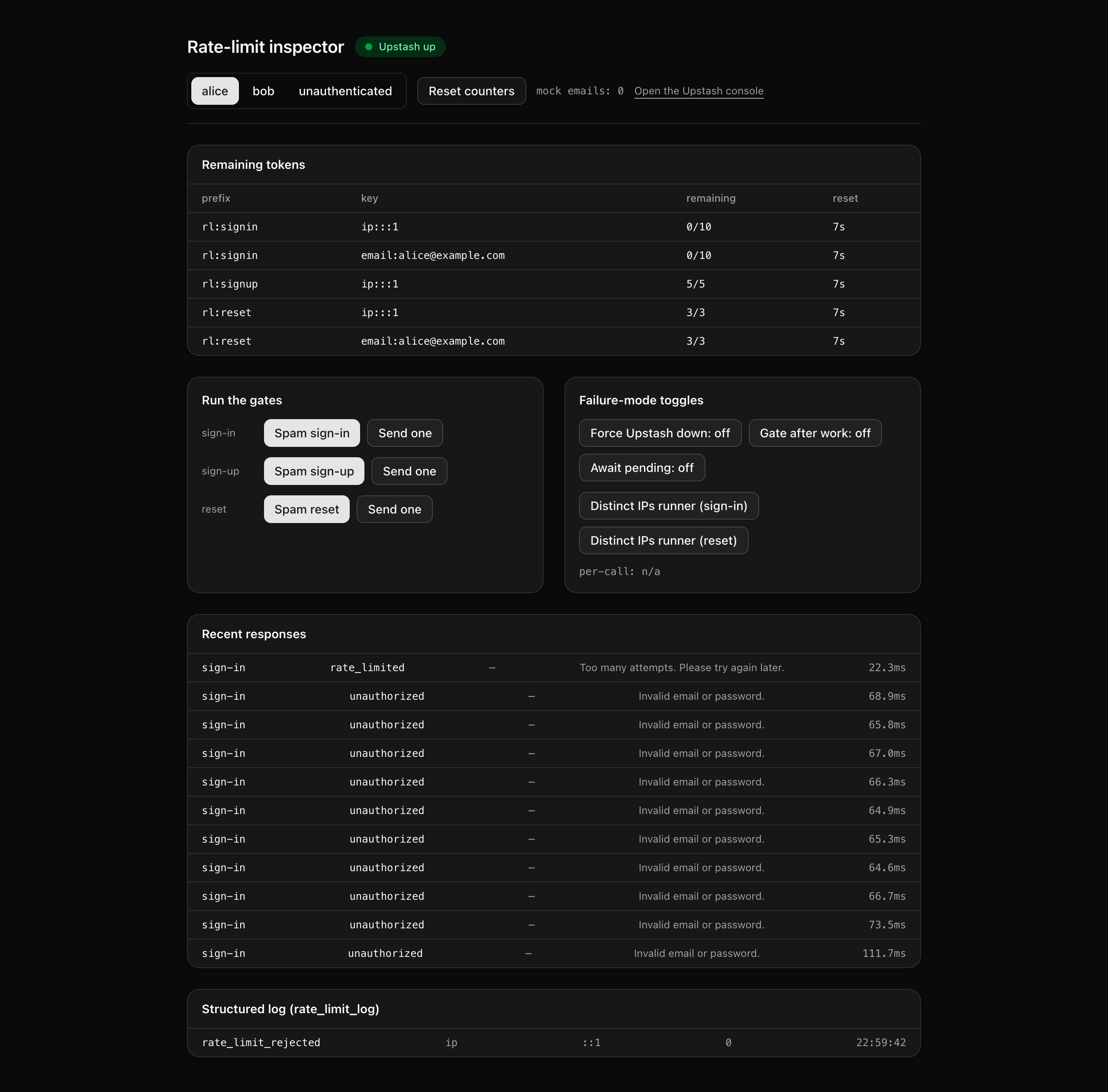
You build none of that this lesson. The goal is narrower: get the starter running, confirm the auth flows still work end to end, and open the inspector to see which gates are missing before you fill them.
Result, one opaque user message, an honest structured log, and the RateLimit-* headers for a route handler.This is the limiter shape every other abusable endpoint copies; once it is built here, a new endpoint is one Ratelimit instance plus one action wrap.
Two layers stand between a request and your auth calls: an edge WAF that drops obvious floods before they reach your code (out of scope here), and the application limiter you build, which makes the per-identity decisions the WAF can’t.
The diagram traces one gated action through that second layer.
Everything turns on the gate: if every safeLimit check passes, the action runs the real auth call; if one fails, it returns early.
The figure’s caption and notes carry the rest, including how the budget leaves on the Result rather than a header.
Result's
ok payload, never an HTTP header.
The starter ships the auth surface from Email+password auth with verification, working end to end, plus the full /inspector page and a few supporting modules you read but never write.
Your work is the nine highlighted files: six stubs holding the limiter infrastructure, and the three auth actions you wrap.
Each carries an inline TODO(Lx) naming the lesson that fills it; everything else is provided as-is.
Two provided files come up across every lesson.
src/app/inspector/ is the verification page you read live budgets and rate_limit_log rows from; you write none of it.
src/app/api/limit-demo/route.ts is the route-handler twin, a deliberate counterexample that returns literal RateLimit-* headers and a JSON 429 body on a plain GET, so you can compare it against the action that has to carry its budget in the Result instead.
Lesson 2 — Declare the Redis client and three limiters
Stand up the Redis client and three module-scope Ratelimit instances, so the inspector’s “Remaining tokens” panel reads live budgets from Redis instead of n/a.
Lesson 3 — Gate sign-in and replace Better Auth's built-in limiter
Key the sign-in gate by both IP and email and swap out Better Auth’s built-in limiter, so the eleventh call returns rate_limited with an opaque message and its remaining budget on the Result.
Lesson 4 — Gate sign-up per IP
Add a per-IP sign-up gate so one host cannot mass-register accounts, with each call’s budget on the Result.
Lesson 5 — Gate reset per IP and per email
Add a per-IP-and-per-email reset gate that protects a victim’s inbox and your Resend cost even when the attacker rotates IPs.
This project runs against a local Postgres in Docker and a free Upstash Redis database.
The two Upstash variables are the only new environment values since chapter 055; everything else carries in and is already templated in .env.example.
Get the starter from the project repository, under Chapter 075/start/. Clone just that subdirectory with degit:
npx degit terencicp/react-saas-course-projects/Chapter\ 075/start rate-limitscd rate-limitsdegit copies the folder into a fresh rate-limits directory with no git history. The repo ships a start/ and a solution/ sibling, so you can diff your work against the reference.
Install dependencies:
pnpm installProvision Upstash Redis. Create a free database in the Upstash console, then copy the REST URL and token from its REST API panel. The free tier comfortably covers this project.
Start Postgres (the provided docker-compose.yml runs Postgres 18):
docker compose up -dCopy the env template and fill in the values (the table below covers the two new ones; the rest are documented inline in the file):
cp .env.example .envRun the migrations:
pnpm db:migrateSeed the accounts (alice, bob, eve):
pnpm db:seedStart the dev server:
pnpm devThe two new variables to set:
| Variable | Purpose | How to obtain |
|---|---|---|
UPSTASH_REDIS_REST_URL | The Upstash REST endpoint the limiters and inspector read through. | The database’s REST API panel in the Upstash console. |
UPSTASH_REDIS_REST_TOKEN | The read/write token paired with that URL. | The same REST API panel. |
The rest — DATABASE_URL, DATABASE_URL_UNPOOLED, BETTER_AUTH_SECRET, BETTER_AUTH_URL, RESEND_API_KEY, EMAIL_FROM, EMAIL_REPLY_TO, NEXT_PUBLIC_APP_NAME, and NEXT_PUBLIC_APP_URL — carry in from chapter 055 with sensible local defaults already filled in.
DATABASE_URL points at the Docker Postgres, and BETTER_AUTH_SECRET is the one value you must generate yourself (openssl rand -base64 32).
On success, pnpm dev serves the chapter 055 auth flows end to end: signing in as alice with the seeded password lands you on /dashboard, and sign-up and reset behave as before.
/inspector loads cleanly, but every “Remaining tokens” row reads n/a, and clicking a “Spam X” button records an internal outcome with a “Not implemented” message rather than crashing.
That is the expected starting state: the inspector is wired but inert, because the limiters and action wrappers don’t exist yet.
You build them starting in the next lesson.