Lesson 2 — The task boundary
Confirm the shipped exportInvoices boundary (Zod payload, predeclared queue), then write the startExport action that fires it with concurrencyKey: orgId and a daily idempotency key.
What you'll build this chapter, a durable paginated CSV export on Trigger.dev, and how to set it up locally.
Over the next three lessons you’ll build a durable, paginated CSV export of an organization’s invoices, fired from a Server Action on Trigger.dev v4. The user clicks Export invoices in the inspector and the Server Action returns in milliseconds, while a background run counts the org’s invoices, streams them out page by page, emails the requester a download link, and writes an audit record. The run survives a worker being killed and replayed, serializes one org’s exports while running other orgs in parallel, sends the email exactly once, and reports progress live to the inspector.
These five skills make up the shape every durable background job reuses:
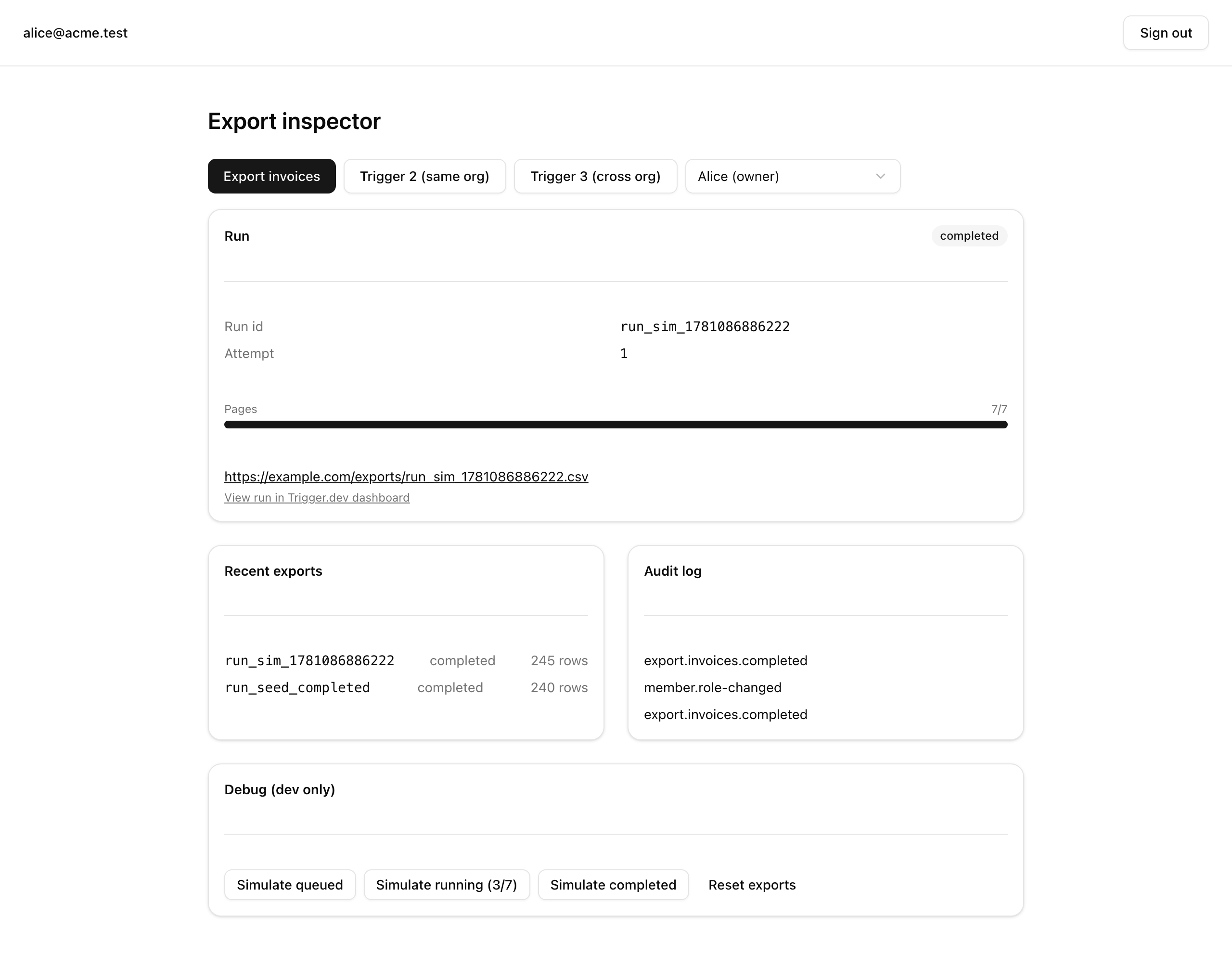
schemaTask and returns at once, so the user never waits on the export.concurrencyKey serializes each org’s exports without letting one org starve the others.run.metadata, which the inspector polls to drive the progress bar.The inspector, a Server Component, calls the startExport Server Action. startExport fires exportInvoices fire-and-forget with tasks.trigger, writes a row in the exports table, and returns the runId without waiting. In the worker, exportInvoices runs on the predeclared export queue, in this org’s concurrencyKey lane at concurrency 1. It counts the pages, then loops, awaiting one paginatePage child per page through triggerAndWait and accumulating CSV. Then it awaits sendExportEmail, updates the exports row, and writes the audit log in a single tenant transaction. Meanwhile the inspector polls GET /api/exports/[runId], which reads run state from the Trigger.dev REST API: status, attemptCount, and the pagesDone / pagesTotal progress carried on metadata. The app fires and polls; the worker executes.
The starter is a working Better Auth + Drizzle + Trigger.dev app with one unfinished slice: the export. Four files ship as stubs; they are the only files you write all chapter, and everything else is provided, introduced in the lesson that first uses it.
postgres:18 for local devdirs: ['./trigger'], retries.env (see Local setup)db:migrate, db:seed, trigger:dev, dev, test:lessondirs: ['./trigger']invoices, exports, emailSuppressions tablesuser, organization, member, …)auditLogs table + RLS policieslogAudit()tenantDb() facade + transaction helperlistInvoices() (cursor) + countInvoices()Result<T>, ok(), err()authedAction() factorysendEmail() with suppression checkretrieveRun() + listRunsForOrg() over the Trigger.dev REST APIrowsToCsv(): RFC-4180 stringdayBucket() → 'YYYY-MM-DD' (UTC)ExportError classstartExport action — you write thisgetInspectorContext(), recentExports(), latestExport()GET → reads run state, returns it as JSONThe one piece to know now is the exports table in src/db/schema.ts. It holds id, organizationId, requestedBy, status, runId, rowCount, idempotencyKey, dayBucket, pagesDone, pagesTotal, downloadUrl, requestedAt, and completedAt, with a unique index on (organizationId, requestedBy, dayBucket) for the app’s own audit and deduplication. Trigger.dev’s run record is the operational source of truth; the exports row is the app’s reference to it.
Three lessons build the export one slice at a time.
Lesson 2 — The task boundary
Confirm the shipped exportInvoices boundary (Zod payload, predeclared queue), then write the startExport action that fires it with concurrencyKey: orgId and a daily idempotency key.
Lesson 3 — One checkpoint per page
Spawn each page as a durable paginatePage child run, drive the progress bar through metadata, and abort on an empty resultset.
Lesson 4 — Send the email, write the audit log
Add the sendExportEmail child guarded by a per-run key, then close the run: update the exports row and write the audit log in one transaction.
Local development needs two terminals: the Trigger.dev worker that runs tasks, and the Next.js dev server. Without the worker, runs queue forever. Create the Trigger.dev cloud project first, since npx trigger.dev@latest init links your folder to it.
Get the starter from the project repository, under Chapter 067/start/. Its four task files are stubs.
Install dependencies:
pnpm installThe repo pins pnpm via only-allow, so npm and yarn refuse.
Copy the env template, then start Postgres:
cp .env.example .envdocker compose up -ddocker-compose.yml ships postgres:18, healthy within seconds.
Apply the schema and seed the data:
pnpm db:migrate && pnpm db:seedThe seed creates four organizations (three with 200–240 invoices each, plus an empty org_empty) and six users with fixed ids. It truncates and re-inserts, so re-running is safe, and never touches the Trigger.dev cloud.
Create a Trigger.dev account, then link your folder to a cloud project:
npx trigger.dev@latest initThe flow writes trigger.config.ts defaults and registers trigger/ via dirs: ['./trigger']. The starter ships a matching config, so you confirm it, not generate it.
Paste TRIGGER_SECRET_KEY and TRIGGER_PROJECT_REF into .env, both from the dashboard. The secret key is per-environment, so use the dev key.
Start the worker in one terminal:
pnpm trigger:devIt prints the dashboard URL and shows Waiting for tasks.
Start the app in a second terminal:
pnpm devVisit /inspector, behind the auth guard, to see the export controls.
Three environment variables are new this chapter; the rest carry over and are already in .env.example.
| Variable | Purpose | How to obtain |
|---|---|---|
TRIGGER_SECRET_KEY | Authenticates the worker and the REST reads (validated startsWith 'tr_'). | Trigger.dev dashboard, per environment — use the dev key. |
TRIGGER_PROJECT_REF | Identifies the linked project (validated startsWith 'proj_'). | Trigger.dev dashboard. |
APP_URL | The app’s base URL, used to build the export download link base. | http://localhost:3000 locally. |
The .env.example ships placeholder tr_… and proj_… values that pass validation, so next build succeeds without reaching the Trigger.dev cloud; you need the real values only for the live run loop.
You’re set up when the inspector shows the export controls and the worker reads Waiting for tasks. Click Export invoices now and you get err('internal', 'Not implemented') from startExport, which is where the next lesson begins.