The welcome email send path
The chokepoint is built and the domain is verified, but nothing has been delivered yet.
You write the two pieces that turn the last lesson’s wrapper into a real email: clicking Send welcome on the inspector renders the WelcomeEmail template, hands it to sendEmail, and delivers an authenticated, DKIM-signed message to the address you typed.
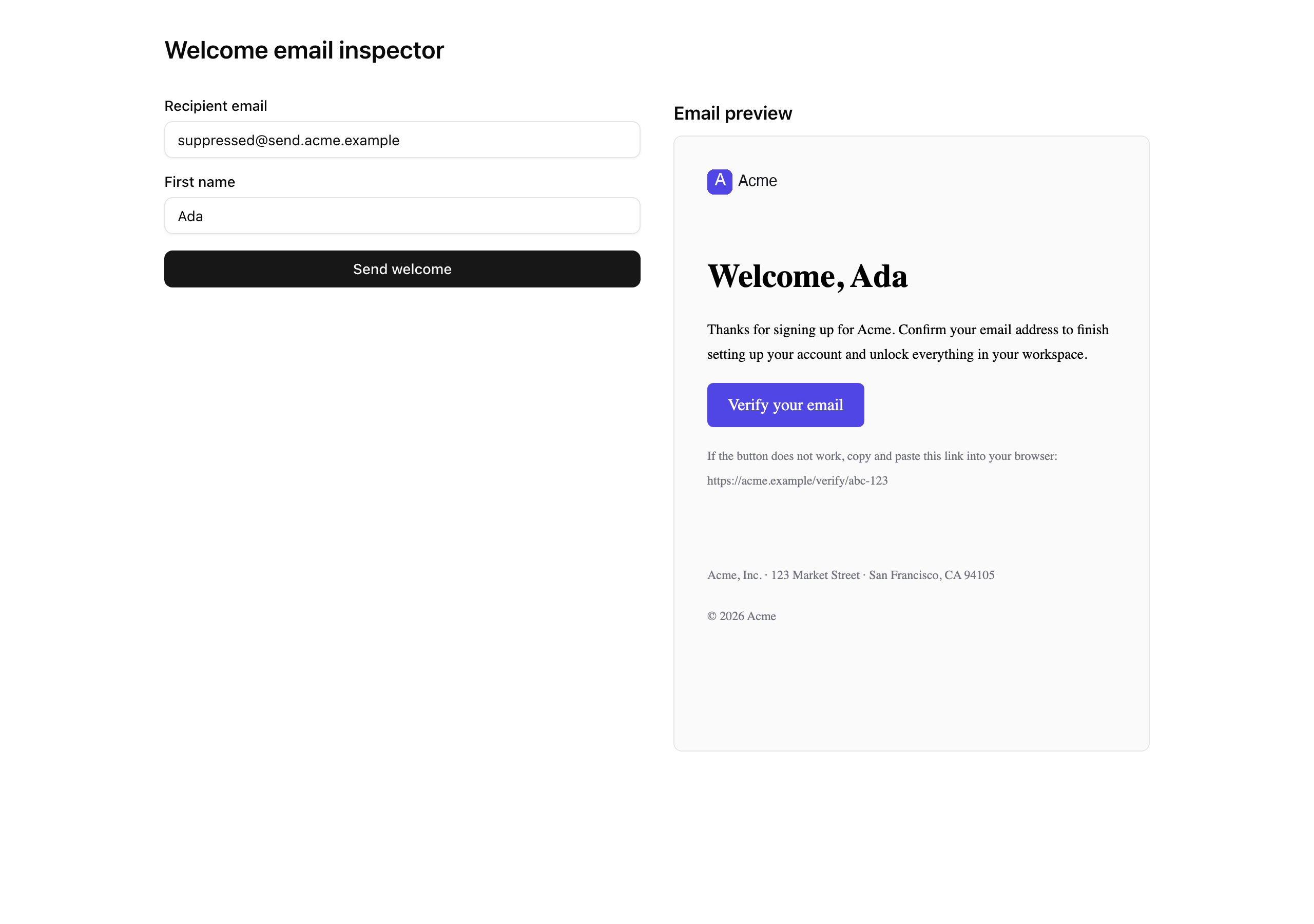
The inspector page already renders the template server-side in an iframe beside the form, so the preview fills in as you build, before you send anything real:
Your mission
Section titled “Your mission”Build two pieces: the WelcomeEmail template the recipient sees and the sendWelcomeEmail action the inspector fires.
WelcomeEmail is a pure renderer — typed props in, HTML and text out, no env, database, or session reads inside the component.
The action computes every per-send value and passes it as a prop; the moment the template reads env directly, its PreviewProps drift from production and the preview starts lying.
Assemble it from the React Email vocabulary in JSX for the email DOM: the <Tailwind> wrapper, then <Html> with the dark-mode head meta, the <Preview> preheader, and a <Body> that mounts EmailLayout around your heading, paragraph, and CTA.
EmailLayout already carries the brand strings and the 600px container, so your template adds neither.
Check it in pnpm email across desktop, the 375 px mobile toggle, dark mode, and the plain-text tab.
sendWelcomeEmail follows the five-seam shape from Result, or throw: parse, authorize, derive the idempotency key, render, send, return.
Parse first: parsing a FormData is cheap, while the identity read becomes a real session-and-database hit once auth lands, so malformed input should never pay that cost.
Read the identity from the getActiveContext() stub the starter ships, not cookies() — Better Auth swaps the stub in cleanly later, so anything you hand-roll today only gets deleted.
Derive the idempotency key from the user and the recipient so repeated clicks collapse to one send.
Return the wrapper’s Result unchanged: the inspector branches on the exact 'forbidden' code to draw the suppression card, so never reshape a suppression failure into a 'validation' one.
The verify link is a deliberate placeholder this chapter: token signing is Better Auth’s job, so you ship an explicit stand-in.
Result carrying the Resend send ID unchanged.validation failure carrying fieldErrors.recipientEmail, and an empty first name returns fieldErrors.firstName — both before the wrapper is ever reached.forbidden suppression failure from the wrapper comes straight back out of the action, never reshaped into another code.<Preview> preheader, the dark-mode color-scheme meta, the compiled <Tailwind> styles, and the verifyUrl on the CTA button’s href.from reads as EMAIL_FROM and a reply lands at EMAIL_REPLY_TO, not the noreply@ mailbox.send.<your-domain>, and DMARC all pass — confirmed on Gmail and one non-Gmail client.text/plain and a text/html part under multipart/alternative.suppressed@… recipient renders the suppression card and produces no entry in the Resend dashboard logs.pnpm email.Coding time
Section titled “Coding time”Build both files against the brief and the test suite: the WelcomeEmail template in src/emails/welcome.tsx and the sendWelcomeEmail action in src/app/actions/send-welcome.tsx. Try a real send before you open the solution.
Reference solution and walkthrough
src/emails/welcome.tsx
Section titled “src/emails/welcome.tsx”One logic-free component: it takes firstName and verifyUrl and returns the inbox-safe tree. The head-meta and <Tailwind> posture come from JSX for the email DOM; what is new is threading the props through and leaning on EmailLayout for the brand chrome.
import {  Body,  Button,  Head,  Heading,  Html,  Preview,  Section,  Tailwind,  Text,} from 'react-email';
import { EmailLayout } from './components/email-layout';import { emailTailwindConfig } from './email-tailwind-config';
const APP_NAME = 'Acme';
export type WelcomeEmailProps = {  firstName: string;  verifyUrl: string;};
const WelcomeEmail = ({ firstName, verifyUrl }: WelcomeEmailProps) => (  <Tailwind config={emailTailwindConfig}>    <Html lang="en" dir="auto">      <Head>        <title>{`Welcome to ${APP_NAME}`}</title>        <meta name="color-scheme" content="light dark" />        <meta name="supported-color-schemes" content="light dark" />        <style>{`:root { color-scheme: light dark; }`}</style>      </Head>      <Preview>Welcome to {APP_NAME} — verify your email</Preview>      <Body className="bg-zinc-50">        <EmailLayout>          <Section className="px-6 py-4">            <Heading as="h1">Welcome, {firstName}</Heading>            <Text>              Thanks for signing up for {APP_NAME}. Confirm your email address              to finish setting up your account and unlock everything in your              workspace.            </Text>            <Button              href={verifyUrl}              className="rounded-md bg-brand px-5 py-3 text-brand-foreground"            >              Verify your email            </Button>            <Text className="text-[12px] text-muted">              If the button does not work, copy and paste this link into your              browser: {verifyUrl}            </Text>          </Section>        </EmailLayout>      </Body>    </Html>  </Tailwind>);
WelcomeEmail.PreviewProps = {  firstName: 'Ada',  verifyUrl: 'https://acme.example/verify/abc-123',} satisfies WelcomeEmailProps;
export default WelcomeEmail;
<Tailwind> wraps everything below it. Most mail clients strip <style> blocks and ignore class names, so it compiles the utility classes — bg-brand, text-brand-foreground, the spacing — to inline styles before the HTML ships. The config is the shared one with the brand hex tokens; the template never invents its own colors.
import {  Body,  Button,  Head,  Heading,  Html,  Preview,  Section,  Tailwind,  Text,} from 'react-email';
import { EmailLayout } from './components/email-layout';import { emailTailwindConfig } from './email-tailwind-config';
const APP_NAME = 'Acme';
export type WelcomeEmailProps = {  firstName: string;  verifyUrl: string;};
const WelcomeEmail = ({ firstName, verifyUrl }: WelcomeEmailProps) => (  <Tailwind config={emailTailwindConfig}>    <Html lang="en" dir="auto">      <Head>        <title>{`Welcome to ${APP_NAME}`}</title>        <meta name="color-scheme" content="light dark" />        <meta name="supported-color-schemes" content="light dark" />        <style>{`:root { color-scheme: light dark; }`}</style>      </Head>      <Preview>Welcome to {APP_NAME} — verify your email</Preview>      <Body className="bg-zinc-50">        <EmailLayout>          <Section className="px-6 py-4">            <Heading as="h1">Welcome, {firstName}</Heading>            <Text>              Thanks for signing up for {APP_NAME}. Confirm your email address              to finish setting up your account and unlock everything in your              workspace.            </Text>            <Button              href={verifyUrl}              className="rounded-md bg-brand px-5 py-3 text-brand-foreground"            >              Verify your email            </Button>            <Text className="text-[12px] text-muted">              If the button does not work, copy and paste this link into your              browser: {verifyUrl}            </Text>          </Section>        </EmailLayout>      </Body>    </Html>  </Tailwind>);
WelcomeEmail.PreviewProps = {  firstName: 'Ada',  verifyUrl: 'https://acme.example/verify/abc-123',} satisfies WelcomeEmailProps;
export default WelcomeEmail;
The accessibility and dark-mode floor. lang and the <title> are the screen-reader baseline; the two color-scheme meta tags and the :root style tell a dark-mode client to render the message in its own palette instead of force-inverting it. This head-meta block is lifted verbatim from the templates chapter — plumbing every template repeats.
import {  Body,  Button,  Head,  Heading,  Html,  Preview,  Section,  Tailwind,  Text,} from 'react-email';
import { EmailLayout } from './components/email-layout';import { emailTailwindConfig } from './email-tailwind-config';
const APP_NAME = 'Acme';
export type WelcomeEmailProps = {  firstName: string;  verifyUrl: string;};
const WelcomeEmail = ({ firstName, verifyUrl }: WelcomeEmailProps) => (  <Tailwind config={emailTailwindConfig}>    <Html lang="en" dir="auto">      <Head>        <title>{`Welcome to ${APP_NAME}`}</title>        <meta name="color-scheme" content="light dark" />        <meta name="supported-color-schemes" content="light dark" />        <style>{`:root { color-scheme: light dark; }`}</style>      </Head>      <Preview>Welcome to {APP_NAME} — verify your email</Preview>      <Body className="bg-zinc-50">        <EmailLayout>          <Section className="px-6 py-4">            <Heading as="h1">Welcome, {firstName}</Heading>            <Text>              Thanks for signing up for {APP_NAME}. Confirm your email address              to finish setting up your account and unlock everything in your              workspace.            </Text>            <Button              href={verifyUrl}              className="rounded-md bg-brand px-5 py-3 text-brand-foreground"            >              Verify your email            </Button>            <Text className="text-[12px] text-muted">              If the button does not work, copy and paste this link into your              browser: {verifyUrl}            </Text>          </Section>        </EmailLayout>      </Body>    </Html>  </Tailwind>);
WelcomeEmail.PreviewProps = {  firstName: 'Ada',  verifyUrl: 'https://acme.example/verify/abc-123',} satisfies WelcomeEmailProps;
export default WelcomeEmail;
The preheader: the dim summary line the inbox shows next to the subject before the message is opened. React Email renders it as hidden text near the top of the body. Without it, the client scrapes the first visible words instead — usually the logo’s alt text or a stray “View in browser”.
import {  Body,  Button,  Head,  Heading,  Html,  Preview,  Section,  Tailwind,  Text,} from 'react-email';
import { EmailLayout } from './components/email-layout';import { emailTailwindConfig } from './email-tailwind-config';
const APP_NAME = 'Acme';
export type WelcomeEmailProps = {  firstName: string;  verifyUrl: string;};
const WelcomeEmail = ({ firstName, verifyUrl }: WelcomeEmailProps) => (  <Tailwind config={emailTailwindConfig}>    <Html lang="en" dir="auto">      <Head>        <title>{`Welcome to ${APP_NAME}`}</title>        <meta name="color-scheme" content="light dark" />        <meta name="supported-color-schemes" content="light dark" />        <style>{`:root { color-scheme: light dark; }`}</style>      </Head>      <Preview>Welcome to {APP_NAME} — verify your email</Preview>      <Body className="bg-zinc-50">        <EmailLayout>          <Section className="px-6 py-4">            <Heading as="h1">Welcome, {firstName}</Heading>            <Text>              Thanks for signing up for {APP_NAME}. Confirm your email address              to finish setting up your account and unlock everything in your              workspace.            </Text>            <Button              href={verifyUrl}              className="rounded-md bg-brand px-5 py-3 text-brand-foreground"            >              Verify your email            </Button>            <Text className="text-[12px] text-muted">              If the button does not work, copy and paste this link into your              browser: {verifyUrl}            </Text>          </Section>        </EmailLayout>      </Body>    </Html>  </Tailwind>);
WelcomeEmail.PreviewProps = {  firstName: 'Ada',  verifyUrl: 'https://acme.example/verify/abc-123',} satisfies WelcomeEmailProps;
export default WelcomeEmail;
EmailLayout is the provided brand chrome: the logo header, the mx-auto max-w-[600px] container, and the legal footer. The template drops its body straight inside and adds no container of its own. EmailLayout keeps its app name, URL, and legal address on literal constants, not process.env reads, so it renders identically in pnpm email, in the inspector iframe, and in a real send.
import {  Body,  Button,  Head,  Heading,  Html,  Preview,  Section,  Tailwind,  Text,} from 'react-email';
import { EmailLayout } from './components/email-layout';import { emailTailwindConfig } from './email-tailwind-config';
const APP_NAME = 'Acme';
export type WelcomeEmailProps = {  firstName: string;  verifyUrl: string;};
const WelcomeEmail = ({ firstName, verifyUrl }: WelcomeEmailProps) => (  <Tailwind config={emailTailwindConfig}>    <Html lang="en" dir="auto">      <Head>        <title>{`Welcome to ${APP_NAME}`}</title>        <meta name="color-scheme" content="light dark" />        <meta name="supported-color-schemes" content="light dark" />        <style>{`:root { color-scheme: light dark; }`}</style>      </Head>      <Preview>Welcome to {APP_NAME} — verify your email</Preview>      <Body className="bg-zinc-50">        <EmailLayout>          <Section className="px-6 py-4">            <Heading as="h1">Welcome, {firstName}</Heading>            <Text>              Thanks for signing up for {APP_NAME}. Confirm your email address              to finish setting up your account and unlock everything in your              workspace.            </Text>            <Button              href={verifyUrl}              className="rounded-md bg-brand px-5 py-3 text-brand-foreground"            >              Verify your email            </Button>            <Text className="text-[12px] text-muted">              If the button does not work, copy and paste this link into your              browser: {verifyUrl}            </Text>          </Section>        </EmailLayout>      </Body>    </Html>  </Tailwind>);
WelcomeEmail.PreviewProps = {  firstName: 'Ada',  verifyUrl: 'https://acme.example/verify/abc-123',} satisfies WelcomeEmailProps;
export default WelcomeEmail;
The per-send content, and the reason the component takes props at all. The greeting interpolates firstName; the CTA’s href is the verifyUrl the action computed. The template never builds the link itself — a pure renderer uses what it is handed.
import {  Body,  Button,  Head,  Heading,  Html,  Preview,  Section,  Tailwind,  Text,} from 'react-email';
import { EmailLayout } from './components/email-layout';import { emailTailwindConfig } from './email-tailwind-config';
const APP_NAME = 'Acme';
export type WelcomeEmailProps = {  firstName: string;  verifyUrl: string;};
const WelcomeEmail = ({ firstName, verifyUrl }: WelcomeEmailProps) => (  <Tailwind config={emailTailwindConfig}>    <Html lang="en" dir="auto">      <Head>        <title>{`Welcome to ${APP_NAME}`}</title>        <meta name="color-scheme" content="light dark" />        <meta name="supported-color-schemes" content="light dark" />        <style>{`:root { color-scheme: light dark; }`}</style>      </Head>      <Preview>Welcome to {APP_NAME} — verify your email</Preview>      <Body className="bg-zinc-50">        <EmailLayout>          <Section className="px-6 py-4">            <Heading as="h1">Welcome, {firstName}</Heading>            <Text>              Thanks for signing up for {APP_NAME}. Confirm your email address              to finish setting up your account and unlock everything in your              workspace.            </Text>            <Button              href={verifyUrl}              className="rounded-md bg-brand px-5 py-3 text-brand-foreground"            >              Verify your email            </Button>            <Text className="text-[12px] text-muted">              If the button does not work, copy and paste this link into your              browser: {verifyUrl}            </Text>          </Section>        </EmailLayout>      </Body>    </Html>  </Tailwind>);
WelcomeEmail.PreviewProps = {  firstName: 'Ada',  verifyUrl: 'https://acme.example/verify/abc-123',} satisfies WelcomeEmailProps;
export default WelcomeEmail;
The alternate link, echoing verifyUrl as plain text. This is the line that earns the plain-text-coherence requirement: when a client strips the styled button, or the recipient reads the text/plain part, the verify URL is still there to copy. A CTA that lives only inside a <Button> disappears the moment the button does.
import {  Body,  Button,  Head,  Heading,  Html,  Preview,  Section,  Tailwind,  Text,} from 'react-email';
import { EmailLayout } from './components/email-layout';import { emailTailwindConfig } from './email-tailwind-config';
const APP_NAME = 'Acme';
export type WelcomeEmailProps = {  firstName: string;  verifyUrl: string;};
const WelcomeEmail = ({ firstName, verifyUrl }: WelcomeEmailProps) => (  <Tailwind config={emailTailwindConfig}>    <Html lang="en" dir="auto">      <Head>        <title>{`Welcome to ${APP_NAME}`}</title>        <meta name="color-scheme" content="light dark" />        <meta name="supported-color-schemes" content="light dark" />        <style>{`:root { color-scheme: light dark; }`}</style>      </Head>      <Preview>Welcome to {APP_NAME} — verify your email</Preview>      <Body className="bg-zinc-50">        <EmailLayout>          <Section className="px-6 py-4">            <Heading as="h1">Welcome, {firstName}</Heading>            <Text>              Thanks for signing up for {APP_NAME}. Confirm your email address              to finish setting up your account and unlock everything in your              workspace.            </Text>            <Button              href={verifyUrl}              className="rounded-md bg-brand px-5 py-3 text-brand-foreground"            >              Verify your email            </Button>            <Text className="text-[12px] text-muted">              If the button does not work, copy and paste this link into your              browser: {verifyUrl}            </Text>          </Section>        </EmailLayout>      </Body>    </Html>  </Tailwind>);
WelcomeEmail.PreviewProps = {  firstName: 'Ada',  verifyUrl: 'https://acme.example/verify/abc-123',} satisfies WelcomeEmailProps;
export default WelcomeEmail;
PreviewProps is the mock-data contract. Both pnpm email and the inspector iframe read it to render the template with no action in the loop, and the test suite renders against it too. satisfies WelcomeEmailProps keeps the mock honest — drop a field and the build catches it.
The brand strings live on EmailLayout’s literals for a mechanical reason: the preview server runs templates from its own .react-email working directory, where process.env.NEXT_PUBLIC_* is undefined and the @/ alias may not resolve, so anything the template reads from env renders blank in pnpm email. Per-send values (firstName, verifyUrl) arrive as props from the action; the brand chrome stays on constants. That is the pure-renderer discipline.
src/app/actions/send-welcome.tsx
Section titled “src/app/actions/send-welcome.tsx”The extension is .tsx, not .ts, because the action constructs a <WelcomeEmail … /> JSX element to hand to sendEmail. That element is built and rendered entirely on the server, never serialized to a client; it is just the argument to render inside the wrapper.
'use server';
import { z } from 'zod';
import WelcomeEmail from '@/emails/welcome';import { env } from '@/env';import { getActiveContext } from '@/lib/auth-stub';import { sendEmail } from '@/lib/email';import { err, type Result } from '@/lib/result';
const schema = z.strictObject({  recipientEmail: z.email(),  firstName: z.string().min(1).max(80),});
export const sendWelcomeEmail = async (  _prevState: Result<{ id: string }> | null,  formData: FormData,): Promise<Result<{ id: string }>> => {  const parsed = schema.safeParse(Object.fromEntries(formData));  if (!parsed.success) {    return err(      'validation',      'Check the highlighted fields.',      z.flattenError(parsed.error).fieldErrors,    );  }
  const { userId } = await getActiveContext();
  const normalizedRecipient = parsed.data.recipientEmail.trim().toLowerCase();  const idempotencyKey = `welcome:${userId}:${normalizedRecipient}`;
  // TODO(Unit 8) — replace placeholder with a real Better Auth verification token.  const verifyUrl = `${env.NEXT_PUBLIC_APP_URL}/verify/placeholder-${idempotencyKey}`;
  return await sendEmail({    to: parsed.data.recipientEmail,    subject: `Welcome to ${env.NEXT_PUBLIC_APP_NAME}`,    react: (      <WelcomeEmail firstName={parsed.data.firstName} verifyUrl={verifyUrl} />    ),    idempotencyKey,  });};
The file-level directive that marks every export as a Server Action — callable from the client form, but only ever executed on the server. The (prevState, formData) signature is the useActionState contract the provided form already wires up.
'use server';
import { z } from 'zod';
import WelcomeEmail from '@/emails/welcome';import { env } from '@/env';import { getActiveContext } from '@/lib/auth-stub';import { sendEmail } from '@/lib/email';import { err, type Result } from '@/lib/result';
const schema = z.strictObject({  recipientEmail: z.email(),  firstName: z.string().min(1).max(80),});
export const sendWelcomeEmail = async (  _prevState: Result<{ id: string }> | null,  formData: FormData,): Promise<Result<{ id: string }>> => {  const parsed = schema.safeParse(Object.fromEntries(formData));  if (!parsed.success) {    return err(      'validation',      'Check the highlighted fields.',      z.flattenError(parsed.error).fieldErrors,    );  }
  const { userId } = await getActiveContext();
  const normalizedRecipient = parsed.data.recipientEmail.trim().toLowerCase();  const idempotencyKey = `welcome:${userId}:${normalizedRecipient}`;
  // TODO(Unit 8) — replace placeholder with a real Better Auth verification token.  const verifyUrl = `${env.NEXT_PUBLIC_APP_URL}/verify/placeholder-${idempotencyKey}`;
  return await sendEmail({    to: parsed.data.recipientEmail,    subject: `Welcome to ${env.NEXT_PUBLIC_APP_NAME}`,    react: (      <WelcomeEmail firstName={parsed.data.firstName} verifyUrl={verifyUrl} />    ),    idempotencyKey,  });};
Seam one: parse, before anything else. Object.fromEntries(formData) turns the form into a plain object, safeParse validates it without throwing, and on failure the action returns err('validation', …) carrying z.flattenError(...).fieldErrors — the flat field-to-messages map the form’s FieldError components render inline. Parsing first means malformed input never pays for the identity read below.
'use server';
import { z } from 'zod';
import WelcomeEmail from '@/emails/welcome';import { env } from '@/env';import { getActiveContext } from '@/lib/auth-stub';import { sendEmail } from '@/lib/email';import { err, type Result } from '@/lib/result';
const schema = z.strictObject({  recipientEmail: z.email(),  firstName: z.string().min(1).max(80),});
export const sendWelcomeEmail = async (  _prevState: Result<{ id: string }> | null,  formData: FormData,): Promise<Result<{ id: string }>> => {  const parsed = schema.safeParse(Object.fromEntries(formData));  if (!parsed.success) {    return err(      'validation',      'Check the highlighted fields.',      z.flattenError(parsed.error).fieldErrors,    );  }
  const { userId } = await getActiveContext();
  const normalizedRecipient = parsed.data.recipientEmail.trim().toLowerCase();  const idempotencyKey = `welcome:${userId}:${normalizedRecipient}`;
  // TODO(Unit 8) — replace placeholder with a real Better Auth verification token.  const verifyUrl = `${env.NEXT_PUBLIC_APP_URL}/verify/placeholder-${idempotencyKey}`;
  return await sendEmail({    to: parsed.data.recipientEmail,    subject: `Welcome to ${env.NEXT_PUBLIC_APP_NAME}`,    react: (      <WelcomeEmail firstName={parsed.data.firstName} verifyUrl={verifyUrl} />    ),    idempotencyKey,  });};
Seam two: authorize. Identity comes from the stub the starter ships, which resolves the seeded org and user by natural key. This is the spot Better Auth slots into later — don’t reach for cookies() or invent a session shape here.
'use server';
import { z } from 'zod';
import WelcomeEmail from '@/emails/welcome';import { env } from '@/env';import { getActiveContext } from '@/lib/auth-stub';import { sendEmail } from '@/lib/email';import { err, type Result } from '@/lib/result';
const schema = z.strictObject({  recipientEmail: z.email(),  firstName: z.string().min(1).max(80),});
export const sendWelcomeEmail = async (  _prevState: Result<{ id: string }> | null,  formData: FormData,): Promise<Result<{ id: string }>> => {  const parsed = schema.safeParse(Object.fromEntries(formData));  if (!parsed.success) {    return err(      'validation',      'Check the highlighted fields.',      z.flattenError(parsed.error).fieldErrors,    );  }
  const { userId } = await getActiveContext();
  const normalizedRecipient = parsed.data.recipientEmail.trim().toLowerCase();  const idempotencyKey = `welcome:${userId}:${normalizedRecipient}`;
  // TODO(Unit 8) — replace placeholder with a real Better Auth verification token.  const verifyUrl = `${env.NEXT_PUBLIC_APP_URL}/verify/placeholder-${idempotencyKey}`;
  return await sendEmail({    to: parsed.data.recipientEmail,    subject: `Welcome to ${env.NEXT_PUBLIC_APP_NAME}`,    react: (      <WelcomeEmail firstName={parsed.data.firstName} verifyUrl={verifyUrl} />    ),    idempotencyKey,  });};
Seam three: the idempotency key. It is built from the user and the lowercased recipient, and deliberately not the first name — “one welcome per user per recipient.” Click twice, change the name, change the casing, and the key is identical, so Resend collapses the retries into a single delivery and a single send ID.
'use server';
import { z } from 'zod';
import WelcomeEmail from '@/emails/welcome';import { env } from '@/env';import { getActiveContext } from '@/lib/auth-stub';import { sendEmail } from '@/lib/email';import { err, type Result } from '@/lib/result';
const schema = z.strictObject({  recipientEmail: z.email(),  firstName: z.string().min(1).max(80),});
export const sendWelcomeEmail = async (  _prevState: Result<{ id: string }> | null,  formData: FormData,): Promise<Result<{ id: string }>> => {  const parsed = schema.safeParse(Object.fromEntries(formData));  if (!parsed.success) {    return err(      'validation',      'Check the highlighted fields.',      z.flattenError(parsed.error).fieldErrors,    );  }
  const { userId } = await getActiveContext();
  const normalizedRecipient = parsed.data.recipientEmail.trim().toLowerCase();  const idempotencyKey = `welcome:${userId}:${normalizedRecipient}`;
  // TODO(Unit 8) — replace placeholder with a real Better Auth verification token.  const verifyUrl = `${env.NEXT_PUBLIC_APP_URL}/verify/placeholder-${idempotencyKey}`;
  return await sendEmail({    to: parsed.data.recipientEmail,    subject: `Welcome to ${env.NEXT_PUBLIC_APP_NAME}`,    react: (      <WelcomeEmail firstName={parsed.data.firstName} verifyUrl={verifyUrl} />    ),    idempotencyKey,  });};
Seam four: the verify URL. It is an explicit placeholder, because minting a real signed verification token is Better Auth’s job in a later unit, not this chapter’s. The wrapper and the template don’t care what the URL is, only that one is supplied.
'use server';
import { z } from 'zod';
import WelcomeEmail from '@/emails/welcome';import { env } from '@/env';import { getActiveContext } from '@/lib/auth-stub';import { sendEmail } from '@/lib/email';import { err, type Result } from '@/lib/result';
const schema = z.strictObject({  recipientEmail: z.email(),  firstName: z.string().min(1).max(80),});
export const sendWelcomeEmail = async (  _prevState: Result<{ id: string }> | null,  formData: FormData,): Promise<Result<{ id: string }>> => {  const parsed = schema.safeParse(Object.fromEntries(formData));  if (!parsed.success) {    return err(      'validation',      'Check the highlighted fields.',      z.flattenError(parsed.error).fieldErrors,    );  }
  const { userId } = await getActiveContext();
  const normalizedRecipient = parsed.data.recipientEmail.trim().toLowerCase();  const idempotencyKey = `welcome:${userId}:${normalizedRecipient}`;
  // TODO(Unit 8) — replace placeholder with a real Better Auth verification token.  const verifyUrl = `${env.NEXT_PUBLIC_APP_URL}/verify/placeholder-${idempotencyKey}`;
  return await sendEmail({    to: parsed.data.recipientEmail,    subject: `Welcome to ${env.NEXT_PUBLIC_APP_NAME}`,    react: (      <WelcomeEmail firstName={parsed.data.firstName} verifyUrl={verifyUrl} />    ),    idempotencyKey,  });};
Seam five: render and send, then return. The action builds the <WelcomeEmail … /> element with the parsed props and hands it to sendEmail with the subject and the key. It returns that call directly — no try/catch, no remapping. Whatever Result the wrapper produces, success or a 'forbidden' suppression failure, flows straight back out unchanged.
Two decisions are each a place a reasonable-looking change quietly breaks something:
- Returning the wrapper’s
Resultunchanged. The inspector’s cards branch on the wrapper’s codes, and the suppression card tests forcode === 'forbidden'. Catch that result and reshape it into'validation', and the card stops firing. A thin orchestrator passes the verdict along; it does not re-judge it. - The key ignores the first name. Keying on the name would let a typo-correcting second click send a second welcome — the exact double-send the key exists to prevent. The logical event is “this user was welcomed at this address.”
The provided SendWelcomeForm calls useActionState(sendWelcomeEmail, null) and renders the success, suppression, and error cards off the returned Result. You write nothing on the client: the moment this action lands, submitting the form works end to end.
The 24-hour dedup window and the <event-type>/<entity-id> key shape your welcome key mirrors.
The exact template-to-send workflow: build the component, hand it to the SDK on the server.
The <Tailwind config> wrapper your template leans on, with the email-client caveats it inlines around.
Why a stable key collapses retries into one send — the reasoning behind seam three.
Moment of truth
Section titled “Moment of truth”Run the lesson’s test suite:
pnpm test:lesson 4The seven tests stub getActiveContext and sendEmail, so nothing touches the database or sends real mail. They prove the branching and the rendering: one keyed send through the wrapper, a stable key across a changed name and mixed casing, empty fields short-circuiting to validation, a 'forbidden' failure returned unchanged, and the HTML and plain-text output.
✓ tests/lessons/Lesson 4.test.ts (7 tests)
Test Files 1 passed (1) Tests 7 passed (7)Tests can’t reach a real inbox, live DNS, or a human eye. Walk this list by hand with pnpm dev and pnpm email both running:
from reads as EMAIL_FROM; click Reply and confirm the recipient is EMAIL_REPLY_TO, not the noreply@ mailbox.SPF: PASS, DKIM: PASS for send.<your-domain>, and DMARC: PASS. If any line reads FAIL or NEUTRAL, re-check the DNS records from the verified-domain ceremony with dig.Welcome, {firstName} and the CTA renders in the brand color, not Outlook blue or an unstyled gray. Open it on a phone (text reflows, button stays tappable) and in dark mode (background and text invert, the logo survives).Content-Type: multipart/alternative with both a text/plain and a text/html part, and that the text part carries the heading, the welcome paragraph, and Verify your email [https://…]. View the message in a plain-text-only mode (Apple Mail’s Plain Text view) for the no-HTML case.suppressed@send.<your-domain> and click send: confirm the suppression card renders (it branches on code === 'forbidden') and the Resend dashboard’s Logs tab shows no entry. In the pnpm dev terminal, confirm the [email] suppressed line fires — not a Resend send.What you installed
Section titled “What you installed”This chapter’s shape is the one every later send reuses. You now have:
- One named send seam. Every email flows through
sendEmailand nowhere else. - A suppression read at the wrapper. Checked once, before any external call, so no caller can forget it.
- A required idempotency key. The compiler enforces replay safety on every send.
- A pure-renderer template. Typed props in, HTML and text out, so the preview never drifts from production.
- A five-seam action funneling every outcome through one
Result. Success, suppression, and validation return as values the form reads offresult.ok, never as thrown exceptions. - Env that fails closed at boot. A missing
RESEND_API_KEYstops the build, not a 2 a.m. page. - A verified domain with DKIM, DMARC, and suppression. The mail authenticates, and a complained-about address never gets a second send.
Every send path you wire after this — verification links, invitations, receipts, notifications, jobs — calls this wrapper unchanged. Run the Show original header check once per new send path to confirm the configuration, not per message.