Move every control to the URL
The list renders, but every control on it is a dead end. Set a filter, sort a column, type a search, page forward, then refresh, and it is all gone. Paste the URL to a coworker and they land on the bare list, not your view. This lesson moves every control out of component state and into the URL, so any view becomes a link that survives a refresh, a share, and the back button.
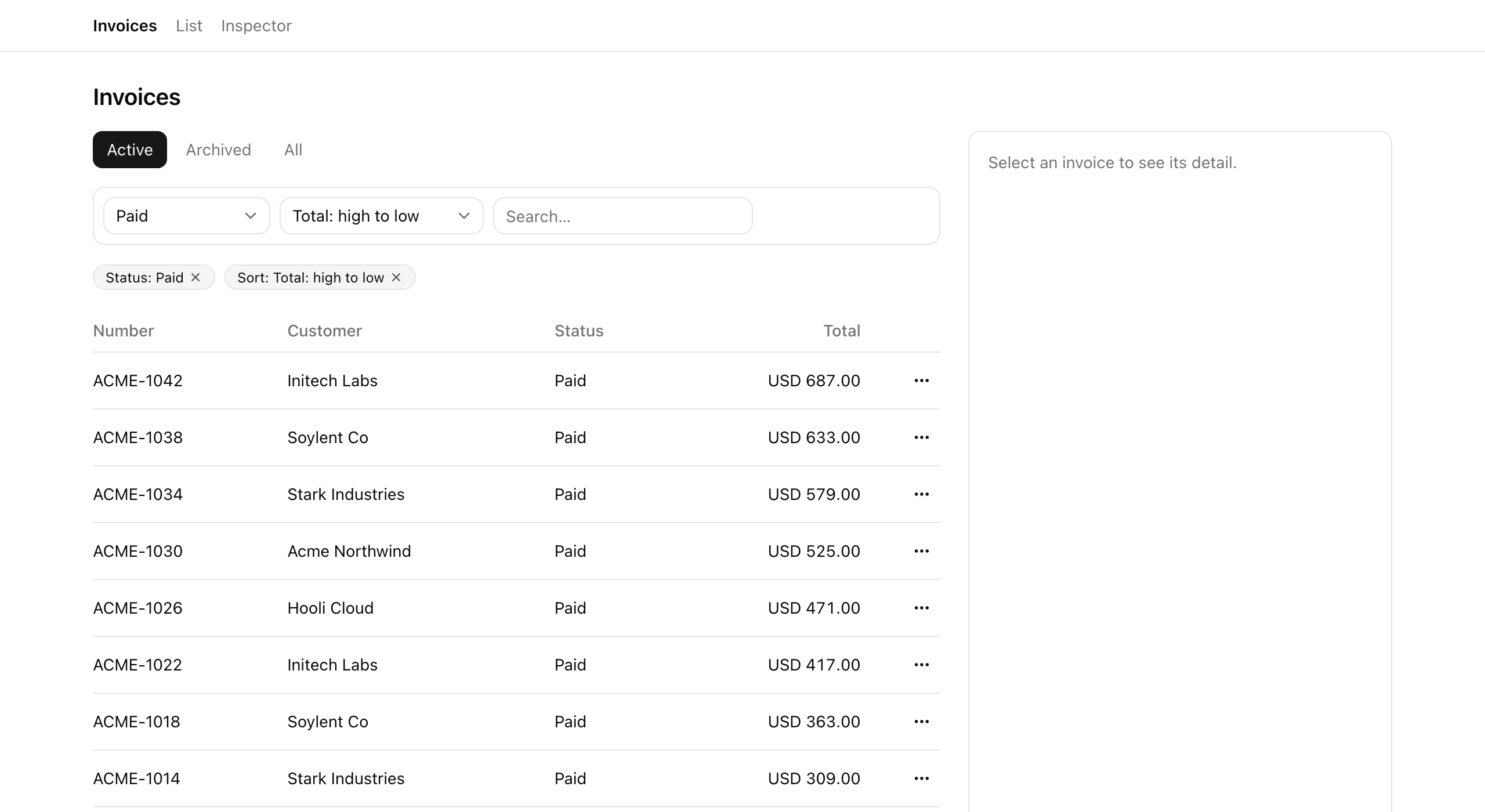
Your mission
Section titled “Your mission”Make the URL the single source of truth for view-state: the filter, the sort, the search, the visibility tab, and the pagination cursor.
The page already reads that URL on the server, parsing the query string through a nuqs searchParamsCache and handing the result to listInvoices.
Your job is the write side: the toolbar, the view tabs, the chips, and pagination, plus the parsers the cache reads.
Four constraints separate a list that feels production-grade from one that fights the browser:
- Defaults stay out of the URL:
nuqsstrips any param equal to its default, so a bare/invoicesis the home state. - Every setter that re-orders or shrinks the result set bundles
cursor: nullin the same call, or a stale cursor points past the end of a different result set. - Leave history mode and scroll behavior alone:
nuqsalready defaults to historyreplaceand{ scroll: false }. - The search box writes its deferred value through
useDeferredValueanduseTransition, withnuqs’slimitUrlUpdates: debounce(300)bounding how often that write commits.
One thing is deliberately out of scope.
The view tabs write the view param, but every tab still returns the same rows; making the read branch on view (and gating the All tab to admins) is the next lesson.
/invoices URL with no query string.cursor in the URL, and the cursor drops whenever status, sort, search, or view changes so the new result set starts at page one.Coding time
Section titled “Coding time”Fill in the five parsers, the toolbar, the view-tabs setter, the chips (plus the new ClearChip), and the pagination control against the brief and the tests.
The TODO(L2) comments mark every spot.
Try it yourself first; the round-trip is much clearer once you have written one setter.
Reference solution and walkthrough
The parsers and the cache
Section titled “The parsers and the cache”Everything downstream reads through search-params.ts.
Each parser declares how one param decodes and its default; nuqs strips any param whose value equals its default.
import {  createSearchParamsCache,  parseAsString,  parseAsStringEnum,} from 'nuqs/server';
export const invoiceListSearchParams = {  status: parseAsStringEnum(['draft', 'sent', 'paid', 'overdue']),  sort: parseAsStringEnum([    '-createdAt',    'createdAt',    '-total',    'total',    '-customer',    'customer',  ]).withDefault('-createdAt'),  q: parseAsString.withDefault(''),  view: parseAsStringEnum(['active', 'archived', 'all']).withDefault('active'),  cursor: parseAsString,};
export const invoiceListSearchParamsCache = createSearchParamsCache(  invoiceListSearchParams,);
status and cursor are nullable with no default. A value outside the allowed set decodes to null and drops from the URL: that is what makes “no status filter” and “page one” the implicit home state.
import {  createSearchParamsCache,  parseAsString,  parseAsStringEnum,} from 'nuqs/server';
export const invoiceListSearchParams = {  status: parseAsStringEnum(['draft', 'sent', 'paid', 'overdue']),  sort: parseAsStringEnum([    '-createdAt',    'createdAt',    '-total',    'total',    '-customer',    'customer',  ]).withDefault('-createdAt'),  q: parseAsString.withDefault(''),  view: parseAsStringEnum(['active', 'archived', 'all']).withDefault('active'),  cursor: parseAsString,};
export const invoiceListSearchParamsCache = createSearchParamsCache( invoiceListSearchParams,);sort, q, and view each carry an explicit default, so nuqs drops the param whenever the live value equals it. A bare /invoices therefore parses to sort -createdAt, empty q, and view active.
import {  createSearchParamsCache,  parseAsString,  parseAsStringEnum,} from 'nuqs/server';
export const invoiceListSearchParams = {  status: parseAsStringEnum(['draft', 'sent', 'paid', 'overdue']),  sort: parseAsStringEnum([    '-createdAt',    'createdAt',    '-total',    'total',    '-customer',    'customer',  ]).withDefault('-createdAt'),  q: parseAsString.withDefault(''),  view: parseAsStringEnum(['active', 'archived', 'all']).withDefault('active'),  cursor: parseAsString,};
export const invoiceListSearchParamsCache = createSearchParamsCache(  invoiceListSearchParams,);
The page calls this cache’s .parse() on the server, turning the raw query string into the typed ListParsed object it hands to listInvoices.
This is the home-state contract: a bare /invoices and /invoices?sort=-createdAt&view=active&q= render the same view, and only the second is one you would never share.
For the parser and cache mechanics, see The list-view anatomy.
The toolbar: from local state to the URL
Section titled “The toolbar: from local state to the URL”The starter holds status, sort, and search in useState: the controls feel interactive, but nothing reaches the URL, so a refresh wipes them.
Swap that local state for one useQueryStates call that writes straight to the URL.
'use client';
import { useState } from 'react';import { Input } from '@/components/ui/input';import {  Select,  SelectContent,  SelectItem,  SelectTrigger,  SelectValue,} from '@/components/ui/select';import type { InvoiceSort, ListParsed } from '@/lib/invoices/queries';
export const Toolbar = ({ parsed }: { parsed: ListParsed }) => {  const [status, setStatus] = useState<string>(parsed.status ?? 'all');  const [sort, setSort] = useState<InvoiceSort>(parsed.sort);  const [q, setQ] = useState(parsed.q);
The state is trapped in the component. setStatus updates a local variable the URL never sees, so the server never re-reads and a refresh resets every control.
'use client';
import { debounce, useQueryStates } from 'nuqs';import { useDeferredValue, useEffect, useState, useTransition } from 'react';import { Input } from '@/components/ui/input';import {  Select,  SelectContent,  SelectItem,  SelectTrigger,  SelectValue,} from '@/components/ui/select';import type { InvoiceSort, ListParsed } from '@/lib/invoices/queries';import { invoiceListSearchParams } from '@/lib/invoices/search-params';import type { InvoiceStatus } from '@/server/types';
export const Toolbar = ({ parsed }: { parsed: ListParsed }) => {  const [, setQueryStates] = useQueryStates(invoiceListSearchParams, {    shallow: false,    limitUrlUpdates: debounce(300),  });
The state lives in the URL. setQueryStates writes the query string, and shallow: false makes the server re-read; drop it and the URL changes client-side only, so the list never refreshes.
shallow: false is the load-bearing option.
nuqs defaults to shallow: true, which rewrites the URL on the client without notifying the server: fine for state a Client Component reads itself, useless for a list the server renders.
Keep it on every setter that should change which rows come back.
The rest of the component reads each value from the parsed prop, the server’s parse of the URL, and writes the new one on change with cursor: null alongside:
  const [q, setQ] = useState(parsed.q);  const deferredQ = useDeferredValue(q);  const [, startTransition] = useTransition();
  useEffect(() => {    if (deferredQ === parsed.q) {      return;    }    startTransition(() => {      setQueryStates({ q: deferredQ || null, cursor: null });    });  }, [deferredQ, parsed.q, setQueryStates]);
  return (    <div      data-testid="toolbar"      className="flex flex-wrap items-center gap-2 rounded-lg border p-2"    >      <Select        value={parsed.status ?? 'all'}        onValueChange={(value) =>          setQueryStates({            status: value === 'all' ? null : (value as InvoiceStatus),            cursor: null,          })        }      >        <SelectTrigger data-testid="filter-status" className="w-36">          <SelectValue placeholder="Status" />        </SelectTrigger>        <SelectContent>          <SelectItem value="all">All statuses</SelectItem>          <SelectItem value="draft">Draft</SelectItem>          <SelectItem value="sent">Sent</SelectItem>          <SelectItem value="paid">Paid</SelectItem>          <SelectItem value="overdue">Overdue</SelectItem>        </SelectContent>      </Select>
      <Select        value={parsed.sort}        onValueChange={(value) =>          setQueryStates({ sort: value as InvoiceSort, cursor: null })        }      >        <SelectTrigger data-testid="filter-sort" className="w-44">          <SelectValue placeholder="Sort" />        </SelectTrigger>        <SelectContent>          <SelectItem value="-createdAt">Newest first</SelectItem>          <SelectItem value="createdAt">Oldest first</SelectItem>          <SelectItem value="-total">Total: high to low</SelectItem>          <SelectItem value="total">Total: low to high</SelectItem>          <SelectItem value="-customer">Customer: Z–A</SelectItem>          <SelectItem value="customer">Customer: A–Z</SelectItem>        </SelectContent>      </Select>
      <Input        data-testid="search-input"        type="search"        placeholder="Search…"        className="w-56"        value={q}        onChange={(event) => setQ(event.target.value)}      />    </div>  );};
The search input needs care: a URL write per keystroke would lag the input and flood the back button.
It reuses the rhythm from Typed input, committed URL.
The input stays in useState so keystrokes render instantly, useDeferredValue makes a lagged copy, an effect writes only that deferred value inside startTransition, and limitUrlUpdates: debounce(300) collapses a burst into one write per ~300ms.
deferredQ || null coerces an empty string to null so the q param strips out instead of lingering as ?q=.
Every setter carries cursor: null because each change reshapes the result set, leaving the held cursor stale; dropping it lands you on page one.
The view tabs
Section titled “The view tabs”The tabs write view through useQueryStates, bundle cursor: null on each click, and read parsed.view to highlight the active tab.
'use client';
import { useQueryStates } from 'nuqs';import type { ListParsed } from '@/lib/invoices/queries';import { invoiceListSearchParams } from '@/lib/invoices/search-params';import { cn } from '@/lib/utils';import type { Role } from '@/server/types';
export const ViewTabs = ({  parsed,  role,}: {  parsed: ListParsed;  role: Role;}) => {  const [, setQueryStates] = useQueryStates(    {      view: invoiceListSearchParams.view,      cursor: invoiceListSearchParams.cursor,    },    { shallow: false },  );
  // The `all` tab is cosmetic on top of the read-layer RBAC gate: hide it from  // non-admins (the read already serves them active rows if they hand-type it).  const tabs: { value: ListParsed['view']; label: string }[] = [    { value: 'active', label: 'Active' },    { value: 'archived', label: 'Archived' },    ...(role === 'admin' ? [{ value: 'all' as const, label: 'All' }] : []),  ];
  return (    <div data-testid="view-tabs" className="flex gap-1">      {tabs.map((tab) => (        <button          key={tab.value}          type="button"          data-testid={`view-tab-${tab.value}`}          onClick={() => setQueryStates({ view: tab.value, cursor: null })}          className={cn(            'rounded-md px-3 py-1.5 text-sm',            parsed.view === tab.value              ? 'bg-primary text-primary-foreground'              : 'text-muted-foreground hover:bg-muted',          )}        >          {tab.label}        </button>      ))}    </div>  );};
Pass useQueryStates only the two params this component touches, view and cursor, not the full parser map.
Scoping the setter that way keeps it from writing a param it has no business changing.
The role === 'admin' line hides the All tab from non-admins, but that is only cosmetic: the read does not branch on view yet, so every tab returns the same rows.
The gate that serves non-admins active rows even when they hand-type ?view=all lands in listInvoices next lesson.
Pagination
Section titled “Pagination”Pagination touches one param, so it uses useQueryState (singular) on cursor.
The server computes nextCursor and hasPrev and passes them as props.
'use client';
import { useQueryState } from 'nuqs';import { Button } from '@/components/ui/button';import { invoiceListSearchParams } from '@/lib/invoices/search-params';
type PaginationProps = {  cursor: string | null;  nextCursor: string | null;  hasPrev: boolean;};
export const Pagination = ({ nextCursor }: PaginationProps) => {  const [cursor, setCursor] = useQueryState(    'cursor',    invoiceListSearchParams.cursor.withOptions({ shallow: false }),  );
  return (    <nav      data-testid="pagination"      aria-label="Pagination"      className="flex items-center justify-end gap-2"    >      <Button        type="button"        variant="outline"        size="sm"        data-testid="pagination-first"        disabled={cursor == null}        onClick={() => setCursor(null)}      >        First page      </Button>      <Button        type="button"        variant="outline"        size="sm"        data-testid="pagination-next"        disabled={!nextCursor}        onClick={() => setCursor(nextCursor)}      >        Next      </Button>    </nav>  );};
The narrow scope is deliberate.
Walking backward through every visited page would mean keeping a stack of cursors and handling the first-page edge case; this list ships the simpler shape instead.
Next sets cursor to the server’s nextCursor, and First page sets it to null: no back-stack to sync, no off-by-one on page one.
The keyset-cursor reasoning behind nextCursor was covered in Cursor by default, offset when small.
The chips: server-rendered, client clear button
Section titled “The chips: server-rendered, client clear button”The active-filter chips are a Server Component.
They read the same parsed object the page has and emit one chip per filter that differs from its default: status when set, q when non-empty, sort when not the default.
import { ClearChip } from '@/app/(app)/invoices/clear-chip';import type { InvoiceSort, ListParsed } from '@/lib/invoices/queries';
const SORT_LABELS: Record<InvoiceSort, string> = {  '-createdAt': 'Newest first',  createdAt: 'Oldest first',  '-total': 'Total: high to low',  total: 'Total: low to high',  '-customer': 'Customer: Z–A',  customer: 'Customer: A–Z',};
const chipClassName =  'inline-flex items-center rounded-full border bg-muted px-2.5 py-0.5 text-xs';
export const ActiveFilterChips = ({ parsed }: { parsed: ListParsed }) => (  <div    data-testid="active-filter-chips"    className="flex min-h-6 flex-wrap items-center gap-2"  >    {parsed.status !== null && (      <span data-testid="chip-status" className={chipClassName}>        <span className="capitalize">Status: {parsed.status}</span>        <ClearChip param="status" label="Clear status filter" />      </span>    )}    {parsed.q !== '' && (      <span data-testid="chip-q" className={chipClassName}>        Search: “{parsed.q}”        <ClearChip param="q" label="Clear search" />      </span>    )}    {parsed.sort !== '-createdAt' && (      <span data-testid="chip-sort" className={chipClassName}>        Sort: {SORT_LABELS[parsed.sort]}        <ClearChip param="sort" label="Reset sort" />      </span>    )}  </div>);
Deciding which filters are active is pure server work, so the chip list renders with zero client JS.
Only the clear button is interactive, so only it is a Client Component, the new clear-chip.tsx:
'use client';
import { XIcon } from 'lucide-react';import { useQueryStates } from 'nuqs';import { invoiceListSearchParams } from '@/lib/invoices/search-params';
type ClearableParam = 'status' | 'q' | 'sort';
export const ClearChip = ({  param,  label,}: {  param: ClearableParam;  label: string;}) => {  const [, setQueryStates] = useQueryStates(    {      status: invoiceListSearchParams.status,      q: invoiceListSearchParams.q,      sort: invoiceListSearchParams.sort,      cursor: invoiceListSearchParams.cursor,    },    { shallow: false },  );
  const clear = () => {    switch (param) {      case 'status':        return setQueryStates({ status: null, cursor: null });      case 'q':        return setQueryStates({ q: null, cursor: null });      case 'sort':        return setQueryStates({ sort: null, cursor: null });    }  };
  return (    <button      type="button"      aria-label={label}      onClick={clear}      className="ms-1 rounded-sm opacity-70 hover:opacity-100"    >      <XIcon className="size-3" />    </button>  );};
Clearing a filter sets its param to null, with cursor: null alongside: a narrower filter widens the result set, so the held cursor is stale.
Setting sort to null works because its parser has .withDefault('-createdAt'): dropping the param falls back to the default, returning sort to “Newest first” and removing it from the URL in one move.
The root layout needs no change: it is already wrapped in <NuqsAdapter>, which lets these setters reach the URL.
The createSearchParamsCache reference behind the parser map and the server-side .parse() the page runs.
How one setter writes several params at once — the pattern every cursor: null bundle in this lesson relies on.
The maintainer's live build covering the declarative search-params pattern and the debounce 'time-safety' you wire into the search box.
Moment of truth
Section titled “Moment of truth”Run the lesson’s automated suite:
pnpm test:lesson 2A green run confirms the URL is the source of truth: controls write to it, defaults strip out, junk collapses to defaults, a bare /invoices is the home state, chips render per non-default filter and clear with the cursor, a cursor advances to a distinct next page, and every reordering or shrinking setter bundles cursor: null, the invariant this lesson turns on.
The suite cannot click, type, or watch the address bar, so the checklist below covers what only you can.
Walk it with the app open and /inspector in a second tab to check what the list returns.
paid, sort by total descending, then Next: the URL reads ?status=paid&sort=-total&cursor=…. Clear the filters and it collapses to a bare /invoices.cursor drops and the list shows page one of the new filter. Repeat for sort, search, and a view tab.view to the URL but returns the same rows, since the read does not branch on view yet. That is the next lesson, not a bug.Next you will make the view tabs mean something: the read helper branches on active, archived, and all, with the All tab behind an RBAC gate at the read, not just the UI.