Lesson 2 — Registry, dispatcher, and dedup
Define the three events, write dispatch() with stubbed channels, and prove the 60-second dedup window from the inspector.
Three events in your SaaS are worth telling a user about: someone invites them to an organization, an admin changes their role, or their billing goes past due.
Each must reach them twice, as an email and as a row in the in-app notification feed.
The naive build scatters a sendEmail(...) and a db.insert(notifications) at every call site that fires one, and within a month no one can answer “what can this app notify about, and on which channels?” without grepping the codebase.
This project builds the alternative: a single dispatch(event) seam every call site hands off to.
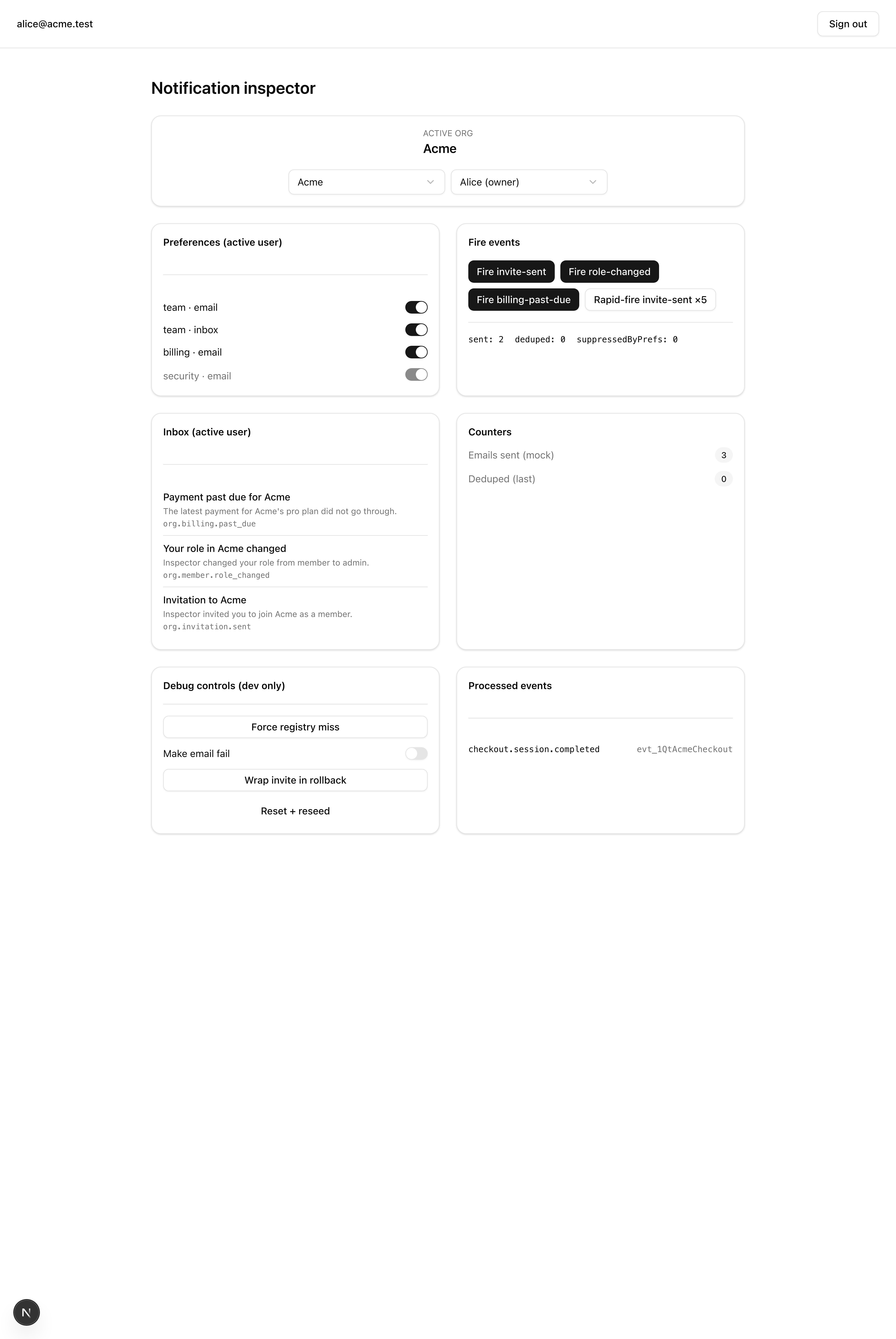
You verify it from one demo loop: fire invite-sent, and the inbox panel and email counter each tick up by one; hit Rapid-fire 5x, and the inbox grows by exactly one while the dedup badge reads 4 deduped.
By the end you will have written the dispatcher, the event registry, the two channel functions, the preference and dedup logic, three database tables, and the wiring at three real call sites.
The notification inspector and the email templates are handed to you.
try/catch, so one failure can’t take down the others.The whole project is one seam with a backing store. The shape below is what you’ll fill in; signatures and SQL come in the lessons that own them.
sendInvitation, changeMemberRole, the Stripe billing webhook) build a NotificationEvent and await dispatch(...) after their transaction commits.dispatch(event) reads the registry entry and all recipients’ preferences in one pass, then per recipient resolves channels, claims the dedup window, and fans out.sendEmailChannel, writeInboxChannel) share one signature — ({ recipient, event, payload, rendered }) — each behind its own try/catch.notifications (the inbox feed), user_notification_preferences (per-category toggles), and notification_dedup (the time window)./inspector drives every behavior from one page; /inbox is a plain server-rendered read of notifications.dispatch(event) registry source of truth sendEmailChannelwriteInboxChannel notifications inbox feed user_notification_preferences per-category toggles notification_dedup the time window The starter forks the billing project from From Stripe webhook to plan entitlement, so the org auth, invitation actions, Stripe webhook, audit log, and plan-entitlements row already work — you layer the dispatcher on top instead of rewriting any of it. The notifications module is a scaffold: the types, the error class, and the barrel are written for you; every other file ships as a no-op or throwing stub.
Highlighted files carry a TODO — your work for the next three lessons.
Everything else is provided: read it as needed, but you won’t author it.
NotificationEvent, DispatchResult, ChannelFn, …)NotificationError (REGISTRY_MISS | RECIPIENT_NOT_FOUND)dispatch and the public typesnotifiableEvents map (source of truth)dispatch(event): the seamisDuplicate / recordDedup / computeDedupKeyreadPrefsForCategory + resolveChannelssendEmailChannelwriteInboxChannelsendInvitation: dispatch after commitchangeMemberRole: dispatch after commitbilling-past-due event in the past-due branchsendEmail wrapper; EMAIL_MOCK mode bumps the counter// TODO(L2)user, organization, member, …)db.transaction commitsdb:migrate, db:seed, dev, test:lesson, …Lesson 2 — Registry, dispatcher, and dedup
Define the three events, write dispatch() with stubbed channels, and prove the 60-second dedup window from the inspector.
Lesson 3 — Channels and preferences live
Replace the stubs with the inbox writer, the email channel, and a batched preferences read with default-on and the critical-channel override.
Lesson 4 — Wire the three call sites
Call dispatch() after commit in sendInvitation, changeMemberRole, and the Stripe past-due webhook branch.
The starter runs on a local Postgres 18 container with email mocked, so you can verify your work without a live Resend account.
Get the starter codebase from the project repository, under Chapter 071/start/. The fastest way is degit, which copies the directory without its git history:
npx degit terencicp/react-saas-course-projects/Chapter\ 071/start notification-dispatchercd notification-dispatcherInstall dependencies:
pnpm installStart Postgres 18:
docker compose up -dCopy the environment template and fill in the two secrets:
cp .env.example .envopenssl rand -base64 32 # paste into BETTER_AUTH_SECRETopenssl rand -base64 32 # paste into INVITATION_SIGNING_SECRETLeave EMAIL_MOCK=1 as it ships.
Migrate and seed the two organizations and four users:
pnpm db:migrate && pnpm db:seedStart the dev server:
pnpm devEach environment variable and where its value comes from:
| Variable | Purpose | How to obtain |
|---|---|---|
DATABASE_URL (+ DATABASE_URL_UNPOOLED) | Postgres connection | Already set to the Docker container in .env.example |
BETTER_AUTH_SECRET | Signs session cookies and tokens | openssl rand -base64 32 |
INVITATION_SIGNING_SECRET | Signs the invitation accept URL | openssl rand -base64 32 |
RESEND_API_KEY | Resend API key | Mocked under EMAIL_MOCK=1; any non-empty value works |
STRIPE_WEBHOOK_SECRET | Verifies Stripe webhook signatures | The whsec_… value stripe listen prints; only for the live billing-past-due path |
APP_URL / NEXT_PUBLIC_APP_URL | App origin | http://localhost:3000 (already set) |
EMAIL_MOCK | Short-circuits Resend and bumps the inspector’s email-sent counter | Leave at 1 |
With pnpm dev up, open http://localhost:3000: the billing project’s dashboard works as before.
Open /inspector and the page loads, but every fire button errors with dispatch not implemented, notification reads return empty, and /inbox renders an empty feed.
That is the expected starting state; the dispatcher is the first thing you write.