Lesson 2 — Type-safe environment variables
Wires the project to a validated env boundary, so a missing DATABASE_URL fails the build instead of the first request after deploy.
Most SaaS products share one relational core: an organization, the records inside it, and the rules for who can see them. Swap the nouns — invoices, customers, deals, tickets — and the shape barely changes. This project builds that core for an invoicing app, data layer only: six tables (organizations, users, org_members, customers, invoices, invoice_lines), one migration to create them, a deterministic seed to fill them, and the two reads later units lean on — a cursor-paginated, org-scoped invoice list with a status filter, and a single-round-trip load of one invoice with its lines and customer. No forms, no auth, no mutations; those come later.
You explore the result at a provided /inspector page, which also runs EXPLAIN ANALYZE to prove Postgres uses the indexes you declare. It ships complete, so the only code you write is the four files it reads: the schema, the relations, the seed, and the queries.
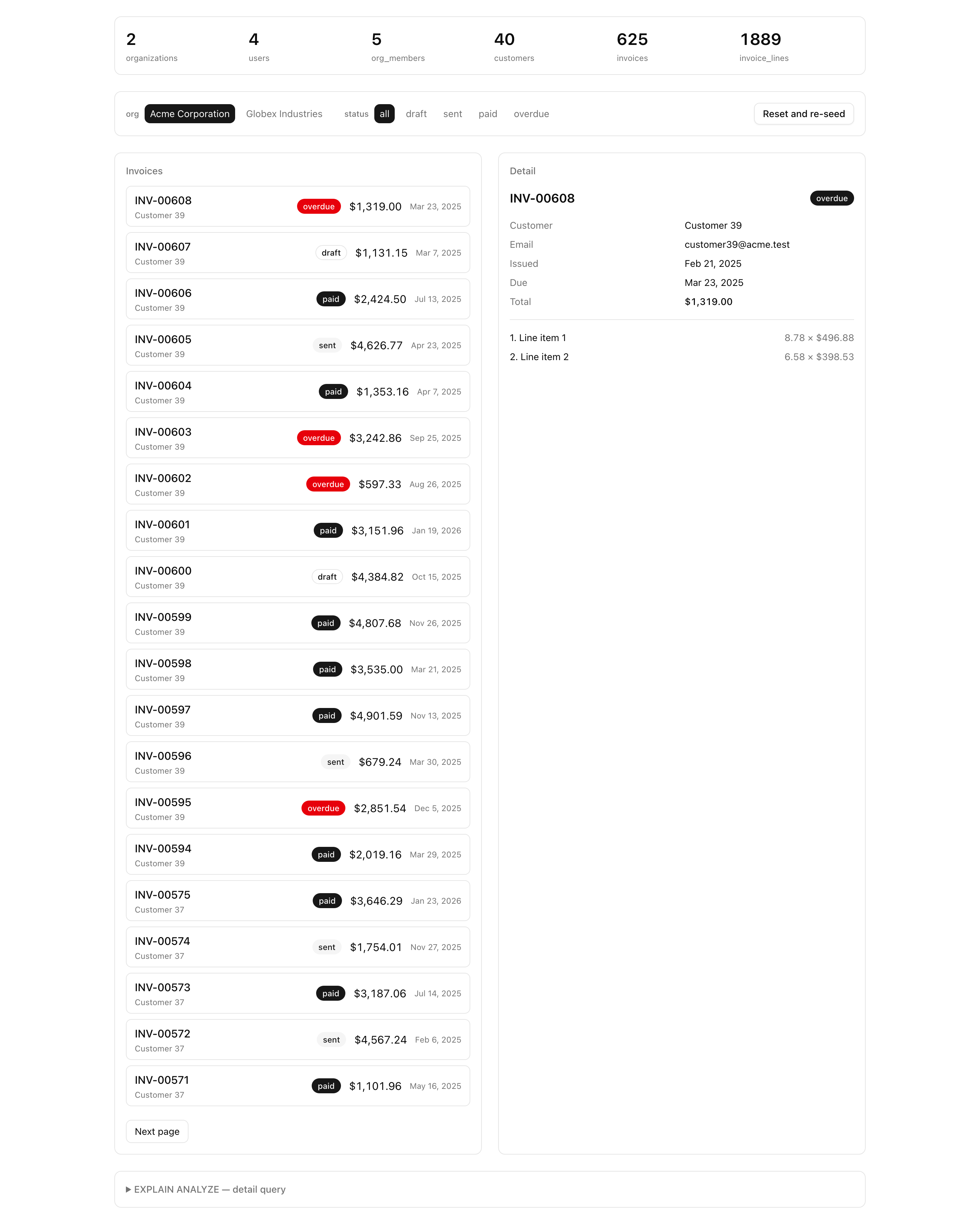
You met each of these primitives in Unit 5’s teaching chapters; here they combine into one production-grade data layer.
$inferSelect.ON DELETE per edge, and scoping every uniqueness constraint and index to the tenant.reset() plus inserts from a fixed-seed PRNG , so every run produces byte-identical data.organizationId in its where.EXPLAIN ANALYZE plan to confirm a query is fast for the reason you expect.The project has four layers, all derived from the schema. Each file gets its full explanation in the lesson that opens it.
src/db/ — the database core. schema.ts holds the six tables and is the project’s single source of truth; relations.ts declares how they connect; index.ts exports the db client; columns.ts holds the shared timestamps group every table reuses; cursor.ts carries the opaque cursor encode/decode helpers.src/lib/invoices/ — the read layer. queries.ts holds the two typed reads you write; schema.ts holds the Zod that validates their input; counts.ts and explain.ts are provided plumbing for the inspector’s banner and plan panel.scripts/seed.ts — the deterministic seed that fills a fresh database with two orgs, overlapping members, and a few hundred invoices.src/app/inspector/ — the provided Server Component surface. It reads from searchParams and renders the four panels you use to verify your work.Types, queries, the inspector, and every later feature derive from db/schema.ts — so you build the schema first.
This project keeps the themed-surface toolchain (pnpm, strict tsconfig, Biome, next-themes) and adds the database machinery: a Docker Postgres service, Drizzle Kit config, and the @t3-oss/env-nextjs boundary. The bold files are the four stubs you fill in, each marked with a TODO(L<n>) comment naming its lesson. Everything else is provided, with a note on the files each lesson opens.
postgres:18 service on :5432, with a persisted pgdata volume.envdb:* and test:lesson scripts@t3-oss/env-nextjs boundary — three validated server varsdb client (postgres-js) and the dbUnpooled aliasTODO L3TODO L3timestamps column grouplistInvoices and getInvoiceDetail TODO L5 / L6statusSchema, listInvoicesInputSchemaEXPLAIN ANALYZE probes the plan panel renderscn() class-merge helper/ to /inspectorloading.tsx, the reseed action, and the four panels
TODO L4There is no drizzle/ directory on purpose. Migrations are generated, not hand-written, so the first SQL file appears when you run pnpm db:generate in Authoring the schema and shipping the init migration.
Five implementation lessons turn the four stubs into a working data layer.
Lesson 2 — Type-safe environment variables
Wires the project to a validated env boundary, so a missing DATABASE_URL fails the build instead of the first request after deploy.
Lesson 3 — Authoring the schema and shipping the init migration
Lands the six tables, their relations, and three indexes in one reviewed migration.
Lesson 4 — A deterministic, idempotent seed
Fills the database with two orgs, overlapping members, and 100+ invoices, identical on every run.
Lesson 5 — The tenant-scoped invoice list
Builds the cursor-paginated list with a server-side status filter, proven against its query plan.
Lesson 6 — The single-round-trip invoice detail
Loads one invoice with its lines and customer in a single round trip, guarded by organizationId.
Run these in order. You’re done when the dev server boots against a running Postgres that holds no tables yet; the migration that creates them runs in the next lesson.
Get the starter codebase from the project repository, under Chapter 041/start/:
pnpm dlx degit terencicp/react-saas-course-projects/Chapter-041/start invoicing-data-layercd invoicing-data-layerdegit copies that folder into a fresh invoicing-data-layer directory with no git history. Each chapter project ships a start/ and a solution/ sibling, so you can diff your work against the reference.
Install the dependencies:
pnpm installThe repo is pnpm-only: a preinstall hook blocks any other package manager, and the versions are pinned.
Copy the example env file:
cp .env.example .envThree variables live here:
DATABASE_URL — the pooled connection string the app’s db client uses, served by the Docker service below. Locally postgres://postgres:postgres@localhost:5432/app.DATABASE_URL_UNPOOLED — the unpooled URL Drizzle Kit uses for migrating and seeding. The same value locally; the split is staged for the Neon swap in a later unit.SEED — the fixed seed that makes seeding deterministic. Locally 1.The defaults already match a local Docker Postgres, so copy the file as-is. .env is git-ignored and holds your real secrets; .env.example is committed and documents every variable the app expects.
Bring up the database:
docker compose up -dThis starts the postgres:18 service on port 5432 in the background. The first run pulls the image.
Start the dev server:
pnpm devThe root path redirects to /inspector. The page compiles, but with no migration run, the tables the inspector reads do not exist yet. An empty starter on a running database is exactly where you should be.