Server-rendered list and detail
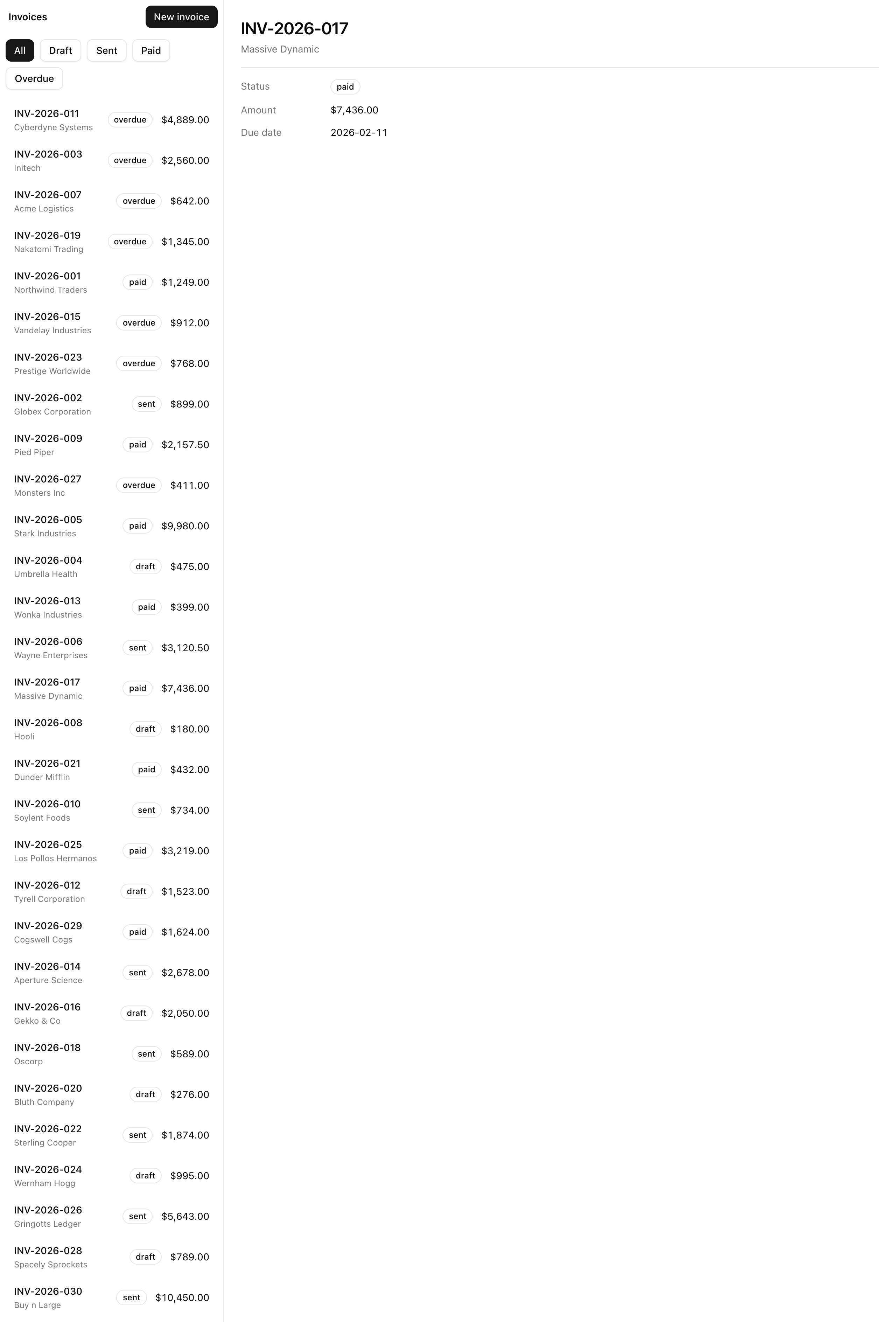
Render the invoices list and the selected invoice’s detail on the server, with the filter and the selection derived entirely from the URL. By the end, /invoices shows the list beside a “pick an invoice” empty state, /invoices/inv_001 shows that list beside the chosen invoice’s detail, and ?status=paid narrows the list — all server-side, so it survives a hard reload.
Your mission
Section titled “Your mission”The layout you were handed wires two parallel slots — @list and @detail — into a two-column grid alongside the page’s children, but the slot pages are still placeholders. Fill them so the whole view state lives in the URL rather than client useState: read both the status filter and the selected invoice from the URL on the server. That makes the surface shareable, refreshable, and bookmarkable for free — the URL is the persistence.
@list is an async Server Component: it awaits searchParams, validates status at the boundary with the project’s searchParamsSchema, and passes the result to the pure <InvoiceList> and the <StatusFilter> client component. A query string is untrusted input, like a form payload, so it runs through Zod before reaching your data layer — the same seam that will validate FormData when Server Actions arrive later. Validate gracefully: ?status=banana must fall back to the full “all” list, never throw. @detail/[id] is the mirror: it awaits params, loads one invoice by id and renders it, or calls notFound() when no id matches.
Each parallel slot also needs a default.tsx. At /invoices/inv_001, @detail/[id] matches but @list has no segment to match, and a slot with no match and no default.tsx 404s the entire route — so @list/default.tsx renders the full list. For @detail, no invoice selected is a valid state, so its default is the empty-state prompt. Keep every fetch inside the Server Component pages and the render components pure. Out of scope: the modal, per-slot skeletons, and mutations. The “New invoice” link navigates to /invoices/new, where the form renders but does not submit yet.
/invoices renders the filtered list and a “pick an invoice” empty state./invoices/inv_001 renders the list alongside that invoice’s detail.?status=paid filters the list server-side, and the filtered list holds across a hard reload at /invoices?status=paid.?status=banana (an invalid status) falls back to the full “all” list without crashing./invoices/inv_001 still renders the list on the left rather than 404ing.Coding time
Section titled “Coding time”Implement the four slot pages against the brief above and the lesson’s test suite before you read on. When you have something running — or you are stuck — open the walkthrough.
Reference solution and walkthrough
Four files, all under src/app/invoices/. Two do the real work — @list/page.tsx and @detail/[id]/page.tsx — and two handle the “no match” cases parallel routes force you to think about.
The list slot reads the filter
Section titled “The list slot reads the filter”@list/page.tsx does three things: read and validate status from the URL, fetch the matching invoices, and render the header, filter pills, and list.
// src/app/invoices/@list/page.tsximport Link from 'next/link';
import { InvoiceList } from '@/components/invoice-list';import { StatusFilter } from '@/components/status-filter';import { Button } from '@/components/ui/button';import { listInvoices } from '@/lib/invoices/queries';import { searchParamsSchema } from '@/lib/invoices/schema';
const ListPage = async ({ searchParams }: PageProps<'/invoices'>) => {  const parsed = searchParamsSchema.safeParse(await searchParams);  const status = parsed.success ? parsed.data.status : undefined;  const invoices = await listInvoices({ status });
  return (    <section className="flex flex-col border-border border-e">      <header className="flex items-center justify-between gap-2 p-2">        <span className="px-1 text-sm font-semibold">Invoices</span>        <Button asChild size="sm">          <Link href="/invoices/new" data-testid="new-invoice-link">            New invoice          </Link>        </Button>      </header>      <StatusFilter current={status} />      <InvoiceList invoices={invoices} />    </section>  );};
export default ListPage;
The boundary. searchParams arrives as a Promise — await it, then run it through searchParamsSchema.safeParse. On success you get a clean status of InvoiceStatus | undefined; on failure you fall back to undefined, which means “all”. That is the graceful-degradation path requirement 4 depends on.
// src/app/invoices/@list/page.tsximport Link from 'next/link';
import { InvoiceList } from '@/components/invoice-list';import { StatusFilter } from '@/components/status-filter';import { Button } from '@/components/ui/button';import { listInvoices } from '@/lib/invoices/queries';import { searchParamsSchema } from '@/lib/invoices/schema';
const ListPage = async ({ searchParams }: PageProps<'/invoices'>) => {  const parsed = searchParamsSchema.safeParse(await searchParams);  const status = parsed.success ? parsed.data.status : undefined;  const invoices = await listInvoices({ status });
  return (    <section className="flex flex-col border-border border-e">      <header className="flex items-center justify-between gap-2 p-2">        <span className="px-1 text-sm font-semibold">Invoices</span>        <Button asChild size="sm">          <Link href="/invoices/new" data-testid="new-invoice-link">            New invoice          </Link>        </Button>      </header>      <StatusFilter current={status} />      <InvoiceList invoices={invoices} />    </section>  );};
export default ListPage;
The fetch. Data fetching lives in the Server Component, not a client effect. listInvoices filters by status when given one and returns every record when status is undefined.
// src/app/invoices/@list/page.tsximport Link from 'next/link';
import { InvoiceList } from '@/components/invoice-list';import { StatusFilter } from '@/components/status-filter';import { Button } from '@/components/ui/button';import { listInvoices } from '@/lib/invoices/queries';import { searchParamsSchema } from '@/lib/invoices/schema';
const ListPage = async ({ searchParams }: PageProps<'/invoices'>) => {  const parsed = searchParamsSchema.safeParse(await searchParams);  const status = parsed.success ? parsed.data.status : undefined;  const invoices = await listInvoices({ status });
  return (    <section className="flex flex-col border-border border-e">      <header className="flex items-center justify-between gap-2 p-2">        <span className="px-1 text-sm font-semibold">Invoices</span>        <Button asChild size="sm">          <Link href="/invoices/new" data-testid="new-invoice-link">            New invoice          </Link>        </Button>      </header>      <StatusFilter current={status} />      <InvoiceList invoices={invoices} />    </section>  );};
export default ListPage;
The render. A header with the “Invoices” label and the “New invoice” link, then <StatusFilter current={status} /> (the pills, told which one is active) and <InvoiceList invoices={invoices} />. Passing current={status} keeps the active pill in sync with the URL on every server render.
The prop type PageProps<'/invoices'> is generated, not hand-written: next typegen emits typed PageProps/LayoutProps helpers keyed by route whenever you build. searchParams arriving as a Promise you await is the App Router shape you already met.
Why safeParse and not parse? parse throws on invalid input, and a thrown error in a Server Component renders the error boundary — the wrong outcome for someone who fat-fingered a query string. safeParse returns a discriminated result instead: success: true with clean data, or success: false, where you fall back to undefined and listInvoices returns everything. That one line is all of requirement 4.
searchParamsSchema lives in src/lib/invoices/schema.ts, not in this page, so the same schema that validates the URL today will validate a form’s payload tomorrow — one Zod definition for both the read path and, later, the write path.
The list slot’s default keeps the route alive
Section titled “The list slot’s default keeps the route alive”@list/default.tsx renders almost exactly what the page renders — same header, pills, and list — with one difference: it does not read the filter.
// src/app/invoices/@list/page.tsximport Link from 'next/link';
import { InvoiceList } from '@/components/invoice-list';import { StatusFilter } from '@/components/status-filter';import { Button } from '@/components/ui/button';import { listInvoices } from '@/lib/invoices/queries';import { searchParamsSchema } from '@/lib/invoices/schema';
const ListPage = async ({ searchParams }: PageProps<'/invoices'>) => {  const parsed = searchParamsSchema.safeParse(await searchParams);  const status = parsed.success ? parsed.data.status : undefined;  const invoices = await listInvoices({ status });
  return (    <section className="flex flex-col border-border border-e">      <header className="flex items-center justify-between gap-2 p-2">        <span className="px-1 text-sm font-semibold">Invoices</span>        <Button asChild size="sm">          <Link href="/invoices/new" data-testid="new-invoice-link">            New invoice          </Link>        </Button>      </header>      <StatusFilter current={status} />      <InvoiceList invoices={invoices} />    </section>  );};
export default ListPage;
Reads the filter. Next picks this slot when the URL has a list segment — /invoices, including /invoices?status=paid — so it reads searchParams and filters.
// src/app/invoices/@list/default.tsximport Link from 'next/link';
import { InvoiceList } from '@/components/invoice-list';import { StatusFilter } from '@/components/status-filter';import { Button } from '@/components/ui/button';import { listInvoices } from '@/lib/invoices/queries';
const ListDefault = async () => {  const invoices = await listInvoices({});
  return (    <section className="flex flex-col border-border border-e">      <header className="flex items-center justify-between gap-2 p-2">        <span className="px-1 text-sm font-semibold">Invoices</span>        <Button asChild size="sm">          <Link href="/invoices/new" data-testid="new-invoice-link">            New invoice          </Link>        </Button>      </header>      <StatusFilter />      <InvoiceList invoices={invoices} />    </section>  );};
export default ListDefault;
No filter. Next picks this slot when no list segment matched — for example a direct visit to /invoices/inv_001, where @detail/[id] matched but @list did not. A default receives no searchParams and no params, so it calls listInvoices({}) and renders <StatusFilter /> with no current.
A parallel slot renders its default.tsx whenever the URL gives that slot no segment to match. Visit /invoices/inv_001 directly: the router matches @detail/[id]/page.tsx for the detail column, but nothing in @list matches, so it looks for @list/default.tsx. Without that file the slot is unresolved and Next renders the not-found surface for the entire route, list and all. With it, the left column paints the full list, the right column paints the selected invoice, and the direct visit works — requirement 5, and the single most common thing junior devs miss about parallel routes.
The render body is duplicated between page.tsx and default.tsx. At this size, two files that read clearly on their own beat the abstraction; factor out the shared markup only if the duplication grows.
The detail slot’s default is an empty state
Section titled “The detail slot’s default is an empty state”@detail/default.tsx is what the detail column renders when no invoice is selected — at /invoices with nothing chosen yet.
// src/app/invoices/@detail/default.tsxconst DetailDefault = () => (  <section    data-testid="detail-empty"    className="sticky top-0 grid h-dvh place-items-center p-6 text-sm text-muted-foreground"  >    Pick an invoice to see its details  </section>);
export default DetailDefault;
This is an empty state, not a 404. A user on /invoices with no invoice picked is in a normal, expected state, so the column prompts them to pick one rather than treating an empty selection as an error — get that distinction wrong and you show a “not found” page on your feature’s home screen. The sticky top-0 grid h-dvh place-items-center styling centers the prompt and pins it as the list scrolls beside it.
The detail slot loads one invoice
Section titled “The detail slot loads one invoice”@detail/[id]/page.tsx fetches a single invoice.
// src/app/invoices/@detail/[id]/page.tsximport { notFound } from 'next/navigation';
import { InvoiceDetail } from '@/components/invoice-detail';import { getInvoice } from '@/lib/invoices/queries';
const DetailPage = async ({ params }: PageProps<'/invoices/[id]'>) => {  const { id } = await params;  const invoice = await getInvoice(id);
  if (!invoice) {    notFound();  }
  return <InvoiceDetail invoice={invoice} />;};
export default DetailPage;
params is a Promise here too — await it for the id, then ask the data layer for that invoice. getInvoice returns Invoice | null, so the if (!invoice) guard handles the miss by calling notFound() rather than throwing your own error. notFound() throws an error Next turns into its 404 surface — the right owner for “this id doesn’t exist”, which belongs to the not-found boundary, not the error boundary. The project uses Next’s default not-found page for now. That is requirement 6.
The guard also pays off in TypeScript. notFound() returns never, so after the if (!invoice) { notFound(); } block TypeScript narrows invoice from Invoice | null to Invoice, and <InvoiceDetail invoice={invoice} /> type-checks with no non-null assertion. The control-flow guard doubles as the type guard.
The data layer you just plugged into
Section titled “The data layer you just plugged into”This is the first lesson that opens the provided src/lib/invoices/ files, so here is what those two functions and the schema do.
import { invoices } from '@/lib/invoices/data';import type { Invoice, InvoiceStatus } from '@/lib/invoices/schema';
export const listInvoices = async (filters: {  status?: InvoiceStatus;}): Promise<Invoice[]> => {  const matched = filters.status    ? invoices.filter((invoice) => invoice.status === filters.status)    : invoices;
  return [...matched].sort((a, b) => a.dueDate.localeCompare(b.dueDate));};
export const getInvoice = async (id: string): Promise<Invoice | null> => {  // Intentional streaming seam: the artificial delay makes the @detail slot  // visibly stream behind its own Suspense boundary (Lesson 4).  await new Promise((resolve) => setTimeout(resolve, 600));
  return invoices.find((invoice) => invoice.id === id) ?? null;};
listInvoices filters by status when you pass one, returns the lot when you don’t, and sorts ascending by dueDate. getInvoice finds one record by id and returns null on a miss. Its 600 ms setTimeout is a planted seam: the detail data is slow on purpose so that, once each slot gets its own skeleton in the Independent streaming per slot lesson, you can watch the detail column stream in behind its Suspense boundary while the list sits still.
Both functions are async and return a Promise, even though the data is an in-memory array — the exact shape of a real database query, so when Postgres and Drizzle replace this fixture in a later unit, your two pages do not change. The Invoice type and schemas come from the file next door:
import { z } from 'zod';
export const statusSchema = z.enum(['draft', 'sent', 'paid', 'overdue']);
export type InvoiceStatus = z.infer<typeof statusSchema>;
export const searchParamsSchema = z.object({  status: statusSchema.optional(),});
export type Invoice = {  id: string;  number: string;  customer: string;  status: InvoiceStatus;  amount: number;  dueDate: string;};
statusSchema is the single source of truth for the four valid statuses, and InvoiceStatus is its inferred type, so the two can never drift. searchParamsSchema wraps an optional status — optional because a bare /invoices is valid — and is what your list page calls safeParse on. The Invoice shape keeps amount in integer cents (never floats for money) and dueDate as a YYYY-MM-DD string. That hand-written type is the one piece the database unit deletes: Drizzle infers the row type from the table definition, so Invoice becomes typeof invoices.$inferSelect.
<StatusFilter> is one component you wired but did not build. It is the only 'use client' piece in this slot — clicking a pill is a browser event, which forces a Client Component — and it drives the filter by calling router.replace('/invoices?status=…'), pushing the status into the URL instead of holding it in state. Click a pill, the URL changes, the server re-renders the filtered list: the URL-as-source-of-truth loop in action.
The exact convention this lesson turns on: the fallback an unmatched slot renders so the route doesn't 404 on a hard load.
How the @list and @detail slots map to layout props, and how soft vs. hard navigation resolves each one.
The function the detail page reaches for on a missing id — and why its never return type narrows the guard.
parse vs. safeParse — the discriminated result that lets ?status=banana degrade to the full list instead of throwing.
Moment of truth
Section titled “Moment of truth”Run the lesson’s test suite:
pnpm test:lesson 2It renders each slot page in isolation and asserts on the markup, covering every requirement from the mission. It should report green:
 ✓ tests/lessons/Lesson 2.test.ts (8 tests)
 Test Files  1 passed (1)      Tests  8 passed (8)
Then run the full gate:
pnpm verifyBiome CI, next typegen, tsc --noEmit, and a production build should all complete clean — the same gate CI runs on every pull request.
The tests render slots one at a time in Node; they can’t boot the router, compose the two columns, or reload a real browser. Confirm those behaviors yourself with pnpm dev running:
/invoices shows the list in the left column and the “pick an invoice” empty state in the right column./invoices/inv_001 shows the list on the left and that invoice’s detail on the right./invoices?status=paid; a hard reload (Cmd/Ctrl+R) keeps the same filtered list./invoices?status=banana directly renders the full list without crashing./invoices/inv_001 directly in a fresh tab renders the list on the left rather than a 404 page.Every view now derives from the URL, and list and detail both render on the server. Next you will make the “New invoice” link open as a modal with its own URL.