Wire the forms and the Next-gate
Make each step’s form write into its slice, show inline field errors, and let Next advance only when the current step’s data is valid.
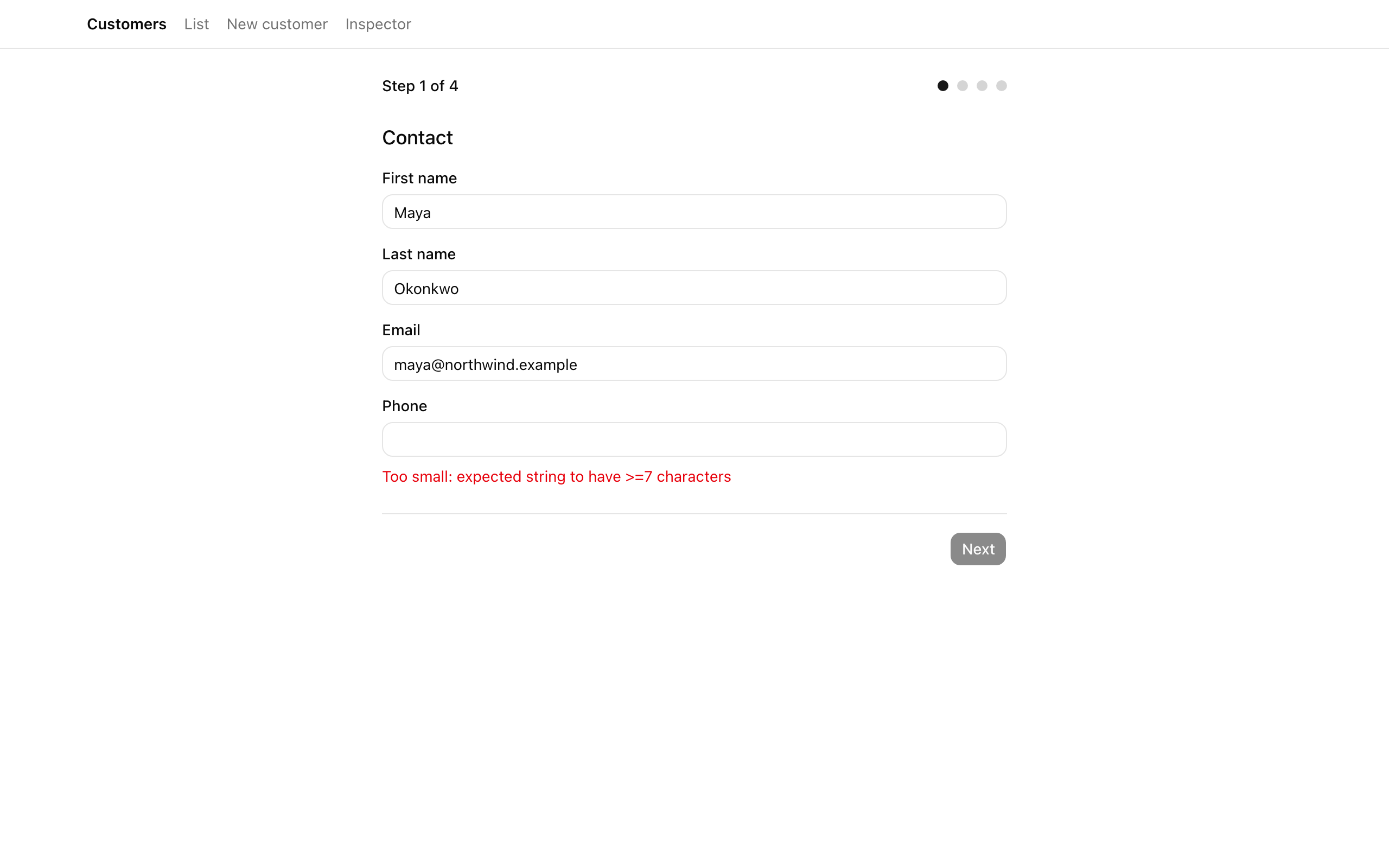
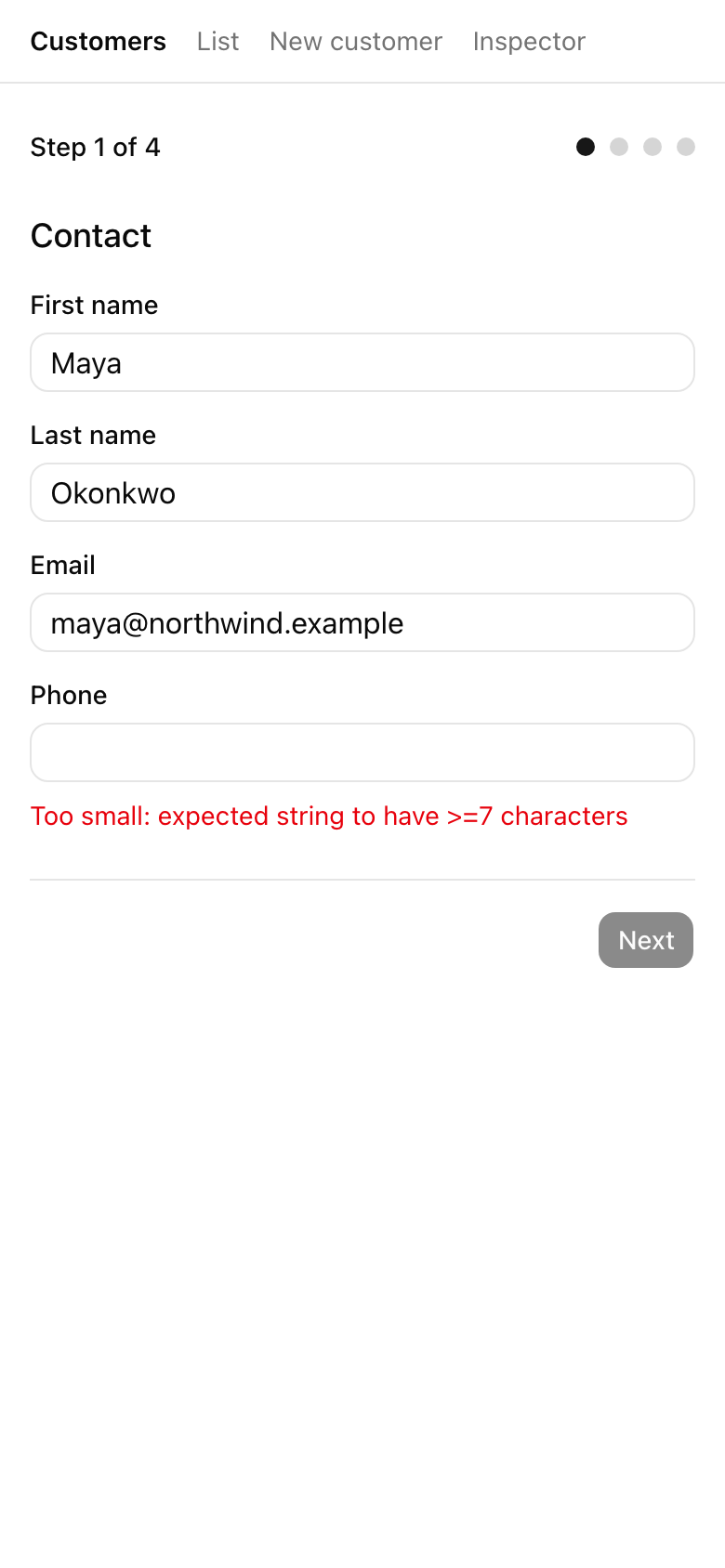
Last lesson left you with a live engine and no controls. The store takes writes, the provider keeps one instance alive across the four routes, and the inspector mirrors it, but every field is static markup: typing does nothing and Next is hardcoded-disabled. This lesson wires them together. By the end, typing a field persists its value and re-renders only that field; a bad value shows a short error beneath it and keeps Next disabled; once the whole step parses, Next enables and one click advances both the URL and the store; Back returns with your draft intact.
Your mission
Section titled “Your mission”Each field on steps 1 through 3 becomes its own client component subscribing to exactly what it reads: an atomic selector for its value, its setter, and one primitive for its own error. So a keystroke re-renders only that field, never its siblings or the progress header. The lazy alternative, one component reading the whole slice, re-renders all four fields on every character — the inspector’s render-counter panel makes the gap obvious. Reach for the atomic selector by default.
Validity and field errors are derived, never stored. A slice holds data and setters; whether it is valid is answered on demand by running its Zod schema inside selectors.ts. That per-step schema is the single source of truth: the same contactSchema re-parses the payload server-side next lesson, so “valid contact” has one definition. Validate the whole slice keyed by the current step, not each touched field, which keeps the model small and lists only the fields that failed.
Two performance traps flank this. The first is the whole-slice read above. The second, subscribing to the whole error object instead of your own string, crashes the page outright; Step 1 covers it. Read each field’s error as a single primitive string, which compares cleanly and re-renders only when that message changes.
The Next-gate applies the same discipline to validity. It derives one primitive boolean from the current step’s whole-slice validation, so the footer re-renders only when validity flips, not on every still-invalid keystroke. Wire Next’s click to advance both the store’s step and the URL in one handler. Firing the navigation from an effect that watches the step is the effects-as-orchestrators pattern this course rejects; keep the cause and its effects in the handler the user triggered.
The gate is UX, not security: it stops a confused user from advancing with bad data, but the action re-parses the schema server-side next lesson, so a payload that skips the gate still fails at the boundary. Render errors as short text-destructive text under the field, no toast. A few fields stay deliberately lean: paymentTerms is a three-option select, country a two-letter input, and channels three checkboxes bound to the toggle. The step-4 review and submit are next lesson.
Coding time
Section titled “Coding time”Write selectors.ts first, then wire the three step pages and the footer against the brief and the Lesson 3 tests. The selectors are what the tests pin down and what every component reads, so get them right before touching the UI.
Reference solution and walkthrough
The selectors: where validity is derived
Section titled “The selectors: where validity is derived”Everything here hangs off selectors.ts, the only place a Zod schema meets the live store. It exposes that meeting through three kinds of selector: atomic field reads, the step-validity boolean, and the field-error map.
import { z } from 'zod';import {  billingSchema,  contactSchema,  preferencesSchema,} from '@/app/(app)/customers/new/_lib/wizard/schemas';import type { WizardState } from '@/app/(app)/customers/new/_lib/wizard/wizard-types';
export const selectCurrentStep = (s: WizardState) => s.currentStep;
export const selectContactFirstName = (s: WizardState) => s.contact.firstName;export const selectContactLastName = (s: WizardState) => s.contact.lastName;export const selectContactEmail = (s: WizardState) => s.contact.email;export const selectContactPhone = (s: WizardState) => s.contact.phone;
type Step = { schema: z.ZodType; slice: (s: WizardState) => unknown };
const steps: readonly Step[] = [  { schema: contactSchema, slice: (s) => s.contact },  { schema: billingSchema, slice: (s) => s.billing },  { schema: preferencesSchema, slice: (s) => s.preferences },];
export const selectIsStepValid = (state: WizardState): boolean => {  const step = steps[state.currentStep - 1];  return step ? step.schema.safeParse(step.slice(state)).success : true;};
export const selectStepErrors = (  state: WizardState,): Record<string, string[]> => {  const step = steps[state.currentStep - 1];  if (!step) {    return {};  }  const result = step.schema.safeParse(step.slice(state));  return result.success ? {} : z.flattenError(result.error).fieldErrors;};
The steps array is the spine, each entry pairing a step’s schema with a function that pulls that step’s slice off the store, indexed zero-based so step 1 is steps[0]. There is deliberately no fourth entry: step 4 is the review, and a review has no schema. That omission is what keeps the gate from ever blocking step 4.
selectIsStepValid indexes steps[currentStep - 1]. An existing entry returns schema.safeParse(slice).success; an undefined lookup, which happens only on step 4, takes the step ? … : true fallback and returns true, so the review screen is never gated. It returns a primitive boolean: safeParse builds a fresh result object on every store change, but Object.is(true, true) holds, so a subscriber re-renders only when validity actually flips.
selectStepErrors is the same lookup with a different payload. It returns {} on step 4 and on any valid slice; only on failure does it call z.flattenError(result.error).fieldErrors, Zod’s helper for turning a parse error into a flat Record<string, string[]> keyed by field name. A field that passed is simply absent. That flat shape lets each field component read its own error, which is the next file.
Step 1: per-field components and the atomic error read
Section titled “Step 1: per-field components and the atomic error read”Step 1 is the template for the other two, so it gets the most explanation. It’s four near-identical field components composed by a parent that subscribes to nothing. Study FirstNameField:
'use client';
import { useBroadcastRender } from '@/app/(app)/customers/new/_components/use-broadcast-render';import { useWizardStore } from '@/app/(app)/customers/new/_components/use-wizard-store';import { selectStepErrors } from '@/app/(app)/customers/new/_lib/wizard/selectors';import { Input } from '@/components/ui/input';import { Label } from '@/components/ui/label';
const FirstNameField = () => {  const firstName = useWizardStore((s) => s.contact.firstName);  const setContactField = useWizardStore((s) => s.setContactField);  const error = useWizardStore((s) => selectStepErrors(s).firstName?.[0]);  useBroadcastRender('firstName');
  return (    <div className="space-y-2">      <Label htmlFor="firstName">First name</Label>      <Input        id="firstName"        data-testid="field-firstName"        value={firstName}        onChange={(e) => setContactField('firstName', e.target.value)}      />      {error ? (        <p data-testid="error-firstName" className="text-sm text-destructive">          {error}        </p>      ) : null}    </div>  );};
The atomic value read. The selector returns one string, so the component re-renders only when this field changes — never on another contact field.
'use client';
import { useBroadcastRender } from '@/app/(app)/customers/new/_components/use-broadcast-render';import { useWizardStore } from '@/app/(app)/customers/new/_components/use-wizard-store';import { selectStepErrors } from '@/app/(app)/customers/new/_lib/wizard/selectors';import { Input } from '@/components/ui/input';import { Label } from '@/components/ui/label';
const FirstNameField = () => {  const firstName = useWizardStore((s) => s.contact.firstName);  const setContactField = useWizardStore((s) => s.setContactField);  const error = useWizardStore((s) => selectStepErrors(s).firstName?.[0]);  useBroadcastRender('firstName');
  return (    <div className="space-y-2">      <Label htmlFor="firstName">First name</Label>      <Input        id="firstName"        data-testid="field-firstName"        value={firstName}        onChange={(e) => setContactField('firstName', e.target.value)}      />      {error ? (        <p data-testid="error-firstName" className="text-sm text-destructive">          {error}        </p>      ) : null}    </div>  );};
The setter is a stable function reference, so subscribing to it never re-renders. onChange calls it with the field key and new value.
'use client';
import { useBroadcastRender } from '@/app/(app)/customers/new/_components/use-broadcast-render';import { useWizardStore } from '@/app/(app)/customers/new/_components/use-wizard-store';import { selectStepErrors } from '@/app/(app)/customers/new/_lib/wizard/selectors';import { Input } from '@/components/ui/input';import { Label } from '@/components/ui/label';
const FirstNameField = () => {  const firstName = useWizardStore((s) => s.contact.firstName);  const setContactField = useWizardStore((s) => s.setContactField);  const error = useWizardStore((s) => selectStepErrors(s).firstName?.[0]);  useBroadcastRender('firstName');
  return (    <div className="space-y-2">      <Label htmlFor="firstName">First name</Label>      <Input        id="firstName"        data-testid="field-firstName"        value={firstName}        onChange={(e) => setContactField('firstName', e.target.value)}      />      {error ? (        <p data-testid="error-firstName" className="text-sm text-destructive">          {error}        </p>      ) : null}    </div>  );};
The atomic error read, the load-bearing line. It pulls this field’s first message from the error map — a single string, or undefined. Subscribing to that primitive instead of the map is what stops the infinite loop (see the callout below).
'use client';
import { useBroadcastRender } from '@/app/(app)/customers/new/_components/use-broadcast-render';import { useWizardStore } from '@/app/(app)/customers/new/_components/use-wizard-store';import { selectStepErrors } from '@/app/(app)/customers/new/_lib/wizard/selectors';import { Input } from '@/components/ui/input';import { Label } from '@/components/ui/label';
const FirstNameField = () => {  const firstName = useWizardStore((s) => s.contact.firstName);  const setContactField = useWizardStore((s) => s.setContactField);  const error = useWizardStore((s) => selectStepErrors(s).firstName?.[0]);  useBroadcastRender('firstName');
  return (    <div className="space-y-2">      <Label htmlFor="firstName">First name</Label>      <Input        id="firstName"        data-testid="field-firstName"        value={firstName}        onChange={(e) => setContactField('firstName', e.target.value)}      />      {error ? (        <p data-testid="error-firstName" className="text-sm text-destructive">          {error}        </p>      ) : null}    </div>  );};
The provided helper posts a render event to the inspector’s counter panel on every commit, so you can see that only the typed field re-renders. It does nothing outside the iframe.
The error shows in a short <p> under the input, only when error is truthy — the inline, no-toast baseline. The other three fields are the same component over a different key. Their parent subscribes to nothing that changes on a keystroke, so it never re-renders mid-typing:
const Step1Page = () => (  <div data-testid="step-1" className="space-y-4">    <h2 className="text-lg font-medium">Contact</h2>    <FirstNameField />    <LastNameField />    <EmailField />    <PhoneField />  </div>);
export default Step1Page;
The value, setter, and error all live inside the field component, and the parent holds no subscription — so React has nothing to re-render above the field you are editing.
The atomic read vs. the whole-slice read
Section titled “The atomic read vs. the whole-slice read”The wrong version type-checks and looks fine; it just quietly re-renders every field on every keystroke. Compare it to the right one:
const ContactFields = () => { // One component, one subscription to the whole slice + setter. const { firstName, lastName, email, phone, setContactField } = useWizardStore((s) => ({ ...s.contact, setContactField: s.setContactField })); // ...renders all four inputs};Re-renders on every keystroke. The selector returns a fresh object literal each run, so the default Object.is check fails on every store change and all four inputs re-render for one character.
const FirstNameField = () => { // Its own component, subscribing to one value + the setter. const firstName = useWizardStore((s) => s.contact.firstName); const setContactField = useWizardStore((s) => s.setContactField); // ...renders one input};Only the changed field re-renders. Each selector returns a primitive or the stable setter reference, so Object.is holds for every field except the one that changed. Splitting the step into per-field components is what makes the surgical re-render real.
You will confirm both sides in the Moment of truth: the render counter shows one field ticking while its siblings stay flat, and swapping a selector to useWizardStore((s) => s.contact) lights up all four per keystroke.
Step 2: the same pattern over eight billing fields
Section titled “Step 2: the same pattern over eight billing fields”Step 2 widens step 1 to eight billing controls, each its own component writing through setBillingField. Three are worth a look:
const Line2Field = () => {  const line2 = useWizardStore((s) => s.billing.line2);  const setBillingField = useWizardStore((s) => s.setBillingField);  useBroadcastRender('line2');
  return (    <div className="space-y-2">      <Label htmlFor="line2">Address line 2</Label>      <Input        id="line2"        data-testid="field-line2"        value={line2}        onChange={(e) => setBillingField('line2', e.target.value)}      />    </div>  );};
const CountryField = () => {  const country = useWizardStore((s) => s.billing.country);  const setBillingField = useWizardStore((s) => s.setBillingField);  const error = useWizardStore((s) => selectStepErrors(s).country?.[0]);  useBroadcastRender('country');
  return (    <div className="space-y-2">      <Label htmlFor="country">Country (2-letter)</Label>      <Input        id="country"        maxLength={2}        data-testid="field-country"        value={country}        onChange={(e) => setBillingField('country', e.target.value)}      />      {error ? (        <p data-testid="error-country" className="text-sm text-destructive">          {error}        </p>      ) : null}    </div>  );};
const PaymentTermsField = () => {  const paymentTerms = useWizardStore((s) => s.billing.paymentTerms);  const setBillingField = useWizardStore((s) => s.setBillingField);  useBroadcastRender('paymentTerms');
  return (    <div className="space-y-2">      <Label htmlFor="paymentTerms">Payment terms</Label>      <select        id="paymentTerms"        data-testid="field-paymentTerms"        className="w-full rounded-md border bg-background px-2 py-1.5 text-sm"        value={paymentTerms}        onChange={(e) =>          setBillingField(            'paymentTerms',            e.target.value as BillingSlice['billing']['paymentTerms'],          )        }      >        <option value="net15">Net 15</option>        <option value="net30">Net 30</option>        <option value="net60">Net 60</option>      </select>    </div>  );};
Line2Field renders no error paragraph: line2 is the one billing field without .min(1) in the schema, so an empty second line is valid.
CountryField caps input at two characters with maxLength={2} to match its z.string().length(2) rule.
PaymentTermsField is a <select> whose onChange casts e.target.value to the enum type; the select can only emit one of the three options, so the cast is sound.
The other five fields (line1, city, region, postalCode, taxId) are the FirstNameField shape over their own keys.
Step 3: selects and the channel toggle
Section titled “Step 3: selects and the channel toggle”Step 3 has three controls: two value selects in the PaymentTermsField shape, and a set of checkboxes.
The checkboxes bind to togglePreferenceChannel rather than a value setter, because channels are a membership set:
const ChannelsField = () => {  const channels = useWizardStore((s) => s.preferences.channels);  const togglePreferenceChannel = useWizardStore(    (s) => s.togglePreferenceChannel,  );  useBroadcastRender('channels');
  return (    <fieldset className="space-y-2">      <legend className="text-sm font-medium">Notification channels</legend>      <div className="flex items-center gap-2">        <Checkbox          id="channel-email"          data-testid="channel-email"          checked={channels.includes('email')}          onCheckedChange={() => togglePreferenceChannel('email')}        />        <Label htmlFor="channel-email">Email</Label>      </div>      <div className="flex items-center gap-2">        <Checkbox          id="channel-sms"          data-testid="channel-sms"          checked={channels.includes('sms')}          onCheckedChange={() => togglePreferenceChannel('sms')}        />        <Label htmlFor="channel-sms">SMS</Label>      </div>      <div className="flex items-center gap-2">        <Checkbox          id="channel-inApp"          data-testid="channel-inApp"          checked={channels.includes('inApp')}          onCheckedChange={() => togglePreferenceChannel('inApp')}        />        <Label htmlFor="channel-inApp">In-app</Label>      </div>    </fieldset>  );};
Each checkbox derives checked from channels.includes(...) and flips it through the toggle you built in the slice last lesson.
The schema requires at least one channel (z.array(...).min(1)), so an empty set keeps the gate closed; checking any box parses the step and enables Next.
The footer: the Next-gate and the bundled handler
Section titled “The footer: the Next-gate and the bundled handler”The footer is where validity becomes a button. It reads the current step, the validity boolean, and the two navigation actions from the store, owns the router, and turns one click into a step forward:
'use client';
import type { Route } from 'next';import { useRouter } from 'next/navigation';import { useBroadcastRender } from '@/app/(app)/customers/new/_components/use-broadcast-render';import { useWizardStore } from '@/app/(app)/customers/new/_components/use-wizard-store';import {  selectCurrentStep,  selectIsStepValid,} from '@/app/(app)/customers/new/_lib/wizard/selectors';import { Button } from '@/components/ui/button';
const TOTAL_STEPS = 4;
export const WizardFooter = () => {  const currentStep = useWizardStore(selectCurrentStep);  const isValid = useWizardStore(selectIsStepValid);  const goNext = useWizardStore((s) => s.goNext);  const goBack = useWizardStore((s) => s.goBack);  const router = useRouter();
  // Report the footer's renders so the inspector's re-render-counter panel can  // show it re-renders at most once per keystroke burst — only when the  // Next-gate boolean (`isValid`) flips, not on every character typed.  useBroadcastRender('footer');
  const onBack = () => {    goBack();    router.push(`/customers/new/step-${currentStep - 1}` as Route);  };
  const onNext = () => {    goNext();    router.push(`/customers/new/step-${currentStep + 1}` as Route);  };
  return (    <div className="flex items-center justify-between gap-2 border-t pt-4">      {currentStep > 1 ? (        <Button          type="button"          variant="outline"          data-testid="wizard-back"          onClick={onBack}        >          Back        </Button>      ) : (        <span />      )}      {currentStep < TOTAL_STEPS ? (        <Button          type="button"          data-testid="wizard-next"          disabled={!isValid}          onClick={onNext}        >          Next        </Button>      ) : (        <span />      )}    </div>  );};
Subscribing to the primitive .success boolean: safeParse reruns on every store change, but the boolean compares with Object.is, so the footer re-renders only when validity flips, not on every keystroke.
'use client';
import type { Route } from 'next';import { useRouter } from 'next/navigation';import { useBroadcastRender } from '@/app/(app)/customers/new/_components/use-broadcast-render';import { useWizardStore } from '@/app/(app)/customers/new/_components/use-wizard-store';import {  selectCurrentStep,  selectIsStepValid,} from '@/app/(app)/customers/new/_lib/wizard/selectors';import { Button } from '@/components/ui/button';
const TOTAL_STEPS = 4;
export const WizardFooter = () => {  const currentStep = useWizardStore(selectCurrentStep);  const isValid = useWizardStore(selectIsStepValid);  const goNext = useWizardStore((s) => s.goNext);  const goBack = useWizardStore((s) => s.goBack);  const router = useRouter();
  // Report the footer's renders so the inspector's re-render-counter panel can  // show it re-renders at most once per keystroke burst — only when the  // Next-gate boolean (`isValid`) flips, not on every character typed.  useBroadcastRender('footer');
  const onBack = () => {    goBack();    router.push(`/customers/new/step-${currentStep - 1}` as Route);  };
  const onNext = () => {    goNext();    router.push(`/customers/new/step-${currentStep + 1}` as Route);  };
  return (    <div className="flex items-center justify-between gap-2 border-t pt-4">      {currentStep > 1 ? (        <Button          type="button"          variant="outline"          data-testid="wizard-back"          onClick={onBack}        >          Back        </Button>      ) : (        <span />      )}      {currentStep < TOTAL_STEPS ? (        <Button          type="button"          data-testid="wizard-next"          disabled={!isValid}          onClick={onNext}        >          Next        </Button>      ) : (        <span />      )}    </div>  );};
The bundled handler: one click advances the store with goNext, then pushes the URL to the next segment. Both belong in the handler the user triggered.
'use client';
import type { Route } from 'next';import { useRouter } from 'next/navigation';import { useBroadcastRender } from '@/app/(app)/customers/new/_components/use-broadcast-render';import { useWizardStore } from '@/app/(app)/customers/new/_components/use-wizard-store';import {  selectCurrentStep,  selectIsStepValid,} from '@/app/(app)/customers/new/_lib/wizard/selectors';import { Button } from '@/components/ui/button';
const TOTAL_STEPS = 4;
export const WizardFooter = () => {  const currentStep = useWizardStore(selectCurrentStep);  const isValid = useWizardStore(selectIsStepValid);  const goNext = useWizardStore((s) => s.goNext);  const goBack = useWizardStore((s) => s.goBack);  const router = useRouter();
  // Report the footer's renders so the inspector's re-render-counter panel can  // show it re-renders at most once per keystroke burst — only when the  // Next-gate boolean (`isValid`) flips, not on every character typed.  useBroadcastRender('footer');
  const onBack = () => {    goBack();    router.push(`/customers/new/step-${currentStep - 1}` as Route);  };
  const onNext = () => {    goNext();    router.push(`/customers/new/step-${currentStep + 1}` as Route);  };
  return (    <div className="flex items-center justify-between gap-2 border-t pt-4">      {currentStep > 1 ? (        <Button          type="button"          variant="outline"          data-testid="wizard-back"          onClick={onBack}        >          Back        </Button>      ) : (        <span />      )}      {currentStep < TOTAL_STEPS ? (        <Button          type="button"          data-testid="wizard-next"          disabled={!isValid}          onClick={onNext}        >          Next        </Button>      ) : (        <span />      )}    </div>  );};
The gate: Next is disabled until the whole current slice parses. This is UX only. The action re-parses server-side next lesson, so it guards a confused user, not a bypass.
'use client';
import type { Route } from 'next';import { useRouter } from 'next/navigation';import { useBroadcastRender } from '@/app/(app)/customers/new/_components/use-broadcast-render';import { useWizardStore } from '@/app/(app)/customers/new/_components/use-wizard-store';import {  selectCurrentStep,  selectIsStepValid,} from '@/app/(app)/customers/new/_lib/wizard/selectors';import { Button } from '@/components/ui/button';
const TOTAL_STEPS = 4;
export const WizardFooter = () => {  const currentStep = useWizardStore(selectCurrentStep);  const isValid = useWizardStore(selectIsStepValid);  const goNext = useWizardStore((s) => s.goNext);  const goBack = useWizardStore((s) => s.goBack);  const router = useRouter();
  // Report the footer's renders so the inspector's re-render-counter panel can  // show it re-renders at most once per keystroke burst — only when the  // Next-gate boolean (`isValid`) flips, not on every character typed.  useBroadcastRender('footer');
  const onBack = () => {    goBack();    router.push(`/customers/new/step-${currentStep - 1}` as Route);  };
  const onNext = () => {    goNext();    router.push(`/customers/new/step-${currentStep + 1}` as Route);  };
  return (    <div className="flex items-center justify-between gap-2 border-t pt-4">      {currentStep > 1 ? (        <Button          type="button"          variant="outline"          data-testid="wizard-back"          onClick={onBack}        >          Back        </Button>      ) : (        <span />      )}      {currentStep < TOTAL_STEPS ? (        <Button          type="button"          data-testid="wizard-next"          disabled={!isValid}          onClick={onNext}        >          Next        </Button>      ) : (        <span />      )}    </div>  );};
Next renders only before the review. Step 4 has no Next here — the review owns its own submit button.
The handler is the senior call worth dwelling on. The naive instinct is to call goNext() and let a useEffect watching currentStep fire the router.push. That inverts cause and effect: the navigation isn’t a consequence of currentStep changing, it is the action the user asked for, so it belongs in the click handler next to goNext.
goNext is also why the progress pips fill in. Last lesson you wrote it to append the step you are leaving to completedSteps, de-duped, in the same set that increments currentStep. So one click advances the step and records the trail, and the provided WizardProgress, subscribed to both, lights the pips with no extra wiring here.
This gate runs on a schema and a Result contract you have already met: the safeParse and flattened-error semantics are parse, safeParse, and the error contract, and the { ok, error } shape the action returns next lesson is Result or throw. The 'use client' directive applies the Server/Client boundary from Directives and server-only enforcement.
TkDodo's canonical guide to the atomic-selector default you build each field on, and why returning a new object re-renders.
The official escape hatch for when you genuinely need a multi-pick object selector instead of atomic reads.
The hook under Zustand, including the 'getSnapshot should be cached' loop that the whole-error-object subscription triggers.
The flattenError helper behind selectStepErrors, turning a parse failure into the fieldErrors map each field reads from.
Moment of truth
Section titled “Moment of truth”The selectors are pure functions of store.getState() — selectIsStepValid and selectStepErrors run no React render — so they get a real test suite. Run it with the project’s lesson runner:
pnpm test:lesson 3Each test builds a fresh store with createWizardStore(), fills a step’s slice through last lesson’s setters, positions currentStep, and asserts what the selectors return. This covers requirements 1 through 3: a filled slice reports valid and an empty or malformed one reports invalid at every step; the flattened error map keys each failing field by name with a message array and omits the fields that pass; step 4 reports valid with an empty error map, since it has no schema. Wired correctly, the suite passes green:
 ✓ lesson-verification/Lesson 3.ts (10 tests)
 Test Files  1 passed (1)      Tests  10 passed (10)
The suite stops at the selectors. The surgical re-renders, the URL advance, and the inline-error DOM are runtime behavior, so confirm them by hand against /inspector and the browser:
step-N segment, advances currentStep, and highlights the new progress pip.useWizardStore((s) => s.contact) makes all four contact fields re-render on every keystroke; revert it.Actually perform that last item. Swap one field’s value selector to useWizardStore((s) => s.contact), watch all four contact counters climb together per keystroke, then revert. Seeing the broken version next to the working one is what makes the atomic-selector default stick.
What remains is the step-4 review and the submit, the final lesson: the three slices come together into one payload, a Server Action writes the customer, and the store resets behind a redirect.