Mobile drawer with scroll lock
Below the md breakpoint the header’s nav links give way to a hamburger that, right now, does nothing.
This lesson wires it: tapping it opens a drawer that slides in from the left, holds keyboard focus inside itself, freezes the page behind it, and closes on Esc or a link tap, handing focus back to the hamburger on the way out.
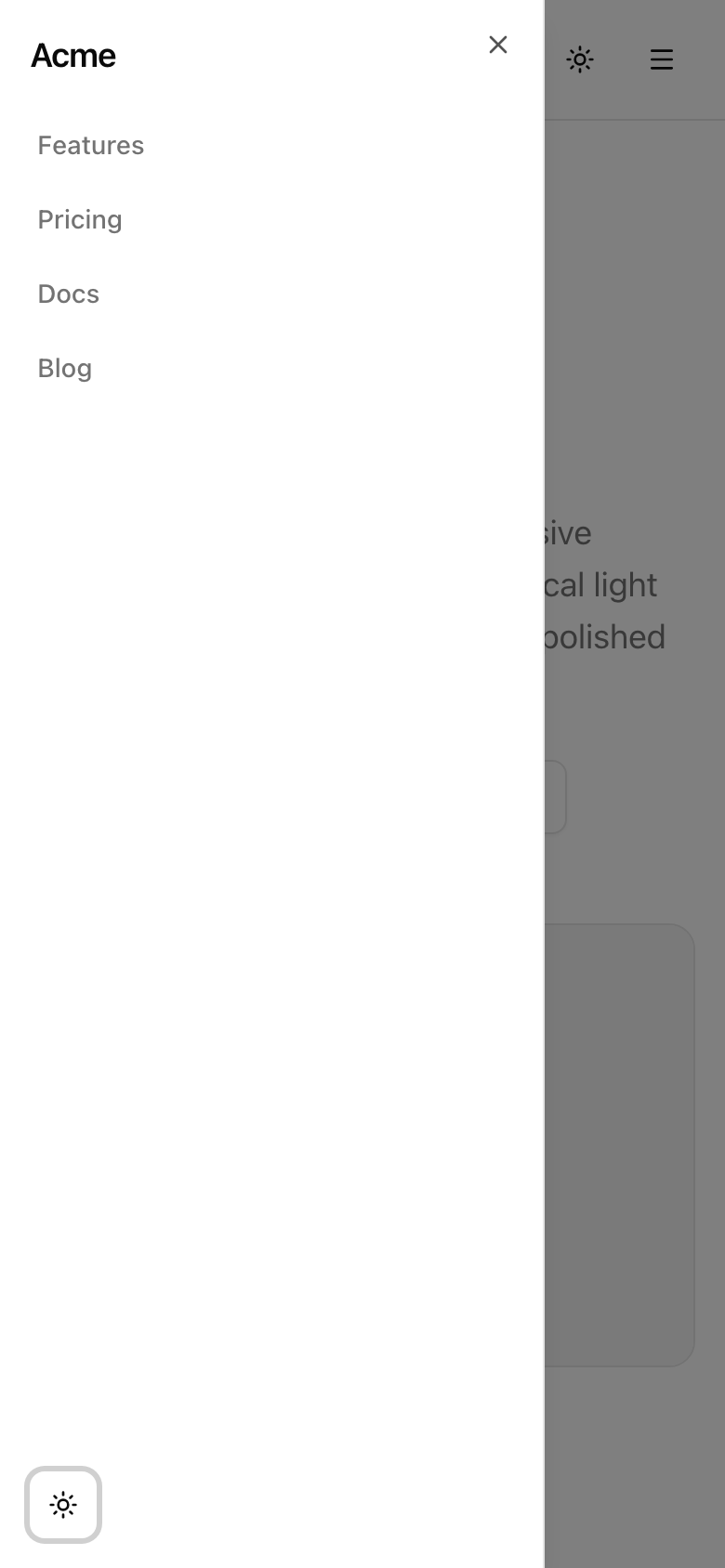
The drawer open at 390px, over a scroll-locked page: the desktop nav links plus the theme toggle.
This drawer is the last piece of the responsive surface, so the checklist below is the project’s full standards bar, not just the drawer’s behavior.
What to build
Section titled “What to build”A modal that traps focus, dims the page, closes on Esc, and returns focus to its trigger is one of the most reimplemented and most broken widgets on the web.
You won’t reimplement it.
shadcn’s Sheet is Radix’s Dialog underneath, and Radix ships all of those behaviors correctly: the focus trap, the overlay, Esc-to-close, and return-focus are the primitive’s job.
Yours is to not break them.
The one thing the primitive does not handle is pinning the page so it can’t scroll behind the drawer, especially under iOS Safari.
That is the only custom behavior this feature owns, and you’ll extract it into a hook, useLockBodyScroll.
Its cleanup must restore the prior overflow value rather than blank it to '', which would clobber a lock some parent might already hold.
In user terms: below md, a hamburger opens a slide-in panel carrying the same nav links the desktop header shows, plus the theme toggle.
Single-source those links from navLinks, which the header already passes in, so desktop and mobile stay one list.
Keep the provided color tokens.
Out of scope: a custom modal, hand-rolled focus management, and nested submenus, since the drawer is a flat list.
md a labelled hamburger button opens a left-side drawer; the desktop nav stays the only nav at md and up.Esc closes the drawer and returns focus to the hamburger trigger.Coding time
Section titled “Coding time”Fill src/hooks/use-lock-body-scroll.ts and src/components/mobile-nav.tsx against the brief and the tests.
SiteHeader already imports MobileNav and mounts it in its md:hidden slot, so once both files are real the drawer works with no further wiring.
Try it before opening the solution.
Reference solution and walkthrough
The hook
Section titled “The hook”The whole custom-behavior budget of this feature is sixteen lines.
import { useEffect } from 'react';
export const useLockBodyScroll = (locked: boolean): void => {  useEffect(() => {    if (!locked) {      return;    }
    const previousOverflow = document.body.style.overflow;    document.body.style.overflow = 'hidden';
    return () => {      document.body.style.overflow = previousOverflow;    };  }, [locked]);};
Two decisions carry this hook.
Touch document only inside useEffect.
document.body doesn’t exist on the server, so reaching for it during render would crash the build.
Effects run only on the client, after paint, so mutating the body there is what makes the hook safe inside a Server-Component tree.
Restore previousOverflow on cleanup rather than clearing to ''.
Read the current value, set 'hidden', and put the captured value back when the effect tears down.
Clearing to '' would erase a lock something else had set: if a parent already froze scroll for its own modal, your drawer’s cleanup would silently un-freeze it.
Restoring composes; blanking does not.
The [locked] dependency engages the lock the instant the drawer opens and releases it the instant it closes, and at no other time.
The drawer
Section titled “The drawer”The component the header already imports has four moving parts.
'use client';
import { Menu } from 'lucide-react';import Link from 'next/link';import { useState } from 'react';
import { ThemeToggle } from '@/components/theme-toggle';import { Button } from '@/components/ui/button';import {  Sheet,  SheetContent,  SheetTitle,  SheetTrigger,} from '@/components/ui/sheet';import { useLockBodyScroll } from '@/hooks/use-lock-body-scroll';
export const MobileNav = ({  links,}: {  links: { href: string; label: string }[];}) => {  const [open, setOpen] = useState(false);
  useLockBodyScroll(open);
  return (    <Sheet open={open} onOpenChange={setOpen}>      <SheetTrigger asChild>        <Button          type="button"          variant="ghost"          size="icon"          data-testid="mobile-nav-trigger"          aria-label="Open menu"        >          <Menu />        </Button>      </SheetTrigger>
      <SheetContent side="left" data-testid="mobile-nav-content">        <SheetTitle className="px-4 pt-4 text-lg font-semibold tracking-tight">          Acme        </SheetTitle>
        <nav aria-label="Primary" className="flex flex-col gap-1 px-2">          {links.map((link) => (            <Link              key={link.href}              href={link.href}              onClick={() => setOpen(false)}              className="rounded-md px-3 py-2 text-sm font-medium text-muted-foreground outline-none transition-colors hover:text-foreground focus-visible:ring-[3px] focus-visible:ring-ring/50"            >              {link.label}            </Link>          ))}        </nav>
        <div className="mt-auto flex items-center gap-2 px-4 pb-4">          <ThemeToggle />        </div>      </SheetContent>    </Sheet>  );};
State and lock, driven by one boolean. useState(false) makes this a controlled Sheet: you own the open/closed flag instead of letting the primitive track it internally. You need that because useLockBodyScroll(open) reads the same flag — the drawer being open is exactly the condition that should freeze the page. Passing open and onOpenChange={setOpen} lets Radix flip the state from its own triggers (overlay click, Esc) while you stay the single source of truth.
'use client';
import { Menu } from 'lucide-react';import Link from 'next/link';import { useState } from 'react';
import { ThemeToggle } from '@/components/theme-toggle';import { Button } from '@/components/ui/button';import {  Sheet,  SheetContent,  SheetTitle,  SheetTrigger,} from '@/components/ui/sheet';import { useLockBodyScroll } from '@/hooks/use-lock-body-scroll';
export const MobileNav = ({  links,}: {  links: { href: string; label: string }[];}) => {  const [open, setOpen] = useState(false);
  useLockBodyScroll(open);
  return (    <Sheet open={open} onOpenChange={setOpen}>      <SheetTrigger asChild>        <Button          type="button"          variant="ghost"          size="icon"          data-testid="mobile-nav-trigger"          aria-label="Open menu"        >          <Menu />        </Button>      </SheetTrigger>
      <SheetContent side="left" data-testid="mobile-nav-content">        <SheetTitle className="px-4 pt-4 text-lg font-semibold tracking-tight">          Acme        </SheetTitle>
        <nav aria-label="Primary" className="flex flex-col gap-1 px-2">          {links.map((link) => (            <Link              key={link.href}              href={link.href}              onClick={() => setOpen(false)}              className="rounded-md px-3 py-2 text-sm font-medium text-muted-foreground outline-none transition-colors hover:text-foreground focus-visible:ring-[3px] focus-visible:ring-ring/50"            >              {link.label}            </Link>          ))}        </nav>
        <div className="mt-auto flex items-center gap-2 px-4 pb-4">          <ThemeToggle />        </div>      </SheetContent>    </Sheet>  );};
The labelled trigger. <SheetTrigger asChild> wraps a real <Button> instead of rendering its own, handing the trigger’s behavior and the ARIA that announces “this opens a dialog” down onto your button — one focusable, keyboard-activatable control instead of a button nested in a button. The button is icon-only, so aria-label="Open menu" is all a screen-reader user has to go on; without it they’d hear only “button”.
'use client';
import { Menu } from 'lucide-react';import Link from 'next/link';import { useState } from 'react';
import { ThemeToggle } from '@/components/theme-toggle';import { Button } from '@/components/ui/button';import {  Sheet,  SheetContent,  SheetTitle,  SheetTrigger,} from '@/components/ui/sheet';import { useLockBodyScroll } from '@/hooks/use-lock-body-scroll';
export const MobileNav = ({  links,}: {  links: { href: string; label: string }[];}) => {  const [open, setOpen] = useState(false);
  useLockBodyScroll(open);
  return (    <Sheet open={open} onOpenChange={setOpen}>      <SheetTrigger asChild>        <Button          type="button"          variant="ghost"          size="icon"          data-testid="mobile-nav-trigger"          aria-label="Open menu"        >          <Menu />        </Button>      </SheetTrigger>
      <SheetContent side="left" data-testid="mobile-nav-content">        <SheetTitle className="px-4 pt-4 text-lg font-semibold tracking-tight">          Acme        </SheetTitle>
        <nav aria-label="Primary" className="flex flex-col gap-1 px-2">          {links.map((link) => (            <Link              key={link.href}              href={link.href}              onClick={() => setOpen(false)}              className="rounded-md px-3 py-2 text-sm font-medium text-muted-foreground outline-none transition-colors hover:text-foreground focus-visible:ring-[3px] focus-visible:ring-ring/50"            >              {link.label}            </Link>          ))}        </nav>
        <div className="mt-auto flex items-center gap-2 px-4 pb-4">          <ThemeToggle />        </div>      </SheetContent>    </Sheet>  );};
The panel and its mandatory title. <SheetContent side="left"> anchors the panel to the start edge. <SheetTitle> is the dialog’s accessible name, not decoration: Radix’s Dialog logs an error when a panel ships without one. The links come from links.map(...), the same array the desktop nav reads, so the codebase holds exactly one list of nav items.
'use client';
import { Menu } from 'lucide-react';import Link from 'next/link';import { useState } from 'react';
import { ThemeToggle } from '@/components/theme-toggle';import { Button } from '@/components/ui/button';import {  Sheet,  SheetContent,  SheetTitle,  SheetTrigger,} from '@/components/ui/sheet';import { useLockBodyScroll } from '@/hooks/use-lock-body-scroll';
export const MobileNav = ({  links,}: {  links: { href: string; label: string }[];}) => {  const [open, setOpen] = useState(false);
  useLockBodyScroll(open);
  return (    <Sheet open={open} onOpenChange={setOpen}>      <SheetTrigger asChild>        <Button          type="button"          variant="ghost"          size="icon"          data-testid="mobile-nav-trigger"          aria-label="Open menu"        >          <Menu />        </Button>      </SheetTrigger>
      <SheetContent side="left" data-testid="mobile-nav-content">        <SheetTitle className="px-4 pt-4 text-lg font-semibold tracking-tight">          Acme        </SheetTitle>
        <nav aria-label="Primary" className="flex flex-col gap-1 px-2">          {links.map((link) => (            <Link              key={link.href}              href={link.href}              onClick={() => setOpen(false)}              className="rounded-md px-3 py-2 text-sm font-medium text-muted-foreground outline-none transition-colors hover:text-foreground focus-visible:ring-[3px] focus-visible:ring-ring/50"            >              {link.label}            </Link>          ))}        </nav>
        <div className="mt-auto flex items-center gap-2 px-4 pb-4">          <ThemeToggle />        </div>      </SheetContent>    </Sheet>  );};
Navigate and close, plus the in-drawer toggle. Each <Link> carries an href so the tap navigates and onClick={() => setOpen(false)} so the same tap closes the drawer; without the onClick you’d scroll to the anchor and leave a full-screen drawer covering it. mt-auto pushes <ThemeToggle /> to the bottom of the panel, so theming stays reachable on mobile, where the header’s toggle is hidden.
Three things here do accessibility work the tests don’t reach.
The aria-label on the icon-only trigger names the hamburger.
The aria-label="Primary" names the navigation landmark inside the drawer.
And <ThemeToggle /> inside the panel is the only reason theme control is reachable below md, since the header’s toggle slot is md:hidden.
Notice what’s absent: no onKeyDown for Esc, no useRef to refocus the trigger on close, no overlay element, no focus-trap loop.
Radix provides all of it, and reimplementing any of it is how you’d introduce the bug.
The single list of links rendered twice through different visibility utilities, never duplicated as literal text, is the mobile-first reflex carried to its conclusion.
The component you compose here — the side prop, the SheetTrigger/SheetContent/SheetTitle anatomy, and the install command.
The primitive under the Sheet: the focus trap, Esc-to-close, and return-focus-to-trigger contract your job is to not break.
Moment of truth
Section titled “Moment of truth”This lesson closes the surface, so it checks in two stages: the lesson tests, then the whole project’s standards bar by hand.
Run the lesson suite:
pnpm test:lesson 12It exercises the four tested requirements against your two files: the trigger is a real, labelled, dialog-wired button; the links are single-sourced from links, carry an href, and close the drawer on click; the panel has a SheetTitle; and the hook sets overflow: hidden while locked, restores the prior value on cleanup, leaves scroll untouched while unlocked, and keys on [locked].
Then run the shippability gate across the whole project:
pnpm verifyThat runs Biome in CI mode, then tsc --noEmit, then a production next build.
A clean exit means the whole surface lints, type-checks, and builds.
The tests can’t reach a real focus cycle, an Esc keypress, or a Lighthouse audit, and since this is the capstone, the by-hand pass covers the project’s full standards bar, not just the drawer.
Walk each item, ticking as you go.
If one fails, the fix lives in the lesson that owns that behavior.
Esc closes any open menu.md.md, Tab cycles within the open drawer and Shift+Tab reverses; focus never escapes to the page behind.Esc close — Esc closes the drawer and returns focus to the trigger.With every item ticked, the surface is done and the project ships.
The audit was cheap because the discipline held from the first component: tokens carry every color, shadcn’s primitives carry the focus and ARIA work, and useLockBodyScroll is the only custom hook the project owns.