The single-round-trip invoice detail read
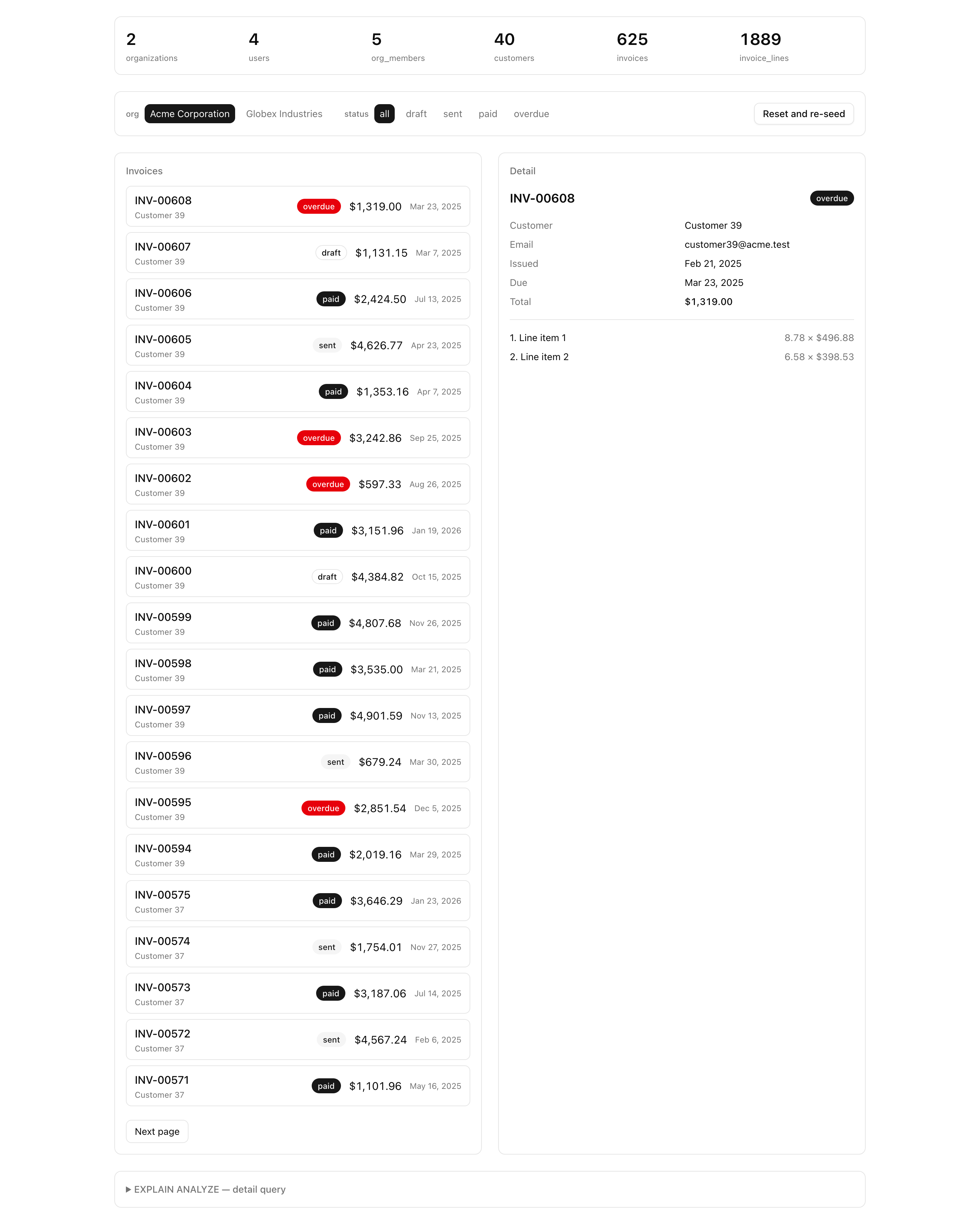
The list panel works, but click any row and the detail panel stays empty.
The click sets ?invoiceId=... in the URL; the panel reads it and calls getInvoiceDetail, which still returns null because the function is a stub.
This lesson writes it: the read that loads one invoice with its customer and line items in a single query, and only when the invoice belongs to the org you are viewing.
This is the data layer’s second and last read, and shipping it closes the chapter. It rests on two ideas you will apply to every relational read that follows: the tenant guard lives inside the query, and a nested entity loads in one query through the relational API rather than a loop that fetches the invoice, then its customer, then its lines.
When you are done, clicking an invoice fills the detail panel, an invoiceId from another org shows the empty state, and the plan panel confirms the whole read is a single query.
Your mission
Section titled “Your mission”Implement getInvoiceDetail in src/lib/invoices/queries.ts.
The inspector calls it with an organizationId and an invoiceId; return the invoice with its customer and line items, or null when nothing matches.
Two decisions shape the solution.
The first is the tenant guard, and it is why this lesson exists.
Filter on organizationId inside the where, AND-ed with the invoice id, so an id from another org matches nothing and returns the empty state.
The failure mode to avoid: load the invoice by id and then check if (invoice.organizationId === orgId).
That reads as correct but leaks every invoice whose id an attacker can guess, because the database already handed the row over before your check runs.
This is an IDOR (insecure direct object reference) leak, and the fix is structural: the org filter belongs in the where, never after the load.
The second is the single round trip.
The relational with brings back the customer and line items in one query plan instead of three lookups.
Order the lines by position: join output has no guaranteed order, so without an explicit orderBy the panel can render “3. … 1. … 2.”.
Out of scope: the plan panel and its EXPLAIN ANALYZE probes are provided, so you read their output to confirm the single round trip rather than build them.
This project is read-only, with no writes.
position.organizationId with another org’s invoiceId returns no invoice (the empty state), never the cross-org row.invoiceId returns that invoice’s customer and its complete set of line items in one result, not a partial set or a follow-up lookup.Index Scan on invoices joined to customers and invoice_lines, not three independent lookups.Coding time
Section titled “Coding time”Implement getInvoiceDetail against the brief above and the Lesson 6 tests, then open the inspector and click a row before you read the walkthrough.
Reference solution and walkthrough
The shape mirrors the list read: a private builder holds the query, a type is inferred from it, and the public function awaits it and coalesces the miss to null.
The query is the whole lesson — three things to get right in one findFirst.
const findInvoiceDetail = (args: { organizationId: string; invoiceId: string;}) => db.query.invoices.findFirst({ // The tenant guard AND-includes organizationId in the where, so a guessed id // from another org returns nothing — the filter is the security boundary, // never a post-load check. where: (t, { and, eq }) => and(eq(t.id, args.invoiceId), eq(t.organizationId, args.organizationId)), with: { customer: true, lines: { orderBy: (t, { asc }) => [asc(t.position)] }, }, });The tenant guard. The match requires both the invoice id and the organizationId, so a guessed id from another org satisfies the id leg, fails the org leg, and findFirst returns nothing. The org filter is part of the match condition, which is the IDOR defense — see the caution below.
const findInvoiceDetail = (args: { organizationId: string; invoiceId: string;}) => db.query.invoices.findFirst({ // The tenant guard AND-includes organizationId in the where, so a guessed id // from another org returns nothing — the filter is the security boundary, // never a post-load check. where: (t, { and, eq }) => and(eq(t.id, args.invoiceId), eq(t.organizationId, args.organizationId)), with: { customer: true, lines: { orderBy: (t, { asc }) => [asc(t.position)] }, }, });The customer join. with: { customer: true } pulls the invoice’s customer in the same query, so the panel’s customer block is already populated — no separate getCustomer call, no second round trip.
const findInvoiceDetail = (args: { organizationId: string; invoiceId: string;}) => db.query.invoices.findFirst({ // The tenant guard AND-includes organizationId in the where, so a guessed id // from another org returns nothing — the filter is the security boundary, // never a post-load check. where: (t, { and, eq }) => and(eq(t.id, args.invoiceId), eq(t.organizationId, args.organizationId)), with: { customer: true, lines: { orderBy: (t, { asc }) => [asc(t.position)] }, }, });The lines join, ordered explicitly. with: { lines: ... } brings the line items back in the same result, and the nested orderBy sorts them by position ascending. The ordering is not optional: row order from a join is undefined, so without it the lines arrive in whatever order the planner produced, and that order can shift as the data grows.
The public function is a thin wrapper: it awaits the builder and turns a findFirst miss (which is undefined) into the null the panel checks for.
export type InvoiceDetail = NonNullable<  Awaited<ReturnType<typeof findInvoiceDetail>>>;
export const getInvoiceDetail = async (args: {  organizationId: string;  invoiceId: string;}): Promise<InvoiceDetail | null> => {  const invoice = await findInvoiceDetail(args);
  return invoice ?? null;};
One decision is worth a closer look: why InvoiceDetail is inferred, not hand-written.
The type NonNullable<Awaited<ReturnType<typeof findInvoiceDetail>>> is the exact shape the query returns — the invoice columns, a nested customer object, and a lines array — with the undefined from findFirst stripped off so the type names a found invoice.
The starter hand-typed it as Invoice & { customer: Customer; lines: InvoiceLine[] } to keep the file compiling, but inferring it from the query is the honest version: it tracks the query automatically, so changing the with updates the type with no edits.
Hover the alias to see what the compiler infers:
export type InvoiceDetail = NonNullable< Awaited<ReturnType<typeof findInvoiceDetail>>>;The relational query reference for findFirst, with, and nested orderBy — the exact API this read uses.
The #1 OWASP risk and the named failure the in-query tenant guard prevents: viewing another org's row by its id.
Moment of truth
Section titled “Moment of truth”Make sure the database is up, migrated, and seeded, then run the suite:
docker compose up -dpnpm db:migratepnpm db:seedpnpm test:lesson 6The suite drives your getInvoiceDetail against the seeded data and asserts that the in-org invoice loads with its customer attached and all its lines in ascending position order, all in one result.
The test the lesson exists for: pairing org A’s organizationId with an invoiceId under org B returns null, while that same invoice loads under org B’s own organizationId — proof the null is the tenant guard, not a missing row.
Three things the tests cannot reach you confirm by hand in the inspector. Tick each as you go.
position in one paint.pnpm db:studio, copy an invoiceId that belongs to org B, and hand-build an inspector URL pairing it with org A’s orgId — confirm the detail panel shows the empty state, not the leaked invoice.Index Scan on invoices joined to customers and invoice_lines, not three independent lookups.With both reads shipping, the data layer is complete: a migrated, seeded schema, a cursor-paginated list, and a tenant-guarded detail read, each filtering on organizationId inside the query.
The next unit adds the writes that create, edit, and delete invoices.