Delete an invoice
Build the delete path of a CRUD surface: a tenant-scoped Server Action behind a confirmation dialog, with a no-JavaScript fallback form.
Create and edit are the forms users live in.
Delete is the one they click once, by accident, with nothing to undo it.
So this lesson ships the smallest of the three Server Actions, deleteInvoice, behind two guard rails: a confirmation dialog before anything is removed, and a tenant-scoped where so one organization can never erase another’s row.
The goal, in user terms: delete an invoice from its detail page behind a confirmation, still working with JavaScript off.
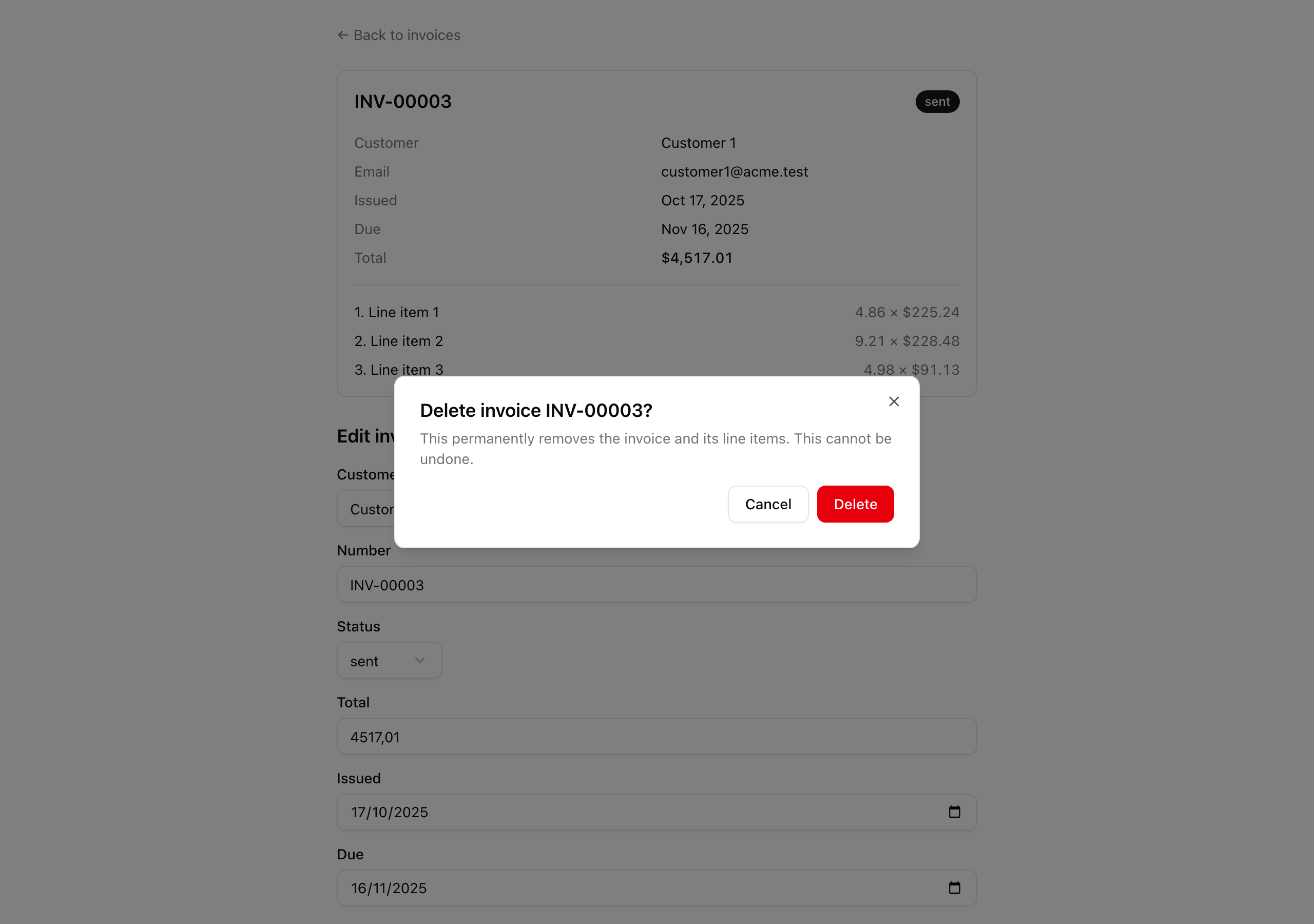
The detail page at /invoices/[invoiceId] carries a red “Delete” button.
Clicking it opens a shadcn <Dialog> over the dimmed page that names the invoice, “Delete invoice INV-00003?”.
Confirming submits through the Server Action and returns you to /invoices with the row gone; cancelling closes the dialog and changes nothing.
With JavaScript off the dialog never opens, and an inline fallback form runs the same delete.
Your mission
Section titled “Your mission”Delete is the smallest action you will write, which makes it the right place to get progressive enhancement right.
The action is almost nothing: a deleteInvoiceInputSchema validating a single id, and a deleteInvoice that parses it, reads the active organization, runs one tenant-scoped db.delete(...), revalidates the list, and redirects to /invoices.
The real work is the form.
The delete must travel through the form action as one POST to the action’s URL, not an onClick handler that calls fetch against an /api/* route.
That fetch reflex throws away progressive enhancement and adds client-side request plumbing to maintain, for nothing the platform did not already give you.
The confirmation is a shadcn <Dialog>, the Radix primitive already in the starter, so the focus trap, Escape-to-close, and click-outside-to-dismiss come for free.
Inside it sits a <form action={formAction}> with a hidden id input naming the invoice to remove.
But Radix needs JavaScript to open the dialog, so the component also renders a second delete form inline beneath it, always present.
With JavaScript the user never sees that fallback and the dialog handles the delete; without it the dialog stays inert and the fallback is the only path, POSTing to the same action with the same id.
Rendering it unconditionally costs nothing when JS is on and spares you a scripting-detection branch you would otherwise get wrong.
The Drizzle transaction around the delete and the ?deleted= success toast both wait for the next lesson, Transactional delete.
For now the delete is a single statement and the redirect lands on a bare /invoices.
Build it so each of these holds:
/invoices/[invoiceId] opens a confirmation dialog; confirming removes the invoice and returns to /invoices without it./api/* fetch anywhere.where.Coding time
Section titled “Coding time”Implement deleteInvoiceInputSchema, deleteInvoice, and DeleteInvoiceForm against the brief and the tests, then open the reference build below to compare.
Reference solution and walkthrough
The schema is the smallest of the three.
Create derives its shape from the whole invoices table, edit adds an id, and delete needs only the id, since the row it targets is the entire input.
Add it to lib/invoices/mutation-schemas.ts beside the create and edit schemas:
export const deleteInvoiceInputSchema = z.object({ id: z.uuid() });
export type DeleteInvoiceInput = z.input<typeof deleteInvoiceInputSchema>;export type DeleteInvoiceOutput = z.output<typeof deleteInvoiceInputSchema>;
The action follows the same five seams as every action in this chapter — parse, authorize, mutate, revalidate, return — just shorter, with one column to match on and nothing to return on success.
Add deleteInvoice to lib/invoices/actions.ts:
export const deleteInvoice = async (  _prevState: Result<null> | null,  formData: FormData,): Promise<Result<null>> => {  const parsed = deleteInvoiceInputSchema.safeParse(    Object.fromEntries(formData),  );  if (!parsed.success) {    return err(      'validation',      'Check the highlighted fields.',      z.flattenError(parsed.error).fieldErrors,    );  }
  const { organizationId } = await getActiveContext();
  await db    .delete(invoices)    .where(      and(        eq(invoices.id, parsed.data.id),        eq(invoices.organizationId, organizationId),      ),    );
  revalidatePath('/invoices');  redirect('/invoices');};
Two details are worth pausing on.
The tenant id sits inside the where rather than in a load-then-check after the fact, the same rule the edit action followed: a forged id from another organization matches zero rows and the delete quietly does nothing, instead of erasing a row the caller had no right to touch — the classic IDOR hole.
And the action ends in redirect rather than an ok return, so the navigation to /invoices is what closes the dialog, with no success state to track or reset on the client.
The form is a Client Component because it uses useActionState, and it renders three things you should be able to point at: the dialog and its trigger, the form inside the dialog, and the always-present fallback form beneath it.
Here is app/invoices/[invoiceId]/delete-invoice-form.tsx in full:
'use client';
import { useActionState } from 'react';
import { SubmitButton } from '@/app/_components/submit-button';import { Button } from '@/components/ui/button';import {  Dialog,  DialogClose,  DialogContent,  DialogDescription,  DialogFooter,  DialogHeader,  DialogTitle,  DialogTrigger,} from '@/components/ui/dialog';import { deleteInvoice } from '@/lib/invoices/actions';
type DeleteInvoiceFormProps = {  invoiceId: string;  invoiceNumber: string;};
export const DeleteInvoiceForm = ({  invoiceId,  invoiceNumber,}: DeleteInvoiceFormProps) => {  const [state, formAction] = useActionState(deleteInvoice, null);
  return (    <section data-testid="delete-invoice-form" className="flex flex-col gap-2">      <Dialog>        <DialogTrigger asChild>          <Button            type="button"            variant="destructive"            data-testid="delete-trigger"          >            Delete          </Button>        </DialogTrigger>        <DialogContent data-testid="delete-dialog">          <DialogHeader>            <DialogTitle>Delete invoice {invoiceNumber}?</DialogTitle>            <DialogDescription>              This permanently removes the invoice and its line items. This              cannot be undone.            </DialogDescription>          </DialogHeader>          <form action={formAction}>            <input type="hidden" name="id" defaultValue={invoiceId} />            <DialogFooter>              <DialogClose asChild>                <Button type="button" variant="outline">                  Cancel                </Button>              </DialogClose>              <SubmitButton variant="destructive">Delete</SubmitButton>            </DialogFooter>          </form>        </DialogContent>      </Dialog>
      <form action={formAction} data-testid="delete-fallback-form">        <input type="hidden" name="id" defaultValue={invoiceId} />        <SubmitButton variant="destructive">Delete invoice</SubmitButton>      </form>
      {state?.ok === false && (        <p role="alert" className="text-destructive">          {state.error.userMessage}        </p>      )}    </section>  );};
The dialog. The shadcn <Dialog> gives you the overlay, focus trap, Escape-to-close, and click-outside from the starter primitive. asChild lets your own destructive Button be the trigger instead of wrapping it. The title names the invoice and the description states that the delete is permanent.
'use client';
import { useActionState } from 'react';
import { SubmitButton } from '@/app/_components/submit-button';import { Button } from '@/components/ui/button';import {  Dialog,  DialogClose,  DialogContent,  DialogDescription,  DialogFooter,  DialogHeader,  DialogTitle,  DialogTrigger,} from '@/components/ui/dialog';import { deleteInvoice } from '@/lib/invoices/actions';
type DeleteInvoiceFormProps = {  invoiceId: string;  invoiceNumber: string;};
export const DeleteInvoiceForm = ({  invoiceId,  invoiceNumber,}: DeleteInvoiceFormProps) => {  const [state, formAction] = useActionState(deleteInvoice, null);
  return (    <section data-testid="delete-invoice-form" className="flex flex-col gap-2">      <Dialog>        <DialogTrigger asChild>          <Button            type="button"            variant="destructive"            data-testid="delete-trigger"          >            Delete          </Button>        </DialogTrigger>        <DialogContent data-testid="delete-dialog">          <DialogHeader>            <DialogTitle>Delete invoice {invoiceNumber}?</DialogTitle>            <DialogDescription>              This permanently removes the invoice and its line items. This              cannot be undone.            </DialogDescription>          </DialogHeader>          <form action={formAction}>            <input type="hidden" name="id" defaultValue={invoiceId} />            <DialogFooter>              <DialogClose asChild>                <Button type="button" variant="outline">                  Cancel                </Button>              </DialogClose>              <SubmitButton variant="destructive">Delete</SubmitButton>            </DialogFooter>          </form>        </DialogContent>      </Dialog>
      <form action={formAction} data-testid="delete-fallback-form">        <input type="hidden" name="id" defaultValue={invoiceId} />        <SubmitButton variant="destructive">Delete invoice</SubmitButton>      </form>
      {state?.ok === false && (        <p role="alert" className="text-destructive">          {state.error.userMessage}        </p>      )}    </section>  );};
The JS path. The dialog-body <form action={formAction}> binds the formAction from useActionState, and the hidden id is its only field. Cancel sits inside <DialogClose>, so it closes the dialog without submitting and needs no handler. The submit reuses the shared <SubmitButton>, so the in-flight spinner comes for free.
'use client';
import { useActionState } from 'react';
import { SubmitButton } from '@/app/_components/submit-button';import { Button } from '@/components/ui/button';import {  Dialog,  DialogClose,  DialogContent,  DialogDescription,  DialogFooter,  DialogHeader,  DialogTitle,  DialogTrigger,} from '@/components/ui/dialog';import { deleteInvoice } from '@/lib/invoices/actions';
type DeleteInvoiceFormProps = {  invoiceId: string;  invoiceNumber: string;};
export const DeleteInvoiceForm = ({  invoiceId,  invoiceNumber,}: DeleteInvoiceFormProps) => {  const [state, formAction] = useActionState(deleteInvoice, null);
  return (    <section data-testid="delete-invoice-form" className="flex flex-col gap-2">      <Dialog>        <DialogTrigger asChild>          <Button            type="button"            variant="destructive"            data-testid="delete-trigger"          >            Delete          </Button>        </DialogTrigger>        <DialogContent data-testid="delete-dialog">          <DialogHeader>            <DialogTitle>Delete invoice {invoiceNumber}?</DialogTitle>            <DialogDescription>              This permanently removes the invoice and its line items. This              cannot be undone.            </DialogDescription>          </DialogHeader>          <form action={formAction}>            <input type="hidden" name="id" defaultValue={invoiceId} />            <DialogFooter>              <DialogClose asChild>                <Button type="button" variant="outline">                  Cancel                </Button>              </DialogClose>              <SubmitButton variant="destructive">Delete</SubmitButton>            </DialogFooter>          </form>        </DialogContent>      </Dialog>
      <form action={formAction} data-testid="delete-fallback-form">        <input type="hidden" name="id" defaultValue={invoiceId} />        <SubmitButton variant="destructive">Delete invoice</SubmitButton>      </form>
      {state?.ok === false && (        <p role="alert" className="text-destructive">          {state.error.userMessage}        </p>      )}    </section>  );};
The no-JS fallback. This second <form> renders unconditionally. With JavaScript on the user never reaches it; with JavaScript off the dialog never opens, so this is the only form that can POST. Both forms bind the same formAction and carry the same hidden id, so the action sees an identical payload whichever one submits.
'use client';
import { useActionState } from 'react';
import { SubmitButton } from '@/app/_components/submit-button';import { Button } from '@/components/ui/button';import {  Dialog,  DialogClose,  DialogContent,  DialogDescription,  DialogFooter,  DialogHeader,  DialogTitle,  DialogTrigger,} from '@/components/ui/dialog';import { deleteInvoice } from '@/lib/invoices/actions';
type DeleteInvoiceFormProps = {  invoiceId: string;  invoiceNumber: string;};
export const DeleteInvoiceForm = ({  invoiceId,  invoiceNumber,}: DeleteInvoiceFormProps) => {  const [state, formAction] = useActionState(deleteInvoice, null);
  return (    <section data-testid="delete-invoice-form" className="flex flex-col gap-2">      <Dialog>        <DialogTrigger asChild>          <Button            type="button"            variant="destructive"            data-testid="delete-trigger"          >            Delete          </Button>        </DialogTrigger>        <DialogContent data-testid="delete-dialog">          <DialogHeader>            <DialogTitle>Delete invoice {invoiceNumber}?</DialogTitle>            <DialogDescription>              This permanently removes the invoice and its line items. This              cannot be undone.            </DialogDescription>          </DialogHeader>          <form action={formAction}>            <input type="hidden" name="id" defaultValue={invoiceId} />            <DialogFooter>              <DialogClose asChild>                <Button type="button" variant="outline">                  Cancel                </Button>              </DialogClose>              <SubmitButton variant="destructive">Delete</SubmitButton>            </DialogFooter>          </form>        </DialogContent>      </Dialog>
      <form action={formAction} data-testid="delete-fallback-form">        <input type="hidden" name="id" defaultValue={invoiceId} />        <SubmitButton variant="destructive">Delete invoice</SubmitButton>      </form>
      {state?.ok === false && (        <p role="alert" className="text-destructive">          {state.error.userMessage}        </p>      )}    </section>  );};
The error banner. useActionState surfaces whatever Result the action returns. On the happy path the action redirects, so this never paints, but a validation failure on a malformed id renders the userMessage here.
One subtlety the two forms share: because both bind the same formAction and a successful delete navigates away, the dialog’s open or closed state stops mattering once the redirect fires — the page it lived on is gone, so there is nothing to coordinate between them.
The shared where, <SubmitButton>, and <Dialog> come from earlier chapters; revisit those if any piece here is unfamiliar.
The exact primitive this form composes — DialogTrigger, DialogContent, DialogClose, and the asChild pattern.
Reference for the hook driving both delete forms, including the FormData signature and permalink for progressive enhancement.
Moment of truth
Section titled “Moment of truth”Run the lesson’s suite:
pnpm test:lesson 4The suite needs Postgres up, migrated, and seeded (docker compose up -d, then pnpm db:migrate, then pnpm db:seed): it commits a fixture invoice, runs your real deleteInvoice against it, and reads the rows back through a separate auditor connection.
Two suites should pass.
The first proves that the form’s first paint carries both a confirm form and an always-rendered fallback form, each posting the invoice id, and that a confirmed delete removes the row and redirects to /invoices.
The second proves the tenant guard: seed an invoice in a second organization, submit its id under the Acme context, and the foreign row survives.
The tests can’t drive a real browser, so confirm the network shape, the cancel path, and the no-JS path by hand:
/invoices. In DevTools → Network: one POST to the action URL, no /api/* fetch./invoices.