Feature grid with CVA card variants
The hero sells the promise; the feature band backs it up. You’ll build the three-column row right under the hero — a card per headline feature, each styled to a tone and an emphasis the data file picks, not a wall of className overrides scattered through the markup. The three cards line up across the page at desktop and stack into one scrollable column below the md breakpoint, and every card recolors itself in dark mode without a single dark-mode rule.
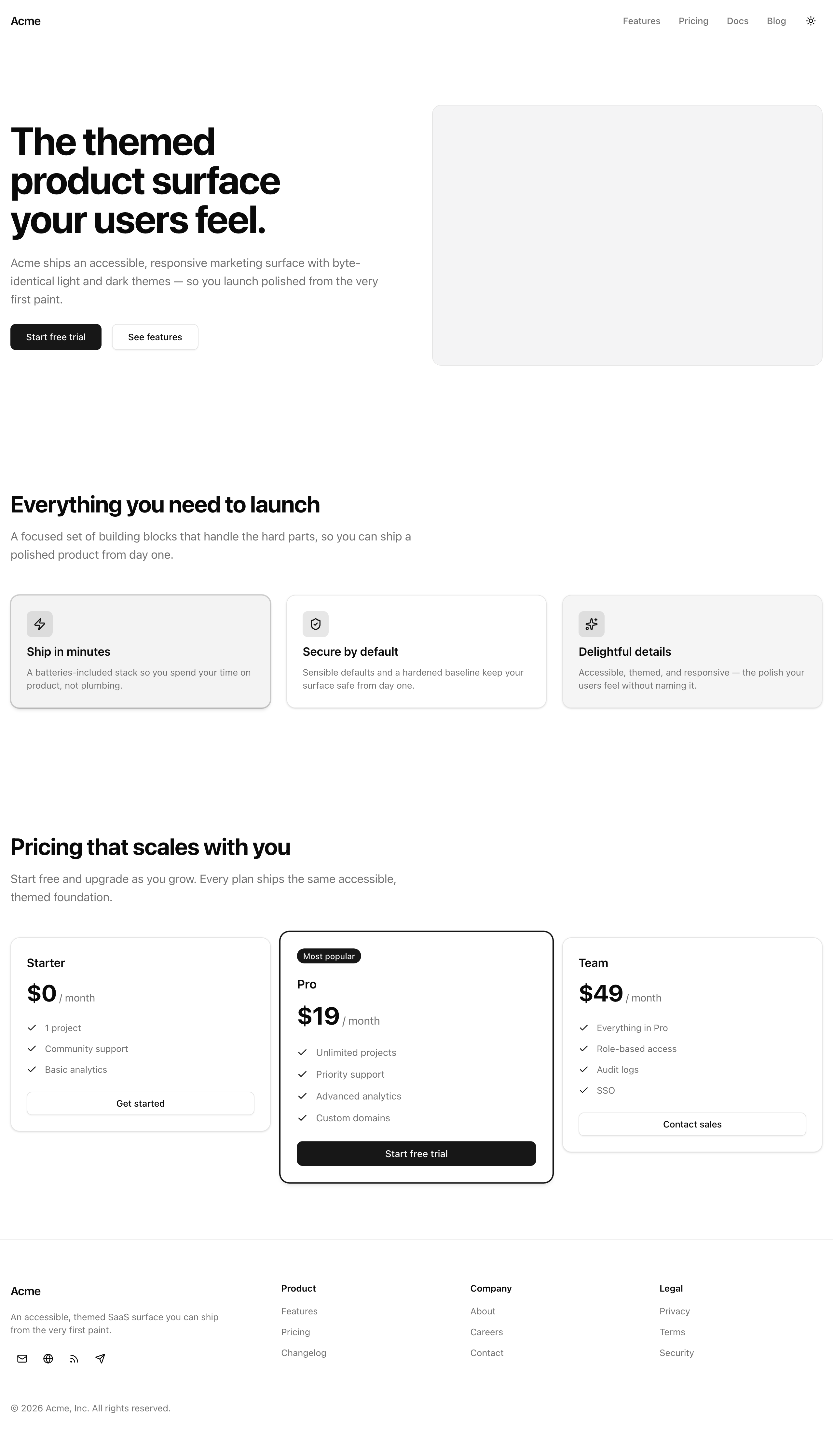
The feature band at desktop width — each card’s tone and emphasis come straight from data.ts.
Your mission
Section titled “Your mission”The naive way to make these cards differ is boolean props — brand, lifted, muted — toggling classes on each. Resist it. Three booleans describe eight combinations, but your design has only a handful of real looks; the rest are nonsense the type system would happily let a teammate ship (brand and muted at once?). Instead, give the card two closed unions, tone and emphasis, routed through one cva variant table. The table enumerates only the looks that exist, so an invalid combination is unrepresentable, and the data file — not the JSX — decides how each card looks. Spread each feature onto the card to wire the data straight to the variants, and a typo in the data becomes a compile error instead of a card that renders wrong.
A few constraints keep this card honest. Every color comes from a semantic token — bg-card, bg-primary/5, bg-muted, text-card-foreground, text-primary — never a literal hex, which is why the cards theme for free when the .dark class flips. Compose the interior from the shadcn header blocks (CardHeader, CardTitle, CardDescription) by hand rather than dropping a whole <Card> inside: the card surface is the <article> you’re styling, so a nested <Card> would double the border and padding. And mind the heading outline — the hero owns the page’s only <h1>, so this section’s heading must be an <h2>, no level skipped. Skip per-card hover or scroll motion and any fourth column or carousel: three cards, one row.
features, each showing its icon, title, and description.md they collapse to one column with no horizontal scroll.<h2> with no heading-level skip from the hero’s <h1>.Coding time
Section titled “Coding time”Fill in src/components/feature-card.tsx and src/components/feature-grid.tsx against the brief above and the lesson tests. Reach for the reference solution below only after your own attempt.
Reference solution and walkthrough
feature-card.tsx
Section titled “feature-card.tsx”The card splits into three parts: the variant table that defines every legal look, the props type derived from it, and the component that composes the card surface.
import { cva, type VariantProps } from 'class-variance-authority';import type { LucideIcon } from 'lucide-react';import type { ComponentProps } from 'react';
import { CardDescription, CardHeader, CardTitle } from '@/components/ui/card';import { cn } from '@/lib/utils';
export const featureCardVariants = cva(  'flex flex-col gap-6 rounded-xl border border-border bg-card py-6 text-card-foreground shadow-sm',  {    variants: {      tone: {        default: '',        brand: 'border-primary/20 bg-primary/5',        muted: 'bg-muted',      },      emphasis: {        quiet: '',        loud: 'shadow-md ring-1 ring-primary/20',      },    },    defaultVariants: {      tone: 'default',      emphasis: 'quiet',    },  },);
export type FeatureCardProps = ComponentProps<'article'> &  VariantProps<typeof featureCardVariants> & {    title: string;    description: string;    icon: LucideIcon;  };
export const FeatureCard = ({  title,  description,  icon: Icon,  tone,  emphasis,  className,  ...props}: FeatureCardProps) => (  <article    data-testid="feature-card"    className={cn(featureCardVariants({ tone, emphasis }), className)}    {...props}  >    <CardHeader>      <span className="flex size-10 items-center justify-center rounded-md bg-primary/10 text-primary">        <Icon className="size-5" />      </span>      <CardTitle className="text-lg">{title}</CardTitle>      <CardDescription>{description}</CardDescription>    </CardHeader>  </article>);
The featureCardVariants table is the single source of truth for how a card looks. The base string carries the surface every card shares: the rounded border, the card background and foreground tokens, the padding and shadow. Each of tone and emphasis then lists only its real values: default and quiet contribute nothing, brand tints the surface with --primary, muted swaps to --muted, and loud lifts the card with a stronger shadow and a faint primary ring. defaultVariants makes both optional with sane fallbacks.
import { cva, type VariantProps } from 'class-variance-authority';import type { LucideIcon } from 'lucide-react';import type { ComponentProps } from 'react';
import { CardDescription, CardHeader, CardTitle } from '@/components/ui/card';import { cn } from '@/lib/utils';
export const featureCardVariants = cva(  'flex flex-col gap-6 rounded-xl border border-border bg-card py-6 text-card-foreground shadow-sm',  {    variants: {      tone: {        default: '',        brand: 'border-primary/20 bg-primary/5',        muted: 'bg-muted',      },      emphasis: {        quiet: '',        loud: 'shadow-md ring-1 ring-primary/20',      },    },    defaultVariants: {      tone: 'default',      emphasis: 'quiet',    },  },);
export type FeatureCardProps = ComponentProps<'article'> &  VariantProps<typeof featureCardVariants> & {    title: string;    description: string;    icon: LucideIcon;  };
export const FeatureCard = ({  title,  description,  icon: Icon,  tone,  emphasis,  className,  ...props}: FeatureCardProps) => (  <article    data-testid="feature-card"    className={cn(featureCardVariants({ tone, emphasis }), className)}    {...props}  >    <CardHeader>      <span className="flex size-10 items-center justify-center rounded-md bg-primary/10 text-primary">        <Icon className="size-5" />      </span>      <CardTitle className="text-lg">{title}</CardTitle>      <CardDescription>{description}</CardDescription>    </CardHeader>  </article>);
FeatureCardProps derives its tone and emphasis types from the table itself via VariantProps, instead of re-typing the unions by hand as the scaffold did. Add a tone to the table and the prop type updates with it, so the two never drift apart. The intersection also pulls in the native <article> attributes and the content the card needs: title, description, and an icon typed as a LucideIcon.
import { cva, type VariantProps } from 'class-variance-authority';import type { LucideIcon } from 'lucide-react';import type { ComponentProps } from 'react';
import { CardDescription, CardHeader, CardTitle } from '@/components/ui/card';import { cn } from '@/lib/utils';
export const featureCardVariants = cva(  'flex flex-col gap-6 rounded-xl border border-border bg-card py-6 text-card-foreground shadow-sm',  {    variants: {      tone: {        default: '',        brand: 'border-primary/20 bg-primary/5',        muted: 'bg-muted',      },      emphasis: {        quiet: '',        loud: 'shadow-md ring-1 ring-primary/20',      },    },    defaultVariants: {      tone: 'default',      emphasis: 'quiet',    },  },);
export type FeatureCardProps = ComponentProps<'article'> &  VariantProps<typeof featureCardVariants> & {    title: string;    description: string;    icon: LucideIcon;  };
export const FeatureCard = ({  title,  description,  icon: Icon,  tone,  emphasis,  className,  ...props}: FeatureCardProps) => (  <article    data-testid="feature-card"    className={cn(featureCardVariants({ tone, emphasis }), className)}    {...props}  >    <CardHeader>      <span className="flex size-10 items-center justify-center rounded-md bg-primary/10 text-primary">        <Icon className="size-5" />      </span>      <CardTitle className="text-lg">{title}</CardTitle>      <CardDescription>{description}</CardDescription>    </CardHeader>  </article>);
The component is an <article> carrying the card surface. cn() merges the variant classes with any className the caller passes, last-wins on conflicts. Inside, a CardHeader holds a token-backed icon chip (bg-primary/10 text-primary), the title, and the description. The icon is rendered from the Icon the data passed in, so the card never imports a specific icon and stays content-agnostic.
feature-grid.tsx
Section titled “feature-grid.tsx”The grid is the simpler half: an introductory heading block, then a responsive grid that maps the data onto cards.
import { FeatureCard } from '@/components/feature-card';import { features } from '@/lib/data';
export const FeatureGrid = () => (  <section    id="features"    data-testid="feature-grid"    className="container mx-auto flex flex-col gap-12 px-4 py-16 lg:py-24"  >    <div className="flex max-w-2xl flex-col gap-4">      <h2 className="text-3xl font-bold tracking-tight text-balance text-foreground sm:text-4xl">        Everything you need to launch      </h2>      <p className="text-lg text-pretty text-muted-foreground">        A focused set of building blocks that handle the hard parts, so you can        ship a polished product from day one.      </p>    </div>
    <div className="grid grid-cols-1 gap-6 md:grid-cols-3">      {features.map((feature) => (        <FeatureCard key={feature.title} {...feature} />      ))}    </div>  </section>);
Why this shape
Section titled “Why this shape”One tone union and one emphasis union beat three booleans. With N boolean flags the type permits 2^N combinations, most of which the design never uses, and nothing stops a teammate from passing two contradictory ones. A cva table enumerates only the real states, so the impossible ones have no name. That is what lets the spread {...feature} wire data straight into the variants safely, and what makes requirement 2’s “no invalid combination expressible” true rather than aspirational.
VariantProps<typeof featureCardVariants> instead of hand-written unions. Hand-typed tone? and emphasis? are a second copy of the table, waiting to disagree with it. Deriving the props from the table makes the table the single source: add a tone there and the prop type follows automatically.
Compose the header sub-parts, not a whole <Card>. The base cva string already paints the card surface onto the <article>, so wrapping a shadcn <Card> inside would stack a second bordered, padded box on top. CardHeader, CardTitle, and CardDescription give you the internal rhythm — the spacing and the muted description color — without that second box.
A few requirements have no automated test, so they live in the code. The card’s colors are token utilities top to bottom (bg-card, bg-primary/5, bg-muted, text-card-foreground, text-primary), so theme switching comes free, no per-card dark rule needed. The grid is grid-cols-1 md:grid-cols-3, so it collapses to one column below md. featureCardVariants mirrors the buttonVariants naming convention, and key={feature.title} is a stable, content-derived key rather than an array index. The <h2> sits one level below the hero’s <h1>, so the heading outline never skips.
The official guide to the variant table, defaultVariants, and VariantProps you wire into the card.
Reference for the CardHeader, CardTitle, and CardDescription sub-parts you compose by hand.
Moment of truth
Section titled “Moment of truth”Run the lesson suite:
pnpm test:lesson 8A green run looks like this:
 ✓ tests/lessons/Lesson 8.test.ts (6 tests)   ✓ Lesson 8 — Feature grid with CVA card variants     ✓ renders one data-driven card per feature, with icon/title/copy       ✓ renders exactly one card per entry in features       ✓ shows each feature's title and description text       ✓ renders an icon (an <svg>) inside every card     ✓ applies each card's tone and emphasis from the data, with no invalid state expressible       ✓ recolors each card to match its data-driven tone       ✓ lifts each card according to its data-driven emphasis       ✓ enumerates only real tones — an unknown tone yields no foreign tone classes
 Test Files  1 passed (1)      Tests  6 passed (6)
Then run the full gate to confirm Biome, the typecheck, and the production build all pass:
pnpm verifyThe tests render the grid’s first-paint HTML in Node, so they catch the card count, the text, the icons, and each card’s tone and emphasis classes. They can’t see layout, the heading outline, or live theming, so confirm those three by hand in the browser with pnpm dev:
md and they collapse to one column with no horizontal scrollbar.<h1> followed directly by this section’s <h2>, with no level skipped.