Fresh-per-render download URLs
Last lesson a picked file landed in R2 and wrote its row, but /files still showed "No files yet.": the row existed, the page just never read it.
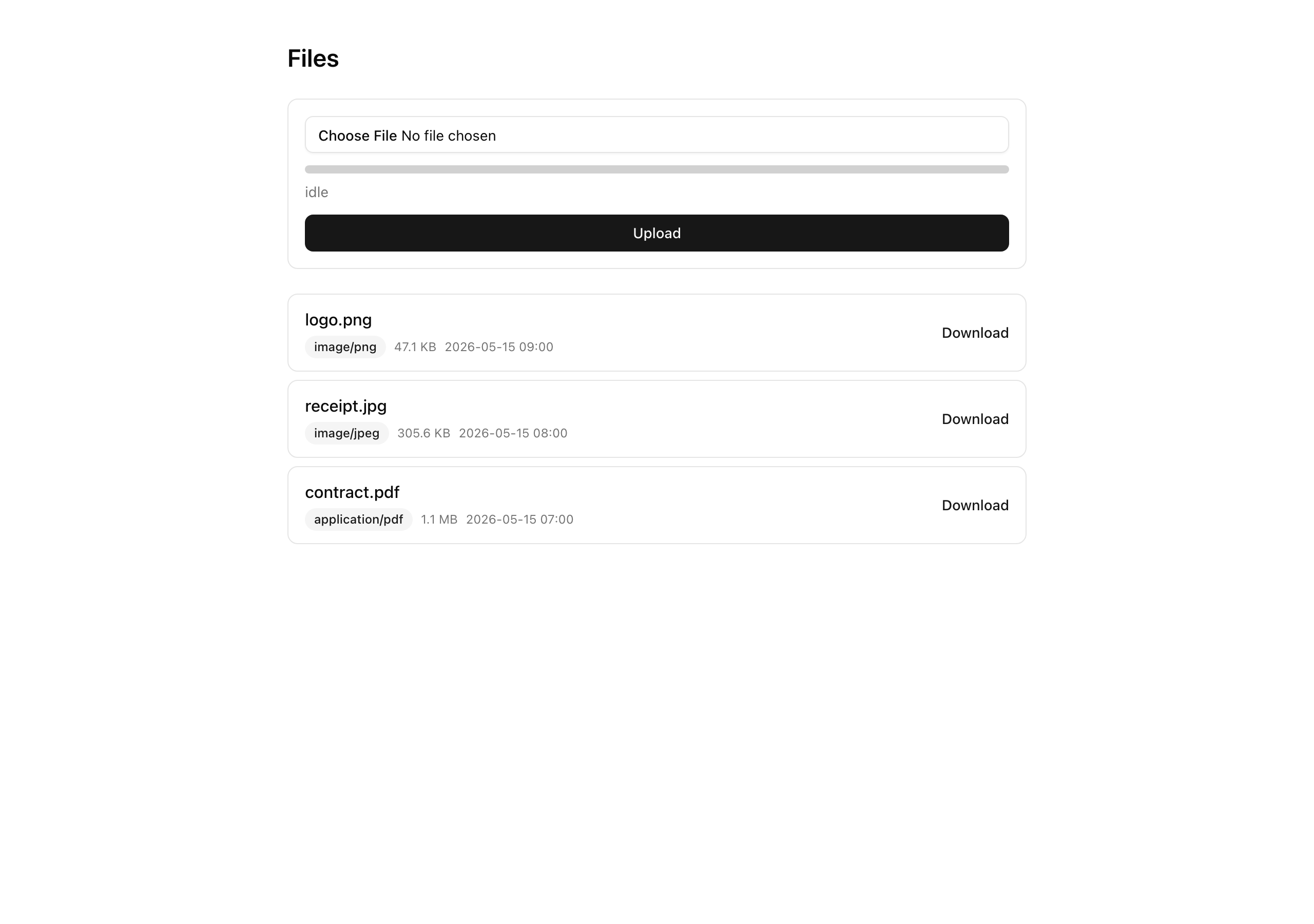
This lesson renders the list, so every uploaded file shows up with a “Download” link signed fresh on every render.
Each link saves the file under the name the user originally chose.
Copy one and sit on it, though, and about ten minutes later it stops working, while a refresh of /files hands you a new working link for the same row.
Your mission
Section titled “Your mission”One idea drives the lesson: a presigned URL is a short-lived credential, not a stable address. It grants “you may GET this one object until the clock runs out,” so the page mints a fresh one per row on every render and never stores or caches the result.
That rules out use cache on the /files Server Component.
Caching the render would freeze the signed URLs inside the cached HTML; they would keep expiring on schedule while the cache served them, so the page would show links that are already dead.
Signing per render is cheap: getSignedUrl is a local HMAC over the request with no round trip to R2, so a page of links costs hashes, not network calls.
The rest of the constraints:
- Reads go through
tenantDb(orgId)filtered to non-deleted rows, the same read-boundary discipline from Postgres owns identity, R2 owns bytes, so one org never sees another’s files. - The download saves under the user’s original file name, not the
org/<id>/files/<uuid>.jpgkey the object lives under. That means settingResponseContentDispositionon the signed GET, RFC 5987 -encoded so names with spaces, accents, or emoji survive. - The render writes no audit entry: auditing is action-and-task only, and a read surface that logged every paint would flood the trail.
- The keyset cursor that pages the list (
lib/files/cursor.ts, a base64url{ uploadedAt, id }) is provided; reuse it.
Two things stay out of scope: a soft-delete button (the softDeletedAt column and a softDeleteFile action exist in the starter but stay unwired here) and any caching layer over the metadata read.
The file also gains a tenant-free getSignedGetForKey helper that the export worker calls next lesson; leave it in, unused for now.
/files list showing its original name, content type (badge), formatted size, and upload time.403 AccessDenied after its 10-minute window passes, while refreshing /files yields a different, working URL for the same row.getFileDownloadUrl for that file while acting as the other org returns the not_found error code.Coding time
Section titled “Coding time”Two files to write, both stubs right now. Implement the four read helpers in src/db/queries/file-metadata.ts, and turn src/app/files/page.tsx from its "No files yet." shell into the real list. Work against the brief and the tests before you open the walkthrough.
Reference solution and walkthrough
Two files, in the order the data flows: the read helpers first, then the page that calls them.
db/queries/file-metadata.ts — the tenant-scoped reads
Section titled “db/queries/file-metadata.ts — the tenant-scoped reads”This file is the read boundary for file metadata. Four exports: a single-row read, the per-row download signer, the tenant-free worker helper, and the keyset list. Every tenant read goes through tenantDb(orgId) with isNull(softDeletedAt) as the inner filter, so a cross-org id and a deleted row both resolve to nothing.
Start with the two tenant-scoped reads. getFile is a single-row lookup; getFileDownloadUrl builds on it to sign the download.
export const getFile = async (  orgId: string,  fileId: string,): Promise<FileMetadata | null> => {  const row = await tenantDb(orgId).query.fileMetadata.findFirst({    where: and(eq(fileMetadata.id, fileId), isNull(fileMetadata.softDeletedAt)),  });  return row ?? null;};
export const getFileDownloadUrl = async (  orgId: string,  fileId: string,): Promise<Result<{ url: string; fileName: string; contentType: string }>> => {  const row = await getFile(orgId, fileId);  if (!row) {    return UploadError.toResult(      new UploadError('object-not-found', 'That file could not be found.'),    );  }
  const url = await getSignedUrl(    r2,    new GetObjectCommand({      Bucket: BUCKET,      Key: row.objectKey,      ResponseContentDisposition: `attachment; filename*=UTF-8''${encodeRFC5987(        row.originalFileName,      )}`,    }),    { expiresIn: GET_EXPIRES_IN },  );
  return ok({    url,    fileName: row.originalFileName,    contentType: row.contentType,  });};
getFile reads one row through tenantDb(orgId), which enforces the org predicate as the outer filter, so the query sees only this org’s rows. isNull(softDeletedAt) is the inner filter that keeps a soft-deleted file out of the result.
export const getFile = async (  orgId: string,  fileId: string,): Promise<FileMetadata | null> => {  const row = await tenantDb(orgId).query.fileMetadata.findFirst({    where: and(eq(fileMetadata.id, fileId), isNull(fileMetadata.softDeletedAt)),  });  return row ?? null;};
export const getFileDownloadUrl = async (  orgId: string,  fileId: string,): Promise<Result<{ url: string; fileName: string; contentType: string }>> => {  const row = await getFile(orgId, fileId);  if (!row) {    return UploadError.toResult(      new UploadError('object-not-found', 'That file could not be found.'),    );  }
  const url = await getSignedUrl(    r2,    new GetObjectCommand({      Bucket: BUCKET,      Key: row.objectKey,      ResponseContentDisposition: `attachment; filename*=UTF-8''${encodeRFC5987(        row.originalFileName,      )}`,    }),    { expiresIn: GET_EXPIRES_IN },  );
  return ok({    url,    fileName: row.originalFileName,    contentType: row.contentType,  });};
row ?? null is where the tenancy boundary leaks nothing: a fileId belonging to another org is outside tenantDb(orgId)’s scope, so it resolves to null, the same answer as a file that never existed. A caller can’t tell a cross-org id from a missing one.
export const getFile = async (  orgId: string,  fileId: string,): Promise<FileMetadata | null> => {  const row = await tenantDb(orgId).query.fileMetadata.findFirst({    where: and(eq(fileMetadata.id, fileId), isNull(fileMetadata.softDeletedAt)),  });  return row ?? null;};
export const getFileDownloadUrl = async (  orgId: string,  fileId: string,): Promise<Result<{ url: string; fileName: string; contentType: string }>> => {  const row = await getFile(orgId, fileId);  if (!row) {    return UploadError.toResult(      new UploadError('object-not-found', 'That file could not be found.'),    );  }
  const url = await getSignedUrl(    r2,    new GetObjectCommand({      Bucket: BUCKET,      Key: row.objectKey,      ResponseContentDisposition: `attachment; filename*=UTF-8''${encodeRFC5987(        row.originalFileName,      )}`,    }),    { expiresIn: GET_EXPIRES_IN },  );
  return ok({    url,    fileName: row.originalFileName,    contentType: row.contentType,  });};
No row means no download. getFileDownloadUrl maps that to an UploadError('object-not-found'), which toResult turns into the not_found Result code. Since getFile already collapsed cross-org and missing into one null, a foreign org gets not_found: denied, not told the file exists.
export const getFile = async (  orgId: string,  fileId: string,): Promise<FileMetadata | null> => {  const row = await tenantDb(orgId).query.fileMetadata.findFirst({    where: and(eq(fileMetadata.id, fileId), isNull(fileMetadata.softDeletedAt)),  });  return row ?? null;};
export const getFileDownloadUrl = async (  orgId: string,  fileId: string,): Promise<Result<{ url: string; fileName: string; contentType: string }>> => {  const row = await getFile(orgId, fileId);  if (!row) {    return UploadError.toResult(      new UploadError('object-not-found', 'That file could not be found.'),    );  }
  const url = await getSignedUrl(    r2,    new GetObjectCommand({      Bucket: BUCKET,      Key: row.objectKey,      ResponseContentDisposition: `attachment; filename*=UTF-8''${encodeRFC5987(        row.originalFileName,      )}`,    }),    { expiresIn: GET_EXPIRES_IN },  );
  return ok({    url,    fileName: row.originalFileName,    contentType: row.contentType,  });};
With a real row in hand, sign a GetObjectCommand for its objectKey. This is the fresh credential, minted at call time, returned to the caller, never written to a column.
export const getFile = async (  orgId: string,  fileId: string,): Promise<FileMetadata | null> => {  const row = await tenantDb(orgId).query.fileMetadata.findFirst({    where: and(eq(fileMetadata.id, fileId), isNull(fileMetadata.softDeletedAt)),  });  return row ?? null;};
export const getFileDownloadUrl = async (  orgId: string,  fileId: string,): Promise<Result<{ url: string; fileName: string; contentType: string }>> => {  const row = await getFile(orgId, fileId);  if (!row) {    return UploadError.toResult(      new UploadError('object-not-found', 'That file could not be found.'),    );  }
  const url = await getSignedUrl(    r2,    new GetObjectCommand({      Bucket: BUCKET,      Key: row.objectKey,      ResponseContentDisposition: `attachment; filename*=UTF-8''${encodeRFC5987(        row.originalFileName,      )}`,    }),    { expiresIn: GET_EXPIRES_IN },  );
  return ok({    url,    fileName: row.originalFileName,    contentType: row.contentType,  });};
ResponseContentDisposition is the one non-obvious line. The object lives under an opaque key like org/abc/files/0192f1a0-….jpg; without this header the browser saves the download under that segment. Setting attachment; filename*=UTF-8''… saves under the original name instead, RFC 5987-encoded so spaces and accents survive.
The encoding earns a closer look, because it stays invisible until a file named Q3 report (final).pdf downloads as 0192f1a0-7000-7000-8000-000000000000.pdf and a user files a bug. filename*=UTF-8''… carries a charset and a percent-encoded string, which is what brings a non-ASCII name through intact. The helper percent-encodes the name, then restores the few characters the grammar allows unescaped:
// RFC 5987 encoding for the Content-Disposition filename* parameter, so the browser// saves the download under the original filename instead of the opaque key segment.// Percent-encode then restore the limited attr-char set the grammar allows unescaped.const encodeRFC5987 = (value: string): string => encodeURIComponent(value) .replace(/['()*]/g, (c) => `%${c.charCodeAt(0).toString(16).toUpperCase()}`) .replace(/%(7C|60|5E)/g, (_match, hex) => String.fromCharCode(Number.parseInt(hex, 16)), );Now the keyset list, the read the /files page pages over, newest-first. The part worth slowing down for is how it walks to the next page without an OFFSET.
export const listFiles = async ({  orgId,  cursor,  limit = DEFAULT_LIMIT,}: {  orgId: string;  cursor: string | null;  limit?: number;}): Promise<{ rows: FileMetadata[]; nextCursor: string | null }> => {  const decoded = decodeCursor(cursor);  const cursorAt = decoded ? new Date(decoded.uploadedAt) : null;
  const keysetPredicate =    decoded && cursorAt      ? or(          lt(fileMetadata.uploadedAt, cursorAt),          and(            eq(fileMetadata.uploadedAt, cursorAt),            lt(fileMetadata.id, decoded.id),          ),        )      : undefined;
  const rows = await tenantDb(orgId).query.fileMetadata.findMany({    where: and(isNull(fileMetadata.softDeletedAt), keysetPredicate),    orderBy: [desc(fileMetadata.uploadedAt), desc(fileMetadata.id)],    limit: limit + 1,  });
  const hasMore = rows.length > limit;  const page = hasMore ? rows.slice(0, limit) : rows;  const last = page.at(-1);  const nextCursor =    hasMore && last      ? encodeCursor({ uploadedAt: last.uploadedAt.toISOString(), id: last.id })      : null;
  return { rows: page, nextCursor };};
decodeCursor turns the ?cursor= token back into a { uploadedAt, id } keyset, or null if it’s absent, garbage, or tampered with. A null decode means page one, never a throw, so a hostile querystring degrades to the first page rather than a crash.
export const listFiles = async ({  orgId,  cursor,  limit = DEFAULT_LIMIT,}: {  orgId: string;  cursor: string | null;  limit?: number;}): Promise<{ rows: FileMetadata[]; nextCursor: string | null }> => {  const decoded = decodeCursor(cursor);  const cursorAt = decoded ? new Date(decoded.uploadedAt) : null;
  const keysetPredicate =    decoded && cursorAt      ? or(          lt(fileMetadata.uploadedAt, cursorAt),          and(            eq(fileMetadata.uploadedAt, cursorAt),            lt(fileMetadata.id, decoded.id),          ),        )      : undefined;
  const rows = await tenantDb(orgId).query.fileMetadata.findMany({    where: and(isNull(fileMetadata.softDeletedAt), keysetPredicate),    orderBy: [desc(fileMetadata.uploadedAt), desc(fileMetadata.id)],    limit: limit + 1,  });
  const hasMore = rows.length > limit;  const page = hasMore ? rows.slice(0, limit) : rows;  const last = page.at(-1);  const nextCursor =    hasMore && last      ? encodeCursor({ uploadedAt: last.uploadedAt.toISOString(), id: last.id })      : null;
  return { rows: page, nextCursor };};
The keyset predicate is “every row strictly after the cursor, in descending order.” Because the list orders by two columns, the cursor carries both: a row qualifies if its uploadedAt is strictly earlier, or equal with a strictly smaller id. That id tie-break stops two files uploaded in the same millisecond from being skipped or shown twice across a page boundary.
export const listFiles = async ({  orgId,  cursor,  limit = DEFAULT_LIMIT,}: {  orgId: string;  cursor: string | null;  limit?: number;}): Promise<{ rows: FileMetadata[]; nextCursor: string | null }> => {  const decoded = decodeCursor(cursor);  const cursorAt = decoded ? new Date(decoded.uploadedAt) : null;
  const keysetPredicate =    decoded && cursorAt      ? or(          lt(fileMetadata.uploadedAt, cursorAt),          and(            eq(fileMetadata.uploadedAt, cursorAt),            lt(fileMetadata.id, decoded.id),          ),        )      : undefined;
  const rows = await tenantDb(orgId).query.fileMetadata.findMany({    where: and(isNull(fileMetadata.softDeletedAt), keysetPredicate),    orderBy: [desc(fileMetadata.uploadedAt), desc(fileMetadata.id)],    limit: limit + 1,  });
  const hasMore = rows.length > limit;  const page = hasMore ? rows.slice(0, limit) : rows;  const last = page.at(-1);  const nextCursor =    hasMore && last      ? encodeCursor({ uploadedAt: last.uploadedAt.toISOString(), id: last.id })      : null;
  return { rows: page, nextCursor };};
Fetching limit + 1 rows is the cheap way to learn whether a next page exists: if the extra row comes back there’s more, otherwise this is the last page, with no second COUNT query. The orderBy [desc(uploadedAt), desc(id)] matches the composite index, so the database walks the index instead of sorting.
export const listFiles = async ({  orgId,  cursor,  limit = DEFAULT_LIMIT,}: {  orgId: string;  cursor: string | null;  limit?: number;}): Promise<{ rows: FileMetadata[]; nextCursor: string | null }> => {  const decoded = decodeCursor(cursor);  const cursorAt = decoded ? new Date(decoded.uploadedAt) : null;
  const keysetPredicate =    decoded && cursorAt      ? or(          lt(fileMetadata.uploadedAt, cursorAt),          and(            eq(fileMetadata.uploadedAt, cursorAt),            lt(fileMetadata.id, decoded.id),          ),        )      : undefined;
  const rows = await tenantDb(orgId).query.fileMetadata.findMany({    where: and(isNull(fileMetadata.softDeletedAt), keysetPredicate),    orderBy: [desc(fileMetadata.uploadedAt), desc(fileMetadata.id)],    limit: limit + 1,  });
  const hasMore = rows.length > limit;  const page = hasMore ? rows.slice(0, limit) : rows;  const last = page.at(-1);  const nextCursor =    hasMore && last      ? encodeCursor({ uploadedAt: last.uploadedAt.toISOString(), id: last.id })      : null;
  return { rows: page, nextCursor };};
When that extra row showed up, hasMore is true: slice it off so the user sees only limit rows, and build nextCursor from the (uploadedAt, id) of the last kept row, so the next page resumes right after it. No extra row, no next cursor, no “Next page” link.
There is no url column on file_metadata: a persisted URL is a cached URL by another name, and it would go stale exactly as a cached render would. A larger codebase would have a base-query helper own the isNull(softDeletedAt) filter so you couldn’t forget it, the scoped-read tabs pattern, but here the surface is small enough that the explicit filter per read is clear and sufficient.
That leaves the one read in this file that is deliberately not tenant-scoped:
// The lone tenant-free helper: signs a GET on a raw key with no tenantDb check. The// caller is the export worker, inside the trust boundary — it owns the key it just PUT,// so there is no org row to scope against. First consumed by the export retrofit (S4).export const getSignedGetForKey = async ({ objectKey, expiresIn,}: { objectKey: string; expiresIn: number;}): Promise<{ url: string }> => { const url = await getSignedUrl( r2, new GetObjectCommand({ Bucket: BUCKET, Key: objectKey }), { expiresIn }, ); return { url };};Here is the file in full, with the imports and the two constants the walkthrough referred to:
import 'server-only';
import { GetObjectCommand } from '@aws-sdk/client-s3';import { getSignedUrl } from '@aws-sdk/s3-request-presigner';import { and, desc, eq, isNull, lt, or } from 'drizzle-orm';
import type { FileMetadata } from '@/db/schema';import { fileMetadata } from '@/db/schema';import { tenantDb } from '@/db/tenant';import { decodeCursor, encodeCursor } from '@/lib/files/cursor';import { UploadError } from '@/lib/files/errors';import { BUCKET, r2 } from '@/lib/r2';import { ok, type Result } from '@/lib/result';
// The tenant-scoped reads for user-upload metadata. Every read goes through// tenantDb(orgId) with isNull(softDeletedAt) as the inner where — the org predicate is// the OUTER and (enforced by tenantDb), so a cross-org fileId resolves to null and a// soft-deleted row stays hidden. There is no `url` column: the download href is signed// fresh per render, never persisted (a stored URL would expire and lie).
// RFC 5987 encoding for the Content-Disposition filename* parameter, so the browser// saves the download under the original filename instead of the opaque key segment.// Percent-encode then restore the limited attr-char set the grammar allows unescaped.const encodeRFC5987 = (value: string): string =>  encodeURIComponent(value)    .replace(/['()*]/g, (c) => `%${c.charCodeAt(0).toString(16).toUpperCase()}`)    .replace(/%(7C|60|5E)/g, (_match, hex) =>      String.fromCharCode(Number.parseInt(hex, 16)),    );
const GET_EXPIRES_IN = 600;
// Tenant-scoped single read. A cross-org or soft-deleted fileId returns null (the org// predicate is tenantDb's OUTER and; isNull(softDeletedAt) is the inner filter).export const getFile = async (  orgId: string,  fileId: string,): Promise<FileMetadata | null> => {  const row = await tenantDb(orgId).query.fileMetadata.findFirst({    where: and(eq(fileMetadata.id, fileId), isNull(fileMetadata.softDeletedAt)),  });  return row ?? null;};
// A fresh presigned GET for one tenant-owned file. No row → object-not-found → not_found// (a cross-org id is indistinguishable from a missing file — the tenancy boundary leaks// nothing). The ResponseContentDisposition makes the download save under the original// filename. The URL is signed at call time and never cached.export const getFileDownloadUrl = async (  orgId: string,  fileId: string,): Promise<Result<{ url: string; fileName: string; contentType: string }>> => {  const row = await getFile(orgId, fileId);  if (!row) {    return UploadError.toResult(      new UploadError('object-not-found', 'That file could not be found.'),    );  }
  const url = await getSignedUrl(    r2,    new GetObjectCommand({      Bucket: BUCKET,      Key: row.objectKey,      ResponseContentDisposition: `attachment; filename*=UTF-8''${encodeRFC5987(        row.originalFileName,      )}`,    }),    { expiresIn: GET_EXPIRES_IN },  );
  return ok({    url,    fileName: row.originalFileName,    contentType: row.contentType,  });};
// The lone tenant-free helper: signs a GET on a raw key with no tenantDb check. The// caller is the export worker, inside the trust boundary — it owns the key it just PUT,// so there is no org row to scope against. First consumed by the export retrofit (S4).export const getSignedGetForKey = async ({  objectKey,  expiresIn,}: {  objectKey: string;  expiresIn: number;}): Promise<{ url: string }> => {  const url = await getSignedUrl(    r2,    new GetObjectCommand({ Bucket: BUCKET, Key: objectKey }),    { expiresIn },  );  return { url };};
const DEFAULT_LIMIT = 20;
// The newest-first list the /files page pages over. orderBy [uploadedAt desc, id desc]// matches the composite index; the cursor is the (uploadedAt, id) keyset of the last row// of the previous page. The n+1 trick: fetch limit+1 rows — if the extra row exists,// there is a next page and its cursor is the last KEPT row. The keyset predicate// ("strictly after the cursor in descending order") avoids the OFFSET drift a deep page// would suffer.export const listFiles = async ({  orgId,  cursor,  limit = DEFAULT_LIMIT,}: {  orgId: string;  cursor: string | null;  limit?: number;}): Promise<{ rows: FileMetadata[]; nextCursor: string | null }> => {  const decoded = decodeCursor(cursor);  const cursorAt = decoded ? new Date(decoded.uploadedAt) : null;
  const keysetPredicate =    decoded && cursorAt      ? or(          lt(fileMetadata.uploadedAt, cursorAt),          and(            eq(fileMetadata.uploadedAt, cursorAt),            lt(fileMetadata.id, decoded.id),          ),        )      : undefined;
  const rows = await tenantDb(orgId).query.fileMetadata.findMany({    where: and(isNull(fileMetadata.softDeletedAt), keysetPredicate),    orderBy: [desc(fileMetadata.uploadedAt), desc(fileMetadata.id)],    limit: limit + 1,  });
  const hasMore = rows.length > limit;  const page = hasMore ? rows.slice(0, limit) : rows;  const last = page.at(-1);  const nextCursor =    hasMore && last      ? encodeCursor({ uploadedAt: last.uploadedAt.toISOString(), id: last.id })      : null;
  return { rows: page, nextCursor };};
The keyset cursor itself is provided in lib/files/cursor.ts, so you don’t write it, but it is worth knowing why it has its own codec instead of reusing the invoices’ createdAt-only one from the tenant-scoped invoice list. The file_metadata index is the composite (uploadedAt desc, id desc), so the cursor carries both columns to break ties deterministically; a single-column cursor would skip or repeat rows that share a millisecond. The codec is base64url JSON, Zod-validated on decode, which lets decodeCursor return null on a tampered token rather than throwing.
app/files/page.tsx — the list render
Section titled “app/files/page.tsx — the list render”The page is a Server Component. It resolves the org, validates the cursor, calls listFiles, and renders the rows, each through an async FileRow that signs its own fresh download URL.
const FileRow = async ({  orgId,  file,}: {  orgId: string;  file: FileMetadata;}) => {  // A fresh presigned GET, minted per row per render — never read from a stored column.  const download = await getFileDownloadUrl(orgId, file.id);
  return (    <div      data-testid="file-row"      className="flex items-center justify-between gap-4 rounded-lg border border-input px-4 py-3"    >      <div className="flex min-w-0 flex-col gap-1">        <span data-testid="file-name" className="truncate font-medium">          {file.originalFileName}        </span>        <div className="flex items-center gap-2 text-xs text-muted-foreground">          <Badge data-testid="file-type-badge" variant="secondary">            {file.contentType}          </Badge>          <span data-testid="file-size">{formatBytes(file.byteSize)}</span>          <span>{formatUploadedAt(file.uploadedAt)}</span>        </div>      </div>
      {download.ok ? (        <a          data-testid="download-link"          href={download.data.url}          className="shrink-0 text-sm font-medium text-primary underline-offset-4 hover:underline"        >          Download        </a>      ) : null}    </div>  );};
FileRow is an async Server Component, so each row awaits its own data: the page maps over the rows, renders one FileRow each, and React resolves them. There is no 'use client' on this surface; the whole list is server-rendered.
const FileRow = async ({  orgId,  file,}: {  orgId: string;  file: FileMetadata;}) => {  // A fresh presigned GET, minted per row per render — never read from a stored column.  const download = await getFileDownloadUrl(orgId, file.id);
  return (    <div      data-testid="file-row"      className="flex items-center justify-between gap-4 rounded-lg border border-input px-4 py-3"    >      <div className="flex min-w-0 flex-col gap-1">        <span data-testid="file-name" className="truncate font-medium">          {file.originalFileName}        </span>        <div className="flex items-center gap-2 text-xs text-muted-foreground">          <Badge data-testid="file-type-badge" variant="secondary">            {file.contentType}          </Badge>          <span data-testid="file-size">{formatBytes(file.byteSize)}</span>          <span>{formatUploadedAt(file.uploadedAt)}</span>        </div>      </div>
      {download.ok ? (        <a          data-testid="download-link"          href={download.data.url}          className="shrink-0 text-sm font-medium text-primary underline-offset-4 hover:underline"        >          Download        </a>      ) : null}    </div>  );};
The fresh signature, per row. Every FileRow calls getFileDownloadUrl on its own, so a page of twenty rows mints twenty just-signed URLs on this render and twenty new ones on the next. None is read from a column; there is no column to read.
const FileRow = async ({  orgId,  file,}: {  orgId: string;  file: FileMetadata;}) => {  // A fresh presigned GET, minted per row per render — never read from a stored column.  const download = await getFileDownloadUrl(orgId, file.id);
  return (    <div      data-testid="file-row"      className="flex items-center justify-between gap-4 rounded-lg border border-input px-4 py-3"    >      <div className="flex min-w-0 flex-col gap-1">        <span data-testid="file-name" className="truncate font-medium">          {file.originalFileName}        </span>        <div className="flex items-center gap-2 text-xs text-muted-foreground">          <Badge data-testid="file-type-badge" variant="secondary">            {file.contentType}          </Badge>          <span data-testid="file-size">{formatBytes(file.byteSize)}</span>          <span>{formatUploadedAt(file.uploadedAt)}</span>        </div>      </div>
      {download.ok ? (        <a          data-testid="download-link"          href={download.data.url}          className="shrink-0 text-sm font-medium text-primary underline-offset-4 hover:underline"        >          Download        </a>      ) : null}    </div>  );};
The four facts the row surfaces, all off the FileMetadata row: the original name, the content type inside a <Badge>, the humanized byteSize, and the upload time as a fixed string. Every one comes from the server-observed row, never a client-supplied label.
const FileRow = async ({  orgId,  file,}: {  orgId: string;  file: FileMetadata;}) => {  // A fresh presigned GET, minted per row per render — never read from a stored column.  const download = await getFileDownloadUrl(orgId, file.id);
  return (    <div      data-testid="file-row"      className="flex items-center justify-between gap-4 rounded-lg border border-input px-4 py-3"    >      <div className="flex min-w-0 flex-col gap-1">        <span data-testid="file-name" className="truncate font-medium">          {file.originalFileName}        </span>        <div className="flex items-center gap-2 text-xs text-muted-foreground">          <Badge data-testid="file-type-badge" variant="secondary">            {file.contentType}          </Badge>          <span data-testid="file-size">{formatBytes(file.byteSize)}</span>          <span>{formatUploadedAt(file.uploadedAt)}</span>        </div>      </div>
      {download.ok ? (        <a          data-testid="download-link"          href={download.data.url}          className="shrink-0 text-sm font-medium text-primary underline-offset-4 hover:underline"        >          Download        </a>      ) : null}    </div>  );};
The “Download” link is gated on download.ok. Usually the sign succeeds and the <a href> is the fresh URL; if signing fails the row still renders its metadata, just without a broken link. getFileDownloadUrl returns a Result, so this branch handles the failure path honestly.
The two formatters are pure, file-local, and deterministic so the seeded list renders identically on every paint:
// Server-observed identity at every read; deterministic so the seeded list renders the// same on every paint. Bytes are humanized for the row; the time is a fixed UTC string// off the plain Date at the timestamptz boundary.const formatBytes = (bytes: number): string => {  if (bytes < 1024) {    return `${bytes} B`;  }  const units = ['KB', 'MB', 'GB'] as const;  let value = bytes / 1024;  let unit = 0;  while (value >= 1024 && unit < units.length - 1) {    value /= 1024;    unit += 1;  }  return `${value.toFixed(1)} ${units[unit]}`;};
const formatUploadedAt = (uploadedAt: Date): string =>  uploadedAt.toISOString().slice(0, 16).replace('T', ' ');
formatUploadedAt renders a fixed UTC string rather than a locale-aware date on purpose: a Server Component formatting with the server’s locale and a client re-rendering with the browser’s would mismatch, and a single canonical representation avoids that. Here the row just needs a stable, unambiguous timestamp.
Finally the page itself: resolve the org, parse the cursor, list, render, and gate the “Next page” link on the cursor listFiles handed back:
const cursorSchema = z.string().min(1).nullable().catch(null);
const FilesPage = async ({  searchParams,}: {  searchParams: Promise<{ cursor?: string }>;}) => {  const { orgId } = await requireOrgUser();  const cursor = cursorSchema.parse((await searchParams).cursor ?? null);  const { rows, nextCursor } = await listFiles({ orgId, cursor });
  return (    <section      data-testid="files-page"      className="mx-auto flex max-w-3xl flex-col gap-6 px-6 py-10"    >      <h1 className="text-2xl font-semibold">Files</h1>
      <UploadForm />
      <div data-testid="files-list" className="flex flex-col gap-2">        {rows.length === 0 ? (          <p            data-testid="files-empty"            className="text-sm text-muted-foreground"          >            No files yet.          </p>        ) : (          rows.map((file) => (            <FileRow key={file.id} orgId={orgId} file={file} />          ))        )}
        {nextCursor ? (          <Link            data-testid="files-next"            href={`/files?cursor=${encodeURIComponent(nextCursor)}` as Route}            className="self-start text-sm font-medium text-primary underline-offset-4 hover:underline"          >            Next page          </Link>        ) : null}      </div>    </section>  );};
export default FilesPage;
Three things to notice in the wiring. requireOrgUser() supplies the orgId that scopes every read on the page, so the list is tenant-scoped at the source, not filtered after the fact. cursorSchema validates searchParams.cursor with a .catch(null), so a hand-edited or junk ?cursor= value collapses to page one instead of erroring, the same fail-soft posture decodeCursor takes inside listFiles, one layer up at the URL boundary. And the empty state is a real branch: an org with zero uploads sees an explicit "No files yet.", while the "Next page" link renders only when listFiles returned a nextCursor.
Notice what is not in this file: no 'use cache', no logAudit, no db.insert or db.update. This is a pure read surface that signs as many URLs as there are rows and writes nothing.
The exact provider this lesson signs against — and it confirms the no-round-trip claim: URLs are signed locally from your R2 credentials.
The reference behind the one non-obvious line: attachment; filename*=UTF-8'' and the RFC 5987 encoding that survives spaces and accents.
Official API for getSignedUrl, GetObjectCommand, and the expiresIn that sets the 10-minute window.
Moment of truth
Section titled “Moment of truth”Run the lesson’s test suite:
pnpm test:lesson 4The runner can’t execute the page: it would sign a live R2 GET against a bucket it has no credentials for, read through tenantDb behind a missing session and database, and render an async Server Component tree. So a node, no-DOM run proves each behavior another way. It exercises the two pure seams for real — a (uploadedAt, id) keyset round-trips through the actual cursor codec, and an object-not-found UploadError runs through the real toResult and comes out not_found — and reads the rest off the implementation source: a row renders its name, type badge, size, and time (req 1); every read goes through tenantDb(orgId) and filters isNull(softDeletedAt) (req 4); the list builds the descending keyset predicate and fetches limit + 1 to gate “Next page” (req 5); and neither the page nor the helpers call logAudit, write to the database, or declare use cache (req 6). A pass looks like this:
 [32m✓[0m Lesson 4 — the /files list signs a fresh download URL per row per render [2m(17)[0m   [32m✓[0m the read helpers and the page are implemented (no longer the stubs)   [32m✓[0m req 1 — a file row shows original name, type badge, formatted size, and upload time [2m(4)[0m   [32m✓[0m req 4 — a cross-org file is absent from the list and its download resolves to not_found [2m(4)[0m   [32m✓[0m req 5 — the keyset cursor pages past the first page [2m(4)[0m   [32m✓[0m req 6 — render writes no audit entry, regardless of how many rows it signs [2m(4)[0m
 [2mTest Files[0m  [32m1 passed[0m [2m(1)[0m [2m     Tests[0m  [32m17 passed[0m [2m(17)[0m
Green tests prove the read boundary’s shape, but the behaviors that matter most to a user only show up in a real browser. With pnpm dev running and signed in as a member of a seeded org, confirm each by hand:
https://<bucket>.r2.cloudflarestorage.com/...?X-Amz-Signature=... hrefs on the “Download” links.403 AccessDenied (Request has expired). Then refresh /files — the same row’s href is different and works.The upload loop now runs end to end: a file goes straight up to R2, writes its row, and renders back as a working, self-expiring download. Next lesson reuses the same presigned-URL mechanics to retrofit the CSV export, replacing its placeholder link with a real one from the getSignedGetForKey helper sitting unused in the query file.