Finding 2: the XSS HTML sink
Finding 1 worked a fail-closed bug from the source side with the running app open beside it. Here you turn the same method on a stored cross-site-scripting sink: a place where content one user typed reaches another user’s browser as live HTML. The find is one grep and one glance at a rendered page; the write-up is harder, because the fix is a two-layer threat model, not a single line.
Your goal: catch the unsanitized-user-content sink on the invoice-notes surface and document it as findings/002-xss-html-sink.md.
The tell is already live in the seeded target.
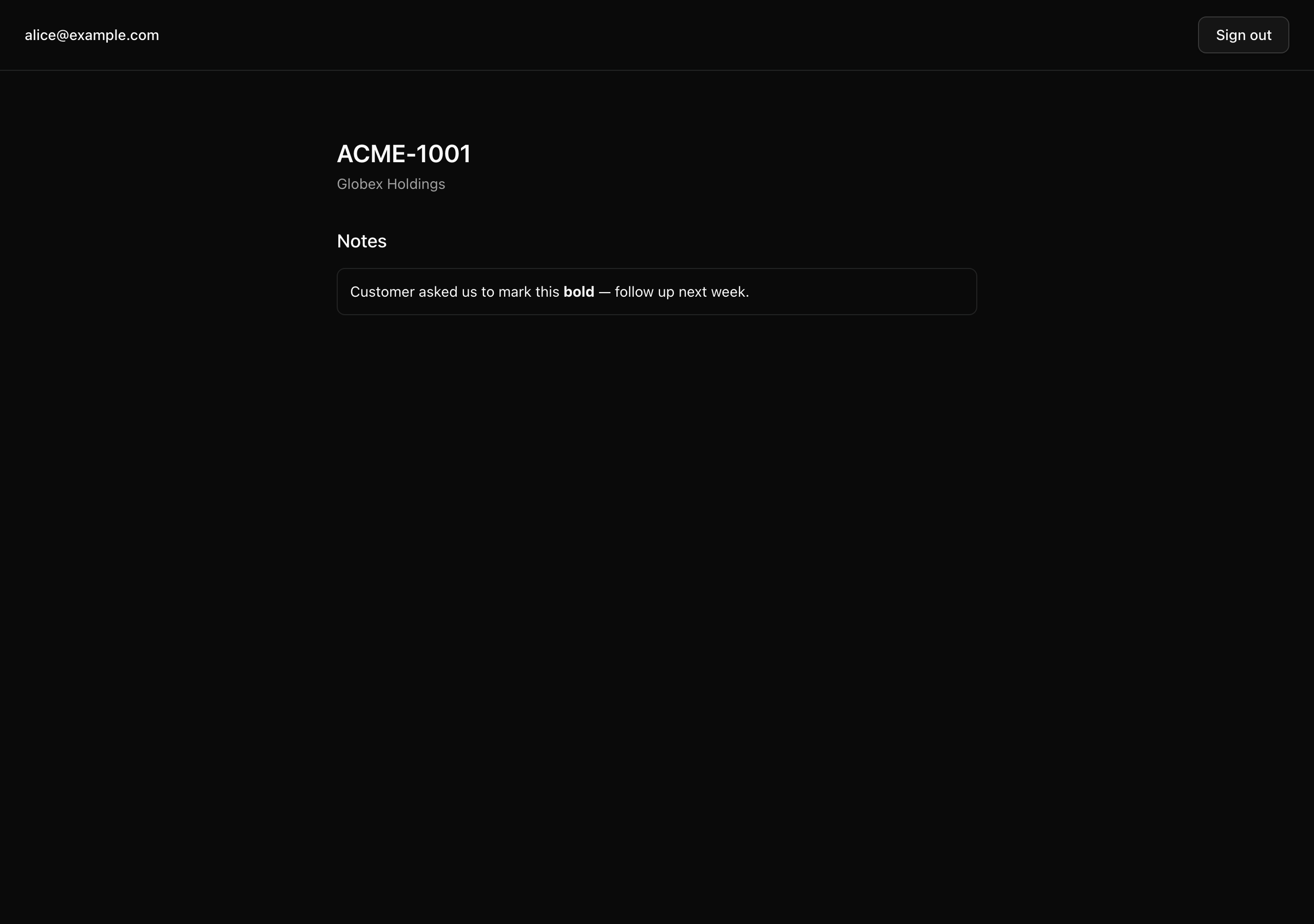
Signed in as alice@example.com, open /invoices/00000000-0000-7000-8000-ace000000001.
The note’s author typed the literal characters <b>bold</b>.
A correct app shows those characters escaped, exactly as typed; this app executed them, painting the word bold as a real bold element.
That gap between escaped text and executing markup is the whole fingerprint.
Your mission
Section titled “Your mission”Surface and document the XSS HTML sink — the user-submitted invoice-note body that renders as raw HTML — as a complete finding.
The find is one command: run rg -n "dangerouslySetInnerHTML" src and examine every hit; here there is exactly one.
A // biome-ignore directive sits on the sink line.
Read it as a tell, not a clearance: the default-on lint rule for dangerous HTML already flagged this line, and the ignore only silences the gate so the target ships green.
The tame <b> you saw is the proof of concept; the same path renders <img src=x onerror=…> or a <script> tag with identical trust.
The rule: rendered content is operator-trustworthy or it is not, and user-submitted content never is without sanitization. This is the user-vs-operator split from chapter 080 lesson 2 (“Two audiences, two messages”) meeting the header baseline from chapter 081 lesson 1 (“Security headers”). Cite both by id; do not re-explain them.
The audit is read-only, so the fix is a paragraph, not a diff, and the finding obeys the report template — the four sections (Rule, Location, Consequence, Fix) every file carries.
Write the consequence in user-visible terms: name what an attacker does and what the victim sees, with no “could potentially” hedging.
Two decisions trip up the write-up.
First, sanitizing only on the write path misses rows already in the table — notes written before the sanitizer shipped still carry their raw payload, so the honest fix sanitizes at write and read, stores the sanitized output, and backfills the history once.
Second, this sink and the missing CSP (finding 4) are two findings against one threat model — the unguarded sink here, the missing defense-in-depth layer there — and a strict CSP with a nonce does not stop an <img onerror> payload, so each is scored on its own.
Out of scope: the adjacent sink shapes the same eye should recognize — eval, new Function, a string-bodied setTimeout or setInterval, a direct el.innerHTML = assignment.
None are seeded here, so recognition is enough. Patching the target is out of scope too, as always on this pass.
dangerouslySetInnerHTML across src) and the file plus a line reference it returned.notes.tsx, untouched — the audit is read-only.biome-ignore directive as a tell that does not retire the finding.Coding time
Section titled “Coding time”Write findings/002-xss-html-sink.md against the template and the brief — run the grep, confirm the fingerprint on the running app, fill all four sections, and assign a justified severity. Then open the walkthrough below and compare.
Reference solution and walkthrough
The completed finding as it lands in the repo, walked section by section.
Location
Section titled “Location”The find is one command:
# Every HTML-injection sink in the tree.rg -n "dangerouslySetInnerHTML" srcIt returns exactly one hit, notes.tsx:37. Here is that line in context — the sink the grep pointed at:
<li key={note.id} className="rounded-md border p-3 text-sm"> <div data-testid="invoice-note-body" // biome-ignore lint/security/noDangerouslySetInnerHtml: deliberately seeded audit defect #2 (unsanitized user content) — the target ships this bug on purpose; the fix is documented in findings/002-xss-html-sink.md, not applied here. dangerouslySetInnerHTML={{ __html: note.body }} /></li>note.body is the free-text column a user typed — invoiceNotes.body in src/db/schema.ts, a plain text() with no transform on the way in, and no sanitizer anywhere on the path from the form to this __html. Record the biome-ignore on line 36 as part of the finding: Biome’s default-on lint/security/noDangerouslySetInnerHtml rule already caught this exact sink, and the directive only silenced it so biome ci — the first gate in pnpm verify — would pass. A suppressed security lint over user input is a tell, not a clearance; it does not retire the bug.
Confirm it on the running app. pnpm db:seed prints the seeded invoice path; navigate to /invoices/00000000-0000-7000-8000-ace000000001 as the seeded admin. The planted note body — Customer asked us to mark this <b>bold</b> — follow up next week. (scripts/seed.ts, SEED_NOTE) — renders the word bold as a live <b> element, not as the escaped text <b>bold</b>. The markup the user stored is executing in the reader’s page. Swap <b> for <img src=x onerror=…> or <script> and the same path runs it.
Rendered content is operator-trustworthy or it is not, and user-submitted content is never operator-trustworthy without sanitization. This is the user-message-vs-operator-record split (chapter 080, lesson 2) meeting the header baseline (chapter 081, lesson 1, where CSP is the only header that blocks live attacks, XSS first). Together they reduce to one rule: a
dangerouslySetInnerHTMLsink fed by user input is a defect on its face.
Consequence
Section titled “Consequence”Any user who can write an invoice note can store live HTML, and that HTML runs in the page of anyone who later opens the invoice — across organizations, since the column is shared free text with no per-tenant trust boundary on its content. An attacker plants a note whose body carries a script that reads the victim’s session, exfiltrates the invoice data they can see, fires authenticated mutations as them (changing billing, transferring ownership), or rewrites the page to phish their password. The victim sees an ordinary invoice; nothing on screen warns them. This is stored XSS — the worst shape, because it persists and fires for every reader without the attacker being present.
Name what the attacker does and what the victim sees. “Stored” is the word that earns the severity: a reflected XSS needs the attacker to lure the victim to a crafted URL; a stored one waits in the database and fires for everyone.
Sanitize at write and at read, and store the sanitized output, with
DOMPurifyas the named tool. The seam is the note’s write path and its render path, not the component’s call site.
// On write (the create-note Server Action): sanitize, store the safe form.const clean = DOMPurify.sanitize(input.body, { ALLOWED_TAGS: ['b', 'i', 'em', 'strong', 'a'] });await tx.insert(invoiceNotes).values({ ...input, body: clean });
// On read (notes.tsx): sanitize again before the sink.<div data-testid="invoice-note-body" dangerouslySetInnerHTML={{ __html: DOMPurify.sanitize(note.body) }} />
This is illustrative, not a diff to apply — the audit is read-only. Two decisions carry it.
Write-only is the partial answer the audit must reject, because it leaves the historical-data vector open: every note already in the table was written before the sanitizer existed and ships raw to the reader. The safe posture sanitizes at read too, plus a one-time backfill that rewrites existing rows through DOMPurify. The honest minimum allows no tags — render notes as escaped plain text — widening to an inline allow-list only if the product needs rich notes.
A strict CSP — finding 4, the missing Content-Security-Policy with a per-request nonce and 'strict-dynamic' — is the defense-in-depth layer that would neuter an injected <script> even if a sink slipped through. It is not a substitute for sanitizing this sink: CSP is the backstop, the sanitizer is the gate, and a launch needs both. Each is scored on its own.
Severity
Section titled “Severity”Severity: critical — a stored XSS sink on user-controlled content, reachable in every organization’s invoice notes, with no sanitization at the seam and no CSP backstop, so any tenant can plant script that runs in another reader’s authenticated session.
Every clause is load-bearing: stored (persists and fires for every reader), user-controlled (any tenant is an attacker), no backstop (finding 4 means nothing catches it). When all three hold, this is the highest severity on the board.
The sink’s relatives — eval, new Function, a string-bodied setTimeout/setInterval, a direct el.innerHTML = assignment — are not seeded here, so none is a separate finding; the full family lives on the audit checklist in SUMMARY.md.
The canonical reference for the threat model and the stored-vs-reflected distinction your consequence and severity lean on.
Output encoding, HTML sanitization, and CSP-as-backstop — the layered defense your Fix section names.
The sanitizer your Fix calls out by name; the README warns against sanitizing then mutating afterward.
Moment of truth
Section titled “Moment of truth”Run the lesson’s test suite:
pnpm test:lesson 3The Lesson 3 describe block should come back green: the assertions check that all four sections are filled in, the rule named and its lessons cited, the Location pinning the grep and file-and-line, and the Fix naming sanitize-at-write-and-read. A final probe confirms the seeded sink in notes.tsx is untouched.
 ✓ tests/lessons/Lesson 3.test.ts (8 tests)   ✓ Lesson 3 — Finding 002 — the XSS HTML sink
 Test Files  1 passed (1)      Tests  8 passed (8)
The tests check that the words are present, not that the finding reasons well. Tick off the parts only you can judge:
<b> text.biome-ignore directive as a tell that does not retire the finding.findings/002-xss-html-sink.md.