Modal with a real URL
In this lesson you build the “New invoice” form once and present it two ways from a single set of files.
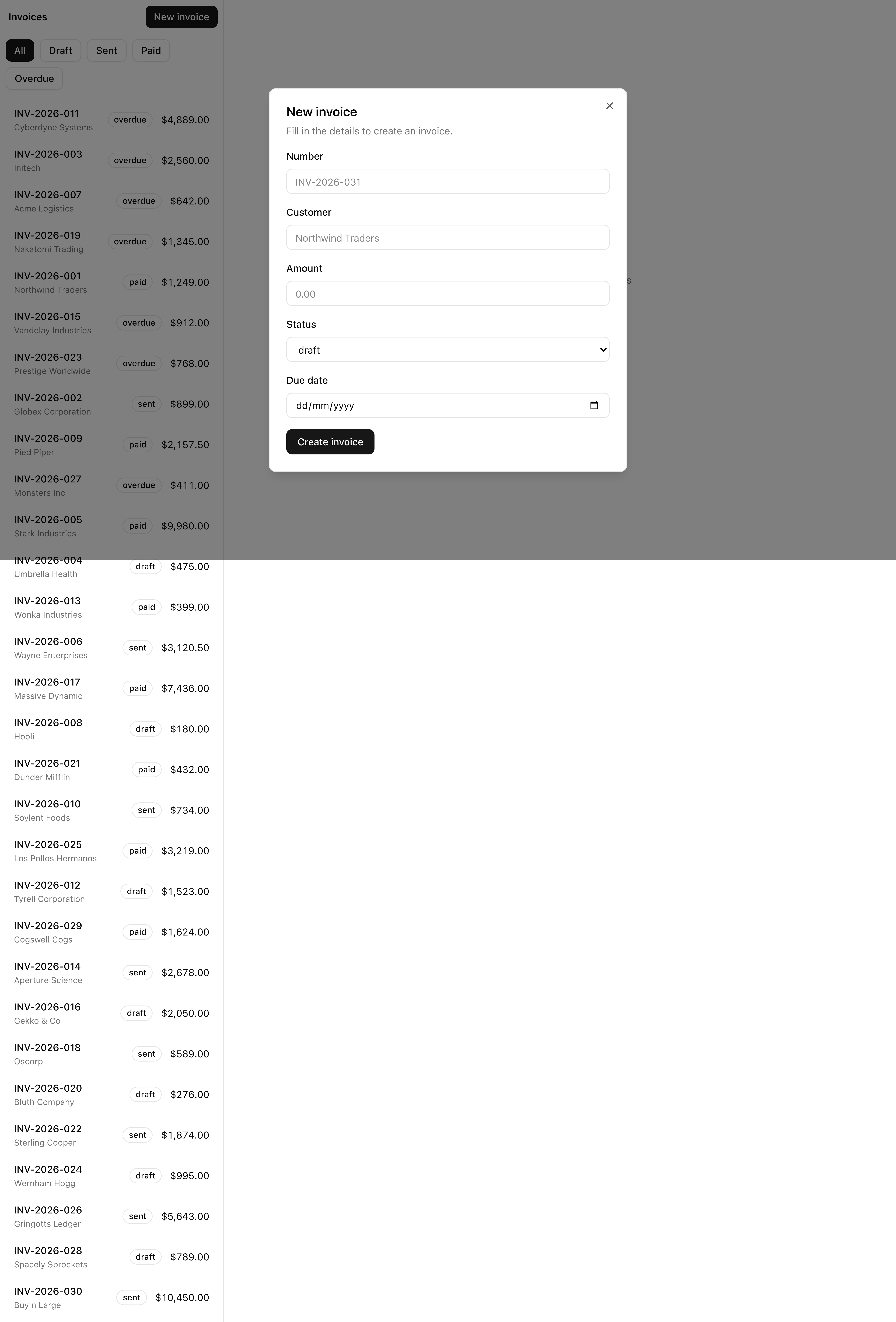
Click “New invoice” from /invoices and it opens as a modal over the list, URL at /invoices/new.
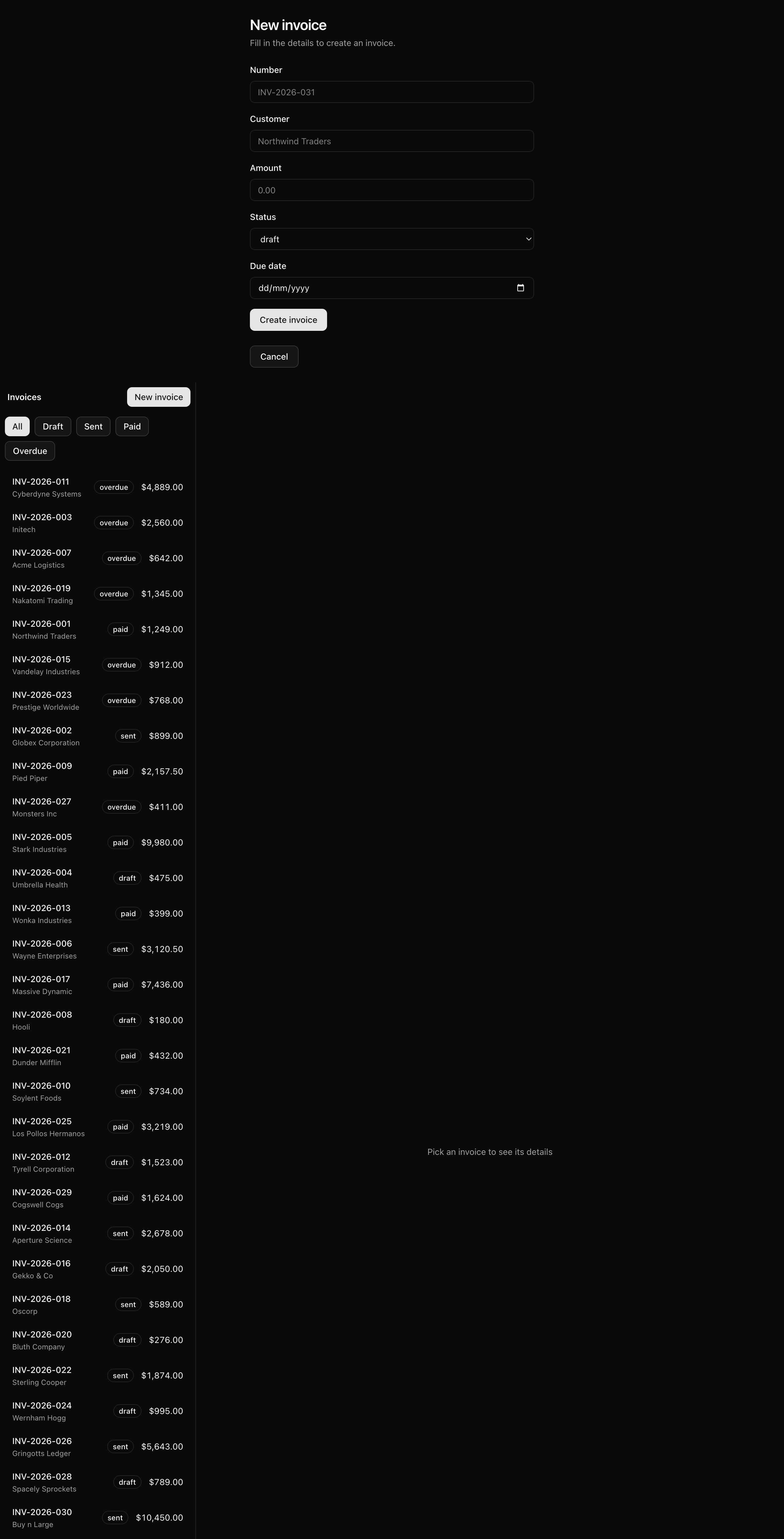
Visit that URL directly, refresh it, or Cmd+click the link, and the same form renders as a full standalone page.
One link, two presentations, decided by how the user arrived.
Your mission
Section titled “Your mission”This is the modal-with-real-URL pattern, the production default for any “form that could just as well be its own page”: new invoice, edit profile, compose message.
The instinct is a useState boolean on the list, flipped by the button.
It works until someone shares, reloads, or opens the form in a new tab, because the form’s existence lives in React state that no URL can address.
Put the URL in charge instead.
When /invoices/new decides whether the form shows, it earns shareability, refreshability, and Cmd+click for free, with no client state owning that decision.
The “New invoice” link is already in the list header from Server-rendered list and detail, pointing at /invoices/new and navigating to a placeholder full page.
You change none of that.
You add an interception: a route that catches the soft navigation to /invoices/new and renders the form as a modal over the list, leaving every other way of reaching that URL untouched.
That brings the constraint that shapes the whole solution: an intercepting route is always paired with its non-intercepting twin.
The interceptor fires only on soft navigation, a <Link> click from inside the app.
A direct visit, refresh, or Cmd+click is not a soft navigation; the browser asks the server for /invoices/new from scratch, and the App Router resolves that to the real page at new/page.tsx.
Skip the twin and all three break: a refresh 404s, a shared link opens nothing.
So build the twin first.
It is the floor every non-soft entry lands on; the interceptor is just an overlay for the one case where the user is already inside the app.
Two more decisions worth naming.
Closing the modal is a navigation, not a state toggle: it calls router.back(), which pops /invoices/new off the history stack and returns to /invoices with a clean back button.
Flipping a boolean would leave a dangling /invoices/new in the URL bar with nothing behind it.
And keep the 'use client' boundary tight: the dialog must be a client component because it reads the router and handles a close event, but the intercepting page stays a thin Server Component that composes the two pieces.
One trade is deliberate.
Refreshing while the modal is open renders the full page and drops the list underneath, because a refresh is not a soft navigation, so the twin takes over.
Preserving the modal and its underlay across a refresh would mean a parallel @modal slot, more machinery than this surface needs.
/invoices opens the form as a modal over the list, with the URL at /invoices/new./invoices/new in a fresh tab or load renders the full-page form, not the modal.Cmd+clicking the “New invoice” link opens the full page in a new tab./invoices and leaves the browser history clean.Coding time
Section titled “Coding time”Build it against the brief and Lesson 3.test.ts before opening the solution.
Three files, all currently TODO(L3) stubs: the full-page twin, the dialog wrapper, and the intercepting page.
Start with the twin.
Reference solution and walkthrough
Build them in resolution order: the twin every non-soft entry lands on, the dialog shell, then the thin overlay that joins them.
The non-intercepting twin
Section titled “The non-intercepting twin”src/app/invoices/new/page.tsx is the real page at /invoices/new, the one the server returns on a direct visit, a refresh, or a Cmd+click.
It is a plain Server Component: a centered <section> with a header, the provided <InvoiceForm />, and a “Cancel” link back to the list.
It does no routing; it just shares a URL with the interceptor.
import Link from 'next/link';
import { InvoiceForm } from '@/components/invoice-form';import { Button } from '@/components/ui/button';
const NewPage = () => (  <section className="mx-auto flex w-full max-w-lg flex-col gap-6 p-6">    <header className="flex flex-col gap-1">      <h1 className="text-2xl font-semibold tracking-tight">New invoice</h1>      <p className="text-sm text-muted-foreground">        Fill in the details to create an invoice.      </p>    </header>
    <InvoiceForm />
    <Button asChild variant="outline" className="self-start">      <Link href="/invoices">Cancel</Link>    </Button>  </section>);
export default NewPage;
Cancel links to /invoices rather than calling router.back() on purpose: this page can be the first thing a user lands on, from a shared link or bookmark, where there is no history to go back to.
A plain link to the list is a safe destination however they arrived.
Button asChild hands the button’s styling to the <Link>, giving you a styled anchor and a real navigation in one element.
The dialog wrapper
Section titled “The dialog wrapper”src/components/new-invoice-dialog.tsx is the only file here that needs 'use client': it reads the router and handles a close event, both client concerns, so the boundary lives here and nowhere else.
It wraps the provided shadcn <Dialog> and renders whatever children you pass inside the dialog content.
'use client';
import { useRouter } from 'next/navigation';import type { ReactNode } from 'react';
import {  Dialog,  DialogContent,  DialogDescription,  DialogHeader,  DialogTitle,} from '@/components/ui/dialog';
export const NewInvoiceDialog = ({ children }: { children: ReactNode }) => {  const router = useRouter();
  return (    <Dialog      open      onOpenChange={(open) => {        if (!open) {          router.back();        }      }}    >      <DialogContent data-testid="new-invoice-dialog">        <DialogHeader>          <DialogTitle>New invoice</DialogTitle>          <DialogDescription>            Fill in the details to create an invoice.          </DialogDescription>        </DialogHeader>        {children}      </DialogContent>    </Dialog>  );};
The dialog is forced open with no <DialogTrigger> and no useState. The route’s existence is the open signal: if this component is mounted, the user is at /invoices/new, so the dialog is open by definition. Nothing to toggle.
'use client';
import { useRouter } from 'next/navigation';import type { ReactNode } from 'react';
import {  Dialog,  DialogContent,  DialogDescription,  DialogHeader,  DialogTitle,} from '@/components/ui/dialog';
export const NewInvoiceDialog = ({ children }: { children: ReactNode }) => {  const router = useRouter();
  return (    <Dialog      open      onOpenChange={(open) => {        if (!open) {          router.back();        }      }}    >      <DialogContent data-testid="new-invoice-dialog">        <DialogHeader>          <DialogTitle>New invoice</DialogTitle>          <DialogDescription>            Fill in the details to create an invoice.          </DialogDescription>        </DialogHeader>        {children}      </DialogContent>    </Dialog>  );};
Closing is a navigation. Radix fires onOpenChange(false) on Escape, backdrop click, or the close button; the if (!open) guard turns only the close into a router.back(), popping the /invoices/new history entry. Without the guard you would navigate on open too.
One detail you rely on without seeing it: <DialogContent> portals its markup to the end of <body>, outside this component’s place in the tree.
That lets the modal sit above the entire list wherever it is nested, escaping any ancestor that clips overflow or pins a stacking context, the trap you took apart in Stacking context and z-index.
The intercepting page
Section titled “The intercepting page”src/app/invoices/(.)new/page.tsx is the interceptor.
The (.) prefix on the folder tells the App Router to catch soft navigations to a new segment at this level and render this instead.
It only composes the dialog around the form, so it stays a thin Server Component with no 'use client' of its own; the client boundary is already paid for, once, inside NewInvoiceDialog.
import { InvoiceForm } from '@/components/invoice-form';import { NewInvoiceDialog } from '@/components/new-invoice-dialog';
const InterceptedNewPage = () => (  <NewInvoiceDialog>    <InvoiceForm />  </NewInvoiceDialog>);
export default InterceptedNewPage;
The same <InvoiceForm /> appears in both the twin and the interceptor.
That is the payoff of keeping the form render-only: one form, two presentations, no duplication.
The only difference between the routes is the frame around it, a full-page <section> versus a <Dialog>.
Three short files, and every behavior in the brief falls out of the shape, not extra code.
Refresh and Cmd+click rendering the full page (requirements 3 and 4) are not handlers you wrote; they are what the twin does by existing.
Official reference for the (.) (..) convention and the soft- vs hard-navigation behavior you rely on here.
The @modal slot variant — the heavier shape this lesson deliberately skips, worth seeing once.
The Dialog primitive behind NewInvoiceDialog, including its onOpenChange and portal behavior.
Moment of truth
Section titled “Moment of truth”Run the lesson’s test suite:
pnpm test:lesson 3Six tests should pass:
 ✓ tests/lessons/Lesson 3.test.ts (6)   ✓ the intercepting route opens the New invoice form as a modal (2)   ✓ a direct visit renders the full-page form, not the modal (2)   ✓ closing the modal navigates back and leaves history clean (2)
 Test Files  1 passed (1)      Tests  6 passed (6)
Then run the structural gate that CI runs on every PR — Biome, type generation, tsc, and a production build:
pnpm verifyThese tests stub the router and walk the rendered tree, proving the composition but not a real browser.
The rest is browser-and-multi-tab behavior, so confirm it by hand: start the dev server with pnpm dev, open /invoices, and tick each item off.
/invoices opens the modal with the list visible underneath, URL at /invoices/new./invoices/new into a fresh tab renders the full page, no list.Cmd+click (or Ctrl+click) on “New invoice” opens the full page in a new tab./invoices and the back button does not bounce you back to /invoices/new.