Lesson 2 — The verified-domain ceremony
Set up Resend on your own domain and get the transactional subdomain to Verified, with SPF, DKIM, and DMARC all passing. Everything after it depends on this gate.
Almost every web app sends the same first message: a welcome email the moment someone signs up. It is the most boring transactional surface in the product, and the most load-bearing. If it lands in spam, the user never confirms their address, and every downstream flow stalls.
This project ships that send end to end: one Server Action calling one template through one wrapper.
Building it pours the structural floor every later send in the course reuses, the sendEmail wrapper, suppression discipline, and Result shape.
Once that floor is poured, adding a send is “write the template, write the action, call sendEmail.”
Checking the suppression list, setting the idempotency key, defaulting the from address: those reflexes live in the wrapper, not in your memory.
This project introduces no new primitives; the email and Server Actions chapters covered them all. It assembles them into one production send path:
src/lib/email.ts) as the single chokepoint every outgoing email passes through.Result instead of throwing.A single send walks a straight line through the chapter’s files. Here is the shape; each seam gets its full explanation in the lesson that opens it.
recipientEmail and firstName to the Server Action through a native <form action={…}> — no fetch, no /api/* route.sendWelcomeEmail Server Action runs five seams in order: parse the FormData with Zod, read the active user from the auth stub, compute the idempotency key, build a placeholder verifyUrl, and call the wrapper.src/lib/email.ts is the chokepoint: it normalizes the recipient, reads the suppression list, and only then calls the Resend SDK, defaulting from and reply_to from validated env and returning a Result.Two facts sit off that line.
The props-only <WelcomeEmail /> template renders twice: once for the real send, and once into the inspector’s preview iframe so you can see the email without leaving the app.
And src/env.ts validates the five new environment entries at build and boot, so a missing key fails the server up front rather than at the first send.
This project carries forward the toolchain and data layer from earlier chapters; the new work is five stubs.
The bold files are those stubs, the whole chapter, and each carries a TODO(L<n>) comment naming the lesson that completes it.
Everything else is provided: read the one-line note on a file when a lesson opens it.
@t3-oss/env-nextjs boundary — add the five email + app vars TODO L3db client (postgres-js), snake-case casingemail_suppressions table + suppression_reason enumtimestamps column groupsendEmail wrapper with the suppression read TODO L3isSuppressed(email, { kind }), normalize-on-read TODO L3Result<T>, ok(), err(), isUniqueViolationgetActiveContext() resolving the seeded org + usercn() class-merge helperWelcomeEmail template + its PreviewProps TODO L4/ to /inspector/send-welcome<Providers> + <Toaster />next-themes ThemeProvideruseFormStatus + the shadcn <Button>Result.error.fieldErrors[name]sendWelcomeEmail Server Action — .tsx, it constructs JSX TODO L4useActionState, three result cardspostgres:18 service on :5432.envThe leading underscore on _components/ opts the folder out of App Router routing, so it is a shared home for route components, not a URL segment.
A few provided pieces are worth a line, since lessons lean on them without redefining them:
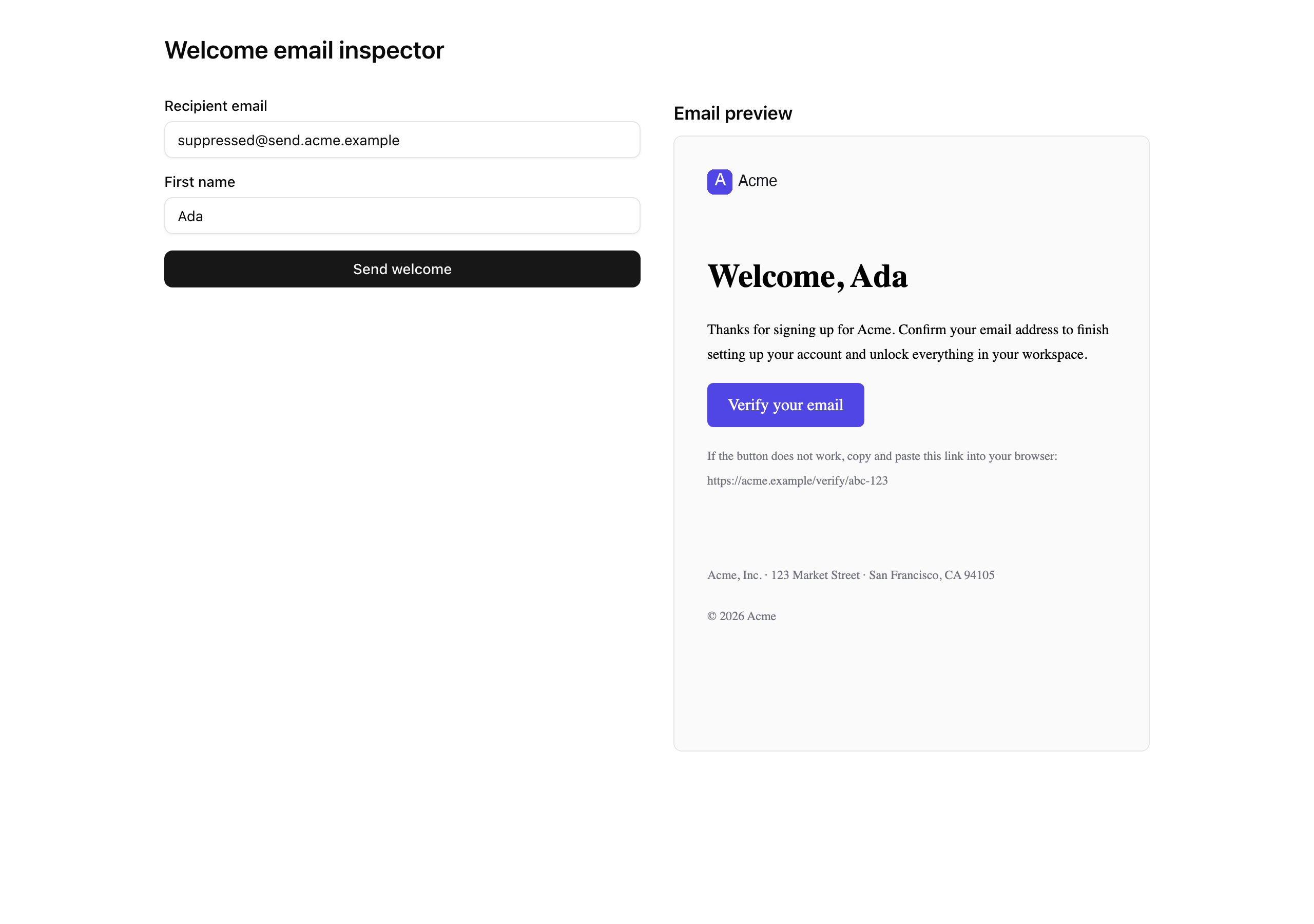
page.tsx) renders a live preview of the template beside the client form. The form (send-welcome-form.tsx) posts recipientEmail and firstName to the action you write, then renders one of three cards from the Result it returns: a success card with the Resend send ID, a suppression card when the code is forbidden, and a generic error card otherwise. Read both when you wire the action.email-layout.tsx is the brand chrome (header, footer, all literal constants, no env reads), and email-tailwind-config.ts is the shared config its <Tailwind> consumes. Read both when you write the template.result.ts, auth-stub.ts, db/*, and seed.ts are carry-ins. The seed inserts the org, the user, and one pre-suppressed row; getActiveContext() resolves that org (slug acme) and user (email ada@acme.test) by natural key. Run the seed before the action can read an identity.Three lessons turn those five stubs into a verified send, each ending on a state you can confirm in the Resend dashboard, a query, or your own inbox.
Lesson 2 — The verified-domain ceremony
Set up Resend on your own domain and get the transactional subdomain to Verified, with SPF, DKIM, and DMARC all passing. Everything after it depends on this gate.
Lesson 3 — The suppression-gated send wrapper
Add the email env entries, write isSuppressed, and build src/lib/email.ts as the single send seam that checks the suppression list and requires an idempotency key.
Lesson 4 — The welcome email send path
Write the <WelcomeEmail /> template and the sendWelcomeEmail Server Action so the inspector button delivers a rendered email end-to-end.
This chapter needs one thing the earlier projects did not: a real domain.
Run these in order.
The lesson is done when both dev servers boot and /inspector/send-welcome renders the form beside the preview iframe.
The email values are not validated until Lesson 3, so you can finish setup before you have a Resend key.
Get the starter codebase from the project repository, under Chapter 050/start/:
pnpm dlx degit terencicp/react-saas-course-projects/Chapter-050/start welcome-emailcd welcome-emaildegit copies that folder into a fresh welcome-email directory with no git history, and pnpm dlx runs it without installing it. Every chapter has a start/ and a solution/ sibling, so you can diff your work against the reference.
Copy the example env file:
cp .env.example .envThe db:* scripts load .env through dotenv-cli; next reads the environment directly. The database variables already match the local Docker Postgres below, so they work as-is. The five email and app variables ship as placeholders, listed below; you fill them in over the next two lessons.
Bring up the database:
docker compose up -dThis starts the postgres:18 service on port 5432 in the background. The first run pulls the image.
Install the dependencies:
pnpm installThe repo is pnpm-only: a preinstall hook blocks other package managers, and the versions are pinned.
Apply the init migration:
pnpm db:migrateThe one migration creates the organizations, users, and email_suppressions tables, plus the suppression_reason enum.
Before you seed, open scripts/seed.ts and replace the placeholder suppressed address (suppressed@send.acme.example) with suppressed@send.<your-domain>; the README flags this under “Seed placeholder”. Then seed:
pnpm db:seedThis inserts the org, the user, and one pre-suppressed row. That address needs no real mailbox: the suppression check short-circuits at the application layer before Resend would attempt delivery.
Start both servers side by side and leave them running for the rest of the chapter:
pnpm devpnpm emailpnpm dev is the Next app at http://localhost:3000. pnpm email is the React Email preview at http://localhost:3001; the script bakes in --dir ./src/emails --port 3001 so it never clashes with the dev server. You fire real sends from the dev inspector and iterate on the template in the preview server.
The .env file carries eight variables: three from the data-layer project, five new to this chapter.
| Variable | Purpose | Where the value comes from |
|---|---|---|
DATABASE_URL | Pooled connection string the app’s db client uses. | The Docker Postgres; the .env.example default works locally. |
DATABASE_URL_UNPOOLED | Unpooled URL Drizzle Kit uses to migrate and seed. | Same value locally; the split is staged for the Neon swap later. |
SEED | Seeds the deterministic PRNG. | The .env.example default of 1. |
RESEND_API_KEY | Authenticates the Resend SDK. Server-only. | The Resend dashboard, in the next lesson. |
EMAIL_FROM | The verified sender, a full Display Name <local-part@send.domain.tld> header. | Your verified domain, set in Lesson 3. |
EMAIL_REPLY_TO | The monitored mailbox replies land in, instead of the noreply@ sender. | A real address you read, set in Lesson 3. |
NEXT_PUBLIC_APP_NAME | Read by the action for the email subject. | Your app’s name, set in Lesson 3. |
NEXT_PUBLIC_APP_URL | Read by the action to build the placeholder verifyUrl. | http://localhost:3000 locally, set in Lesson 3. |
The src/env.ts schema does not read the email values until Lesson 3, so the placeholders are fine for now.
Once pnpm dev serves /inspector/send-welcome with the form beside the preview iframe, the project’s floor is in place.
The iframe shows a skeleton until you write the template in Lesson 4, and clicking “Send welcome” returns Not implemented because sendWelcomeEmail is still a stub; that error is the intended starting point, not a problem to fix.
Next, you verify your own domain.