Independent streaming per slot
The surface works: the list filters server-side, the detail loads, the modal opens on soft navigation and falls back to a full page on a direct visit. But you have only seen it on a fast connection, where everything resolves before you can blink. Your users, on hotel Wi-Fi or a train, will not. While the detail’s data arrives, the slot flashes the placeholder text “Loading detail…” that the starter left for you.
This last lesson makes the surface feel right under a real network.
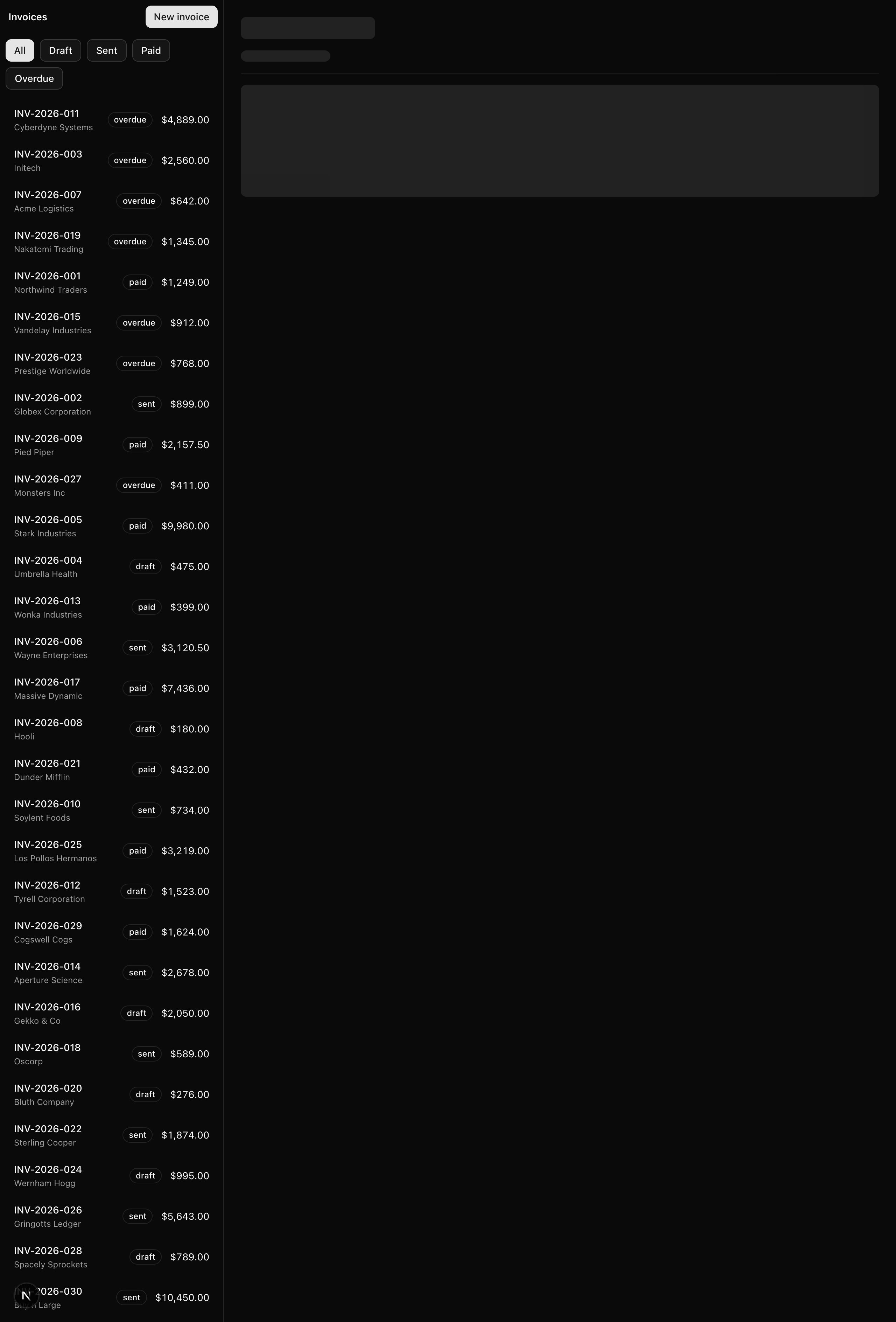
The goal: under a throttled connection, opening or switching an invoice keeps the list exactly where it is while the detail panel streams from a skeleton to its content.
The list’s data has already resolved, so it stays put; only the detail streams, gated by the artificial 600 ms delay on getInvoice from when you wired the slots.
Your mission
Section titled “Your mission”Each slot should get its own segment-level loading UI, owned by the file convention rather than a hand-written tag.
You will build two skeletons over the shadcn <Skeleton> primitive — a row-count one for the list, a header-plus-body one for the detail — then drop a loading.tsx into each slot that renders the matching skeleton.
That placement is the whole point: because each slot owns its own loading file, each gets its own Suspense boundary, and the two regions stream independently with no extra wiring.
A single shared boundary at the segment would gate both regions on the slower one, leaving the list behind the detail’s 600 ms delay even though its data is already in hand.
Two traps catch inexperienced engineers, and both have a cheap defence.
The first is believing you are streaming when you are actually waterfalling; fast localhost hides every sequencing mistake, so throttle the network in DevTools and watch.
The second is a skeleton that does not match its content, so the layout jumps the moment real data arrives; shape each skeleton to mirror the element it stands in for and the swap becomes invisible.
Streaming a slow sub-section inside a page — a “related invoices” panel below the detail, say — would earn its own explicit <Suspense> tag rather than a loading.tsx; you will see where that reach lives but not build it.
/invoices to /invoices/inv_005 streams the detail slot while the list stays mounted./invoices/inv_005 to /invoices/inv_009 re-streams only the detail slot.Coding time
Section titled “Coding time”Implement the three files against the brief and the test suite, then open the walkthrough to compare.
Reference solution and walkthrough
Start with the skeletons, since the loading.tsx files are one-liners that render them.
Both live in components/skeletons.tsx and build on the shadcn <Skeleton> primitive you copied in earlier: the animate-pulse rounded-md block you reach for over a spinner.
import { Skeleton } from '@/components/ui/skeleton';
const ROWS = ['r1', 'r2', 'r3', 'r4', 'r5', 'r6'] as const;
export const ListSkeleton = () => (  <div data-testid="list-skeleton" className="flex flex-col gap-1 p-2">    {ROWS.map((row) => (      <Skeleton key={row} className="h-12 w-full" />    ))}  </div>);
export const DetailSkeleton = () => (  <div data-testid="detail-skeleton" className="flex flex-col gap-4 p-6">    <Skeleton className="h-8 w-48" />    <Skeleton className="h-4 w-32" />    <Skeleton className="h-px w-full" />    <Skeleton className="h-40 w-full" />  </div>);
ListSkeleton drives its rows off a ROWS constant of stable string ids, the same pattern the provided invoices/loading.tsx uses, so the keys hold up if the list ever becomes dynamic.
Six rows is deliberate: it fills the visible height so the placeholder reads as “a list is coming,” not “one item is coming.”
DetailSkeleton is where the “mirror the content” rule earns its place, and it is the one requirement the tests cannot reach.
Each block’s height and width stands in for a specific element of the real InvoiceDetail, so when the 600 ms delay resolves and the article replaces the skeleton, nothing on screen moves:
<div data-testid="detail-skeleton" className="flex flex-col gap-4 p-6"> <Skeleton className="h-8 w-48" /> {/* → number heading */} <Skeleton className="h-4 w-32" /> {/* → customer subtitle */} <Skeleton className="h-px w-full" />{/* → <Separator /> */} <Skeleton className="h-40 w-full" />{/* → the details <dl> */}</div>Four blocks, one per element. The h-8 heading bar stands in for the text-2xl number h1, the h-4 bar for the customer subtitle, the h-px bar matches the <Separator />’s exact height, and the h-40 block covers the status/amount/due-date dl.
<article data-testid="invoice-detail" className="flex flex-col gap-4 p-6">  <header className="flex flex-col gap-1">    <h1 className="text-2xl font-semibold tracking-tight">      {invoice.number}    </h1>    <p className="text-sm text-muted-foreground">{invoice.customer}</p>  </header>
  <Separator />
  <dl className="grid grid-cols-[8rem_1fr] gap-y-3 text-sm">    {/* status, amount, due date rows */}  </dl></article>
The content the skeleton mirrors. Note the shared flex flex-col gap-4 p-6 wrapper: same vertical rhythm as the skeleton, so when the 600 ms delay resolves and the article replaces the placeholder, nothing on screen moves.
Now the two loading files. Each is a single default export rendering its skeleton, small enough to look like it does nothing.
import { ListSkeleton } from '@/components/skeletons';
const ListLoading = () => <ListSkeleton />;
export default ListLoading;import { DetailSkeleton } from '@/components/skeletons';
// A slow related panel inside the detail would get its own explicit <Suspense> (Ch 031); this loading.tsx is the whole-slot seam.const DetailLoading = () => <DetailSkeleton />;
export default DetailLoading;There is no <Suspense> tag anywhere in this lesson, yet both slots stream, because the loading.tsx file convention is the Suspense boundary.
Place a loading.tsx in a segment and the App Router wraps that segment’s page.tsx in a <Suspense> whose fallback is your loading file.
The wiring is the file’s location, not a wrapper you write.
Each slot is its own segment with its own loading.tsx, so each gets its own boundary and the framework streams them in parallel.
Carry one division of labour out of this chapter: loading.tsx is the segment-level skeleton owner, and an explicit <Suspense> is the sub-segment one.
Reach for the file convention first; it is the default, it is free, and it stays put as you move code around.
Reach for an explicit <Suspense> only when you need a boundary inside a segment, around one slow piece of a page while the rest renders immediately.
The comment in @detail/[id]/loading.tsx marks exactly that reach: a slow “related invoices” panel below the detail would get its own <Suspense> so it streams while the invoice shows right away.
The exact convention you drop into each slot, and why it is a Suspense boundary.
Why slots stream independently, each with its own loading state.
loading.js vs an explicit <Suspense>, plus the Network-tab check behind your throttle test.
The pulse primitive both ListSkeleton and DetailSkeleton build on.
Moment of truth
Section titled “Moment of truth”Run the lesson’s test suite:
pnpm test:lesson 4It renders each skeleton and checks its container’s data-testid and pulse-block count: six rows for ListSkeleton, four for DetailSkeleton.
A clean run looks like this:
 ✓ tests/lessons/Lesson 4.test.ts (4 tests) 12ms   ✓ List slot shows a six-row ListSkeleton placeholder     ✓ renders the list-skeleton container so the loading slot is identifiable     ✓ draws six placeholder rows that mirror the invoice list   ✓ Detail slot shows a DetailSkeleton that mirrors the invoice detail     ✓ renders the detail-skeleton container so the loading slot is identifiable     ✓ draws four placeholder blocks mirroring heading, subtitle, separator and body
 Test Files  1 passed (1)      Tests  4 passed (4)
Then run the full project gate, which CI runs on every push:
pnpm verifyThat is Biome’s CI check, next typegen, tsc --noEmit, and a production build, all clean.
No TODO(L4) markers should remain.
The tests confirm the skeletons’ shape, but independent streaming and a shift-free swap only show up on a real connection. Open DevTools, go to the Network tab, set throttling to Slow 3G, then walk this list by hand:
DetailSkeleton, then the content, while the list stays mounted the whole time.That last check is the proof the surface degrades gracefully: with no client JavaScript, the server still renders both slots and the modal link becomes a plain navigation.