Scoped reads and the view tabs
Last lesson you wired the view tabs to the URL: clicking Active, Archived, or All rewrites ?view=… and re-runs the server read.
But every tab still shows the same rows.
scopedInvoices(orgId) hands callers three views — active(), archived(), and includingDeleted() — but all three return the same org-filtered list.
They are tenant-scoped, not lifecycle-aware, so the seeded archived and soft-deleted rows leak into every tab.
This lesson routes the read on view so each tab returns its own rows, and moves the RBAC gate into the data layer.
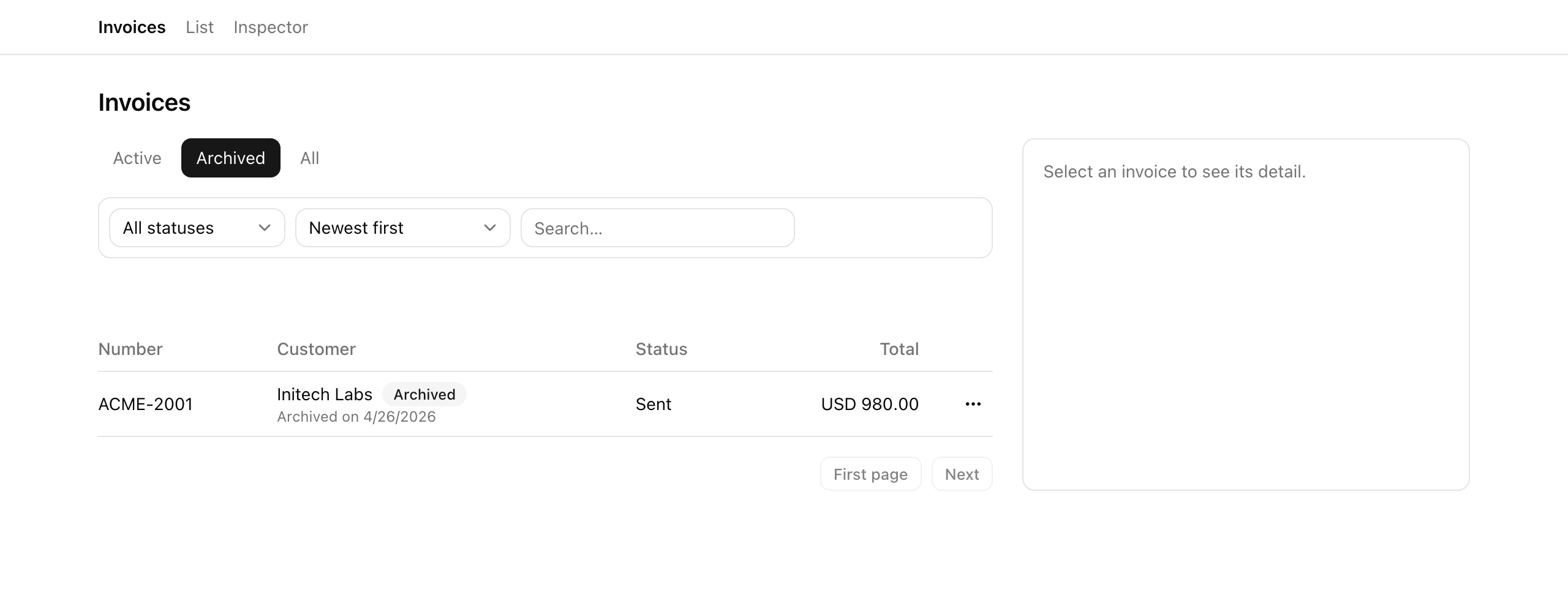
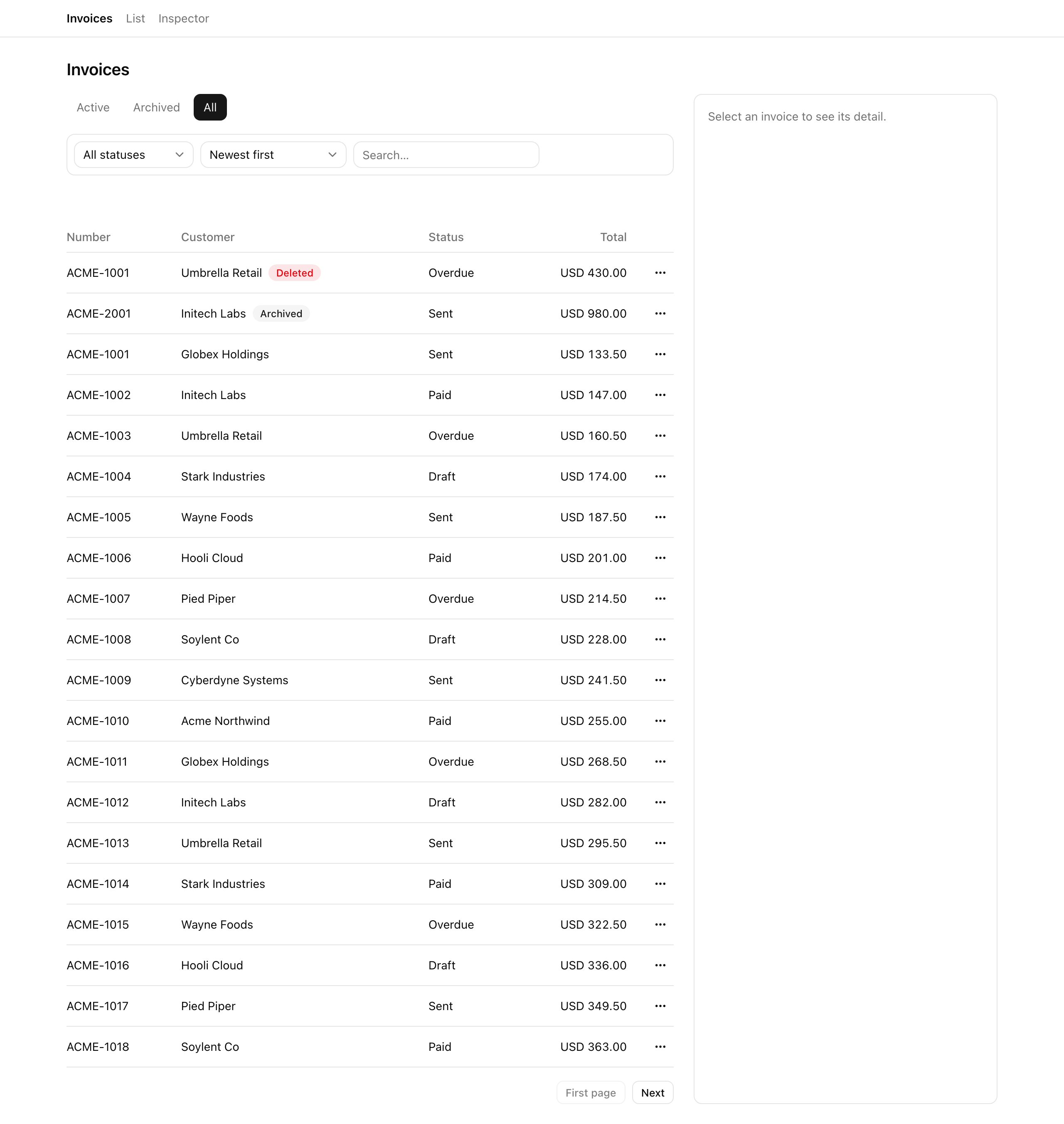
When you finish, Active hides archived and deleted rows, Archived shows the archived row, and the admin-only All tab shows every lifecycle state.
A member who hand-types ?view=all is served active rows, refused at the query, not at a hidden button.
Your mission
Section titled “Your mission”The starter gives you a fluent in-memory builder — scopedInvoices(orgId) returns chainable query objects with three views — plus two exported predicates, activeFilter and archivedFilter.
Swap the right predicate into each view, then route listInvoices and getInvoiceDetail onto the view the view param asks for.
What matters is where the RBAC gate lives.
The all view is admin-only, and hiding the All tab does not enforce that: a member can hand-type ?view=all and walk straight into the deleted rows.
The gate belongs in the read — a resolveView(view, role) step that collapses all to active for non-admins, so the query refuses the request before it touches includingDeleted().
The tenant boundary works the same way.
The org filter stays spelled out inline, inv.orgId === orgId, inside the helper.
Routing every sanctioned read through it — the in-memory analogue of a Drizzle .$dynamic() builder against a real database — makes a forgotten org filter structurally impossible, and a bare store.invoices read outside the helper a code-review red flag.
Archive, restore, and soft-delete — the actions that create those rows — are next lesson; here you lean on the store’s seeded rows, one pre-archived and one pre-soft-deleted, proving the views read them correctly.
?view=all serves active rows — the refusal happens at the read in resolveView, not at the hidden tab.Coding time
Section titled “Coding time”Make the helper’s three views honest, route listInvoices and getInvoiceDetail on view, gate the All tab, add the lifecycle badges, then run the tests.
Open the walkthrough once you have made your attempt.
Reference solution and walkthrough
The three honest views
Section titled “The three honest views”All the work is in scoped-query.ts, and only one thing changes: the predicate each view applies before returning its query.
active() excludes archived and deleted rows, archived() keeps archived-but-not-deleted, and includingDeleted() keeps the whole org slice.
export const scopedInvoices = (orgId: string) => {  const inOrg = (): Invoice[] => invoices.filter((inv) => inv.orgId === orgId);
  // Naive baseline: all three views return the same org list (no lifecycle  // split). The student makes them honest in L3.  return {    active: () => makeQuery(inOrg(), false),    archived: () => makeQuery(inOrg(), false),    includingDeleted: () => makeQuery(inOrg(), false),  };};
Every view lies. All three return the same org-filtered list, so the seeded archived and soft-deleted rows leak straight into Active.
export const scopedInvoices = (orgId: string) => {  const inOrg = (): Invoice[] => invoices.filter((inv) => inv.orgId === orgId);
  return {    active: () => makeQuery(inOrg().filter(activeFilter), false),    archived: () => makeQuery(inOrg().filter(archivedFilter), false),    includingDeleted: () => makeQuery(inOrg(), false),  };};
Honest views. Each view pre-filters the org slice by its lifecycle predicate before the caller composes status, sort, and cursor onto it. Only the three return values changed.
The inspector’s row-count panels import activeFilter and archivedFilter from this same file for their “active / archived / deleted” tallies.
So the list and the counts read through one predicate each and cannot disagree: if a count ever drifts from the rows, the predicate moved, not one of two copies.
Routing the list read on the view
Section titled “Routing the list read on the view”listInvoices now picks a base query from the view param, after one pure function, resolveView, runs first:
export const listInvoices = ({  orgId,  view: _view,  status,  sort,  q,  cursor,  role: _role,  pageSize = 20,}: ListInvoicesArgs): ListInvoicesResult => {  const base = scopedInvoices(orgId).active();
  // ...status / search / sort / cursor compose on `base`, then page it.
Ignores view and role. The starter always reads active(), with both params renamed _view / _role to mark them unused. Every tab returns the active list and ?view=all is never gated.
// The read-layer RBAC gate: `all` collapses to `active` for non-admins, so a// member hand-typing `?view=all` is served active rows regardless of the URL.const resolveView = (view: InvoiceView, role: Role): InvoiceView =>  view === 'all' && role !== 'admin' ? 'active' : view;
export const listInvoices = ({  orgId,  view,  status,  sort,  q,  cursor,  role,  pageSize = 20,}: ListInvoicesArgs): ListInvoicesResult => {  const scoped = scopedInvoices(orgId);  const resolved = resolveView(view, role);  const base =    resolved === 'archived'      ? scoped.archived()      : resolved === 'all'        ? scoped.includingDeleted()        : scoped.active();
// ...status / search / sort / cursor compose on `base`, then page it.resolveView, then route. resolveView collapses all to active for non-admins; base is then chosen from the resolved view, and status, search, sort, and cursor compose on it exactly as before.
The compose-and-page tail — the status filter, the q substring match against customerName or number, the sort, and cursorAfter — is untouched.
It runs on base and does not care which view produced it, which is the point of returning a chainable builder.
Routing the detail read
Section titled “Routing the detail read”getInvoiceDetail applies the same idea to a single row, but with a deliberate lookup order: archived() first, then active(), then — only for an admin — includingDeleted():
export const getInvoiceDetail = ({ orgId, id, role,}: GetInvoiceDetailArgs): Invoice | null => { // Active + archived rows load for everyone (archived so the row can be // restored); a soft-deleted row only loads for an admin. const scoped = scopedInvoices(orgId); const live = scoped.archived().find((inv) => inv.id === id); if (live) { return live; } const active = scoped.active().find((inv) => inv.id === id); if (active) { return active; } if (role === 'admin') { return scoped.includingDeleted().find((inv) => inv.id === id) ?? null; } return null;};An archived invoice’s detail page must load for everyone, since that is how a member reaches the row to restore it next lesson; check only active() and the row would 404 with no way back.
The soft-deleted fall-through is admin-gated for the reverse reason: a member who hand-types a deleted row’s URL gets null and a not-found page.
Hiding the All tab
Section titled “Hiding the All tab”The gate already lives in the read, so hiding the All tab is just the cosmetic finish.
In view-tabs.tsx the All entry is spread into the tabs array conditionally:
// The `all` tab is cosmetic on top of the read-layer RBAC gate: hide it from // non-admins (the read already serves them active rows if they hand-type it). const tabs: { value: ListParsed['view']; label: string }[] = [ { value: 'active', label: 'Active' }, { value: 'archived', label: 'Archived' }, ...(role === 'admin' ? [{ value: 'all' as const, label: 'All' }] : []), ];You now read the role the starter left as _role.
The as const keeps value typed as the literal 'all' rather than widening to string, so the array still satisfies ListParsed['view'].
The lifecycle badges
Section titled “The lifecycle badges”Finally, the table shows each row’s lifecycle state.
You add a “Deleted” badge when row.deletedAt is set, an “Archived” badge when the row is archived-but-not-deleted, and — only in the Archived view — an “Archived on …” date line.
This touches the customer cell only; the row’s action menu stays “Edit” until next lesson:
<td className="py-2"> <div className="flex flex-wrap items-center gap-2"> <span>{row.customerName}</span> {row.deletedAt ? ( <Badge data-testid="badge-deleted" variant="destructive"> Deleted </Badge> ) : null} {row.archivedAt && !row.deletedAt ? ( <Badge data-testid="badge-archived" variant="secondary"> Archived </Badge> ) : null} </div> {view === 'archived' && row.archivedAt ? ( <div data-testid="archived-on" className="text-xs text-muted-foreground" > Archived on {new Date(row.archivedAt).toLocaleDateString()} </div> ) : null} </td>The !row.deletedAt guard stops a soft-deleted row from wearing both badges: a deleted invoice may still have an archivedAt, but “Deleted” is the state that matters, so it wins.
The “Archived on …” line is scoped to view === 'archived' because the date only helps where the user is looking at archived rows; in All it would be noise.
Moment of truth
Section titled “Moment of truth”Run the lesson’s test suite.
pnpm test:lesson 3The tests run the query functions against the seeded store, not the rendered UI. On success:
✓ Requirement 1 — the Active and Archived views return distinct, honest row sets✓ Requirement 2 — an admin All view returns every org row including the soft-deleted one✓ Requirement 3 — view=all is refused to a member at the read✓ Requirement 4 — getInvoiceDetail loads lifecycle rows per role✓ Scoped helper — the three views are honestly distinctConfirm the UI by hand at /invoices, using /inspector to switch identities and reseed:
org-acme:admin, switch to All; the seeded soft-deleted row appears with a red “Deleted” badge. Open its detail page (it loads for an admin), and confirm an archived invoice’s detail page also loads.org-acme:member; confirm the All tab is absent from the tabs. Hand-type ?view=all into the URL and confirm the list still returns active rows.