Lesson 2 — Type-safe environment variables
Wires the project to a validated env boundary so a missing DATABASE_URL fails the build instead of crashing the first request after deploy.
Almost every SaaS product is, underneath the marketing, the same relational surface: a workspace that belongs to an organization, the records inside it, the people who can see them, and the rules about who owns what. Invoices, customers, projects, deals, tickets — swap the nouns and the shape barely moves. This project builds the canonical version of that surface for an invoicing app, and it builds only the data layer: six tables (organizations, users, org_members, customers, invoices, invoice_lines), their relations, the one migration that creates them, a deterministic seed that fills them, and the two reads every later unit in the course bends back to — a cursor-paginated, org-scoped invoice list with a status filter, and a single-round-trip “one invoice with its lines and customer” detail load. No forms, no auth, no buttons that mutate anything; those are later units’ jobs. You ship the foundation they all stand on.
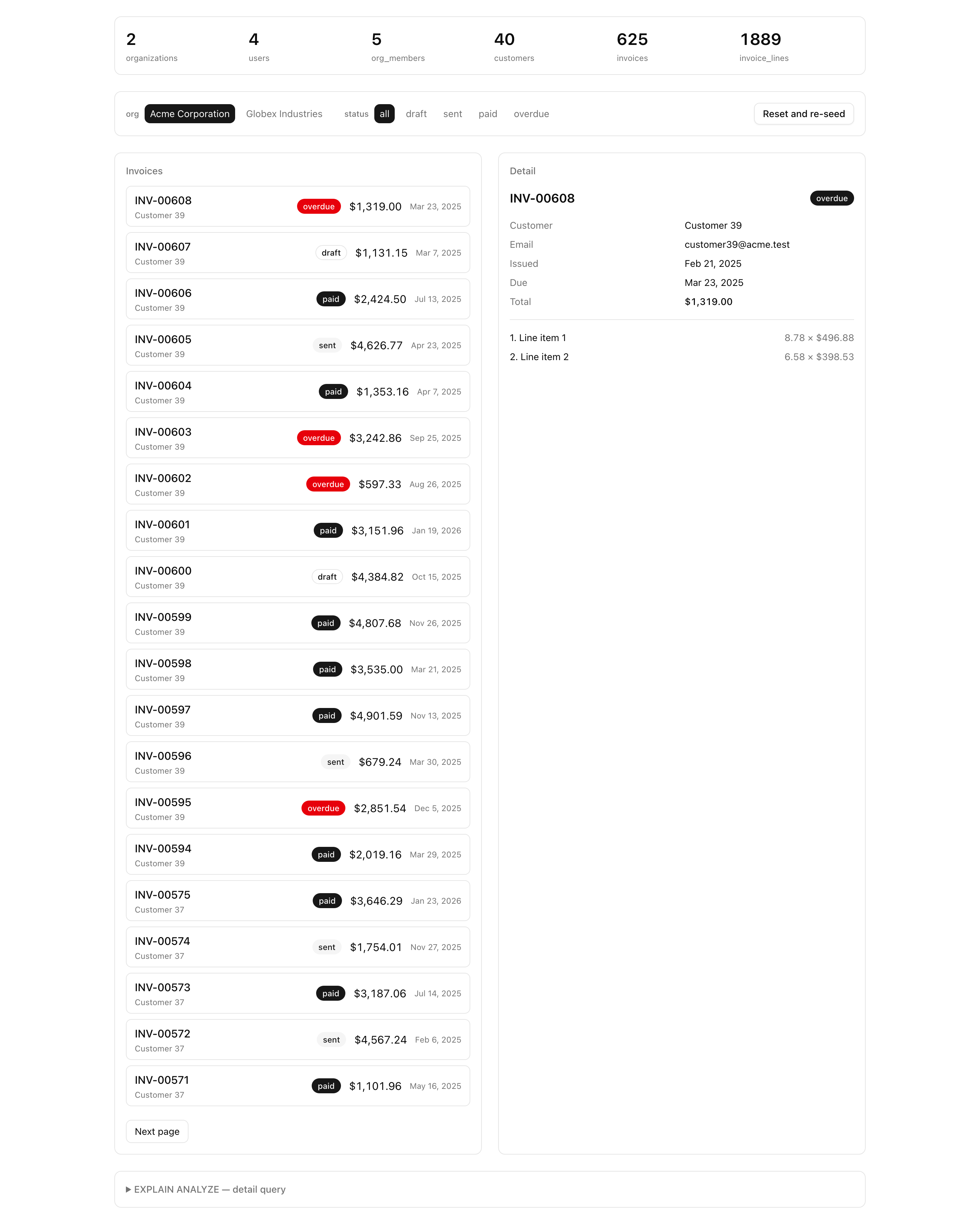
You explore the finished result through a provided page at /inspector: an org switcher across the top, the paginated invoice list on one side, a detail panel on the other, and an EXPLAIN ANALYZE plan panel at the bottom that proves the indexes you declare are the ones Postgres actually reaches for. The inspector is given to you in full — header, panels, counts banner, the plan probes, all of it — so the only code you write is the four files it depends on. That is the deal this project makes: you spend your effort on the schema, the seed, and the queries, and you get a real surface to verify them against without building a UI from scratch.
You are not meeting new primitives here — Unit 5’s teaching chapters covered every one of them. This is where they stop being isolated exercises and become a single data layer a team would actually run in production.
$inferSelect, never hand-written.ON DELETE one edge at a time, and scoping every uniqueness constraint and every index to the tenant rather than the whole table.reset() plus inserts driven by a fixed-seed PRNG, so every run produces byte-identical data.organizationId guard baked into the where of each one.EXPLAIN ANALYZE plan to confirm a query is fast for the reason you think it is, not by accident.The project has four layers, and they all lean on the schema. Here is the shape, not the detail — each file gets its full explanation in the lesson that first opens it.
src/db/ — the database core. schema.ts holds the six tables and is the single source of truth for the whole project; relations.ts declares how they connect; index.ts exports the db client; columns.ts holds the shared timestamps column group every table reuses; and cursor.ts carries the opaque cursor encode/decode helpers.src/lib/invoices/ — the read layer. queries.ts holds the two typed reads you write; schema.ts holds the Zod that validates their input at the boundary; and counts.ts and explain.ts are provided plumbing the inspector calls for its banner and its plan panel.scripts/seed.ts — the deterministic, idempotent seed that fills a fresh database with two orgs, overlapping members, and a few hundred invoices.src/app/inspector/ — the provided Server Component surface. It reads everything it needs from searchParams and renders the four panels you use to verify your work.Notice the direction every arrow points: types, queries, the inspector, and every feature later units add all derive from db/schema.ts. Get the schema right and the rest has a solid floor; get it wrong and the cracks show up everywhere downstream. That is why the schema is the first thing you build and the thing the whole chapter orbits.
This project continues the toolchain you have been carrying since the themed-surface project — pnpm, the strict tsconfig, Biome, the next-themes providers — and adds the database machinery this unit is about: a Docker Postgres service, Drizzle Kit config, and the @t3-oss/env-nextjs boundary. The bold files are the four stubs you fill in; each carries a TODO(L<n>) comment naming the lesson that completes it, and together they are your work for the chapter. Everything else is provided — read the one-line note on the files a lesson will open, and leave the rest until you reach them.
postgres:18 service on :5432, with a persisted pgdata volume.envdb:* and test:lesson scripts@t3-oss/env-nextjs boundary — three validated server varsdb client (postgres-js) and the dbUnpooled aliasTODO L3TODO L3timestamps column grouplistInvoices and getInvoiceDetail TODO L5 / L6statusSchema, listInvoicesInputSchemaEXPLAIN ANALYZE probes the plan panel renderscn() class-merge helper/ to /inspectorloading.tsx, the reseed action, and the four panels
TODO L4One folder is missing on purpose: there is no drizzle/ directory yet. Migrations are generated, not written by hand, so the first SQL file lands when you run pnpm db:generate in the Authoring the schema and shipping the init migration lesson. Its absence now is the starting state, not an oversight.
Five implementation lessons turn those four stubs into a working data layer, each closing on a state you can confirm in the inspector or against a query plan.
Lesson 2 — Type-safe environment variables
Wires the project to a validated env boundary so a missing DATABASE_URL fails the build instead of crashing the first request after deploy.
Lesson 3 — Authoring the schema and shipping the init migration
Lands the six tables, their relations, and the three indexes in Postgres through one reviewed migration.
Lesson 4 — A deterministic, idempotent seed
Fills the database with two orgs, overlapping members, and 100+ invoices that come out identical on every run.
Lesson 5 — The tenant-scoped invoice list
Builds the cursor-paginated list with a server-side status filter, proven against its query plan.
Lesson 6 — The single-round-trip invoice detail
Loads one invoice with its lines and customer in a single round trip, guarded by organizationId.
Run these in order. This lesson is done when the dev server boots and serves the project against a running Postgres — the database is up but holds no tables yet, because the migration that creates them runs in the next lesson.
Get the starter codebase from the project repository, under Chapter 041/start/:
pnpm dlx degit terencicp/react-saas-course-projects/Chapter-041/start invoicing-data-layercd invoicing-data-layerdegit copies that folder into a fresh invoicing-data-layer directory with no git history, and pnpm dlx runs the tool without installing it first. Each chapter project in the repo has a start/ and a solution/ sibling, so you can diff your work against the reference whenever you want.
Install the dependencies:
pnpm installThe repo is pnpm-only — a preinstall hook blocks any other package manager — and the versions are pinned. The install completes with no errors.
Copy the example env file and fill it in:
cp .env.example .envThe db:* scripts load .env through dotenv-cli, while next build reads the environment directly. Three variables live here, all validated at the env.ts boundary:
DATABASE_URL — the pooled connection string the app’s db client uses. Locally postgres://postgres:postgres@localhost:5432/app, from the Docker service below.DATABASE_URL_UNPOOLED — the unpooled URL Drizzle Kit uses for migrating and seeding. The same value locally; the split is a no-op for now, staged for the Neon swap in a later unit.SEED — the fixed seed number that makes the seed deterministic. Locally 1.The defaults in .env.example already match a local Docker Postgres, so for local work you can copy the file as-is. .env is git-ignored and holds your real secret; .env.example is committed and documents every variable the app expects.
Bring up the database:
docker compose up -dThis starts the postgres:18 service on port 5432 in the background. The first run pulls the image; after that it is instant.
Start the dev server:
pnpm devThe root path redirects to /inspector. The page compiles and the dev server is up, but the data layer is still bare — no migration has run, so the tables the inspector reads from do not exist in Postgres yet. The seeded inspector in the figure above is what it becomes a few lessons from now; right now, an empty starter on a running database is exactly where you should be.
When pnpm dev serves the project against a running Postgres, you have the project’s floor in place. From here the work is the schema, the migration, the seed, and the two reads — and the reasoning behind every decision arrives in the lesson that makes it.