Lesson 2 — Declare the Redis client and three module-scope limiters
Stand up the Redis client and the three Ratelimit instances so the inspector’s “Remaining tokens” panel reads live budgets straight from Redis instead of n/a.
The starter is the email+password auth surface you built in Email+password auth with verification — sign-in, sign-up, and password reset, all running through Better Auth — with one thing missing that no public auth endpoint should ship without: a rate limit. Right now nothing stops a script from posting the sign-in form ten thousand times a minute, walking a password list against alice@example.com, or hammering one victim’s address until their inbox drowns in reset mail and your Resend bill notices. Over this chapter you instrument all three flows with @upstash/ratelimit, wrapped at the Server Action boundary so the auth core never moves. The finished shape, named in one breath: sign-in dual-gated per-IP and per-email; sign-up gated per-IP; reset gated per-IP and per-email; every action carrying its rate-limit budget inside the Result payload; rejections returning one opaque rate_limited message that never reveals which gate tripped; a Redis outage failing open and logging an alertable event so the auth path stays up; and Better Auth’s own built-in limiter switched off so the application wrapper is the single enforcement point.
You read every one of those effects off a page the starter hands you. There is no production UI to inspect a rate limiter — a limit either fires or it doesn’t, silently — so the starter ships an /inspector that makes the gates visible: a “Remaining tokens” panel reading live budgets straight from Redis, a “Spam sign-in” button that fires eleven calls in a row, a recent-responses log, and the structured-log tail an operator would actually watch. This is the surface every later lesson verifies against.
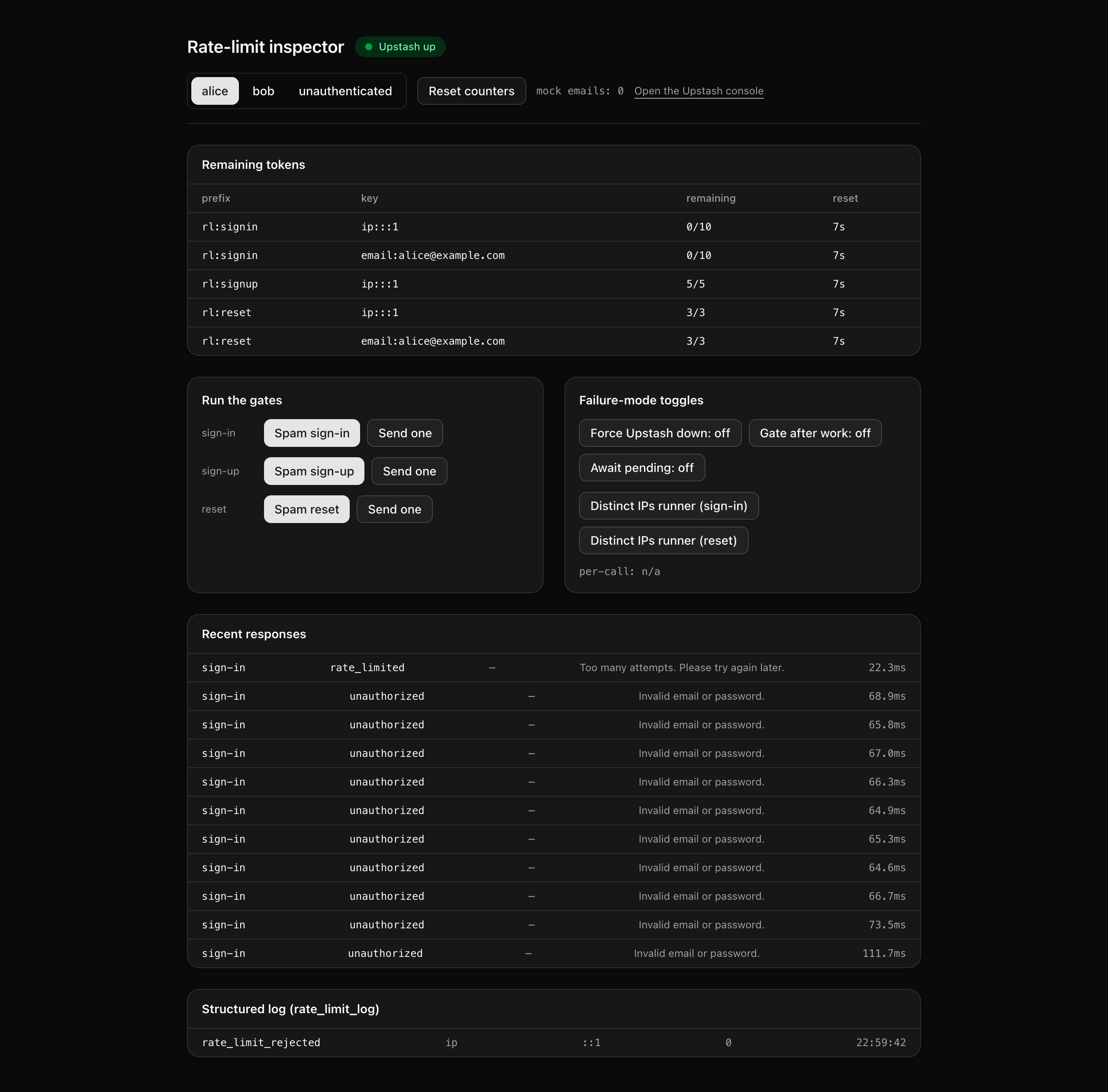
You will not build any of that this lesson. The goal here is narrower and worth doing carefully: get the starter running, confirm the auth flows still work end to end, and open the inspector so you can see exactly which gates are missing before you fill them. The technology rationale — why Upstash, why a sliding window, why the budget rides the Result instead of HTTP headers — was the whole of the previous chapter and is linked from the lessons that lean on it; none of it is re-argued here.
Result, one opaque user-facing message, an operator-honest structured log, and the literal RateLimit-* headers reserved for a route-handler twin.after() so they flush off the response path.This is the canonical limiter shape every other abusable endpoint in a SaaS copies — webhook receivers, file uploads, AI generation. Once it is built here, adding a fourth limiter is one new Ratelimit instance plus one action wrap: same Result-carried budget, same fail-open. By the end of the chapter, safeLimit, rateLimited, and rateLimitBudget are your seam on the action path, and rateLimitHeaders / rateLimitedResponse are the matching seam on a route handler.
Two layers from Two layers: edge WAF and application limiter carry into this project: an edge WAF that rejects obvious floods before they reach your code (out of scope here), and the application limiter you build, which makes the per-identity decisions the WAF can’t. The diagram below is the request flow for one gated action — read it left to right, and notice the two places it forks. The first fork is the gate: either every safeLimit check passes and the action runs the real auth call, or one fails and the action returns early. The second is what carries the limiter state out: on the pass branch the budget rides inside the ok payload’s rateLimit field, never in a response header, because a Server Action calls headers() read-only and cannot set one. The literal RateLimit-* headers only exist on the read-only /api/limit-demo route-handler twin, which is there purely so you can see the IETF header shape next to the action that can’t emit it.
Result's
ok payload, never an HTTP header.
The starter ships the auth surface from Email+password auth with verification working end to end, plus the entire /inspector page and a few supporting modules you will read but never author. Your focus is nine files: the six stubs that hold the limiter infrastructure, and the three auth actions you wrap. They are the highlighted entries below, each carrying an inline TODO(Lx) naming the lesson that fills it. Everything uncommented is provided as-is.
A few of those provided files are worth knowing by name before you start, because the lessons refer to them constantly. The /inspector folder is the largest — it is a single Server Component plus a split of small client panels (the “Remaining tokens” table, the spam buttons, the recent-responses log, the structured-log tail, and the failure-mode toggles). It reads live budgets out of Redis and rows out of rate_limit_log, and it is provided in full; you write none of it. src/app/api/limit-demo/route.ts is the route-handler twin — the deliberate counterexample that shows the literal RateLimit-* headers and a JSON 429 body on a plain GET, with no auth path attached, so you can compare it against the action that has to carry its budget in the Result instead. src/lib/auth.ts is carried in from chapter 055 with Better Auth’s built-in limiter still enabled; switching it off is one of the deliberate moves in lesson 3, not an accident of the starter. src/lib/email.ts is mocked in inspector mode and exposes getMockEmailSentCount(), which lesson 5 reads to prove that rate-limited resets send no mail. And scripts/seed.ts plants the accounts every spam button targets: alice@example.com and bob@example.com, both verified with a known password, and eve@example.com as the reset victim.
Lesson 2 — Declare the Redis client and three module-scope limiters
Stand up the Redis client and the three Ratelimit instances so the inspector’s “Remaining tokens” panel reads live budgets straight from Redis instead of n/a.
Lesson 3 — Gate sign-in with dual-keying and swap out Better Auth's built-in
Add the helper trio and the per-IP-and-per-email sign-in gate, plus the architectural swap, so the 11th call returns rate_limited with an opaque message and the budget riding the Result.
Lesson 4 — Gate sign-up per-IP
Add the per-IP sign-up gate so a single host cannot mass-register accounts, while each call still carries its budget on the Result.
Lesson 5 — Gate reset per-IP and per-email
Add the per-IP-plus-per-email reset gate so a victim’s inbox and your Resend cost are protected even when the attacker rotates IPs.
This project runs against a local Postgres in Docker and a free Upstash Redis database. The two Upstash variables are the only new environment values over chapter 055; everything else is carried in and already templated in .env.example.
Get the starter codebase from the project repository, under Chapter 075/start/. Clone just that subdirectory with degit:
npx degit terencicp/react-saas-course-projects/Chapter\ 075/start rate-limitscd rate-limitsdegit copies that folder into a fresh rate-limits directory with no git history. The project ships a start/ and a solution/ sibling, so you can diff your work against the reference whenever you want.
Install dependencies:
pnpm installProvision Upstash Redis. The Vercel Marketplace integration is the recommended path if your app already lives on Vercel; for local-only work, create a free database in the Upstash console, then copy the REST URL and token from the database’s REST API panel. The free tier comfortably covers this project.
Start Postgres (the provided docker-compose.yml runs Postgres 18):
docker compose up -dCopy the env template and fill in the values (the table below covers the two new ones; the rest are already documented inline in the file):
cp .env.example .envRun the migrations:
pnpm db:migrateSeed the accounts (alice, bob, eve):
pnpm db:seedStart the dev server:
pnpm devThe two new variables to set:
| Variable | Purpose | How to obtain |
| --- | --- | --- |
| UPSTASH_REDIS_REST_URL | The Upstash REST endpoint the limiters and the inspector read through. | The database’s REST API panel in the Upstash console. |
| UPSTASH_REDIS_REST_TOKEN | The read/write token paired with that URL. | The same REST API panel. |
The remaining variables — DATABASE_URL, DATABASE_URL_UNPOOLED, BETTER_AUTH_SECRET, BETTER_AUTH_URL, RESEND_API_KEY, EMAIL_FROM, EMAIL_REPLY_TO, NEXT_PUBLIC_APP_NAME, and NEXT_PUBLIC_APP_URL — carry in from chapter 055 and are documented inline in .env.example, with sensible local defaults already filled in. The local DATABASE_URL points at the Docker Postgres, and BETTER_AUTH_SECRET is the one value you must generate yourself (openssl rand -base64 32).
On success, pnpm dev serves the chapter 055 auth flows working end to end: signing in as alice with the seeded password lands you on /dashboard, and sign-up and reset behave exactly as they did in that project. Open /inspector and it loads cleanly — but the “Remaining tokens” panel reads n/a on every row, and clicking a “Spam X” button records an internal outcome with a “Not implemented” message in the recent-responses log rather than crashing. That is the expected starting state: the inspector is wired and inert, because the limiters and the action wrappers don’t exist yet. You leave this lesson with the starter running locally and every gate visibly missing. Building begins in the next lesson.