Two tabs, one winner
Open one of your invoices in two browser tabs. Change the customer in the first tab and save. Change the status in the second tab and save. Right now the second save wins — quietly, completely, with no hint that it just buried the first edit. That is last-write-wins, and it is the most expensive bug in this whole chapter because nobody sees it happen.
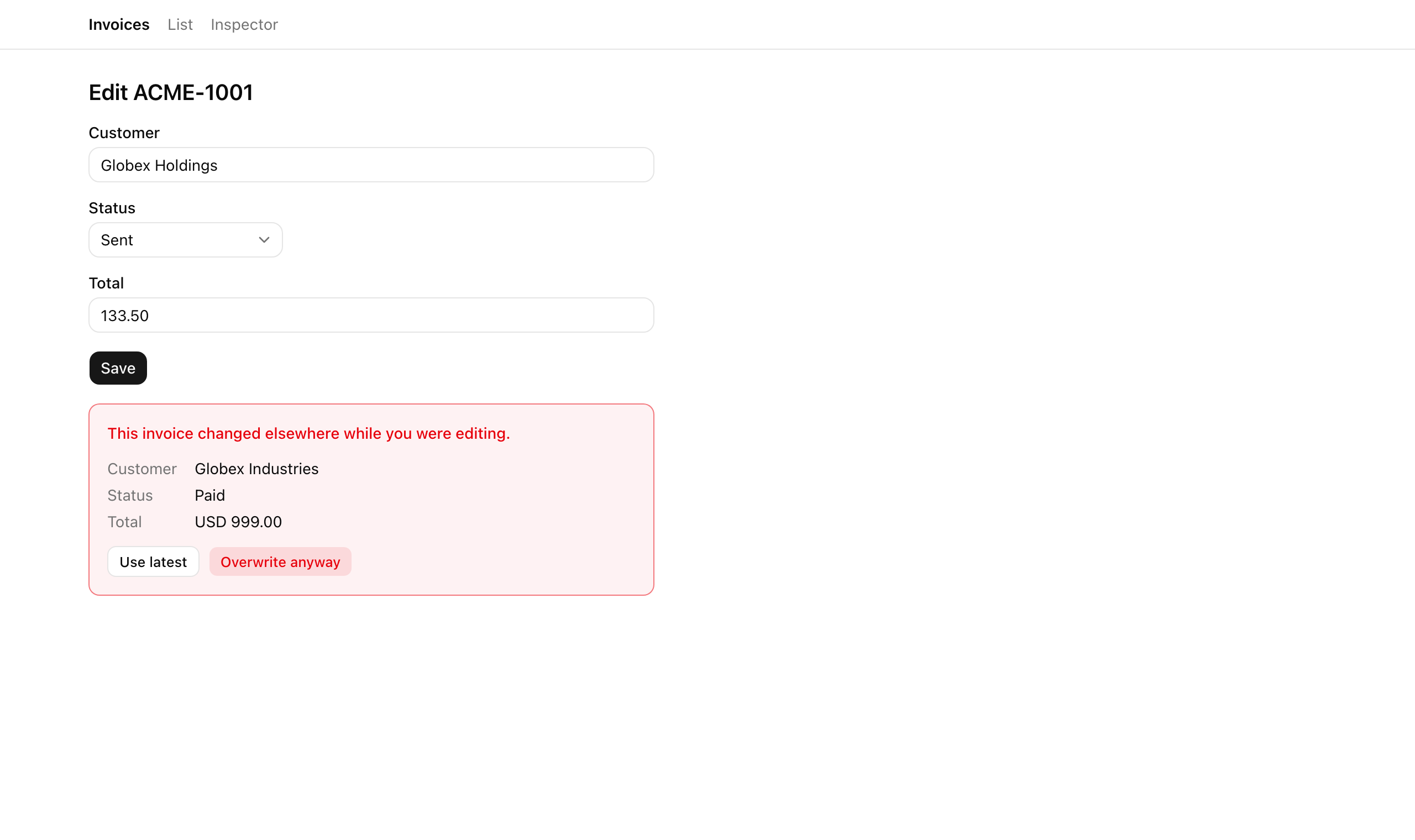
In this lesson you close it. You add the version precondition to updateInvoice so the second tab’s stale save returns an honest conflict instead of clobbering the row, and you render a banner that shows the user exactly what the server holds now — with a Use latest button to pull those values in and resubmit, and an admin-only Overwrite anyway button for when they really do mean to force it. The first tab keeps its win; the second tab gets a recoverable surface instead of a silent loss. By the end, every behavior on the chapter’s acceptance list holds.
Your mission
Section titled “Your mission”Two tabs can no longer silently clobber each other. The first submit wins; the second submit — still holding the version it loaded with — gets refused with a conflict and a surface it can recover from in place. That is the whole user-facing change, and it rests on one discipline: every write checks three preconditions before it touches the row. Tenancy: is this row in the acting org? Lifecycle: is this row still editable, or has it been soft-deleted out from under us? Version: is this still the row the client last saw, or did someone else move it? Miss the first and you let one tenant overwrite another’s data. Miss the second and you let someone edit a deleted row back to life. Miss the third and you get exactly the silent clobber you are here to kill.
Two of the three are already wired in the starter. The row loads through findInvoice(ctx.orgId, id), so a row that belongs to another org is simply not found — tenancy is enforced by the lookup itself, not by a separate check. The lifecycle guard rides alongside it: a soft-deleted row (deletedAt !== null) takes the same not-found path. What is missing is the version check, and the way you add it matters as much as that you add it. The precondition has to run against the row you just loaded, in the same request — never a SELECT in one request and an UPDATE in a later one. Split them across two round trips and you reopen the exact race you are closing: the row can change in the gap between the read and the write. One request, one freshly-loaded row, one comparison. A mismatch is the honest conflict.
When that conflict fires, the client should not have to go fetch the current row to show it — that would be a second round trip for data the server already has in hand. So the conflict result carries the server’s current row inline as current (the refresh-and-retry shape from the lifecycle and concurrency work earlier in this unit). The banner rebuilds itself from that payload, and Use latest reseeds the form from it, all without a refetch.
The escape hatch needs the same care as the lock. Overwrite anyway deliberately skips the version check, so it is a sharp edge — you show it to admins and hide it from members. But hiding a button is cosmetic. A member can forge overwrite=true straight into the form data, so the admin gate has to be re-checked inside the action with roleAtLeast(ctx.role, 'admin') — the hidden control is the convenience, the server check is the security. (Tampering with the hidden version instead just earns another conflict, with the server-side Zod parse as the front line at the FormData boundary.)
One note on where the version number comes from. This project carries a dedicated version column that every write increments — cheap, unambiguous, and impossible to confuse with anything else. On an existing table that already tracks updatedAt, you can use that timestamp as the version token instead and avoid a migration; the trade is precision, since two writes inside the same clock tick can collide. The course default is the dedicated counter.
Out of scope here: the lifecycle actions already return conflicts on a stale precondition — you built that earlier in this chapter — but they surface a toast, not this banner, because a table row has no editable form state to merge the server’s values back into. The full banner is the edit path’s affordance alone.
Coding time
Section titled “Coding time”Add the version precondition to updateInvoice, build the conflict branch in the edit form, and fill in the conflict banner — against the brief and against the tests. Try it before you open the solution below.
Reference solution and walkthrough
1. The version precondition — src/lib/invoices/actions.ts
Section titled “1. The version precondition — src/lib/invoices/actions.ts”The whole fix to the clobber bug is three guards inserted between loading the row and mutating it. The before/after makes the insertion the focus — the starter applied the edit the moment it found the row; the solution refuses to touch it until tenancy, lifecycle, the overwrite gate, and the version all clear.
const updateInvoiceSchema = z.strictObject({  id: z.string(),  customerName: z.string().min(1),  status: z.enum(STATUS_VALUES),  total: z.string().min(1),  version: z.coerce.number().int(),});
export const updateInvoice = authedAction(  'member',  updateInvoiceSchema,  async (input, ctx): Promise<Result<Invoice>> => {    const row = findInvoice(ctx.orgId, input.id);    if (!row || row.deletedAt !== null) {      return err('not_found', 'Invoice not found.');    }
    row.customerName = input.customerName;    row.status = input.status;    row.total = input.total;    row.version += 1;
    pushAudit({      orgId: ctx.orgId,      actorUserId: ctx.userId,      action: 'invoice.update',      subjectId: row.id,    });
    revalidatePath('/invoices');    return ok(row);  },);
Silent last-write-wins. The hidden version rides in with the form, but nothing reads it — the edit applies the instant the row is found. Two stale tabs both succeed, and the later one buries the earlier.
const updateInvoiceSchema = z.strictObject({  id: z.string(),  customerName: z.string().min(1),  status: z.enum(STATUS_VALUES),  total: z.string().min(1),  version: z.coerce.number().int(),  overwrite: z.coerce.boolean().default(false),});
export const updateInvoice = authedAction(  'member',  updateInvoiceSchema,  async (input, ctx): Promise<Result<Invoice>> => {    const row = findInvoice(ctx.orgId, input.id);    if (!row || row.deletedAt !== null) {      return err('not_found', 'Invoice not found.');    }
    if (input.overwrite && !roleAtLeast(ctx.role, 'admin')) {      return err('forbidden', 'Only an admin can overwrite a conflict.');    }
    if (!input.overwrite && row.version !== input.version) {      return conflict(CONFLICT_MESSAGE, row);    }
    row.customerName = input.customerName;    row.status = input.status;    row.total = input.total;    row.version += 1;    // …audit + revalidate + ok(row) as before  },);
Three guards before the mutation. The not-found check is tenancy + lifecycle; the new admin gate refuses a forged overwrite; the version check returns an honest conflict carrying current. The row is touched only once all four clear.
The full action body, exactly as it reads in the repo (the schema fields and the unchanged audit-and-return tail are folded — expand them if you want the whole thing):
const CONFLICT_MESSAGE = 'This invoice changed elsewhere — refresh to retry.';
// The `version` precondition is the optimistic-concurrency guard. FormData is// strings, so coerce; `overwrite` is the admin-only escape hatch (defaults off).const updateInvoiceSchema = z.strictObject({6 collapsed lines  id: z.string(),  customerName: z.string().min(1),  status: z.enum(STATUS_VALUES),  total: z.string().min(1),  version: z.coerce.number().int(),  overwrite: z.coerce.boolean().default(false),});
export const updateInvoice = authedAction(  'member',  updateInvoiceSchema,  async (input, ctx): Promise<Result<Invoice>> => {    const row = findInvoice(ctx.orgId, input.id);    if (!row || row.deletedAt !== null) {      return err('not_found', 'Invoice not found.');    }
    // Overwrite skips the version precondition, so it is admin-only — the RBAC    // gate lives HERE, not only behind the hidden UI control. A member who    // forges `overwrite=true` is refused at the action.    if (input.overwrite && !roleAtLeast(ctx.role, 'admin')) {      return err('forbidden', 'Only an admin can overwrite a conflict.');    }
    // The UPDATE applies only when the row the client last saw still matches    // (tenancy + `deletedAt IS NULL` already hold above). A stale tab that lost    // the race gets an honest 409 carrying the row the server holds now — one    // round trip, no client refetch — never a silent clobber.    if (!input.overwrite && row.version !== input.version) {      return conflict(CONFLICT_MESSAGE, row);    }
    row.customerName = input.customerName;    row.status = input.status;    row.total = input.total;    row.version += 1;
    pushAudit({8 collapsed lines      orgId: ctx.orgId,      actorUserId: ctx.userId,      action: 'invoice.update',      subjectId: row.id,    });
    revalidatePath('/invoices');    return ok(row);  },);
The decisions worth naming:
- The schema gains
overwrite: z.coerce.boolean().default(false).versionwas already there. Both ride in from the form as strings — FormData has no other type — soz.coerceturns"false"and"42"back into a boolean and a number at the boundary. (That boundary coercion is covered where you first met Zod and server actions, earlier in the course; no need to re-derive it here.) - The not-found guard is the tenancy + lifecycle pair.
!rowis the tenancy outcome:findInvoice(ctx.orgId, id)scopes the lookup to the acting org, so another tenant’s ID just misses.row.deletedAt !== nullis the lifecycle guard: a soft-deleted row is not editable. Both collapse into one honest “not found”. - The admin gate is placed before the version check, on purpose. A member forging
overwrite=trueshould be refused for the forgery regardless of whether their version happens to be current — checking the role first means a stale member-overwrite still hitsforbidden, never slips through to the mutation. - The version check runs against the freshly loaded
row, in this same call. That is what keeps it atomic. There is no window between a read and a write for the row to drift, because the read and the comparison are the same step. A mismatch returnsconflict(CONFLICT_MESSAGE, row)— andconflictfromresult.tspacks that currentrowinto the result’scurrentfield, so the losing tab recovers in this one round trip without going back to fetch anything.
2. The conflict branch — src/app/(app)/invoices/[id]/edit/edit-form.tsx
Section titled “2. The conflict branch — src/app/(app)/invoices/[id]/edit/edit-form.tsx”The starter form already does the hard parts: it drives updateInvoice through useActionState, keeps the inputs uncontrolled with defaultValue, keys the field block on ${seed.id}:${seed.version} so it can remount with fresh defaults, and routes submits through a thin onSubmit wrapper. Five additions turn it into a conflict-aware form. Step through them on top of that scaffold.
const [state, action] = useActionState(updateInvoice, null);const formRef = useRef<HTMLFormElement>(null);
const [seed, setSeed] = useState(invoice);const [conflictRow, setConflictRow] = useState<Invoice | null>(null);
useEffect(() => {  if (!state) {    return;  }  if (state.ok) {    setSeed(state.data);    setConflictRow(null);    return;  }  setConflictRow(    state.error.code === 'conflict' ? (state.error.current as Invoice) : null,  );}, [state]);
const onUseLatest = () => {  if (conflictRow) {    setSeed(conflictRow);    setConflictRow(null);  }};
const onOverwrite = () => {  const form = formRef.current;  if (!form) {    return;  }  const formData = new FormData(form);  formData.set('overwrite', 'true');  action(formData);};
A formRef on the <form>. Overwrite anyway needs to grab the user’s current field values straight from the DOM, so the form needs a ref. (The ref={formRef} lands on the <form> element itself in the JSX below.)
const [state, action] = useActionState(updateInvoice, null);const formRef = useRef<HTMLFormElement>(null);
const [seed, setSeed] = useState(invoice);const [conflictRow, setConflictRow] = useState<Invoice | null>(null);
useEffect(() => {  if (!state) {    return;  }  if (state.ok) {    setSeed(state.data);    setConflictRow(null);    return;  }  setConflictRow(    state.error.code === 'conflict' ? (state.error.current as Invoice) : null,  );}, [state]);
const onUseLatest = () => {  if (conflictRow) {    setSeed(conflictRow);    setConflictRow(null);  }};
const onOverwrite = () => {  const form = formRef.current;  if (!form) {    return;  }  const formData = new FormData(form);  formData.set('overwrite', 'true');  action(formData);};
A conflictRow state slot. When it holds an invoice, the banner renders; when it is null, the form is clean. This is the single switch that controls the whole conflict surface.
const [state, action] = useActionState(updateInvoice, null);const formRef = useRef<HTMLFormElement>(null);
const [seed, setSeed] = useState(invoice);const [conflictRow, setConflictRow] = useState<Invoice | null>(null);
useEffect(() => {  if (!state) {    return;  }  if (state.ok) {    setSeed(state.data);    setConflictRow(null);    return;  }  setConflictRow(    state.error.code === 'conflict' ? (state.error.current as Invoice) : null,  );}, [state]);
const onUseLatest = () => {  if (conflictRow) {    setSeed(conflictRow);    setConflictRow(null);  }};
const onOverwrite = () => {  const form = formRef.current;  if (!form) {    return;  }  const formData = new FormData(form);  formData.set('overwrite', 'true');  action(formData);};
The result handler, extended. On ok it reseeds the form to the returned row and clears conflictRow — so the next save starts from the fresh version and cannot self-conflict. On a conflict code it pulls state.error.current into conflictRow; any other error leaves the banner closed.
const [state, action] = useActionState(updateInvoice, null);const formRef = useRef<HTMLFormElement>(null);
const [seed, setSeed] = useState(invoice);const [conflictRow, setConflictRow] = useState<Invoice | null>(null);
useEffect(() => {  if (!state) {    return;  }  if (state.ok) {    setSeed(state.data);    setConflictRow(null);    return;  }  setConflictRow(    state.error.code === 'conflict' ? (state.error.current as Invoice) : null,  );}, [state]);
const onUseLatest = () => {  if (conflictRow) {    setSeed(conflictRow);    setConflictRow(null);  }};
const onOverwrite = () => {  const form = formRef.current;  if (!form) {    return;  }  const formData = new FormData(form);  formData.set('overwrite', 'true');  action(formData);};
Use latest. Swap the form’s seed to the server’s conflictRow and clear the banner. Because the field block is keyed on ${seed.id}:${seed.version}, swapping the seed remounts it — which resets the uncontrolled hidden version input to current.version. The next submit now carries the matching version and succeeds.
const [state, action] = useActionState(updateInvoice, null);const formRef = useRef<HTMLFormElement>(null);
const [seed, setSeed] = useState(invoice);const [conflictRow, setConflictRow] = useState<Invoice | null>(null);
useEffect(() => {  if (!state) {    return;  }  if (state.ok) {    setSeed(state.data);    setConflictRow(null);    return;  }  setConflictRow(    state.error.code === 'conflict' ? (state.error.current as Invoice) : null,  );}, [state]);
const onUseLatest = () => {  if (conflictRow) {    setSeed(conflictRow);    setConflictRow(null);  }};
const onOverwrite = () => {  const form = formRef.current;  if (!form) {    return;  }  const formData = new FormData(form);  formData.set('overwrite', 'true');  action(formData);};
Overwrite anyway. Read the user’s edits out of the live form via new FormData(form), set overwrite to 'true', and dispatch. This sends the user’s own values — not the server’s — with the bypass flag, so the action applies them despite the stale version. The server still re-checks the admin gate.
And the banner is rendered conditionally below the Save button, passing the admin check down so the destructive button only appears for those allowed to use it:
{conflictRow ? ( <ConflictBanner current={conflictRow} onUseLatest={onUseLatest} onOverwrite={onOverwrite} canOverwrite={roleAtLeast(role, 'admin')} />) : null}3. The banner — src/app/(app)/invoices/[id]/edit/conflict-banner.tsx
Section titled “3. The banner — src/app/(app)/invoices/[id]/edit/conflict-banner.tsx”A presentational component. It shows the server’s current customer, status, and total so the user can compare before deciding, then offers Use latest to everyone and Overwrite anyway only when canOverwrite is true.
'use client';
import { Button } from '@/components/ui/button';import type { Invoice } from '@/server/types';
// The honest-409 surface: the server returned the row it holds now as `current`,// so the stale tab can recover without a refetch. "Use latest" pulls those// values into the form (and resets the hidden version) so the resubmit succeeds.// "Overwrite anyway" renders ONLY for an admin — the gate is enforced again at// the action, this affordance is the cosmetic half of that gate.export const ConflictBanner = ({  current,  onUseLatest,  onOverwrite,  canOverwrite,}: {  current: Invoice;  onUseLatest: () => void;  onOverwrite: () => void;  canOverwrite: boolean;}) => (  <div    data-testid="conflict-banner"    className="space-y-3 rounded-lg border border-destructive/50 bg-destructive/5 p-4 text-sm"  >    <p className="font-medium text-destructive">      This invoice changed elsewhere while you were editing.    </p>    <dl className="grid grid-cols-[auto_1fr] gap-x-4 gap-y-1 text-muted-foreground">      <dt>Customer</dt>      <dd className="text-foreground">{current.customerName}</dd>      <dt>Status</dt>      <dd className="text-foreground capitalize">{current.status}</dd>      <dt>Total</dt>      <dd data-testid="conflict-current-total" className="text-foreground">        {current.currency} {current.total}      </dd>    </dl>    <div className="flex flex-wrap gap-2">      <Button        type="button"        size="sm"        variant="outline"        data-testid="conflict-use-latest"        onClick={onUseLatest}      >        Use latest      </Button>      {canOverwrite ? (        <Button          type="button"          size="sm"          variant="destructive"          data-testid="conflict-overwrite"          onClick={onOverwrite}        >          Overwrite anyway        </Button>      ) : null}    </div>  </div>);
Two details: the status is rendered with a capitalize class so the stored 'paid' reads as “Paid” without transforming the data, and the data-testid hooks (conflict-banner, conflict-use-latest, conflict-overwrite, conflict-current-total) are there for the test suite — they do not change behavior, they just give the tests a stable handle.
The lifecycle conflict path is already done
Section titled “The lifecycle conflict path is already done”You don’t write new code for it, but it is worth seeing how the same conflict result lands differently on the table. The archive, restore, and soft-delete actions you built earlier already return conflict(message, row) when their version precondition is stale. On the table, a stale lifecycle action surfaces as a toast — “This invoice changed elsewhere — refresh to retry.” — rather than the banner, because a table row has no controlled form state to merge the server’s values back into. And when an optimistic archive loses the race, the row reappears: the optimistic value was never committed, so it expires the moment the transition ends on a returned { ok: false }. That is expiry, not a throw-triggered rollback — the same distinction drawn in the lifecycle and concurrency work earlier in this unit.
The version-token-prevents-lost-updates pattern this action implements, spelled out as the canonical OCC design.
Reference for the hook the conflict branch reads state from — including the form-action and pending shapes.
How z.coerce turns the FormData strings for version and overwrite back into a number and a boolean at the boundary.
The HTTP semantics behind the conflict result you return when the stale version loses the race.
Moment of truth
Section titled “Moment of truth”Run the suite for this lesson:
pnpm test:lesson 5It should pass. The assertions drive the full version-precondition contract through the real action and store: a clean save wins and bumps the version; a second submit at the stale version is refused with code conflict, the row untouched; the conflict result carries the server’s post-winner row as current; resubmitting at current.version (what Use latest loads) succeeds; an admin’s overwrite=true applies the edit despite the drift while a member’s forged overwrite=true is refused as forbidden with the row untouched; and an org-globex actor submitting an org-acme ID takes the not_found path and never mutates the acme row, while the globex admin can still edit its own org’s row.
The tests cover the precondition and the action gate. The visual recovery loop and the toast paths you confirm by hand — the inspector page has the tooling for all of it:
org-acme:member via the inspector and trigger a conflict on the edit form: the banner renders, but the Overwrite anyway button is absent — members only see Use latest.org-globex:admin, hand-construct an edit URL for an org-acme invoice ID: the detail page is not found because the read is org-scoped, and a forged submit of that ID takes the not-found path at the write.all tab, archive and restore, the two-tab conflict — and confirm every behavior holds end to end.That last item is the real finish line: the list view is now something a coworker can paste a URL of, reload a hundred times, archive and restore rows from, and race two tabs against — and every behavior holds.
A few of these threads get picked back up later, for the curious: the notification work later in the course fires an alert when an invoice is archived or restored; the caching unit adds tag-driven invalidation to these lifecycle actions; the security hardening pass tightens the audit discipline these writes lean on; and the testing unit writes integration tests for this very conflict path and the cross-tenant probe.