The welcome email send path
The chokepoint is built, the domain is verified, and nothing has been delivered yet. This lesson closes that gap: you write the two pieces that turn the wrapper from the last lesson into a real email landing in your own inbox. By the end, clicking Send welcome on the inspector renders the WelcomeEmail template, hands it to sendEmail, and delivers an authenticated, DKIM-signed message to the address you typed in.
The inspector page already gives you a live preview. It calls render(<WelcomeEmail {...WelcomeEmail.PreviewProps} />) server-side and shows the result in an iframe beside the form, so the template lights up in the panel as you build it — before you ever send a real test. When the action lands too, a success returns the Resend send ID and a dashboard link in about two seconds and the email arrives within roughly fifteen; the seeded suppressed@… recipient short-circuits to the suppression card with no Resend call; and an empty field surfaces inline. Here is the finished surface, the form on the left and the rendered template on the right:
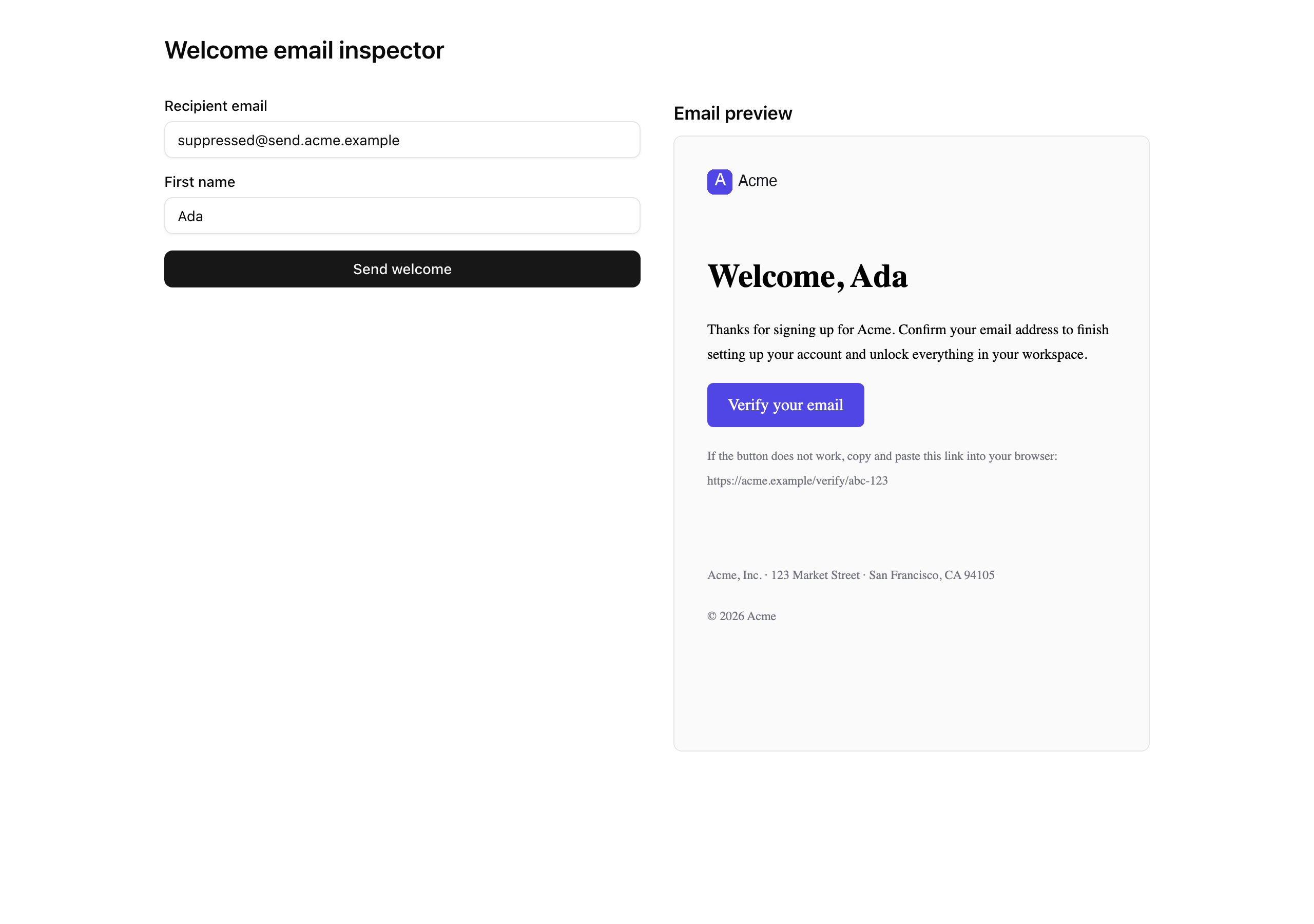
Your mission
Section titled “Your mission”You are wiring the send end to end: the template the recipient sees and the action the inspector fires. The template, WelcomeEmail, is a pure renderer — typed props in, HTML and text out, with no env reads, no database reads, and no session reads inside the component. The action computes every per-send value and passes it down as a prop, because the moment the template reaches for env directly, its PreviewProps stop matching what production ships and the preview server starts lying to you about the real email. Build it from the React Email vocabulary you already know from JSX for the email DOM: the <Tailwind> wrapper on the outside, then <Html> with the dark-mode head meta, the <Preview> preheader, and a <Body> that mounts the provided EmailLayout chrome around your heading, paragraph, and CTA. EmailLayout already carries its brand strings on literal constants and already supplies the 600px container, so your template adds no container and no env reads of its own. Before you send anything real, eyeball it in pnpm email across desktop, the 375 px mobile toggle (the button has to stay a tappable target), and the dark-mode toggle, and read the plain-text tab top to bottom so the message still holds together with every style stripped away.
The action, sendWelcomeEmail, follows the same five-seam shape from Result, or throw you used across the CRUD project: parse, authorize, derive the idempotency key, render, send, return. Parse first — parsing a FormData is cheap, and the identity read becomes a real session-and-database hit once auth lands, so malformed input should never pay that cost. Read the identity from the getActiveContext() stub the starter ships; do not reach for cookies() or invent a session reader, because Better Auth swaps that stub in cleanly a few units from now and anything you hand-roll today only gets deleted. Build the idempotency key from the user and the recipient so repeated clicks collapse to one send, and return the wrapper’s Result unchanged — never reshape a 'forbidden' suppression failure into a 'validation' one. The action is a thin orchestrator; the wrapper owns the failure taxonomy, and the inspector branches on that exact 'forbidden' code to draw the suppression card. The verify link is a deliberate placeholder this chapter: token signing is Better Auth’s job, so you ship an explicit stand-in with a forward-looking comment rather than inventing a token here. And there is no MX-record probe on the recipient — that is out of scope, because the suppression read catches the typo case after a bounce writes the row.
Result carrying the Resend send ID unchanged.validation failure carrying fieldErrors.recipientEmail, and an empty first name returns fieldErrors.firstName — both before the wrapper is ever reached.forbidden suppression failure from the wrapper comes straight back out of the action, never reshaped into another code.<Preview> preheader, the dark-mode color-scheme meta, the compiled <Tailwind> styles, and the verifyUrl on the CTA button’s href.from reads as EMAIL_FROM and a reply lands at EMAIL_REPLY_TO, not the noreply@ mailbox.send.<your-domain>, and DMARC all pass — confirmed on Gmail and one non-Gmail client.text/plain and a text/html part under multipart/alternative.suppressed@… recipient renders the suppression card and produces no entry in the Resend dashboard logs.pnpm email.Coding time
Section titled “Coding time”Implement the two files against the brief and the test suite: the WelcomeEmail template in src/emails/welcome.tsx and the sendWelcomeEmail action in src/app/actions/send-welcome.tsx. Watch the preview iframe fill in as you go, and try a real send before you open the solution.
Reference solution and walkthrough
src/emails/welcome.tsx
Section titled “src/emails/welcome.tsx”The template is a single component with no logic — it takes firstName and verifyUrl and returns the inbox-safe tree. The structure mirrors the head-meta and <Tailwind> posture from JSX for the email DOM; what is new here is wiring the props through and leaning on the provided EmailLayout for the brand chrome.
import {  Body,  Button,  Head,  Heading,  Html,  Preview,  Section,  Tailwind,  Text,} from 'react-email';
import { EmailLayout } from './components/email-layout';import { emailTailwindConfig } from './email-tailwind-config';
const APP_NAME = 'Acme';
export type WelcomeEmailProps = {  firstName: string;  verifyUrl: string;};
const WelcomeEmail = ({ firstName, verifyUrl }: WelcomeEmailProps) => (  <Tailwind config={emailTailwindConfig}>    <Html lang="en" dir="auto">      <Head>        <title>{`Welcome to ${APP_NAME}`}</title>        <meta name="color-scheme" content="light dark" />        <meta name="supported-color-schemes" content="light dark" />        <style>{`:root { color-scheme: light dark; }`}</style>      </Head>      <Preview>Welcome to {APP_NAME} — verify your email</Preview>      <Body className="bg-zinc-50">        <EmailLayout>          <Section className="px-6 py-4">            <Heading as="h1">Welcome, {firstName}</Heading>            <Text>              Thanks for signing up for {APP_NAME}. Confirm your email address              to finish setting up your account and unlock everything in your              workspace.            </Text>            <Button              href={verifyUrl}              className="rounded-md bg-brand px-5 py-3 text-brand-foreground"            >              Verify your email            </Button>            <Text className="text-[12px] text-muted">              If the button does not work, copy and paste this link into your              browser: {verifyUrl}            </Text>          </Section>        </EmailLayout>      </Body>    </Html>  </Tailwind>);
WelcomeEmail.PreviewProps = {  firstName: 'Ada',  verifyUrl: 'https://acme.example/verify/abc-123',} satisfies WelcomeEmailProps;
export default WelcomeEmail;
<Tailwind> is the outermost element, wrapping everything below. It compiles the utility classes — bg-brand, text-brand-foreground, the spacing — down to inline styles before the HTML leaves the building, because most mail clients strip <style> blocks and ignore class names. The config is the shared one with the brand hex tokens; the template never invents its own colors.
import {  Body,  Button,  Head,  Heading,  Html,  Preview,  Section,  Tailwind,  Text,} from 'react-email';
import { EmailLayout } from './components/email-layout';import { emailTailwindConfig } from './email-tailwind-config';
const APP_NAME = 'Acme';
export type WelcomeEmailProps = {  firstName: string;  verifyUrl: string;};
const WelcomeEmail = ({ firstName, verifyUrl }: WelcomeEmailProps) => (  <Tailwind config={emailTailwindConfig}>    <Html lang="en" dir="auto">      <Head>        <title>{`Welcome to ${APP_NAME}`}</title>        <meta name="color-scheme" content="light dark" />        <meta name="supported-color-schemes" content="light dark" />        <style>{`:root { color-scheme: light dark; }`}</style>      </Head>      <Preview>Welcome to {APP_NAME} — verify your email</Preview>      <Body className="bg-zinc-50">        <EmailLayout>          <Section className="px-6 py-4">            <Heading as="h1">Welcome, {firstName}</Heading>            <Text>              Thanks for signing up for {APP_NAME}. Confirm your email address              to finish setting up your account and unlock everything in your              workspace.            </Text>            <Button              href={verifyUrl}              className="rounded-md bg-brand px-5 py-3 text-brand-foreground"            >              Verify your email            </Button>            <Text className="text-[12px] text-muted">              If the button does not work, copy and paste this link into your              browser: {verifyUrl}            </Text>          </Section>        </EmailLayout>      </Body>    </Html>  </Tailwind>);
WelcomeEmail.PreviewProps = {  firstName: 'Ada',  verifyUrl: 'https://acme.example/verify/abc-123',} satisfies WelcomeEmailProps;
export default WelcomeEmail;
The accessibility and dark-mode floor. lang and the <title> are the screen-reader baseline; the two color-scheme meta tags plus the :root style tell a dark-mode client to render the message in its own palette instead of force-inverting it. This is the same head-meta block from the templates chapter, lifted verbatim — it is plumbing every template repeats.
import {  Body,  Button,  Head,  Heading,  Html,  Preview,  Section,  Tailwind,  Text,} from 'react-email';
import { EmailLayout } from './components/email-layout';import { emailTailwindConfig } from './email-tailwind-config';
const APP_NAME = 'Acme';
export type WelcomeEmailProps = {  firstName: string;  verifyUrl: string;};
const WelcomeEmail = ({ firstName, verifyUrl }: WelcomeEmailProps) => (  <Tailwind config={emailTailwindConfig}>    <Html lang="en" dir="auto">      <Head>        <title>{`Welcome to ${APP_NAME}`}</title>        <meta name="color-scheme" content="light dark" />        <meta name="supported-color-schemes" content="light dark" />        <style>{`:root { color-scheme: light dark; }`}</style>      </Head>      <Preview>Welcome to {APP_NAME} — verify your email</Preview>      <Body className="bg-zinc-50">        <EmailLayout>          <Section className="px-6 py-4">            <Heading as="h1">Welcome, {firstName}</Heading>            <Text>              Thanks for signing up for {APP_NAME}. Confirm your email address              to finish setting up your account and unlock everything in your              workspace.            </Text>            <Button              href={verifyUrl}              className="rounded-md bg-brand px-5 py-3 text-brand-foreground"            >              Verify your email            </Button>            <Text className="text-[12px] text-muted">              If the button does not work, copy and paste this link into your              browser: {verifyUrl}            </Text>          </Section>        </EmailLayout>      </Body>    </Html>  </Tailwind>);
WelcomeEmail.PreviewProps = {  firstName: 'Ada',  verifyUrl: 'https://acme.example/verify/abc-123',} satisfies WelcomeEmailProps;
export default WelcomeEmail;
The preheader: the dim summary line the inbox shows next to the subject before the message is opened. React Email renders it as hidden text near the top of the body. Without it, the client scrapes the first visible words instead — usually the logo’s alt text or a stray “View in browser”.
import {  Body,  Button,  Head,  Heading,  Html,  Preview,  Section,  Tailwind,  Text,} from 'react-email';
import { EmailLayout } from './components/email-layout';import { emailTailwindConfig } from './email-tailwind-config';
const APP_NAME = 'Acme';
export type WelcomeEmailProps = {  firstName: string;  verifyUrl: string;};
const WelcomeEmail = ({ firstName, verifyUrl }: WelcomeEmailProps) => (  <Tailwind config={emailTailwindConfig}>    <Html lang="en" dir="auto">      <Head>        <title>{`Welcome to ${APP_NAME}`}</title>        <meta name="color-scheme" content="light dark" />        <meta name="supported-color-schemes" content="light dark" />        <style>{`:root { color-scheme: light dark; }`}</style>      </Head>      <Preview>Welcome to {APP_NAME} — verify your email</Preview>      <Body className="bg-zinc-50">        <EmailLayout>          <Section className="px-6 py-4">            <Heading as="h1">Welcome, {firstName}</Heading>            <Text>              Thanks for signing up for {APP_NAME}. Confirm your email address              to finish setting up your account and unlock everything in your              workspace.            </Text>            <Button              href={verifyUrl}              className="rounded-md bg-brand px-5 py-3 text-brand-foreground"            >              Verify your email            </Button>            <Text className="text-[12px] text-muted">              If the button does not work, copy and paste this link into your              browser: {verifyUrl}            </Text>          </Section>        </EmailLayout>      </Body>    </Html>  </Tailwind>);
WelcomeEmail.PreviewProps = {  firstName: 'Ada',  verifyUrl: 'https://acme.example/verify/abc-123',} satisfies WelcomeEmailProps;
export default WelcomeEmail;
EmailLayout is the provided brand chrome — the logo header, the mx-auto max-w-[600px] container, and the legal footer. The template drops its body straight inside it and adds no container of its own. Crucially, EmailLayout keeps its app name, URL, and legal address on literal constants, not process.env reads, so it renders identically in pnpm email, in the inspector iframe, and in a real send.
import {  Body,  Button,  Head,  Heading,  Html,  Preview,  Section,  Tailwind,  Text,} from 'react-email';
import { EmailLayout } from './components/email-layout';import { emailTailwindConfig } from './email-tailwind-config';
const APP_NAME = 'Acme';
export type WelcomeEmailProps = {  firstName: string;  verifyUrl: string;};
const WelcomeEmail = ({ firstName, verifyUrl }: WelcomeEmailProps) => (  <Tailwind config={emailTailwindConfig}>    <Html lang="en" dir="auto">      <Head>        <title>{`Welcome to ${APP_NAME}`}</title>        <meta name="color-scheme" content="light dark" />        <meta name="supported-color-schemes" content="light dark" />        <style>{`:root { color-scheme: light dark; }`}</style>      </Head>      <Preview>Welcome to {APP_NAME} — verify your email</Preview>      <Body className="bg-zinc-50">        <EmailLayout>          <Section className="px-6 py-4">            <Heading as="h1">Welcome, {firstName}</Heading>            <Text>              Thanks for signing up for {APP_NAME}. Confirm your email address              to finish setting up your account and unlock everything in your              workspace.            </Text>            <Button              href={verifyUrl}              className="rounded-md bg-brand px-5 py-3 text-brand-foreground"            >              Verify your email            </Button>            <Text className="text-[12px] text-muted">              If the button does not work, copy and paste this link into your              browser: {verifyUrl}            </Text>          </Section>        </EmailLayout>      </Body>    </Html>  </Tailwind>);
WelcomeEmail.PreviewProps = {  firstName: 'Ada',  verifyUrl: 'https://acme.example/verify/abc-123',} satisfies WelcomeEmailProps;
export default WelcomeEmail;
The per-send content, and the reason the component takes props at all. The greeting interpolates firstName; the CTA’s href is the verifyUrl the action computed. The template never builds the link itself — a pure renderer uses what it is handed.
import {  Body,  Button,  Head,  Heading,  Html,  Preview,  Section,  Tailwind,  Text,} from 'react-email';
import { EmailLayout } from './components/email-layout';import { emailTailwindConfig } from './email-tailwind-config';
const APP_NAME = 'Acme';
export type WelcomeEmailProps = {  firstName: string;  verifyUrl: string;};
const WelcomeEmail = ({ firstName, verifyUrl }: WelcomeEmailProps) => (  <Tailwind config={emailTailwindConfig}>    <Html lang="en" dir="auto">      <Head>        <title>{`Welcome to ${APP_NAME}`}</title>        <meta name="color-scheme" content="light dark" />        <meta name="supported-color-schemes" content="light dark" />        <style>{`:root { color-scheme: light dark; }`}</style>      </Head>      <Preview>Welcome to {APP_NAME} — verify your email</Preview>      <Body className="bg-zinc-50">        <EmailLayout>          <Section className="px-6 py-4">            <Heading as="h1">Welcome, {firstName}</Heading>            <Text>              Thanks for signing up for {APP_NAME}. Confirm your email address              to finish setting up your account and unlock everything in your              workspace.            </Text>            <Button              href={verifyUrl}              className="rounded-md bg-brand px-5 py-3 text-brand-foreground"            >              Verify your email            </Button>            <Text className="text-[12px] text-muted">              If the button does not work, copy and paste this link into your              browser: {verifyUrl}            </Text>          </Section>        </EmailLayout>      </Body>    </Html>  </Tailwind>);
WelcomeEmail.PreviewProps = {  firstName: 'Ada',  verifyUrl: 'https://acme.example/verify/abc-123',} satisfies WelcomeEmailProps;
export default WelcomeEmail;
The alternate link, echoing verifyUrl as plain text. This is the line that earns the plain-text-coherence requirement: when a client strips the styled button, or the recipient reads the text/plain part, the verify URL is still right there to copy. A CTA that lives only inside a <Button> disappears the moment the button does.
import {  Body,  Button,  Head,  Heading,  Html,  Preview,  Section,  Tailwind,  Text,} from 'react-email';
import { EmailLayout } from './components/email-layout';import { emailTailwindConfig } from './email-tailwind-config';
const APP_NAME = 'Acme';
export type WelcomeEmailProps = {  firstName: string;  verifyUrl: string;};
const WelcomeEmail = ({ firstName, verifyUrl }: WelcomeEmailProps) => (  <Tailwind config={emailTailwindConfig}>    <Html lang="en" dir="auto">      <Head>        <title>{`Welcome to ${APP_NAME}`}</title>        <meta name="color-scheme" content="light dark" />        <meta name="supported-color-schemes" content="light dark" />        <style>{`:root { color-scheme: light dark; }`}</style>      </Head>      <Preview>Welcome to {APP_NAME} — verify your email</Preview>      <Body className="bg-zinc-50">        <EmailLayout>          <Section className="px-6 py-4">            <Heading as="h1">Welcome, {firstName}</Heading>            <Text>              Thanks for signing up for {APP_NAME}. Confirm your email address              to finish setting up your account and unlock everything in your              workspace.            </Text>            <Button              href={verifyUrl}              className="rounded-md bg-brand px-5 py-3 text-brand-foreground"            >              Verify your email            </Button>            <Text className="text-[12px] text-muted">              If the button does not work, copy and paste this link into your              browser: {verifyUrl}            </Text>          </Section>        </EmailLayout>      </Body>    </Html>  </Tailwind>);
WelcomeEmail.PreviewProps = {  firstName: 'Ada',  verifyUrl: 'https://acme.example/verify/abc-123',} satisfies WelcomeEmailProps;
export default WelcomeEmail;
PreviewProps is the mock-data contract. Both pnpm email and the inspector iframe read it to render the template with no action in the loop, and the test suite renders against it too. Because the props are typed, satisfies WelcomeEmailProps keeps the mock honest — drop a field and the build catches it.
The reason the brand strings live on EmailLayout’s literals and not on env is mechanical: the preview server runs templates from its own .react-email working directory, where process.env.NEXT_PUBLIC_* is undefined and the @/ import alias may not resolve. Anything the template reads from env would render blank in pnpm email — so the rule is that per-send values (firstName, verifyUrl) arrive as props from the action, and the brand chrome stays on constants inside EmailLayout. That is the whole pure-renderer discipline in one sentence.
src/app/actions/send-welcome.tsx
Section titled “src/app/actions/send-welcome.tsx”Now the action the inspector fires. Note the file extension first: it is .tsx, not .ts, because it constructs a <WelcomeEmail … /> JSX element to hand to the wrapper. That element is built and rendered entirely on the server and never serialized to a client — it is just the argument to render inside sendEmail.
'use server';
import { z } from 'zod';
import WelcomeEmail from '@/emails/welcome';import { env } from '@/env';import { getActiveContext } from '@/lib/auth-stub';import { sendEmail } from '@/lib/email';import { err, type Result } from '@/lib/result';
const schema = z.strictObject({  recipientEmail: z.email(),  firstName: z.string().min(1).max(80),});
export const sendWelcomeEmail = async (  _prevState: Result<{ id: string }> | null,  formData: FormData,): Promise<Result<{ id: string }>> => {  const parsed = schema.safeParse(Object.fromEntries(formData));  if (!parsed.success) {    return err(      'validation',      'Check the highlighted fields.',      z.flattenError(parsed.error).fieldErrors,    );  }
  const { userId } = await getActiveContext();
  const normalizedRecipient = parsed.data.recipientEmail.trim().toLowerCase();  const idempotencyKey = `welcome:${userId}:${normalizedRecipient}`;
  // TODO(Unit 8) — replace placeholder with a real Better Auth verification token.  const verifyUrl = `${env.NEXT_PUBLIC_APP_URL}/verify/placeholder-${idempotencyKey}`;
  return await sendEmail({    to: parsed.data.recipientEmail,    subject: `Welcome to ${env.NEXT_PUBLIC_APP_NAME}`,    react: (      <WelcomeEmail firstName={parsed.data.firstName} verifyUrl={verifyUrl} />    ),    idempotencyKey,  });};
The file-level directive that marks every export as a Server Action — callable from the client form, but only ever executed on the server. The signature (prevState, formData) is the useActionState contract the provided form already wires up.
'use server';
import { z } from 'zod';
import WelcomeEmail from '@/emails/welcome';import { env } from '@/env';import { getActiveContext } from '@/lib/auth-stub';import { sendEmail } from '@/lib/email';import { err, type Result } from '@/lib/result';
const schema = z.strictObject({  recipientEmail: z.email(),  firstName: z.string().min(1).max(80),});
export const sendWelcomeEmail = async (  _prevState: Result<{ id: string }> | null,  formData: FormData,): Promise<Result<{ id: string }>> => {  const parsed = schema.safeParse(Object.fromEntries(formData));  if (!parsed.success) {    return err(      'validation',      'Check the highlighted fields.',      z.flattenError(parsed.error).fieldErrors,    );  }
  const { userId } = await getActiveContext();
  const normalizedRecipient = parsed.data.recipientEmail.trim().toLowerCase();  const idempotencyKey = `welcome:${userId}:${normalizedRecipient}`;
  // TODO(Unit 8) — replace placeholder with a real Better Auth verification token.  const verifyUrl = `${env.NEXT_PUBLIC_APP_URL}/verify/placeholder-${idempotencyKey}`;
  return await sendEmail({    to: parsed.data.recipientEmail,    subject: `Welcome to ${env.NEXT_PUBLIC_APP_NAME}`,    react: (      <WelcomeEmail firstName={parsed.data.firstName} verifyUrl={verifyUrl} />    ),    idempotencyKey,  });};
Seam one: parse, before anything else. Object.fromEntries(formData) turns the form into a plain object, safeParse validates it without throwing, and on failure the action returns err('validation', …) carrying z.flattenError(...).fieldErrors — the flat field-to-messages map the form’s FieldError components render inline. Parse-before-authorize is the order that matters: malformed input never pays for the identity read below.
'use server';
import { z } from 'zod';
import WelcomeEmail from '@/emails/welcome';import { env } from '@/env';import { getActiveContext } from '@/lib/auth-stub';import { sendEmail } from '@/lib/email';import { err, type Result } from '@/lib/result';
const schema = z.strictObject({  recipientEmail: z.email(),  firstName: z.string().min(1).max(80),});
export const sendWelcomeEmail = async (  _prevState: Result<{ id: string }> | null,  formData: FormData,): Promise<Result<{ id: string }>> => {  const parsed = schema.safeParse(Object.fromEntries(formData));  if (!parsed.success) {    return err(      'validation',      'Check the highlighted fields.',      z.flattenError(parsed.error).fieldErrors,    );  }
  const { userId } = await getActiveContext();
  const normalizedRecipient = parsed.data.recipientEmail.trim().toLowerCase();  const idempotencyKey = `welcome:${userId}:${normalizedRecipient}`;
  // TODO(Unit 8) — replace placeholder with a real Better Auth verification token.  const verifyUrl = `${env.NEXT_PUBLIC_APP_URL}/verify/placeholder-${idempotencyKey}`;
  return await sendEmail({    to: parsed.data.recipientEmail,    subject: `Welcome to ${env.NEXT_PUBLIC_APP_NAME}`,    react: (      <WelcomeEmail firstName={parsed.data.firstName} verifyUrl={verifyUrl} />    ),    idempotencyKey,  });};
Seam two: authorize. The identity comes from the stub the starter ships, which resolves the seeded org and user by natural key. This is the spot Better Auth slots into later — do not reach for cookies() or invent a session shape here.
'use server';
import { z } from 'zod';
import WelcomeEmail from '@/emails/welcome';import { env } from '@/env';import { getActiveContext } from '@/lib/auth-stub';import { sendEmail } from '@/lib/email';import { err, type Result } from '@/lib/result';
const schema = z.strictObject({  recipientEmail: z.email(),  firstName: z.string().min(1).max(80),});
export const sendWelcomeEmail = async (  _prevState: Result<{ id: string }> | null,  formData: FormData,): Promise<Result<{ id: string }>> => {  const parsed = schema.safeParse(Object.fromEntries(formData));  if (!parsed.success) {    return err(      'validation',      'Check the highlighted fields.',      z.flattenError(parsed.error).fieldErrors,    );  }
  const { userId } = await getActiveContext();
  const normalizedRecipient = parsed.data.recipientEmail.trim().toLowerCase();  const idempotencyKey = `welcome:${userId}:${normalizedRecipient}`;
  // TODO(Unit 8) — replace placeholder with a real Better Auth verification token.  const verifyUrl = `${env.NEXT_PUBLIC_APP_URL}/verify/placeholder-${idempotencyKey}`;
  return await sendEmail({    to: parsed.data.recipientEmail,    subject: `Welcome to ${env.NEXT_PUBLIC_APP_NAME}`,    react: (      <WelcomeEmail firstName={parsed.data.firstName} verifyUrl={verifyUrl} />    ),    idempotencyKey,  });};
Seam three: the idempotency key. It is built from the user and the lowercased recipient — and deliberately not the first name. That makes it “one welcome per user per recipient”: click twice, change the name, change the casing, and the key is identical, so the wrapper hands it to Resend and Resend collapses the retries into a single delivery and a single send ID.
'use server';
import { z } from 'zod';
import WelcomeEmail from '@/emails/welcome';import { env } from '@/env';import { getActiveContext } from '@/lib/auth-stub';import { sendEmail } from '@/lib/email';import { err, type Result } from '@/lib/result';
const schema = z.strictObject({  recipientEmail: z.email(),  firstName: z.string().min(1).max(80),});
export const sendWelcomeEmail = async (  _prevState: Result<{ id: string }> | null,  formData: FormData,): Promise<Result<{ id: string }>> => {  const parsed = schema.safeParse(Object.fromEntries(formData));  if (!parsed.success) {    return err(      'validation',      'Check the highlighted fields.',      z.flattenError(parsed.error).fieldErrors,    );  }
  const { userId } = await getActiveContext();
  const normalizedRecipient = parsed.data.recipientEmail.trim().toLowerCase();  const idempotencyKey = `welcome:${userId}:${normalizedRecipient}`;
  // TODO(Unit 8) — replace placeholder with a real Better Auth verification token.  const verifyUrl = `${env.NEXT_PUBLIC_APP_URL}/verify/placeholder-${idempotencyKey}`;
  return await sendEmail({    to: parsed.data.recipientEmail,    subject: `Welcome to ${env.NEXT_PUBLIC_APP_NAME}`,    react: (      <WelcomeEmail firstName={parsed.data.firstName} verifyUrl={verifyUrl} />    ),    idempotencyKey,  });};
Seam four: the verify URL. It is an explicit placeholder, flagged with a forward-looking comment, because minting a real signed verification token is Better Auth’s job in a later unit — not this chapter’s. The comment is a note to your future self, not a task for now; the wrapper and the template don’t care what the URL is, only that one is supplied.
'use server';
import { z } from 'zod';
import WelcomeEmail from '@/emails/welcome';import { env } from '@/env';import { getActiveContext } from '@/lib/auth-stub';import { sendEmail } from '@/lib/email';import { err, type Result } from '@/lib/result';
const schema = z.strictObject({  recipientEmail: z.email(),  firstName: z.string().min(1).max(80),});
export const sendWelcomeEmail = async (  _prevState: Result<{ id: string }> | null,  formData: FormData,): Promise<Result<{ id: string }>> => {  const parsed = schema.safeParse(Object.fromEntries(formData));  if (!parsed.success) {    return err(      'validation',      'Check the highlighted fields.',      z.flattenError(parsed.error).fieldErrors,    );  }
  const { userId } = await getActiveContext();
  const normalizedRecipient = parsed.data.recipientEmail.trim().toLowerCase();  const idempotencyKey = `welcome:${userId}:${normalizedRecipient}`;
  // TODO(Unit 8) — replace placeholder with a real Better Auth verification token.  const verifyUrl = `${env.NEXT_PUBLIC_APP_URL}/verify/placeholder-${idempotencyKey}`;
  return await sendEmail({    to: parsed.data.recipientEmail,    subject: `Welcome to ${env.NEXT_PUBLIC_APP_NAME}`,    react: (      <WelcomeEmail firstName={parsed.data.firstName} verifyUrl={verifyUrl} />    ),    idempotencyKey,  });};
Seam five: render and send, then return. The action constructs the <WelcomeEmail … /> element with the parsed props and hands it to sendEmail alongside the subject and the key. It returns that call directly — no try/catch, no remapping. Whatever Result the wrapper produces, success or a 'forbidden' suppression failure, flows straight back out unchanged.
Two of those decisions are worth naming on their own, because each is a place a reasonable-looking change would quietly break something:
- Returning the wrapper’s
Resultunchanged. The whole error vocabulary already lives in the wrapper — a suppression hit is'forbidden', a send failure is'internal'. The inspector’s three cards branch on those codes, and the suppression card specifically tests forcode === 'forbidden'. The instant the action catches that result and reshapes it into'validation'or'internal', the suppression card stops firing and the diagnostic surface goes dark. A thin orchestrator passes the verdict along; it does not re-judge it. - The key ignores the first name. Keying on the name would mean a typo-correcting second click sends a second welcome — exactly the double-send the idempotency key exists to prevent. The logical event is “this user was welcomed at this address,” and that is what the key encodes.
One last thing about the surface you can already see: the provided SendWelcomeForm reads useActionState(sendWelcomeEmail, null) and renders the success, suppression, and error cards off the returned Result. You write nothing on the client. The moment this action lands, submitting the form works end to end.
The 24-hour dedup window and the <event-type>/<entity-id> key shape your welcome key mirrors.
The exact template-to-send workflow: build the component, hand it to the SDK on the server.
The <Tailwind config> wrapper your template leans on, with the email-client caveats it inlines around.
Why a stable key collapses retries into one send — the reasoning behind seam three.
Moment of truth
Section titled “Moment of truth”Run the lesson’s test suite:
pnpm test:lesson 4The seven tests stub out getActiveContext and sendEmail, so nothing here touches the database or fires a real send — they assert that the action funnels one keyed send through the wrapper, that the key is stable across a changed name and mixed casing, that empty fields short-circuit to validation with field errors, that a 'forbidden' failure comes back unchanged, and that the template renders the expected HTML and plain-text surfaces. On success you’ll see the green Lesson 4 summary with every test passing.
✓ tests/lessons/Lesson 4.test.ts (7 tests)
Test Files 1 passed (1) Tests 7 passed (7)The suite proves the branching and the rendering, but everything that needs a real inbox, live DNS, or a human eye lives outside it. Walk this list by hand, with pnpm dev and pnpm email both running:
from reads as EMAIL_FROM; click Reply and confirm the recipient is EMAIL_REPLY_TO, not the noreply@ mailbox.SPF: PASS, DKIM: PASS for send.<your-domain>, and DMARC: PASS. If any line reads FAIL or NEUTRAL, re-check the DNS records from the verified-domain ceremony with dig.Welcome, {firstName} and the CTA renders in the brand color, not Outlook blue or an unstyled gray. Open it on a phone (text reflows, button stays tappable) and in dark mode (background and text invert, the logo survives).Content-Type: multipart/alternative with both a text/plain and a text/html part, and that the text part carries the heading, the welcome paragraph, and Verify your email [https://…]. View the message in a plain-text-only mode (Apple Mail’s Plain Text view) for the no-HTML case.suppressed@send.<your-domain> and click send: confirm the suppression card renders (it branches on code === 'forbidden') and the Resend dashboard’s Logs tab shows no entry. In the pnpm dev terminal, confirm the [email] suppressed line fires — not a Resend send.What you installed
Section titled “What you installed”Step back from the diff and look at the shape of what this chapter built, because it is the shape every send you ever wire after this one will reuse. You now have:
- One named send seam. Every email the app sends flows through
sendEmailand nowhere else — the side-effect boundary made literal. - A suppression read at the wrapper. The list is checked once, at the chokepoint, before any external call. No caller re-checks; no caller can forget.
- A required idempotency key. Replay safety is a type, not a hope — the compiler asks the question on every send.
- A pure-renderer template. Typed props in, HTML and text out, no env or session reads, so the preview never drifts from production.
- A five-seam action funneling every outcome through one
Result. Success, suppression, and validation all come back as values the form reads offresult.ok, never as thrown exceptions. - Env that fails closed at boot. A missing
RESEND_API_KEYstops the build, not a 2 a.m. page. - A verified domain with DKIM, DMARC, and suppression as the deliverability floor. The mail authenticates, and a complained-about address never gets a second send.
That floor holds up under everything still ahead. Better Auth swaps the placeholder verify link for a real signed token and calls this exact wrapper with a VerificationEmail. The organizations work ships an InvitationEmail through the same seam. Billing sends receipts through it; the notification dispatcher makes sendEmail its email channel; and durable background jobs call it unchanged from inside a task body. The email_suppressions table starts empty, but the bounce-and-complaint webhook writer later fills it from real delivery telemetry — and this read benefits the moment it does. The DMARC policy, shipping today at p=none, graduates to p=quarantine and then p=reject over the project’s life, which is the calendar reminder you set in the verified-domain ceremony.
One reflex to carry forward: the Show original header check is the 2026 habit for every new send path. Run the cross-client pass once per chapter, not per send — you are verifying the configuration, not the message. And when this ships to production, the Vercel env panel takes the production Resend key, not your dev one: the per-environment key discipline you set up at the very start of this unit, paying off at the deploy.