The invoice CRUD surface you built earlier in the course works, but it is the version you ship on day one. The version every SaaS app grows into looks different: a coworker pastes you a URL and your screen lands on the exact filtered, sorted page they were looking at; a deleted invoice does not actually vanish; archived rows live in their own tab and come back with one click; and when two people edit the same invoice at once, the second save is told no instead of silently winning. Over this chapter you turn the plain list into that production list view — URL-state filter, sort, search, and cursor pagination; soft delete and archive as two distinct lifecycle states; restore from an Archived tab; and optimistic concurrency on update that converts a silent two-tab overwrite into a recoverable conflict.
The one thing that is not production is the database. Instead of Postgres, the data layer is an in-memory store that seeds itself the moment the server imports it. That choice is deliberate: it means the whole project boots on pnpm dev with no Docker, no migrations, and no .env, so nothing stands between you and the patterns that actually matter — one sanctioned read helper, writes that carry their own preconditions, the authedAction wrapper, and audit entries written in the same step as the change. Those are the SQL-backed shapes the rest of the course teaches, run against arrays so they stay the focus.
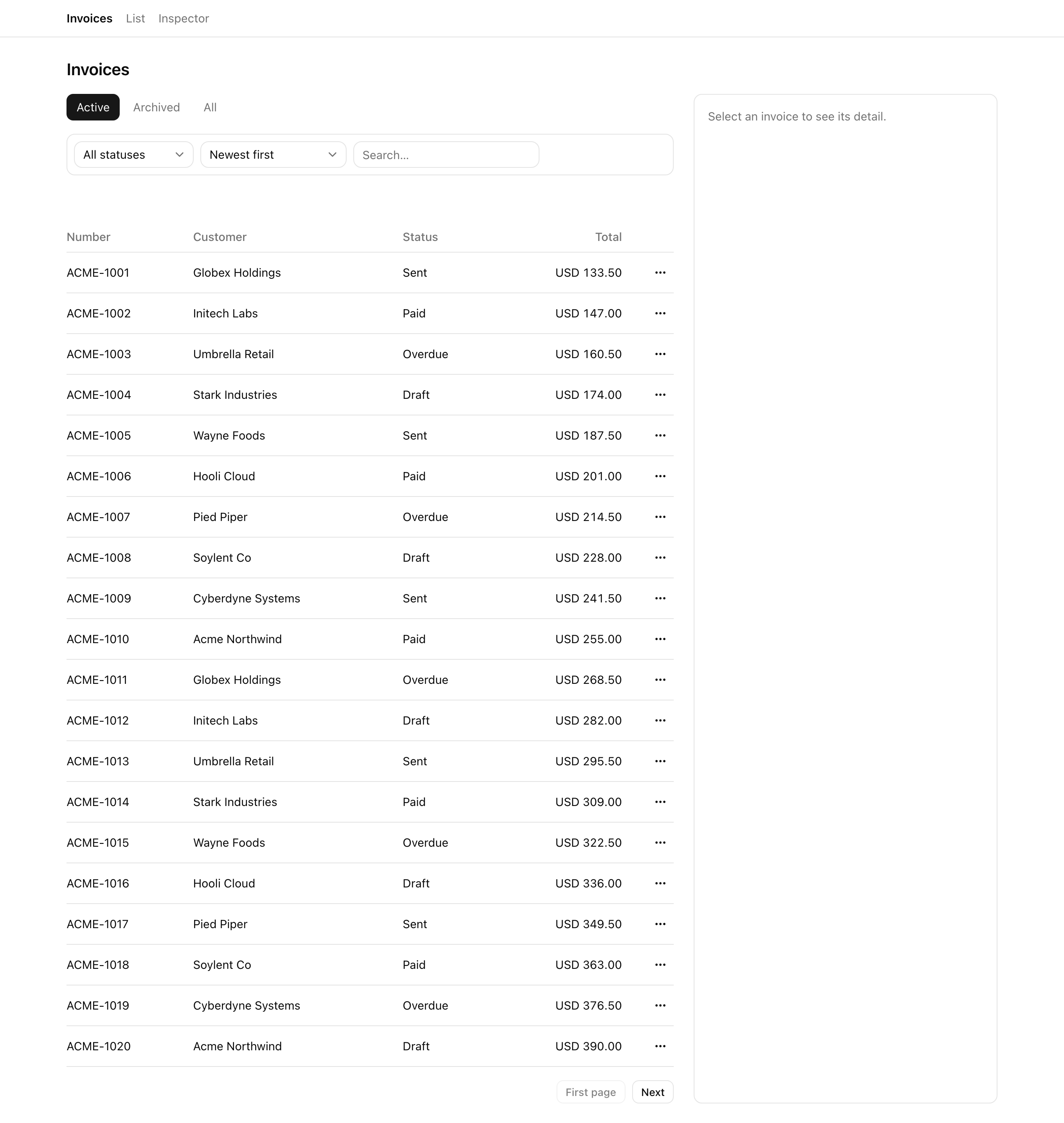
The finished surface at desktop width — the Active / Archived / All view tabs, the status / sort / search toolbar, the invoice table with Number / Customer / Status / Total columns and a per-row action menu, and the First page / Next pagination row, all driven by the URL.
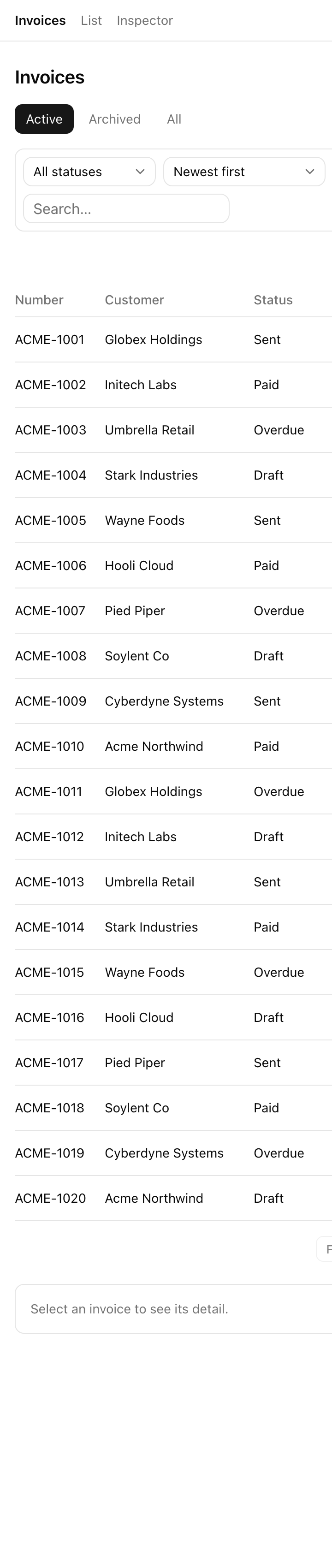
The same surface at phone width — the status, sort, and search controls stack into a single column above the invoice table, with the detail panel falling below the list.
The finished /invoices page — the view tabs, the status / sort / search toolbar, the invoice table, and the cursor pagination row, all driven by the URL.
Promoting view-state — filter, sort, search, cursor, visibility — out of component state and into the URL, so a view is shareable and survives a refresh.
Composing a lifecycle-aware, tenant-scoped read helper, so a query cannot forget the org filter or the deletedAt / archivedAt lifecycle filter.
Adding tenancy, lifecycle, and version preconditions to every write, and turning a stale precondition into an honest conflict instead of a silent overwrite.
Wiring useActionState to carry both the success path and the conflict banner in one shape, and layering useOptimistic on archive so a row leaves the table on click and reappears if the write comes back rejected.
There is one round-trip to keep in your head, and everything in the project hangs off it: the URL is the source of truth, a Server Component reads it, the client writes back to it, and the read flows through a single helper. Here are the moving parts and how they connect.
The /invoices page is a Server Component. It parses the URL through a nuqssearchParamsCache, reads the session, and calls listInvoices with the parsed slice plus the session’s orgId and role.
The toolbar and view tabs are Client Components. They write filter, sort, search, view, and cursor back to the URL through nuqs setters with { shallow: false }, and they bundle cursor: null into any change that re-orders or shrinks the result set.
listInvoices reads exclusively through scopedInvoices(orgId).active() / .archived() / .includingDeleted(), routing on the view param — with all collapsed to active for non-admins at the read itself, not just hidden in the UI.
The lifecycle and update actions are wrapped in authedAction. Each applies its store mutation only when the tenancy, lifecycle, and version precondition holds, and calls pushAudit in the same atomic step.
The edit form carries a hidden version field. On a conflict it renders a banner built from the current payload the action hands back in that same round trip — no second fetch.
The /inspector page is the verification surface every later lesson leans on: row counts, an identity switcher, reset-and-reseed, a force-version-drift tool, and the audit-log tail.
Keep one fact front of mind as you read the code: the store is in memory and stands in for Postgres. The shapes you wire here — scoped reads, version preconditions, audit writes — are exactly the SQL-backed shapes the database units teach, only executed against arrays. The why behind each pattern was taught in the two chapters just before this project, on URL state and on soft delete and concurrency; this project is where you assemble them into one surface, so lean on those chapters rather than re-deriving the reasoning here.
The starter renders but is deliberately unfinished. The bolded files carry a TODO you fill in over the four build lessons; everything else is provided and working. Comments below mark only the files the lessons touch or that change the shape of the app.
package.jsonprovided — dev, build, verify, test:lesson scripts (no db:migrate / db:seed, there is no database)
Directorysrc/
Directoryserver/
types.tsthe Invoice type with deletedAt / archivedAt / version, plus Role and roleAtLeast
store.tsthe in-memory “database” — seeds invoices and audit logs on import; findInvoice / pushAudit / reseed
session.tscookie-driven dev session — getSession reads the acting identity
Directorylib/
result.tsResult<T> union + ok / err / conflict constructors
The lesson-verification/ folder is not in the starter — each lesson’s test file arrives with that lesson. And clear-chip.tsx does not exist yet either; it is the one file you create from scratch, in the first build lesson.
Four build lessons, each ending on a runnable, verifiable state. Together they close every gap the starter ships with.
Lesson 2 — Move every control to the URL
Adds the nuqs parsers, the searchParamsCache, the toolbar, the view-tabs setter, the active-filter chips (and the new ClearChip), and cursor pagination with the deferred-search rhythm — so filter, sort, search, view, and page all live in the URL.
Lesson 3 — Scoped reads and the view tabs
Makes scopedInvoices(orgId)’s three views honest and routes the reads on the view param with RBAC gating — so the Active, Archived, and All tabs each return the right rows.
Lesson 4 — Archive, restore, and delete
Implements the three lifecycle actions with audit writes and wires them into the row action menu, with optimistic archive in the table.
Lesson 5 — Two tabs, one winner
Adds the version precondition to the update action, returns a conflict carrying the current row, and renders the conflict banner with “Use latest” and an admin-gated “Overwrite anyway”.
There is nothing to provision. No Docker, no Postgres, no migration, no .env — the store seeds itself on first import and your identity is the acting-identity cookie, which defaults to org-acme:admin.
Get the starter codebase from the project repository, under Chapter 062/start/.
Install dependencies.
Terminal window
pnpminstall
Start the dev server.
Terminal window
pnpmdev
On success, pnpm dev serves the list view at /invoices and the edit form at /invoices/[id]/edit — but in the unfinished starter state. The toolbar filters are local component state only, so a refresh wipes them. The view tabs and the pagination buttons do nothing. Every tab shows the same rows, because the scoped helper does not yet branch on view. There are no archive or restore actions. And the update path silently overwrites on a two-tab race. Each of those is a gap a build lesson closes — and you will be able to watch each one go from broken to working.
Your second URL is the verification surface. Open /inspector and keep it in a tab as you work:
Every build lesson also ships an automated check. Once you have attempted a lesson, run pnpm test:lesson <n> (for example pnpm test:lesson 2) to grade it against that lesson’s lesson-verification/Lesson <n>.ts file. When the starter renders /invoices and /inspector, you are set up — head to the first build lesson and start moving controls into the URL.