This project takes the two halves you studied in the last two chapters — the webhook discipline and the Stripe billing model — and welds them into one runnable surface. On the way in, three Stripe webhooks (checkout.session.completed, customer.subscription.updated, customer.subscription.deleted) land at a single route handler, get verified, deduped, and projected into one derived plan_entitlements row per organization. On the way out, three methods behind lib/billing/ — upgrade, openPortal, requirePlan — let the app start a subscription, manage it, and gate paywalled content. The inbound webhook and the outbound interface are joined by one rule that runs through every lesson: the webhook is the only thing that ever writes the entitlement, and everything else reads. You will prove the whole loop on your own machine with stripe listen and stripe trigger, no deploy required.
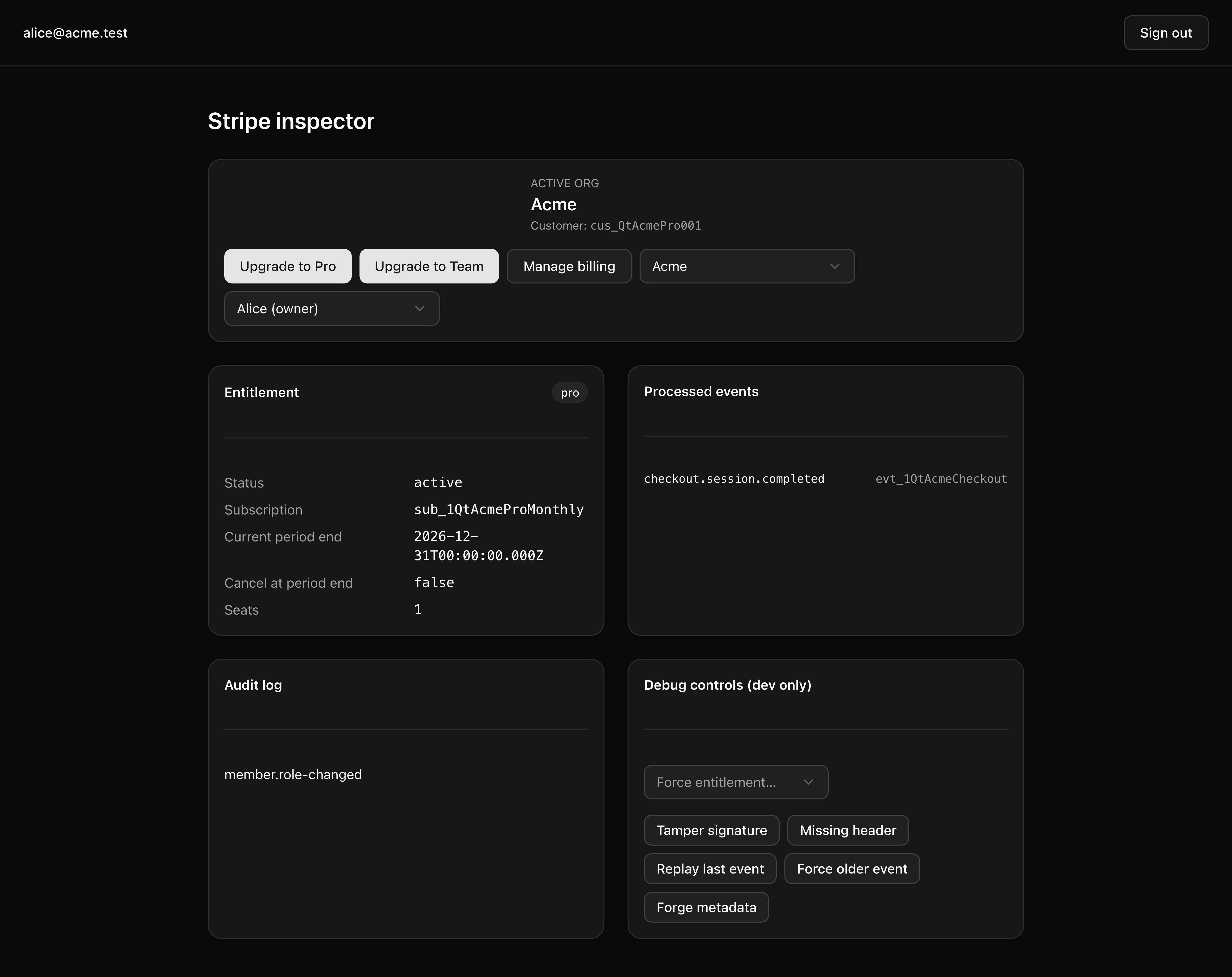
By lesson 6 — the inspector after a test-card upgrade: the entitlement panel reads plan: pro with a populated subscriptionId and currentPeriodEnd, the processed_events tail shows the landed event, and the Portal button is enabled.
The webhook is the production async edge of every modern SaaS, and the code that sits on it is the most expensive code in the codebase when it is written carelessly. It runs unattended, retries on failure, and writes the state your customers pay for — a partial write or a double-applied event here is money, not a cosmetic bug. So the skill this project drills is not “call the Stripe SDK”; it is the discipline that makes that seam safe:
Verify, then claim, then mutate — inside one transaction. A forged request never reaches your parser, a replayed event lands exactly once, and a crash mid-handler can never leave the database half-written.
Order with a predicate, not a guess. Stripe makes no delivery-order promise, so the entitlement write carries a last_event_at comparison that lets an out-of-order event silently no-op instead of overwriting newer state with older.
One writer for derived state. The plan_entitlements row is computed from Stripe’s events; the webhook owns every write, and Server Actions, the Portal return, and the success page only ever read it.
Project, don’t store raw. A pure function turns a Stripe.Subscription into exactly the columns your app cares about — the seam you will unit-test when the course reaches testing.
A thin interface around the SDK. Three methods, one import site, so the rest of the app never touches Stripe directly.
None of these are Stripe-specific. The same shape carries into every async ingest you will write next — payment webhooks, email-bounce webhooks, third-party callbacks, an internal event bus. That is the point of the chapter: not Stripe, but the durable pattern, applied to one real third-party.
The webhook chapter’s discipline is carry-in here, not something you re-derive. The starter already ships the claimEvent check-and-claim helper and the configured Stripe SDK singleton; this project is their application to a real integration.
The loop has two directions and one rule that governs both. Named here, built across the next five lessons.
In-bound — the webhook. Stripe sends an event to POST /api/webhooks/stripe. The handler reads the raw body, verifies the signature, claims the event in processed_events to dedupe, dispatches by event type, projects the Subscription into an entitlement patch, UPSERTs or UPDATEs plan_entitlements, writes an audit_logs row, and answers 200. Every database write happens inside one db.transaction, so the whole landing is all-or-nothing.
Out-bound — the interface. The inspector’s buttons call upgrade and openPortal — Server Actions that return a Stripe-hosted URL the browser navigates to: Checkout to start a subscription, the Customer Portal to manage it. Back in the app, requirePlan gates Server Components by reading the entitlement row before rendering paywalled content.
The contract between them. The webhook is the only writer for plan_entitlements; every other surface reads. When a Checkout starts, the org’s id rides along on the Subscription’s metadata.organization_id — the carry-channel from Checkout to webhook. But that channel is not trusted on its own: the authoritative resolver is the reverse lookup resolveOrgIdFromCustomer, which maps the Stripe Customer back to the org that owns it. The last lesson cross-checks the two so a forged organization_id cannot write to the wrong tenant.
Everything that is not bold below ships complete in the starter — the SDK singleton, the claim helper, the catalog loader, the error class, the barrel, the entire inspector, the success page, and the seeds. The bold files are your work: they carry TODO markers, and each one names the lesson it belongs to. The deep auth, email, invitation, and UI subtrees you never touch are collapsed to one line.
Directorysrc/
env.tsvalidates the sk_test_ prefix at boot
Directorydb/
schema.tsplanEntitlements stub, PK-only — L4 adds the columns
schema/auth.tsBetter Auth tables, organization now carries stripeCustomerId
A few of the provided pieces are worth knowing by name before you start, because the lessons lean on them:
lib/billing/stripe.ts is the only file in the codebase that imports stripe. The SDK singleton is configured there with the apiVersion pinned and STRIPE_SECRET_KEY pulled from the typed env. Everywhere else either calls one of the three exported methods or reads the entitlement row.
catalog.json is the bridge from Stripe-side ids to app-side plan slugs. The seed:stripe script rewrites it to { "lookup_keys": { "course_pro_monthly": "pro", "course_team_monthly": "team" } }, and the catalog loader’s planFromLookupKey(key) is the projection’s only path across that boundary. Raw price_id strings never appear in app code — lookup_key is the stable handle.
claimEvent(tx, provider, eventId, eventType) in lib/webhooks/processed-events.ts is the check-and-claim helper from the webhook chapter. It returns true when the row is freshly inserted and false when the unique(provider, eventId) constraint blocked it — the same seam every webhook handler in the codebase shares.
inspector/page.tsx is your control room. It renders the plan_entitlements row, the processed_events tail, and the audit log for the active org, plus the Checkout and Portal buttons and a row of dev-only debug controls — tamper a signature, replay the last event, force an out-of-order delivery, forge tenancy metadata. You will watch every lesson’s behavior land here; you write only the handlers and methods it exercises.
Five implementation lessons build the loop, one capability each.
Lesson 2 — Verify before you parse
Lands the route handler’s verification skeleton: read the raw body once, verify the signature with constructEvent, and answer 400 application/problem+json on failure — with structured logging on every disposition.
Lesson 3 — Claim the event inside one transaction
Wraps the post-verify path in db.transaction, dedupes against processed_events, and stubs the dispatch switch so every event type is logged.
Lesson 4 — Project three events into one entitlement row
Completes the plan_entitlements schema, writes the pure projection, and lands the three handlers with the ordering predicate and an audit-log write on every transition.
Lesson 5 — Ship the three-method billing interface
Implements upgrade, openPortal, and requirePlan, wires the Checkout and Portal buttons, and runs the Stripe-hosted flow end to end with a test card.
Lesson 6 — Harden the webhook against forged tenancy
Adds the metadata cross-check so a forged organization_id can never write an entitlement to the wrong organization.
Get the starter codebase from the project repository, under Chapter 065/start/.
Copy the env template.
Terminal window
cp.env.example.env
Start local Postgres (the project ships a docker-compose.yml with postgres:18). Wait for the container to report healthy.
Terminal window
dockercomposeup-d
Install dependencies. preinstall enforces pnpm and the engines field requires Node 24, so this fails fast if either is wrong.
Terminal window
pnpminstall
Fill in .env (see the variable list below). Generate the two secrets with openssl rand -base64 32, and paste your Stripe test-mode secret key. You will add STRIPE_WEBHOOK_SECRET in step 8.
Terminal window
opensslrand-base6432
Apply the migrations. This runs the prior project’s set plus processed_events, the plan_entitlements PK stub, and organization.stripe_customer_id.
Terminal window
pnpmdb:migrate
Seed the database. You get two orgs (Acme and Globex), four users (Alice, Bob, Carol, Dave), and one 'free'plan_entitlements row per org. No Stripe round-trip happens here, so each org’s stripe_customer_id stays null.
Terminal window
pnpmdb:seed
Authenticate the Stripe CLI, then open the forwarding tunnel in a second terminal and leave it running for the rest of the project.
Terminal window
stripelogin
Terminal window
pnpmstripe:listen
stripe listen prints a local signing secret that looks like whsec_…. Copy it into .env as STRIPE_WEBHOOK_SECRET.
Seed your Stripe account. This creates the pro and team Products with monthly Prices in your test-mode account and rewrites src/lib/billing/catalog.json with their real lookup_keys. It is idempotent — find-or-create by lookup_key — so re-running is a no-op.
Terminal window
pnpmseed:stripe
Start the dev server. If it was already running when you pasted STRIPE_WEBHOOK_SECRET, restart it so the new env loads.
Four entries are specific to this project; the rest carry over from the earlier projects unchanged.
STRIPE_SECRET_KEY — your test-mode secret key (sk_test_…), from the Stripe Dashboard under Developers → API keys, with the dashboard toggled to test mode. Server-only. Never paste an sk_live_ key here: src/env.ts validates the sk_test_ prefix at boot and refuses to start otherwise. That guard is the project’s never-ship-a-live-key rail — keep it.
STRIPE_WEBHOOK_SECRET — the local signing secret (whsec_…) that stripe listen prints. It is different on every fresh CLI session and is not the same value as a dashboard-configured production endpoint secret. Re-paste it whenever you restart the CLI.
STRIPE_PORTAL_RETURN_URL — http://localhost:3000/inspector. Where the Customer Portal sends the user back after they manage their subscription.
APP_URL — http://localhost:3000. The origin Checkout’s success_url and cancel_url are built from.
Open http://localhost:3000/inspector. The page shows the plan_entitlements row for the active org reading plan: free, and the Portal button is disabled — there is no Stripe Customer yet, so there is nothing for the Portal to manage.
The stripe listen terminal is your live tunnel check: it prints 200 OK or 404 on every event it forwards. Fire one now:
Terminal window
stripetriggercheckout.session.completed
It returns 404. That is correct. No route logic exists yet — the handler is an empty stub. That 404 is the deliberate starting line: the next lesson lands the 200, and the four lessons after it build the rest of the loop from there.