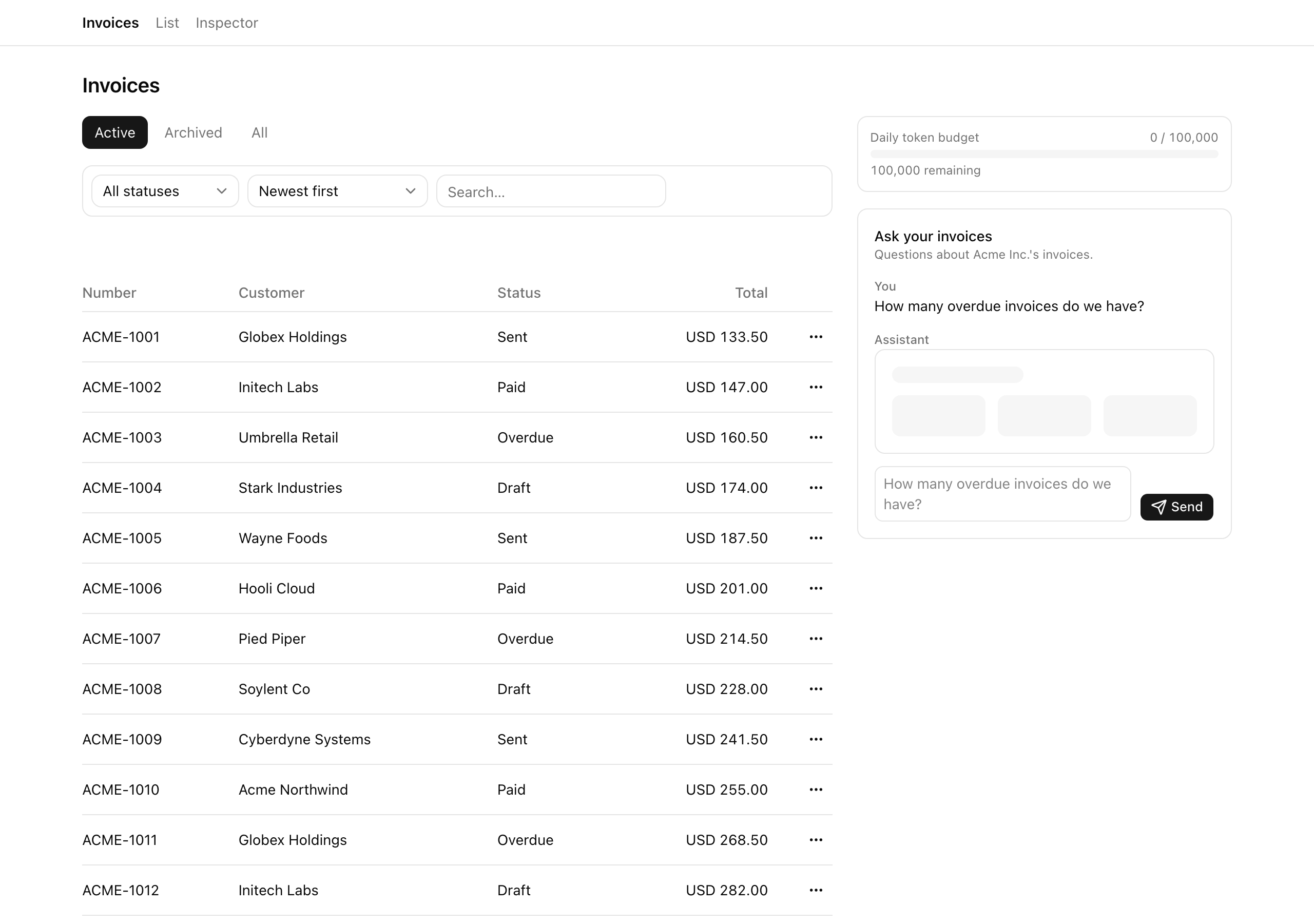
The last three chapters gave you the pieces of an LLM feature in isolation: when one earns its place in a product and how to bound its cost, the streamText and useChat plumbing with the UIMessage parts protocol, and tool calling with the server-owned agentic loop and typed tool parts. This project is where those pieces become one runnable surface — an “ask-your-invoices” chat that lives in the right rail of the invoices app you built earlier in the course. A user types a plain question about their organization’s invoices (“how many overdue do we have?”, “what’s our total paid this month?”), and a tool-calling model answers, grounded in real scopedInvoices data, with a small panel beside it showing how much of today’s token budget is left. The single rule running through every lesson, said plainly now so it never surprises you later: the model is treated as untrusted input. It never sees the store, never sees an orgId, and never touches a row it isn’t allowed to — every read happens inside a tool’s execute, under the route’s auth boundary, scoped by an orgId the server closes over and the model can’t reach.
By the end of this lesson you have written no code. What you leave with is the running skeleton and a clear map of the nine stubs you fill across the next four lessons. The project boots with no database, no Docker, and no auth wall: the seeded invoices list renders, the chat rail is present, and the panel shows a usage bar — but the two route handlers behind them 404 until you write them. The payoff here is orientation, not a feature.
The finished surface at the END of the chapter, not this lesson's boot state — a question typed, the tool-part skeleton flashing, the stats card with real numbers, an assistant bubble citing the count, and the usage panel ticking up. Your fresh boot will look emptier: the rail is present but unwired until you build the route in the next lesson.
This project is an application chapter: every primitive below was taught in the previous three chapters, and here you wire them into one surface that holds together. The list is the set of reflexes you are installing, not the syntax — the syntax you already have.
Wrapping a streaming LLM endpoint in the same auth boundary that guards every other mutation in the app, so the model only ever runs for an authenticated org member.
Treating the model as untrusted input: tools as the only doorway into app state, orgId taken from the server closure rather than the model’s arguments, and aggregate projections returned to the model instead of raw rows.
Owning the agentic loop server-side with an explicit step cap, rather than trusting a client or an SDK default to bound it.
Accounting for cost per user, per day, and refusing gracefully — with a typed response, not a thrown 500 — once the budget is spent.
Rendering a typed useChat surface where each tool’s output is fully typed at the call site and each tool draws its own loading shape rather than a generic spinner.
This is the canonical 2026 shape for any LLM-backed SaaS surface. A future customer-support assistant or an onboarding helper reuses this exact skeleton — auth wrapper, quota wrapper, a tool registry behind a lib/llm seam, a typed client — with a different set of tools and a different prompt.
The request path is short, but its shape is the whole lesson: a streaming route handler with two wrappers stacked around it, a tool registry that is the model’s only window into the data, and a separate inspector surface for watching it all by hand. Five layers:
Client — invoice-chat.tsx runs useChat<InvoiceUIMessage> over a DefaultChatTransport, rendering text parts and tool-getInvoiceStats parts; token-usage-panel.tsx polls /api/usage. Both live in the /invoices right rail.
Route — POST /api/chat, composed as withLlmQuota(authedRoute('member', …)): the quota wrapper reserves budget before the stream starts, then inside the handler streamText runs with the tool-grounded system prompt, stopWhen(stepCountIs(5)), the tool registry, an onStepFinish (quota increment plus per-step audit), and an onFinish (the aggregate audit write).
Feature seam — src/lib/llm/{prompts,tools,quota,audit,with-llm-quota}.ts, the wall the model never sees past: no store reference, no orgId, no raw row crosses it. models.ts holds only the bare AI Gateway model id.
Data — the invoices array carried from the earlier list project, read exclusively through scopedInvoices(orgId).active(); plus two new arrays, usageQuota and llmAuditEvents, for accounting.
Inspector — /inspector, a Server Component that mirrors quota and audit state and offers the verification toggles (its mutations are Server Actions in inspector/actions.ts). The chat lives on /invoices; the inspector is where you watch it work.
The request path, left to right. The route is three boxes nested one inside the next — withLlmQuota wraps authedRoute('member') wraps streamText — so a request must clear the quota reservation, then auth, before the stream ever starts. Inside, the model reaches the store through one doorway only: the getInvoiceStats tool, which calls scopedInvoices under an orgId the server closes over. Accounting writes land in the usageQuota and llmAuditEvents arrays; the inspector reads all three arrays from the side, off the request path.
The starter carries the entire invoices surface from the earlier list project intact — the list, the store, the auth wrappers, the scoped query, the model registry, the inspector shell — and marks the nine files you write with a TODO(L<n>) stub naming the lesson that fills it. The bolded files below are your whole build. Everything not bolded is carried code you read but do not change. The one provided seam worth noting is with-llm-quota.ts: it ships complete, so you wrap with it in the quota lesson rather than writing it.
next.config.ts
.env.exampleAI_GATEWAY_API_KEY — only the live-model checks need it
package.jsonai@^5, @ai-sdk/react@^2 (no @ai-sdk/openai — the gateway is a plain string)
Before you write the first stub, read a handful of carried files so the seams the build hangs off are familiar. These are reads, not edits:
src/lib/llm/models.ts — one role-named handle, chatModel = 'openai/gpt-5-mini', a bare provider/model string. The SDK routes it through the Vercel AI Gateway and reads AI_GATEWAY_API_KEY from process.env, so no @ai-sdk/openai package is imported anywhere. Swapping providers is a one-line change here — the discipline from the model-swap chapter, never a provider(...) factory call at the call site.
src/server/store.ts — the in-memory stand-in for Postgres. Alongside the carried invoices array sit two new arrays: usageQuota, keyed by (userId, day) (the usage_quota_daily analogue, primary key (userId, day)), and llmAuditEvents, with an event of 'llm.step' or 'llm.finish' and a jsonb-shaped payload (the llm_audit_events analogue). Each later lesson names the SQL lineage of the shape it touches, so the patterns transfer the day you put this on a real backend.
src/server/session.ts — the cookie-driven dev getSession(). There is no auth wall, so it never redirects; absent or unknown, the acting-identity cookie defaults to org-acme:admin. This stands in for the requireOrgUser you’d have in a DB-backed app.
src/server/inspector-flags.ts — three flags, all default off: BYPASS_AUTHED_ROUTE, MODEL_FROM_INPUT_ORGID, and FORCE_TOOL_ERROR. None is reachable in normal operation; they exist only to make each failure mode visible by hand from the inspector, and they drive the later Moments of truth.
src/app/(app)/invoices/page.tsx — the list view from the earlier project, plus a right-rail <aside> that renders <TokenUsagePanel /> above <InvoiceChat />. Two grid children, the list and the rail — the chat surface slots into a shape that already exists.
package.json — ai@^5 and @ai-sdk/react@^2, with no @ai-sdk/openai (the gateway string needs no provider package). The v5 import paths are the ones the previous three chapters used.
src/env.ts — AI_GATEWAY_API_KEY as z.string().min(1), server-only. Validation is skipped outside production (and whenever SKIP_ENV_VALIDATION=true), so pnpm verify’s build stays green without a real key.
The /inspector page, end to end — the row counts, the identity switcher, the audit tail, the live usage counter, the “Force quota to 99,500” button, the “Force tool error” toggle, the LLM audit-events tail, the forge-orgId explainer, and the two debug-flag toggles. This is your control room for the rest of the chapter; walk it once now so you know where each verification lever lives.
One seeded fact the later lessons lean on: the member-A user starts today at 90,000 tokens used against a 100,000 daily cap, with a separate near-cap yesterday row at 99,000. The yesterday row proves the daily key resets — today’s row is independent of it — and the 90k starting point means a couple of small questions cross the cap deterministically, so you can reach the over-budget refusal path by hand without spending real money.
Each of the next four lessons fills one slice of the nine stubs and ends on a capability you verify by hand.
Lesson 2 — Streaming route under auth
Adds POST /api/chat: streamText wrapped in authedRoute('member'), capped at five agentic steps, with the tool-grounded system prompt and an onFinish audit write. Ends streaming text-only answers into a throwaway smoke-test box.
Lesson 3 — The org-scoped tool
Adds getInvoiceStats, the tool that closes over ctx.orgId and projects an aggregate back to the model, so the chat answers questions grounded in real scopedInvoices numbers — and a forged orgId cannot reach another org.
Lesson 4 — The daily token quota
Adds quota.ts, the withLlmQuota reservation wrapped around the route, the per-user-per-day accounting inside onStepFinish, and the /api/usage read endpoint. Ends refusing the over-cap request with a typed 429.
Lesson 5 — Typed client and usage panel
Replaces the smoke-test box with the real typed useChat client — text bubbles and tool-part cards across all four lifecycle states with a per-tool skeleton — plus the live usage panel. Ends with the full happy and unhappy paths working live.
The whole project runs on your machine with no external accounts and no environment variables for the shell — the “database” is an in-memory store seeded at boot, identity comes from a cookie, and nothing reaches a real Postgres or third-party service to render. This lesson ends when /invoices and /inspector are both on screen.
Get the starter codebase from the project repository, under Chapter 108/start/.
Install dependencies — this completes clean.
Terminal window
pnpminstall
Boot the dev server.
Terminal window
pnpmdev
Open http://localhost:3000/invoices. The seeded list renders with the right-rail chat panel present, and /inspector loads with the member-A usage row and an empty LLM audit-events tail. The store seeds deterministically on first import; the inspector’s “Reset and re-seed” control restores it between demos.
Environment variables. The shell needs none. One key matters for the manual live-chat checks in the next four lessons — the streamed answer, the 429 refusal, the forged-orgId proof, the step-ceiling demo:
AI_GATEWAY_API_KEY — the server-only key the model handle reads. Get it from the Vercel AI Gateway dashboard, then copy .env.example to .env and paste it in. No test, build, or rendered check makes a live model call, so pnpm verify stays green without it; you only need a real key when you want to talk to the model by hand.
Expected result. On success, /invoices renders the seeded list with the right-rail chat panel present, and /inspector loads with the seeded member-A usage row and an empty LLM audit-events tail. POST /api/chat and GET /api/usage return 404 until their handlers exist — that’s the unwired state you build out next. The project runs locally; this lesson ends here.