Move every control to the URL
The list renders, but every control on it is a dead end. Set a filter, sort a column, type a search, page forward — then refresh, and it is all gone. Paste the URL to a coworker and they land on the bare list, not the view you were looking at. In this lesson you fix that at the root: filter, sort, search, the visibility tab, and the pagination cursor all move out of component state and into the URL, so any view becomes a link that survives a refresh, a share, and the back button.
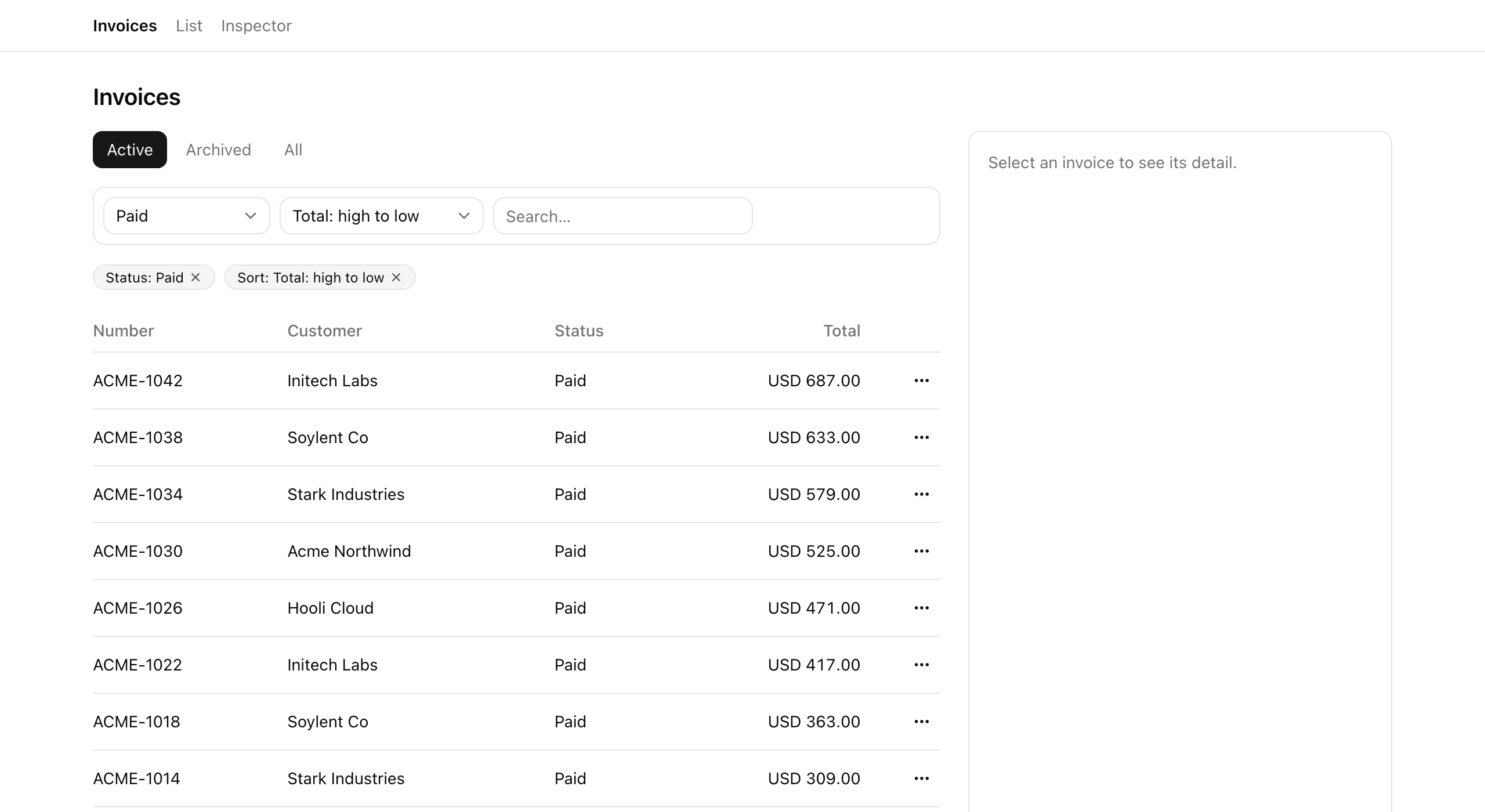
The finished behavior is the contract you would expect from any production list. Click a status, change the sort, or switch tabs and the URL rewrites to match. A chip appears above the table for every filter that differs from the default, each with its own clear button. Next carries a fresh cursor; the search box keeps typing smoothly while the URL settles a beat later. And the proof is the paste test: copy the URL into a fresh tab and the same list renders, down to the page you were on.
Your mission
Section titled “Your mission”Make the URL the single source of truth for every piece of view-state that should survive a refresh, a share, or the back button — filter, sort, search, the visibility tab, and the pagination cursor. The page already reads that URL on the server: it parses the query string through a nuqs searchParamsCache and hands the result to listInvoices. Your job is the write side — the toolbar, the view tabs, the chips, and pagination — plus filling in the parsers the cache reads through.
A few constraints shape the solution, and they are the difference between a list that feels production-grade and one that fights the browser. Default values stay out of the URL: nuqs strips any param that equals its default, so a bare /invoices is the home state and only differences from default ever show in the address bar. The one invariant that keeps pagination honest is that every setter which re-orders or shrinks the result set bundles cursor: null in the same call — change the filter while holding a cursor and that cursor points past the end of a different result set, so page one is the only safe landing. You do not need to think about history mode or scroll behavior: nuqs already uses history replace and { scroll: false } by default, so a fast-changing filter never buries the back button or yanks the viewport. And the search box stays responsive by writing its deferred value to the URL through useDeferredValue + useTransition, with nuqs’s own limitUrlUpdates: debounce(300) bounding how often that write commits — not a hand-rolled setTimeout.
One thing is deliberately out of scope. The view tabs will write the view param, but every tab still returns the same rows — making the read branch on view (and gating the All tab to admins) is the next lesson. Lifecycle actions and the version precondition come later still. Here you are wiring the URL plumbing and nothing downstream of it.
/invoices URL with no query string.cursor in the URL; the cursor is dropped whenever status, sort, search, or view changes, so the new result set starts at page one.Coding time
Section titled “Coding time”Fill in the five parsers, the toolbar, the view-tabs setter, the chips (plus the new ClearChip), and the pagination control against the brief and the tests. The TODO(L2) comments mark every spot. Give it a real attempt before opening the walkthrough below — the round-trip clicks into place once you have wrestled with one setter yourself.
Reference solution and walkthrough
The mental model worth holding before any code: this is a one-way loop. The URL is read on the server, and written from the client. The page parses the query string, calls listInvoices, and renders rows; the toolbar, tabs, chips, and pagination only ever write back to the URL, which triggers the server to read again. No client-side filtering, no duplicated state — the URL is the one place the view-state lives.
The parsers and the cache
Section titled “The parsers and the cache”Everything downstream reads through search-params.ts. Each parser declares how one param decodes from the query string and, crucially, what its default is — because the default is what nuqs strips from the URL to keep it clean.
import {  createSearchParamsCache,  parseAsString,  parseAsStringEnum,} from 'nuqs/server';
export const invoiceListSearchParams = {  status: parseAsStringEnum(['draft', 'sent', 'paid', 'overdue']),  sort: parseAsStringEnum([    '-createdAt',    'createdAt',    '-total',    'total',    '-customer',    'customer',  ]).withDefault('-createdAt'),  q: parseAsString.withDefault(''),  view: parseAsStringEnum(['active', 'archived', 'all']).withDefault('active'),  cursor: parseAsString,};
export const invoiceListSearchParamsCache = createSearchParamsCache(  invoiceListSearchParams,);
status and cursor are nullable with no default. A value outside the allowed set decodes to null, which strips it from the URL — that is what makes “no status filter” and “page one” the implicit home state.
import {  createSearchParamsCache,  parseAsString,  parseAsStringEnum,} from 'nuqs/server';
export const invoiceListSearchParams = {  status: parseAsStringEnum(['draft', 'sent', 'paid', 'overdue']),  sort: parseAsStringEnum([    '-createdAt',    'createdAt',    '-total',    'total',    '-customer',    'customer',  ]).withDefault('-createdAt'),  q: parseAsString.withDefault(''),  view: parseAsStringEnum(['active', 'archived', 'all']).withDefault('active'),  cursor: parseAsString,};
export const invoiceListSearchParamsCache = createSearchParamsCache( invoiceListSearchParams,);sort, q, and view each carry an explicit default, so whenever the live value equals it nuqs drops the param. A bare /invoices therefore parses to sort -createdAt, empty q, and view active.
import {  createSearchParamsCache,  parseAsString,  parseAsStringEnum,} from 'nuqs/server';
export const invoiceListSearchParams = {  status: parseAsStringEnum(['draft', 'sent', 'paid', 'overdue']),  sort: parseAsStringEnum([    '-createdAt',    'createdAt',    '-total',    'total',    '-customer',    'customer',  ]).withDefault('-createdAt'),  q: parseAsString.withDefault(''),  view: parseAsStringEnum(['active', 'archived', 'all']).withDefault('active'),  cursor: parseAsString,};
export const invoiceListSearchParamsCache = createSearchParamsCache(  invoiceListSearchParams,);
The page calls this cache’s .parse() on the server to turn the raw query string into the typed ListParsed object it hands to listInvoices.
The split between nullable and defaulted parsers is doing real work. status and cursor have no default, so their natural empty state is null and they simply do not appear in the URL until set. sort, q, and view each carry a .withDefault(...), so they always have a value but vanish from the URL the moment that value is the default. The net effect is the home-state contract: a bare /invoices and /invoices?sort=-createdAt&view=active&q= are the same view, and only the second one is something you would never want to share. The parseAsStringEnum parsers also reject anything outside their allowed set, collapsing junk like ?status=banana back to the default — which is why a hand-typed garbage URL can never break the page. The nuqs parser and searchParamsCache mechanics were covered in detail in The list-view anatomy; here you are just declaring the five params this list needs.
The toolbar: from local state to the URL
Section titled “The toolbar: from local state to the URL”This is the change that defines the whole lesson, so it is worth seeing side by side. The starter holds status, sort, and search in useState — the controls render and feel interactive, but nothing reaches the URL, so a refresh wipes the lot. The solution swaps that local state for a single useQueryStates call that writes straight to the URL.
'use client';
import { useState } from 'react';import { Input } from '@/components/ui/input';import {  Select,  SelectContent,  SelectItem,  SelectTrigger,  SelectValue,} from '@/components/ui/select';import type { InvoiceSort, ListParsed } from '@/lib/invoices/queries';
export const Toolbar = ({ parsed }: { parsed: ListParsed }) => {  const [status, setStatus] = useState<string>(parsed.status ?? 'all');  const [sort, setSort] = useState<InvoiceSort>(parsed.sort);  const [q, setQ] = useState(parsed.q);
The state is trapped in the component. setStatus updates a local variable the URL never sees, so the server never re-reads and a refresh resets every control to the seed it was first rendered with.
'use client';
import { debounce, useQueryStates } from 'nuqs';import { useDeferredValue, useEffect, useState, useTransition } from 'react';import { Input } from '@/components/ui/input';import {  Select,  SelectContent,  SelectItem,  SelectTrigger,  SelectValue,} from '@/components/ui/select';import type { InvoiceSort, ListParsed } from '@/lib/invoices/queries';import { invoiceListSearchParams } from '@/lib/invoices/search-params';import type { InvoiceStatus } from '@/server/types';
export const Toolbar = ({ parsed }: { parsed: ListParsed }) => {  const [, setQueryStates] = useQueryStates(invoiceListSearchParams, {    shallow: false,    limitUrlUpdates: debounce(300),  });
The state lives in the URL. setQueryStates writes the query string, and shallow: false is what makes the server re-read — drop it and the URL updates client-side only, so the list never refreshes.
shallow: false is the load-bearing option here. nuqs defaults to shallow: true, which rewrites the URL on the client without notifying the server — fine for state a Client Component reads itself, useless for a list the server renders. Because the page re-queries on every URL change, you want that option on every setter that should change what rows come back. The rest of the component reads the current value from the parsed prop (the server’s parse of the URL) and writes the new value on change, with cursor: null riding along on every setter:
  const [q, setQ] = useState(parsed.q);  const deferredQ = useDeferredValue(q);  const [, startTransition] = useTransition();
  useEffect(() => {    if (deferredQ === parsed.q) {      return;    }    startTransition(() => {      setQueryStates({ q: deferredQ || null, cursor: null });    });  }, [deferredQ, parsed.q, setQueryStates]);
  return (    <div      data-testid="toolbar"      className="flex flex-wrap items-center gap-2 rounded-lg border p-2"    >      <Select        value={parsed.status ?? 'all'}        onValueChange={(value) =>          setQueryStates({            status: value === 'all' ? null : (value as InvoiceStatus),            cursor: null,          })        }      >        <SelectTrigger data-testid="filter-status" className="w-36">          <SelectValue placeholder="Status" />        </SelectTrigger>        <SelectContent>          <SelectItem value="all">All statuses</SelectItem>          <SelectItem value="draft">Draft</SelectItem>          <SelectItem value="sent">Sent</SelectItem>          <SelectItem value="paid">Paid</SelectItem>          <SelectItem value="overdue">Overdue</SelectItem>        </SelectContent>      </Select>
      <Select        value={parsed.sort}        onValueChange={(value) =>          setQueryStates({ sort: value as InvoiceSort, cursor: null })        }      >        <SelectTrigger data-testid="filter-sort" className="w-44">          <SelectValue placeholder="Sort" />        </SelectTrigger>        <SelectContent>          <SelectItem value="-createdAt">Newest first</SelectItem>          <SelectItem value="createdAt">Oldest first</SelectItem>          <SelectItem value="-total">Total: high to low</SelectItem>          <SelectItem value="total">Total: low to high</SelectItem>          <SelectItem value="-customer">Customer: Z–A</SelectItem>          <SelectItem value="customer">Customer: A–Z</SelectItem>        </SelectContent>      </Select>
      <Input        data-testid="search-input"        type="search"        placeholder="Search…"        className="w-56"        value={q}        onChange={(event) => setQ(event.target.value)}      />    </div>  );};
The search input is the one control that needs care, because typing is fast and a URL write per keystroke would both lag the input and flood the back button. The fix is the rhythm you learned in Typed input, committed URL: the input itself stays in plain useState, so every keystroke renders instantly. useDeferredValue produces a lagged copy of that text, and an effect writes only the deferred value to the URL inside startTransition, so the write never blocks the keystroke. On top of that, limitUrlUpdates: debounce(300) on the useQueryStates call collapses a burst of writes into one roughly every 300ms. Two layers, two jobs: the deferred value keeps the input responsive, the debounce keeps the history clean. Note deferredQ || null — an empty string coerces to null so the q param strips out of the URL rather than lingering as ?q=.
And every setter — status, sort, search — carries cursor: null. That is the invariant from the brief, made concrete: each of these changes the result set, so the cursor you were holding is meaningless against the new set, and dropping it lands you on page one.
The view tabs
Section titled “The view tabs”The tabs write the view param the same way, through useQueryStates, bundling cursor: null on click. They read the active tab from parsed.view to know which one to highlight.
'use client';
import { useQueryStates } from 'nuqs';import type { ListParsed } from '@/lib/invoices/queries';import { invoiceListSearchParams } from '@/lib/invoices/search-params';import { cn } from '@/lib/utils';import type { Role } from '@/server/types';
export const ViewTabs = ({  parsed,  role,}: {  parsed: ListParsed;  role: Role;}) => {  const [, setQueryStates] = useQueryStates(    {      view: invoiceListSearchParams.view,      cursor: invoiceListSearchParams.cursor,    },    { shallow: false },  );
  // The `all` tab is cosmetic on top of the read-layer RBAC gate: hide it from  // non-admins (the read already serves them active rows if they hand-type it).  const tabs: { value: ListParsed['view']; label: string }[] = [    { value: 'active', label: 'Active' },    { value: 'archived', label: 'Archived' },    ...(role === 'admin' ? [{ value: 'all' as const, label: 'All' }] : []),  ];
  return (    <div data-testid="view-tabs" className="flex gap-1">      {tabs.map((tab) => (        <button          key={tab.value}          type="button"          data-testid={`view-tab-${tab.value}`}          onClick={() => setQueryStates({ view: tab.value, cursor: null })}          className={cn(            'rounded-md px-3 py-1.5 text-sm',            parsed.view === tab.value              ? 'bg-primary text-primary-foreground'              : 'text-muted-foreground hover:bg-muted',          )}        >          {tab.label}        </button>      ))}    </div>  );};
Notice that useQueryStates is passed a subset of the parser map — just view and cursor, not all five. nuqs lets you scope a setter to only the params it touches, which keeps the component’s intent obvious and avoids accidentally writing a param it has no business changing.
The role === 'admin' line already hides the All tab from non-admins, so you will see it wired here. That visibility toggle is only the cosmetic half, though — the half that matters is the read gate that serves a non-admin active rows even if they hand-type ?view=all, and that lives in listInvoices in the next lesson. Until then, the All tab writes view=all but every tab returns the same rows, because the read does not branch on view yet.
Pagination
Section titled “Pagination”Pagination reads and writes a single param, so it uses useQueryState (singular) on cursor. The server hands it nextCursor and hasPrev as props — it does not compute them itself.
'use client';
import { useQueryState } from 'nuqs';import { Button } from '@/components/ui/button';import { invoiceListSearchParams } from '@/lib/invoices/search-params';
type PaginationProps = {  cursor: string | null;  nextCursor: string | null;  hasPrev: boolean;};
export const Pagination = ({ nextCursor }: PaginationProps) => {  const [cursor, setCursor] = useQueryState(    'cursor',    invoiceListSearchParams.cursor.withOptions({ shallow: false }),  );
  return (    <nav      data-testid="pagination"      aria-label="Pagination"      className="flex items-center justify-end gap-2"    >      <Button        type="button"        variant="outline"        size="sm"        data-testid="pagination-first"        disabled={cursor == null}        onClick={() => setCursor(null)}      >        First page      </Button>      <Button        type="button"        variant="outline"        size="sm"        data-testid="pagination-next"        disabled={!nextCursor}        onClick={() => setCursor(nextCursor)}      >        Next      </Button>    </nav>  );};
There is a deliberate scope call here. A full pagination control would let you walk backward through every page you have visited, which means maintaining a stack of cursors and getting the first-page edge case exactly right. This list ships the simpler shape instead: Next advances by setting cursor to the server-provided nextCursor, and First page jumps home by setting cursor to null. No back-stack to keep in sync, no off-by-one on page one, and it covers the cases a list actually needs — go deeper, or start over. The keyset-cursor reasoning behind nextCursor was covered in Cursor by default, offset when small.
The chips, server-rendered, with a client clear button
Section titled “The chips, server-rendered, with a client clear button”The active-filter chips are a Server Component. They read the same parsed object the page already has and emit one chip per filter that differs from its default — status when it is set, q when it is non-empty, sort when it is not the default. Nothing here needs to run on the client, so none of it does.
import { ClearChip } from '@/app/(app)/invoices/clear-chip';import type { InvoiceSort, ListParsed } from '@/lib/invoices/queries';
const SORT_LABELS: Record<InvoiceSort, string> = {  '-createdAt': 'Newest first',  createdAt: 'Oldest first',  '-total': 'Total: high to low',  total: 'Total: low to high',  '-customer': 'Customer: Z–A',  customer: 'Customer: A–Z',};
const chipClassName =  'inline-flex items-center rounded-full border bg-muted px-2.5 py-0.5 text-xs';
export const ActiveFilterChips = ({ parsed }: { parsed: ListParsed }) => (  <div    data-testid="active-filter-chips"    className="flex min-h-6 flex-wrap items-center gap-2"  >    {parsed.status !== null && (      <span data-testid="chip-status" className={chipClassName}>        <span className="capitalize">Status: {parsed.status}</span>        <ClearChip param="status" label="Clear status filter" />      </span>    )}    {parsed.q !== '' && (      <span data-testid="chip-q" className={chipClassName}>        Search: “{parsed.q}”        <ClearChip param="q" label="Clear search" />      </span>    )}    {parsed.sort !== '-createdAt' && (      <span data-testid="chip-sort" className={chipClassName}>        Sort: {SORT_LABELS[parsed.sort]}        <ClearChip param="sort" label="Reset sort" />      </span>    )}  </div>);
The split is worth naming, because it is a pattern you will reach for again: enumerating which filters are active is pure server work — it is a function of the already-parsed URL, no interactivity involved — so the chip list renders on the server with zero client JS. Only the one interactive part, the clear button, is a Client Component. That is the new file you create, clear-chip.tsx:
'use client';
import { XIcon } from 'lucide-react';import { useQueryStates } from 'nuqs';import { invoiceListSearchParams } from '@/lib/invoices/search-params';
type ClearableParam = 'status' | 'q' | 'sort';
export const ClearChip = ({  param,  label,}: {  param: ClearableParam;  label: string;}) => {  const [, setQueryStates] = useQueryStates(    {      status: invoiceListSearchParams.status,      q: invoiceListSearchParams.q,      sort: invoiceListSearchParams.sort,      cursor: invoiceListSearchParams.cursor,    },    { shallow: false },  );
  const clear = () => {    switch (param) {      case 'status':        return setQueryStates({ status: null, cursor: null });      case 'q':        return setQueryStates({ q: null, cursor: null });      case 'sort':        return setQueryStates({ sort: null, cursor: null });    }  };
  return (    <button      type="button"      aria-label={label}      onClick={clear}      className="ms-1 rounded-sm opacity-70 hover:opacity-100"    >      <XIcon className="size-3" />    </button>  );};
Clearing a filter is just setting its param to null — and, once more, cursor: null rides along, because removing a filter widens the result set just as much as adding one narrows it, and either way the held cursor is stale. Setting sort to null works because the parser has a .withDefault('-createdAt'): writing null tells nuqs to drop the param, and dropping it means the value falls back to the default. Clearing the sort chip therefore returns sort to “Newest first” and removes it from the URL in one move.
One last thing you do not need to touch: the root layout is already wrapped in <NuqsAdapter>, which is what lets every one of these setters reach the URL. That wrapper went in back in the URL-state chapter; without it the hooks would throw, but it is provided here.
The createSearchParamsCache reference behind the parser map and the server-side .parse() the page runs.
How one setter writes several params at once — the pattern every cursor: null bundle in this lesson relies on.
The maintainer's live build covering the declarative search-params pattern and the debounce 'time-safety' you wire into the search box.
Moment of truth
Section titled “Moment of truth”Run the lesson’s automated suite once you have wired everything up:
pnpm test:lesson 2A green run means the URL is genuinely the source of truth: the suite parses query strings through your cache and asserts that controls write the URL, that defaults strip out of it, that a bare /invoices is the home state, that junk values collapse to defaults, that the chips render per non-default filter and clear with the cursor, that a cursor advances to a distinct next page, and — the invariant the whole lesson turns on — that every reordering or shrinking setter bundles cursor: null.
The suite cannot click, type, or watch the address bar, so a few things only you can confirm. Walk this list with the app open, and keep /inspector in a second tab to sanity-check what the list is returning:
paid, sort by total descending, then Next; the URL reads ?status=paid&sort=-total&cursor=…. Clear the filters and the URL collapses back to a bare /invoices.cursor param drops and the list shows page one of the new filter. Repeat for sort, search, and a view tab.view to the URL but still returns the same rows; the read does not branch on view yet. That is the next lesson, not a bug.With the URL now driving the read and four Client Components writing it back, you can paste, refresh, and share any view and have it hold. Next you will make the view tabs mean something: teach the read helper to branch on active, archived, and all, and put the All tab behind an RBAC gate that lives at the read, not just in the UI.