The single-round-trip invoice detail read
The list panel works, but click any row and the detail panel on the right stays empty. Clicking a row sets ?invoiceId=... in the URL; the panel reads it, calls getInvoiceDetail, and gets back null every time, because that function is still a stub. This lesson writes it — the read that loads one invoice with its customer and its line items, in a single query, and only if the invoice belongs to the org you are looking at.
This is the second and last read in the data layer, and shipping it closes the chapter. It also installs the two reflexes that govern every relational read for the rest of the course. The first you already met in the list: the tenant guard goes inside the query. The second is new here: a nested entity — “one invoice with its lines and customer” — is one query through the relational API, not a loop that fetches the invoice, then its customer, then its lines. Get that wrong and nothing throws; the page just makes three round trips where it should make one, and on a list of details it makes a hundred.
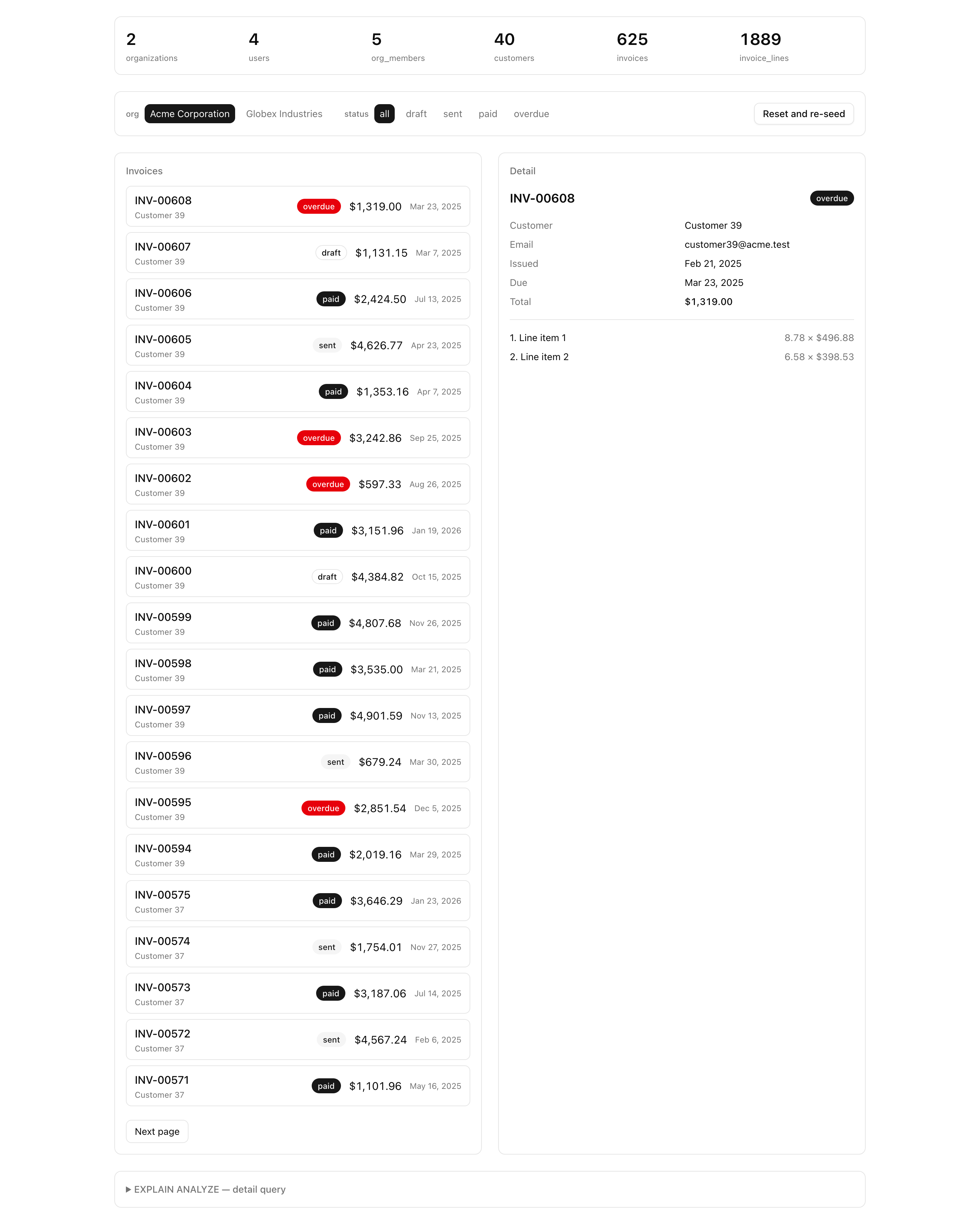
When you are done, clicking an invoice fills the detail panel: the invoice number and status, the customer block, the issued and due dates, the total, and the line items in their position order. An invoiceId from a different org shows the empty state instead of the row. And the plan panel at the bottom confirms the whole thing is one query plan — a single outer Index Scan on invoices with the customer and lines joined in, not three independent lookups.
Your mission
Section titled “Your mission”Implement getInvoiceDetail in src/lib/invoices/queries.ts. The inspector’s detail panel already calls it with the two identifiers it parsed from the URL — an organizationId and an invoiceId — so your job is to fill the body and return the invoice, its customer, and its line items, or null when nothing matches.
This is the read that closes the data layer, and it earns its place by proving a point: the relational query API turns “one invoice with its lines and customer” into a single round trip. The hand-written alternative is a getInvoice, then a getCustomer, then a getLines — three queries for one screen, and the classic N+1 the moment you do it inside a list. The nested read collapses all of it into one plan the database resolves in a single pass.
Two decisions shape the solution, and the first is the whole reason this lesson exists. The tenant guard must live in the query: the read filters on organizationId as part of the match condition, AND-ed with the invoice id, so an invoice id from another org matches nothing and comes back as the empty state. Name the failure mode plainly, because it is the one inexperienced devs ship without noticing — the shape that loads the invoice by id and then checks if (invoice.organizationId === orgId) reads as perfectly correct, and it leaks every invoice whose id an attacker can guess. The database already handed the row over before your check runs. That is an IDOR (insecure direct object reference) leak, and the fix is structural: the org filter is part of the where, never a step after the load. This is the same rule the list read follows, and the manual discipline a later chapter’s tenantDb helper makes impossible to forget.
The second is the single round trip. The customer and the line items must come back in one query plan, not three lookups — that is what the relational with buys you. And the line items must be ordered deterministically by their position: row order out of a join is not guaranteed, so without an explicit orderBy the lines can come back in any order and the panel renders “3. … 1. … 2.”.
Out of scope: the list read (listInvoices) is the previous lesson — leave it alone. The plan panel and the EXPLAIN ANALYZE probes behind it are provided; you read their output here to confirm the single round trip, you do not build the probe. And no writes — this project is read-only. The Server Actions that mutate this schema come in a later chapter.
position.organizationId with another org’s invoiceId returns no invoice (the empty state), never the cross-org row.invoiceId returns that invoice’s customer and its complete set of line items in one result, not a partial set or a follow-up lookup.Index Scan on invoices joined to customers and invoice_lines, not three independent lookups.Coding time
Section titled “Coding time”Implement getInvoiceDetail against the brief above and the Lesson 6 tests, then open the inspector and click a row before you read the walkthrough.
Reference solution and walkthrough
The shape mirrors the list read: a private builder holds the query, a type is inferred from it, and the public function awaits it and coalesces the miss to null. The query itself is the entire lesson — three things to get right in one findFirst.
const findInvoiceDetail = (args: { organizationId: string; invoiceId: string;}) => db.query.invoices.findFirst({ // The tenant guard AND-includes organizationId in the where, so a guessed id // from another org returns nothing — the filter is the security boundary, // never a post-load check. where: (t, { and, eq }) => and(eq(t.id, args.invoiceId), eq(t.organizationId, args.organizationId)), with: { customer: true, lines: { orderBy: (t, { asc }) => [asc(t.position)] }, }, });The tenant guard. The callback where AND-includes both the invoice id and the organizationId, so a match requires both to be true. A guessed id from another org satisfies the id leg but fails the org leg, so findFirst returns nothing. The org filter is part of the match condition — this is the IDOR defense, and it is why a cross-org id can never come back as a row.
const findInvoiceDetail = (args: { organizationId: string; invoiceId: string;}) => db.query.invoices.findFirst({ // The tenant guard AND-includes organizationId in the where, so a guessed id // from another org returns nothing — the filter is the security boundary, // never a post-load check. where: (t, { and, eq }) => and(eq(t.id, args.invoiceId), eq(t.organizationId, args.organizationId)), with: { customer: true, lines: { orderBy: (t, { asc }) => [asc(t.position)] }, }, });The customer join. with: { customer: true } pulls the invoice’s customer in the same query, so the panel’s customer block is already populated. No separate getCustomer call, no second round trip.
const findInvoiceDetail = (args: { organizationId: string; invoiceId: string;}) => db.query.invoices.findFirst({ // The tenant guard AND-includes organizationId in the where, so a guessed id // from another org returns nothing — the filter is the security boundary, // never a post-load check. where: (t, { and, eq }) => and(eq(t.id, args.invoiceId), eq(t.organizationId, args.organizationId)), with: { customer: true, lines: { orderBy: (t, { asc }) => [asc(t.position)] }, }, });The lines join, ordered explicitly. with: { lines: ... } brings the line items back in the same result, and the nested orderBy sorts them by position ascending. The ordering is not optional: row order from a join is undefined, so without it the lines arrive in whatever order the planner happened to produce.
The public function is a thin wrapper: it awaits the builder and turns a findFirst miss (which is undefined) into the null the panel checks for.
export type InvoiceDetail = NonNullable<  Awaited<ReturnType<typeof findInvoiceDetail>>>;
export const getInvoiceDetail = async (args: {  organizationId: string;  invoiceId: string;}): Promise<InvoiceDetail | null> => {  const invoice = await findInvoiceDetail(args);
  return invoice ?? null;};
A few decisions worth calling out:
Why the tenant filter lives in the where, not after the load. It is the single most important line in the file. The org filter is the security boundary. Move it out of the query — load by id, then check the org in TypeScript — and you have shipped an IDOR leak: the row is already in your process before the check runs, and any code path that forgets the check (or any future refactor that drops it) hands a cross-org invoice straight to the user. Inside the where, the database simply never returns it. The list read in the previous lesson follows the same rule, and a later chapter’s tenantDb helper wraps both reads so the missing organizationId filter becomes impossible to write. Until then, you write it by hand on every read.
Why the relational with stays one round trip. The relational query API resolves the customer and lines joins inside a single query plan — one trip to the database for the invoice, its customer, and all its lines. The alternative is the loop: fetch the invoice, then fetch its customer, then fetch its lines — three queries for one screen, and the textbook N+1 once you do it across a list. We covered the relational query API in the relational reads lesson of chapter 38, and why N+1 is a performance killer in the query-plans lesson of chapter 39; this is the same tool, applied to a one-to-one and a one-to-many at once.
Why lines is ordered explicitly by position. SQL makes no promise about the order rows come out of a join — without an ORDER BY, the planner is free to return the lines in any order, and that order can change between runs as the data grows. The orderBy: asc(position) is what makes the panel render “1. … 2. … 3.” every time.
Why InvoiceDetail is inferred, not hand-written. The type is NonNullable<Awaited<ReturnType<typeof findInvoiceDetail>>> — the exact shape the query returns (the invoice columns, a nested customer object, and a lines array), with the undefined that findFirst can return stripped off so the non-null type names a found invoice. The starter hand-typed InvoiceDetail as Invoice & { customer: Customer; lines: InvoiceLine[] } to keep the file compiling, but inferring it from the query is the honest version: it is exactly what DetailPanel consumes, and it tracks the query automatically — change the with and the type updates itself with no edits. Hover the alias to see what the compiler infers:
export type InvoiceDetail = NonNullable< Awaited<ReturnType<typeof findInvoiceDetail>>>;The relational query reference for findFirst, with, and nested orderBy — the exact API this read uses.
The #1 OWASP risk and the named failure the in-query tenant guard prevents: viewing another org's row by its id.
Moment of truth
Section titled “Moment of truth”Run the lesson’s test suite:
pnpm test:lesson 6The suite drives your getInvoiceDetail against the seeded database and asserts on the returned invoice. It does not re-seed, so make sure the database is up, migrated, and seeded first:
docker compose up -dpnpm db:migratepnpm db:seedOn success every test in the Lesson 6 suite passes: the in-org invoice loads with its customer attached and its lines in ascending position order; the complete set of lines comes back in the one result; and — the test the lesson exists for — pairing org A’s organizationId with an invoiceId that lives under org B returns null, while that same org-B invoice loads fine under its own org. That last pair is the proof the null is the tenant guard at work, not a missing row.
The tests cover the read’s behavior, but three things they cannot reach you confirm by hand in the inspector. Tick each as you go.
position in one paint.pnpm db:studio, copy an invoiceId that belongs to org B, and hand-build an inspector URL pairing it with org A’s orgId — confirm the detail panel shows the empty state, not the leaked invoice.Index Scan on invoices joined to customers and invoice_lines, not three independent lookups.With both reads shipping, the data layer is complete: a migrated, seeded schema, a cursor-paginated list, and a tenant-guarded detail read, each one filtering on organizationId inside the query. This is the foundation the rest of the app is built on, and later chapters pick it up from here. The next unit adds Server Actions and useActionState so the inspector’s reads gain the writes that create, edit, and delete invoices. A later chapter swaps the users stub for Better Auth’s generated tables — an additive migration, since the FK targets stay the same. Another wraps both of these reads in a tenantDb(orgId) helper, so the organizationId filter you just wrote by hand becomes impossible to leave out. And later still, the inspector’s URL state — the org, the status, the cursor, the selected invoice — grows into the production list view with real filters, sorting, and pagination. Every one of them starts from the schema and the two reads you shipped in this chapter.