Lesson 2 — The verified-domain ceremony
Stand up Resend on your own domain and get the transactional subdomain to Verified, with SPF, DKIM, and DMARC all passing — the unblocking gate for everything after it.
Almost every SaaS app sends the same first message: a welcome email the moment someone signs up. It is the most boring transactional surface in the product and the most load-bearing — if it lands in spam, the user never confirms their address, and every flow downstream stalls. This project ships that send end-to-end and, in doing so, builds the structural floor every later send in the course stands on. The verification email Better Auth fires on sign-up, the invitation email when you add organizations, the billing receipt, the notification dispatcher’s email channel — all of them reuse the exact same wrapper, the exact same suppression discipline, and the exact same Result shape you install here. The chapter is one Server Action calling one template through one wrapper. Once that floor is poured, adding a new send is “write the template, write the action, call sendEmail” — never “remember to check the suppression list, remember to set the idempotency key, remember to default the from address.” Those reflexes live in the seam, not in your memory.
You are not meeting new primitives in this project — the email chapters and the Server Actions chapters covered every one of them. This is where those isolated pieces lock together into one send path a team would actually run in production. Each line below leads with the skill, not the syntax.
src/lib/email.ts) as the single chokepoint every email the app sends has to pass through.Result instead of throwing.The chapter touches a handful of files, but a single send walks a straight line through them, and once you can trace that line every later lesson reads as one move along it rather than an isolated trick. Here is the shape, not the detail — each seam gets its full explanation in the lesson that first opens it.
Walk it left to right:
recipientEmail and firstName straight to the Server Action — a native <form action={…}>, no fetch, no /api/* route.sendWelcomeEmail Server Action runs five seams in order: it parses the FormData with Zod, reads the active user from the auth stub, computes the idempotency key, builds a placeholder verifyUrl, and calls the wrapper.src/lib/email.ts is the chokepoint: it normalizes the recipient, reads the suppression list, and only then calls the Resend SDK — defaulting the from and reply_to from validated env and returning a Result.Two facts sit off to the side of that line. The <WelcomeEmail /> template is rendered twice: the action renders it on the way to a real send, and the inspector page renders it again into the preview iframe so you can see the email without leaving the app — the same props-only component, proving it renders identically in both places. And before any of this runs, src/env.ts validates the five new environment entries at build and boot, so a missing key fails the server up front rather than at the first send.
This project continues the toolchain and the data layer you have been carrying — pnpm, the strict tsconfig, Biome, the next-themes providers, the Docker Postgres service, Drizzle, and the @t3-oss/env-nextjs boundary — and the work the chapter is actually about lives in five stubs. The bold files are your stubs; each carries a TODO(L<n>) comment naming the lesson that completes it, and together they are the whole chapter. Everything else is provided — read the one-line note on the files a lesson will open, and leave the rest until you reach them.
@t3-oss/env-nextjs boundary — add the five email + app vars TODO L3db client (postgres-js), snake-case casingemail_suppressions table + suppression_reason enumtimestamps column groupsendEmail wrapper with the suppression read TODO L3isSuppressed(email, { kind }), normalize-on-read TODO L3Result<T>, ok(), err(), isUniqueViolationgetActiveContext() resolving the seeded org + usercn() class-merge helperWelcomeEmail template + its PreviewProps TODO L4/ to /inspector/send-welcome<Providers> + <Toaster />next-themes ThemeProvideruseFormStatus + the shadcn <Button>Result.error.fieldErrors[name]sendWelcomeEmail Server Action — .tsx, it constructs JSX TODO L4useActionState, three result cardspostgres:18 service on :5432.envThe underscore-prefixed _components/ folder is an App Router convention: a folder whose name starts with an underscore is opted out of routing, so it is not a URL segment, just a place to keep components the routes share.
A few provided pieces are worth a line now, because lessons lean on them and never redefine them:
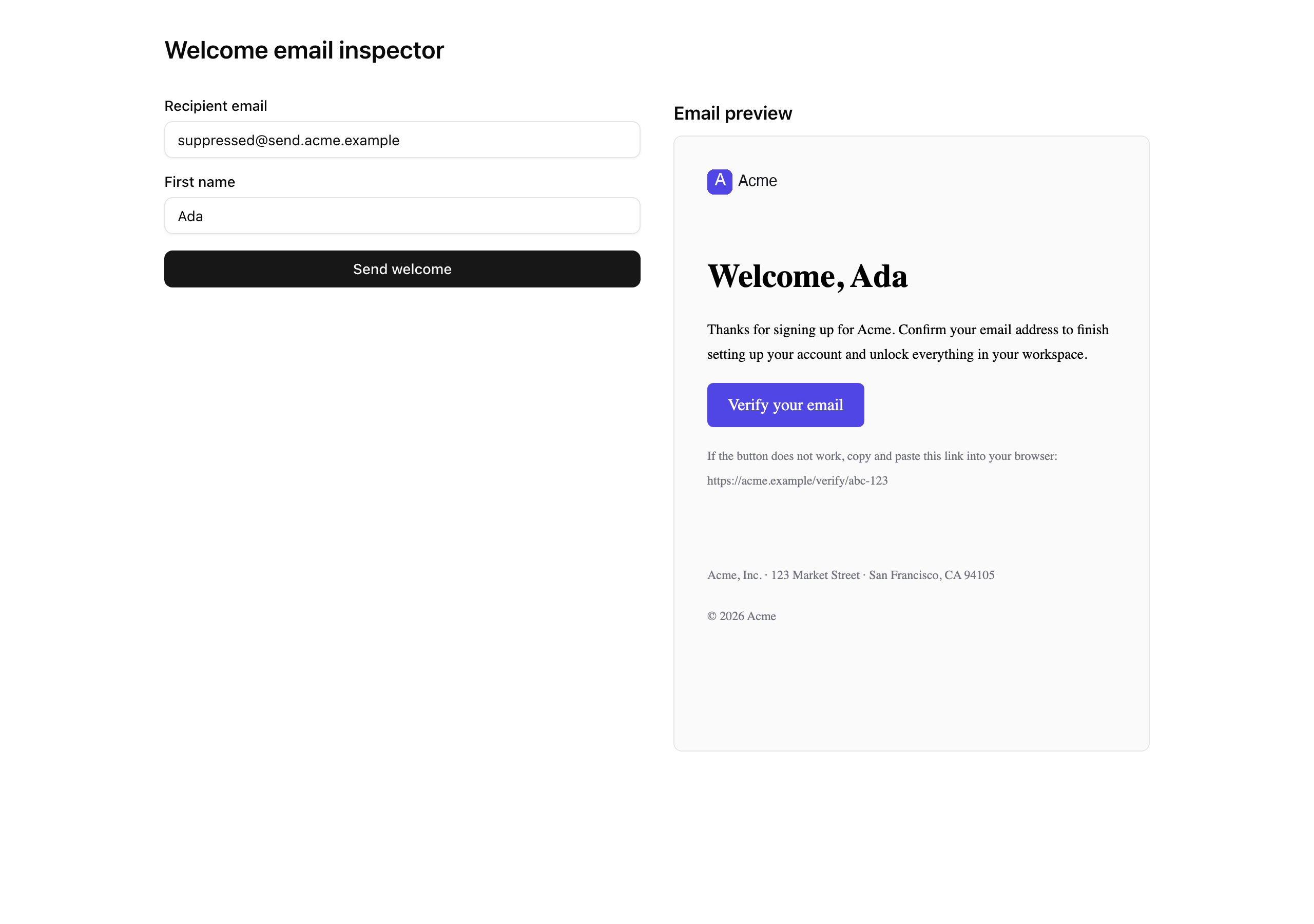
src/app/inspector/send-welcome/page.tsx) renders a live preview iframe of the template beside the client form. The form (send-welcome-form.tsx) posts recipientEmail and firstName to the action you write and renders one of three result cards against the Result it gets back — a success card with the Resend send ID, a suppression card when the code is forbidden, and a generic error card for everything else. Read both in full when you wire the action.src/emails/components/email-layout.tsx is the brand surface — a header band with the logo and a footer with the legal line, all on literal constants with no env reads — and src/emails/email-tailwind-config.ts is the shared email Tailwind config the welcome template’s <Tailwind> consumes. Both get unpacked when you write the template.src/lib/result.ts, src/lib/auth-stub.ts, src/db/*, and scripts/seed.ts are carry-ins from earlier projects. The seed inserts the org, the user, and one pre-suppressed row, and getActiveContext() resolves the seeded org and user by natural key — the org slug acme and the user email ada@acme.test — which is why the seed has to run before the action can read an identity.Three lessons turn those five stubs into a real, verified send, each closing on a state you can confirm — in the Resend dashboard, in a query, or in your own inbox.
Lesson 2 — The verified-domain ceremony
Stand up Resend on your own domain and get the transactional subdomain to Verified, with SPF, DKIM, and DMARC all passing — the unblocking gate for everything after it.
Lesson 3 — The suppression-gated send wrapper
Add the email env entries, write isSuppressed, and build src/lib/email.ts as the single send seam that reads the suppression list and requires an idempotency key.
Lesson 4 — The welcome email send path
Write the <WelcomeEmail /> template and the sendWelcomeEmail Server Action so the inspector button delivers a real, rendered email end-to-end.
This chapter needs one thing the previous projects did not.
Run these in order. This lesson is done when both dev servers boot and /inspector/send-welcome renders the form beside the preview iframe — the email entries are not validated yet, so you can complete the whole setup before you have a Resend key.
Get the starter codebase from the project repository, under Chapter 050/start/:
pnpm dlx degit terencicp/react-saas-course-projects/Chapter-050/start welcome-emailcd welcome-emaildegit copies that folder into a fresh welcome-email directory with no git history, and pnpm dlx runs the tool without installing it first. Every chapter project in the repo has a start/ and a solution/ sibling, so you can diff your work against the reference whenever you want.
Copy the example env file:
cp .env.example .envThe db:* scripts load .env through dotenv-cli, while next reads the environment directly. The database variables already match the local Docker Postgres below, so the database works as-is. The five email and app variables ship with placeholder values — you fill the real RESEND_API_KEY in the next lesson and the rest after that. They are listed in full below.
Bring up the database:
docker compose up -dThis starts the postgres:18 service on port 5432 in the background. The first run pulls the image; after that it is instant.
Install the dependencies:
pnpm installThe repo is pnpm-only — a preinstall hook blocks any other package manager — and the versions are pinned. The install completes with no errors.
Apply the init migration:
pnpm db:migrateThis runs the one migration that creates the organizations, users, and email_suppressions tables, plus the suppression_reason enum.
Before you seed, open scripts/seed.ts and replace the placeholder suppressed address (suppressed@send.acme.example) with suppressed@send.<your-domain> — the README calls this out under “Seed placeholder”. Then seed:
pnpm db:seedThis inserts the org, the user, and the one pre-suppressed row. That address never needs to exist as a real mailbox: the suppression check short-circuits at the application layer before Resend would ever attempt delivery, so the destination is irrelevant on that path.
Start both servers, side by side, and leave them running for the rest of the chapter:
pnpm devpnpm emailpnpm dev is the Next app at http://localhost:3000. pnpm email is the React Email preview server at http://localhost:3001 — the script bakes in --dir ./src/emails --port 3001 so it never clashes with the dev server. You use the dev server’s inspector to fire real sends and the preview server to iterate on the template itself.
The .env file carries eight variables. Three are carried in from the data-layer project; five are new to this chapter.
| Variable | Purpose | Where the value comes from |
| --- | --- | --- |
| DATABASE_URL | Pooled connection string the app’s db client uses. | The Docker Postgres; the .env.example default works locally. |
| DATABASE_URL_UNPOOLED | Unpooled URL Drizzle Kit uses to migrate and seed. | Same value locally; the split is staged for the Neon swap later in the course. |
| SEED | Seeds the deterministic PRNG. | The .env.example default of 1. |
| RESEND_API_KEY | Authenticates the Resend SDK. Server-only. | The Resend dashboard, in the next lesson. |
| EMAIL_FROM | The verified sender — a full Display Name <local-part@send.domain.tld> header. | Your verified domain, set in Lesson 3. |
| EMAIL_REPLY_TO | The monitored mailbox replies land in, instead of the noreply@ sender. | A real address you read, set in Lesson 3. |
| NEXT_PUBLIC_APP_NAME | Read by the action for the email subject. | Your app’s name, set in Lesson 3. |
| NEXT_PUBLIC_APP_URL | Read by the action to build the placeholder verifyUrl. | http://localhost:3000 locally, set in Lesson 3. |
This lesson does not require the email entries to be valid. The src/env.ts schema does not pick them up until Lesson 3, so the placeholder values are fine for now.
When pnpm dev serves /inspector/send-welcome with the form rendered beside the preview iframe, you have the project’s floor in place. The iframe shows a skeleton of the template until you write it in Lesson 4, and clicking “Send welcome” returns Not implemented because sendWelcomeEmail is still a stub — that error is the intended runnable starting point, not a problem to fix. The first real move is in the next lesson, where you get your own domain to Verified so every send after it can prove who it came from.