Scoped reads and the view tabs
In the last lesson you wired the view tabs to the URL: clicking Active, Archived, or All rewrites ?view=… and re-runs the server read. But every tab still shows the same rows. Switch to Archived and you see the full active list; switch to All and you see it again. The tabs move the URL honestly — the read underneath them lies.
The lie lives in one file. scopedInvoices(orgId) hands callers three views — active(), archived(), includingDeleted() — and right now all three return the identical org-filtered list. They are tenant-scoped but not lifecycle-aware, so the seeded archived row and the seeded soft-deleted row leak straight into Active, and the other two tabs are indistinguishable from it.
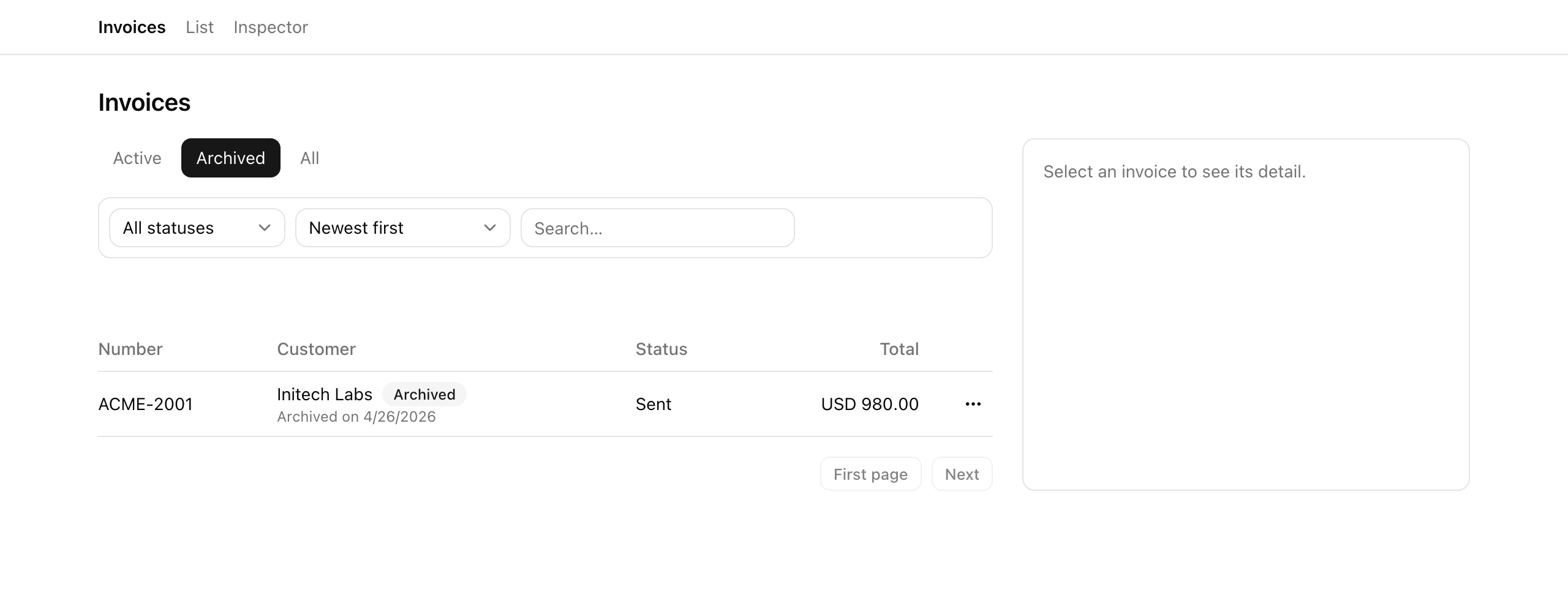
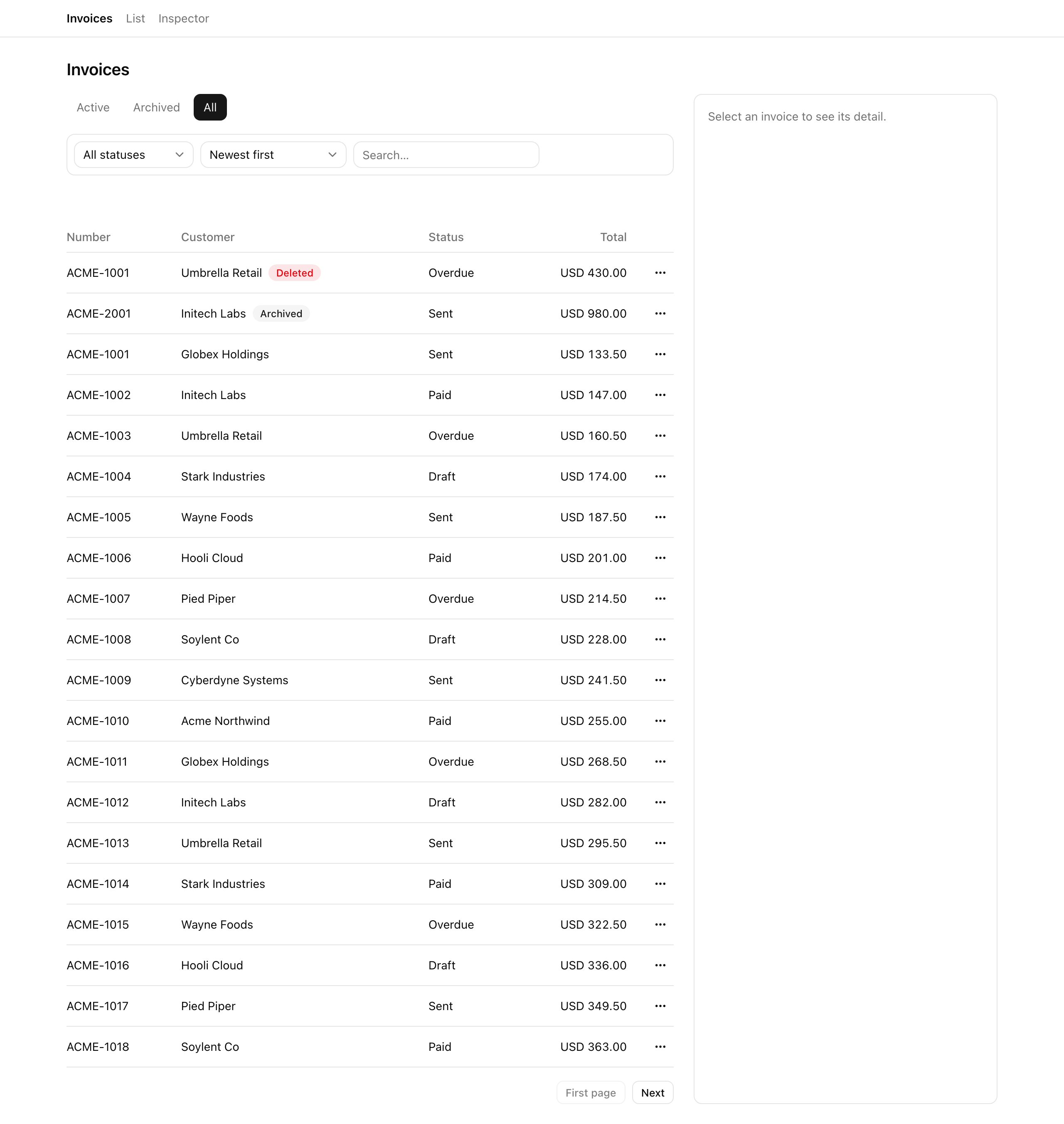
This lesson makes those three views honest and routes the read on view, with the RBAC gate enforced at the data layer rather than only hidden in the UI. When you finish, switching tabs returns the correct row set: Active hides archived and deleted rows, Archived shows the seeded archived row with an “Archived on …” line, and the admin-only All tab shows the seeded soft-deleted row with a “Deleted” badge — while a member who hand-types ?view=all into the address bar is quietly served active rows, refused at the query, not just at a hidden button.
Your mission
Section titled “Your mission”This is the read discipline the whole project leans on. The starter gives you a fluent in-memory builder — scopedInvoices(orgId) returns chainable query objects you compose filter / sort / cursorAfter / take onto — and two predicate functions, activeFilter and archivedFilter, already exported and already used by the inspector’s row-count panels. Your job is to swap the right predicate into each of the three views, then route listInvoices and getInvoiceDetail onto whichever view the view param asks for.
The constraint that matters here is where the RBAC gate lives. The all view is admin-only, and it is tempting to enforce that by hiding the All tab and calling it done. Don’t. A hidden tab is cosmetic: a member can hand-type ?view=all, a forged client can post any param, and either one would walk straight into the deleted rows if the only guard were a missing button. The gate belongs in the read — a resolveView(view, role) step that collapses all to active for anyone who is not an admin, so the query itself refuses the request before it ever touches includingDeleted(). Hiding the tab is the second, cosmetic layer on top of that, not the defense.
The same instinct governs the tenant boundary. The org filter stays spelled out inline — inv.orgId === orgId, right there inside the helper — rather than threaded through some separate tenant client you have to remember to call. This in-memory builder is the analogue of a Drizzle .$dynamic() builder you will meet against a real database; routing every sanctioned read through it is what makes “I forgot the org filter” structurally impossible at the read. The convention that backs it up: a bare store.invoices read anywhere outside this helper (and the inspector’s count panels) is a code-review red flag, full stop.
One thing is deliberately out of scope. The actions that create archived and deleted rows — archive, restore, soft-delete — are the next lesson. This lesson leans entirely on the rows the store already seeds: one pre-archived invoice and one pre-soft-deleted invoice. You are proving the views read correctly, not yet writing the states they read.
?view=all serves active rows — the refusal happens at the read in resolveView, not at the hidden tab.Coding time
Section titled “Coding time”Make the helper’s three views honest, route listInvoices and getInvoiceDetail on view, gate the All tab, and add the lifecycle badges. Then run the tests. Open the walkthrough below only once you have made your attempt.
Reference solution and walkthrough
The three honest views
Section titled “The three honest views”Everything turns on scoped-query.ts. The builder, the predicates, and the org filter are all provided; the only change is which predicate each view applies before handing back its query. active() excludes archived and deleted rows, archived() keeps archived-but-not-deleted, and includingDeleted() keeps the whole org slice untouched.
export const scopedInvoices = (orgId: string) => {  const inOrg = (): Invoice[] => invoices.filter((inv) => inv.orgId === orgId);
  // Naive baseline: all three views return the same org list (no lifecycle  // split). The student makes them honest in L3.  return {    active: () => makeQuery(inOrg(), false),    archived: () => makeQuery(inOrg(), false),    includingDeleted: () => makeQuery(inOrg(), false),  };};
Every view lies. All three methods return makeQuery(inOrg(), false) — the same org-filtered list. The tabs render but never branch, so the seeded archived and soft-deleted rows leak straight into Active.
export const scopedInvoices = (orgId: string) => {  const inOrg = (): Invoice[] => invoices.filter((inv) => inv.orgId === orgId);
  return {    active: () => makeQuery(inOrg().filter(activeFilter), false),    archived: () => makeQuery(inOrg().filter(archivedFilter), false),    includingDeleted: () => makeQuery(inOrg(), false),  };};
Honest views. Each view pre-filters the org slice by its lifecycle predicate before the caller composes status, sort, and cursor onto it. The only lines that changed are the three return values.
activeFilter and archivedFilter are exported from this same file, and the inspector’s row-count panels import the same two functions to compute its “active / archived / deleted” tallies. That is on purpose: the list and the counts read through one predicate each, so they cannot disagree by construction. If the counts ever drifted from the rows, you would know the predicate moved, not that two copies fell out of sync.
Routing the list read on the view
Section titled “Routing the list read on the view”listInvoices now picks a base query from the view param before it composes anything else. The RBAC gate is one small pure function, resolveView, that runs first:
export const listInvoices = ({  orgId,  view: _view,  status,  sort,  q,  cursor,  role: _role,  pageSize = 20,}: ListInvoicesArgs): ListInvoicesResult => {  const base = scopedInvoices(orgId).active();
  // ...status / search / sort / cursor compose on `base`, then page it.
Ignores view and role. The starter always reads active(), with both params renamed _view / _role to mark them unused. Every tab returns the active list and ?view=all is never gated.
// The read-layer RBAC gate: `all` collapses to `active` for non-admins, so a// member hand-typing `?view=all` is served active rows regardless of the URL.const resolveView = (view: InvoiceView, role: Role): InvoiceView =>  view === 'all' && role !== 'admin' ? 'active' : view;
export const listInvoices = ({  orgId,  view,  status,  sort,  q,  cursor,  role,  pageSize = 20,}: ListInvoicesArgs): ListInvoicesResult => {  const scoped = scopedInvoices(orgId);  const resolved = resolveView(view, role);  const base =    resolved === 'archived'      ? scoped.archived()      : resolved === 'all'        ? scoped.includingDeleted()        : scoped.active();
  // ...status / search / sort / cursor compose on `base`, then page it.
resolveView then route. resolveView collapses all → active for non-admins, then base is chosen from the resolved view; status, search, sort, and cursor compose on base exactly as before.
The compose-and-page tail — the status filter, the q substring match against customerName or number, the sort, and cursorAfter — is untouched from the starter. It runs on base and does not care which of the three views produced it; that is the whole point of returning a chainable builder. resolveView is the gate that makes requirement 3 hold: a member sending view=all gets resolved === 'active', so base is active() and they never see a deleted or archived row, no matter what the address bar says.
Routing the detail read
Section titled “Routing the detail read”getInvoiceDetail is the same idea for a single row, with one twist in the order it checks. It looks in archived() first, then active(), then — only for an admin — includingDeleted():
export const getInvoiceDetail = ({ orgId, id, role,}: GetInvoiceDetailArgs): Invoice | null => { // Active + archived rows load for everyone (archived so the row can be // restored); a soft-deleted row only loads for an admin. const scoped = scopedInvoices(orgId); const live = scoped.archived().find((inv) => inv.id === id); if (live) { return live; } const active = scoped.active().find((inv) => inv.id === id); if (active) { return active; } if (role === 'admin') { return scoped.includingDeleted().find((inv) => inv.id === id) ?? null; } return null;};Why consult archived() first? Because an archived invoice’s detail and edit pages must load for everyone — that is how a member reaches the row to restore it next lesson. If you only checked active(), an archived row would 404 and there would be no way back. The soft-deleted fall-through is admin-gated for the same reason in reverse: a deleted row is privileged, so only an admin can open it. A member who hand-types a deleted row’s URL gets null, and the page renders a not-found.
Hiding the All tab
Section titled “Hiding the All tab”With the gate enforced at the read, hiding the All tab from non-admins is the cosmetic finishing touch. In view-tabs.tsx the All entry is spread into the tabs array conditionally:
// The `all` tab is cosmetic on top of the read-layer RBAC gate: hide it from // non-admins (the read already serves them active rows if they hand-type it). const tabs: { value: ListParsed['view']; label: string }[] = [ { value: 'active', label: 'Active' }, { value: 'archived', label: 'Archived' }, ...(role === 'admin' ? [{ value: 'all' as const, label: 'All' }] : []), ];The starter passed role as _role because it was unused; now you read it. The as const on the spread entry keeps value typed as the literal 'all' rather than widening to string, so the array still satisfies ListParsed['view'].
The lifecycle badges
Section titled “The lifecycle badges”Finally, the table tells the user which lifecycle state each row is in. The starter renders a plain customer name; you add a “Deleted” badge when row.deletedAt is set, an “Archived” badge when the row is archived-but-not-deleted, and — only in the Archived view — an “Archived on …” date line. This is the customer cell, and only the customer cell — the row’s action menu is still just “Edit” until next lesson:
<td className="py-2"> <div className="flex flex-wrap items-center gap-2"> <span>{row.customerName}</span> {row.deletedAt ? ( <Badge data-testid="badge-deleted" variant="destructive"> Deleted </Badge> ) : null} {row.archivedAt && !row.deletedAt ? ( <Badge data-testid="badge-archived" variant="secondary"> Archived </Badge> ) : null} </div> {view === 'archived' && row.archivedAt ? ( <div data-testid="archived-on" className="text-xs text-muted-foreground" > Archived on {new Date(row.archivedAt).toLocaleDateString()} </div> ) : null} </td>The !row.deletedAt guard on the Archived badge keeps a soft-deleted row from wearing both badges — a deleted invoice may still have an archivedAt set, but “Deleted” is the state that matters, so it wins. The “Archived on …” line is scoped to view === 'archived' because the date is only useful context where the user is looking at archived rows; in All it would be noise.
This completes the view-tab behavior the toolbar wired in the last lesson but could not yet satisfy: the tabs wrote the URL, and now the read finally branches on it.
Moment of truth
Section titled “Moment of truth”Run the lesson’s test suite:
pnpm test:lesson 3The run drives listInvoices, getInvoiceDetail, and scopedInvoices directly against the seeded store. On success every suite reports green — the Active/Archived partition, the admin All view, the member view=all refusal, the per-role detail loads, and the scoped helper’s three-way split:
✓ Requirement 1 — the Active and Archived views return distinct, honest row sets✓ Requirement 2 — an admin All view returns every org row including the soft-deleted one✓ Requirement 3 — view=all is refused to a member at the read✓ Requirement 4 — getInvoiceDetail loads lifecycle rows per role✓ Scoped helper — the three views are honestly distinctThe tests reach the query and RBAC behavior but not the rendered React. Confirm the rest by hand at /invoices, using /inspector to switch identities and reseed:
org-acme:admin, switch to All; the seeded soft-deleted row appears with a red “Deleted” badge. Open its detail page (it loads for an admin), and confirm an archived invoice’s detail page also loads.org-acme:member; confirm the All tab is absent from the tabs. Hand-type ?view=all into the URL and confirm the list still returns active rows.